




Eigent
Pricing
A cream facade with blue windows refracted through fine vertical glass

AI workspace

  • OverviewSee the whole workspace.
  • Spaces and SessionsKeep each project's files and work together.
  • Skills & ConnectorsTeach agents your way of working. Connect your tools.
  • AutomationsRun Tasks on a schedule or a trigger.
  • Remote ControlCheck in from your browser or phone.
  • Use casesSee real work, finished.

Updates

  • ChangelogCatch up on the latest releases.
  • RoadmapFollow what comes next.
  • WindowsDownload Eigent for Windows.
  • MacDownload Eigent for macOS.
  • LinuxDownload Eigent for Linux.
  • Open SourceInspect, adapt, and make it yours.
  • EnterpriseRoll Eigent out across your company.
Concrete balconies and golden railings refracted through fine vertical glass

Enterprise

  • OverviewAn AI workspace for every team, in your environment.
  • MonitoringSee every run, step by step.
  • GovernanceSet who can build, run, and approve.
  • ControlLimit what agents can reach.
  • Security and trustHow we protect your data.
  • Enterprise servicesWe build it with you, then hand it over to your team.
  • Talk to salesPlan a proof of concept for your company.
A sunlit facade and geometric shadows refracted through fine vertical glass

Environments

  • OverviewTrain and test agents on real work.
  • Environment catalogBrowse 30 categories of environments.
  • Request an environmentTell us what your agents need to learn.
  • AgenticRL-BenchCan agents do agentic RL? See the leaderboard. (opens in a new tab)
  • Env-LabCustom RL environments, training data, and benchmarks for real work. (opens in a new tab)
Weathered window frames refracted through fine vertical glass

Learn

  • DocsGet started and go deeper.
  • BlogIdeas, releases, and stories.
  • SupportFind answers and get help.

Company

  • AboutMeet the people behind Eigent.
  • CareersJoin the team building Eigent.

Community

  • CAMEL-AIThe multi-agent research community behind Eigent. (opens in a new tab)

AI workspace

  • OverviewSee the whole workspace.
  • Spaces and SessionsKeep each project's files and work together.
  • Skills & ConnectorsTeach agents your way of working. Connect your tools.
  • AutomationsRun Tasks on a schedule or a trigger.
  • Remote ControlCheck in from your browser or phone.
  • Use casesSee real work, finished.

Updates

  • ChangelogCatch up on the latest releases.
  • RoadmapFollow what comes next.
  • WindowsDownload Eigent for Windows.
  • MacDownload Eigent for macOS.
  • LinuxDownload Eigent for Linux.
  • Open SourceInspect, adapt, and make it yours.
  • EnterpriseRoll Eigent out across your company.

Enterprise

  • OverviewAn AI workspace for every team, in your environment.
  • MonitoringSee every run, step by step.
  • GovernanceSet who can build, run, and approve.
  • ControlLimit what agents can reach.
  • Security and trustHow we protect your data.
  • Enterprise servicesWe build it with you, then hand it over to your team.
  • Talk to salesPlan a proof of concept for your company.

Environments

  • OverviewTrain and test agents on real work.
  • Environment catalogBrowse 30 categories of environments.
  • Request an environmentTell us what your agents need to learn.
  • AgenticRL-BenchCan agents do agentic RL? See the leaderboard. (opens in a new tab)
  • Env-LabCustom RL environments, training data, and benchmarks for real work. (opens in a new tab)

Learn

  • DocsGet started and go deeper.
  • BlogIdeas, releases, and stories.
  • SupportFind answers and get help.

Company

  • AboutMeet the people behind Eigent.
  • CareersJoin the team building Eigent.

Community

  • CAMEL-AIThe multi-agent research community behind Eigent. (opens in a new tab)
Pricing
الدعم
استكشاف الأخطاء وإصلاحها|آخر تحديث 19 أكتوبر 2026

How do I download task logs for support?

Learn how to take a screenshot of a problem in your Eigent session, download the Eigent and Camel logs, and email everything to support@eigent.ai for debugging.

هذه المقالة متاحة حاليًا باللغة الإنجليزية.

  • 1. Take a screenshot
  • 2. Open Support
  • 3. Download both logs and email support

If you encounter a bug while working on a Task, send our support team a screenshot and both log files so we can investigate.

1. Take a screenshot#

Open the session where you encountered the bug. Take a screenshot showing the affected Task and any error message or unexpected behavior. Keep this session open while you download the logs.

2. Open Support#

Click the Support icon (the question mark) in the top-right corner of the Eigent app.
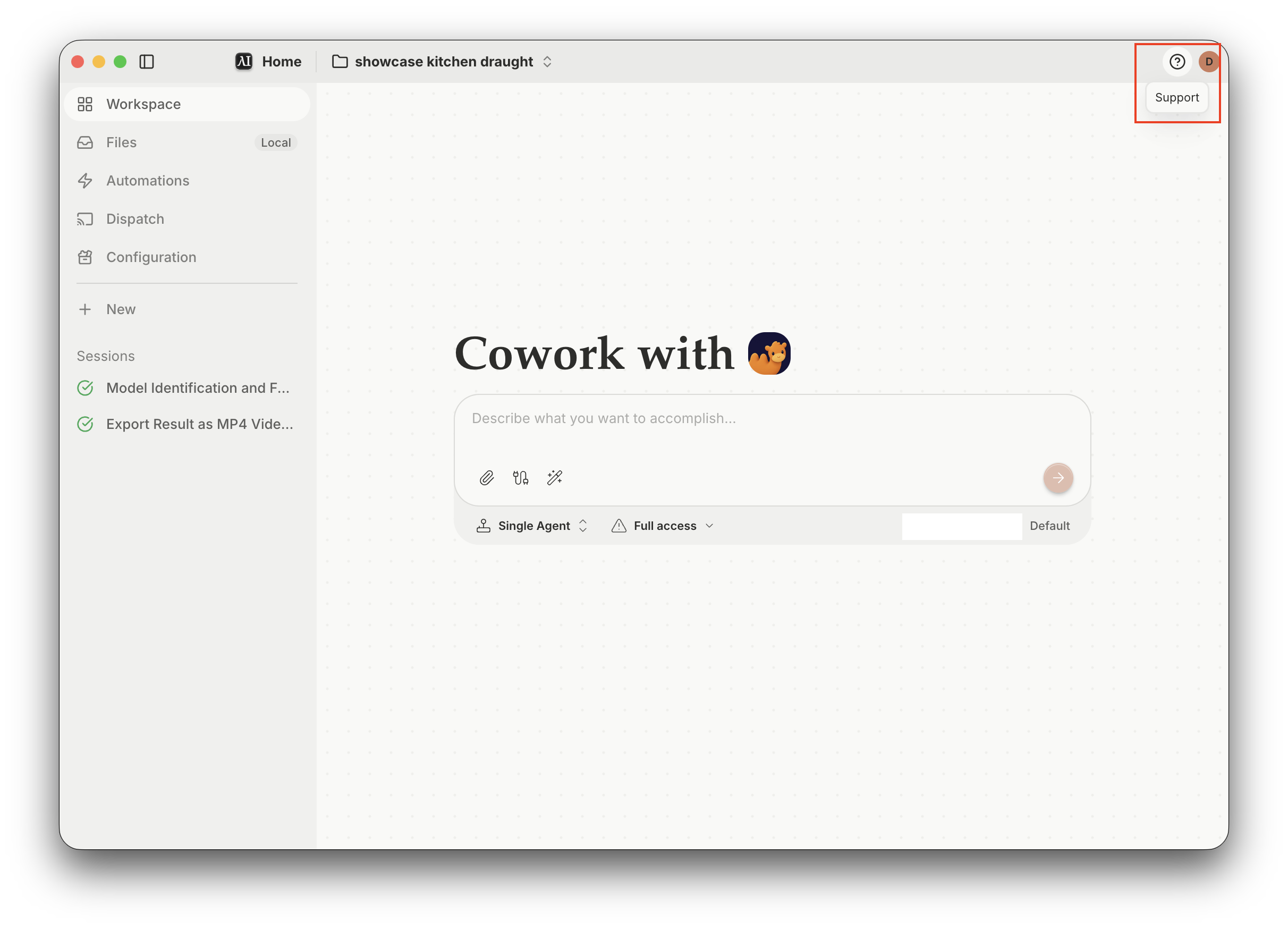
The Eigent app with the Support icon highlighted in the top-right corner

3. Download both logs and email support#

In the Support window, find Download logs and click Download next to each of these:

  • Eigent log — desktop app logs.
  • Camel log — agent task logs from the CAMEL backend.
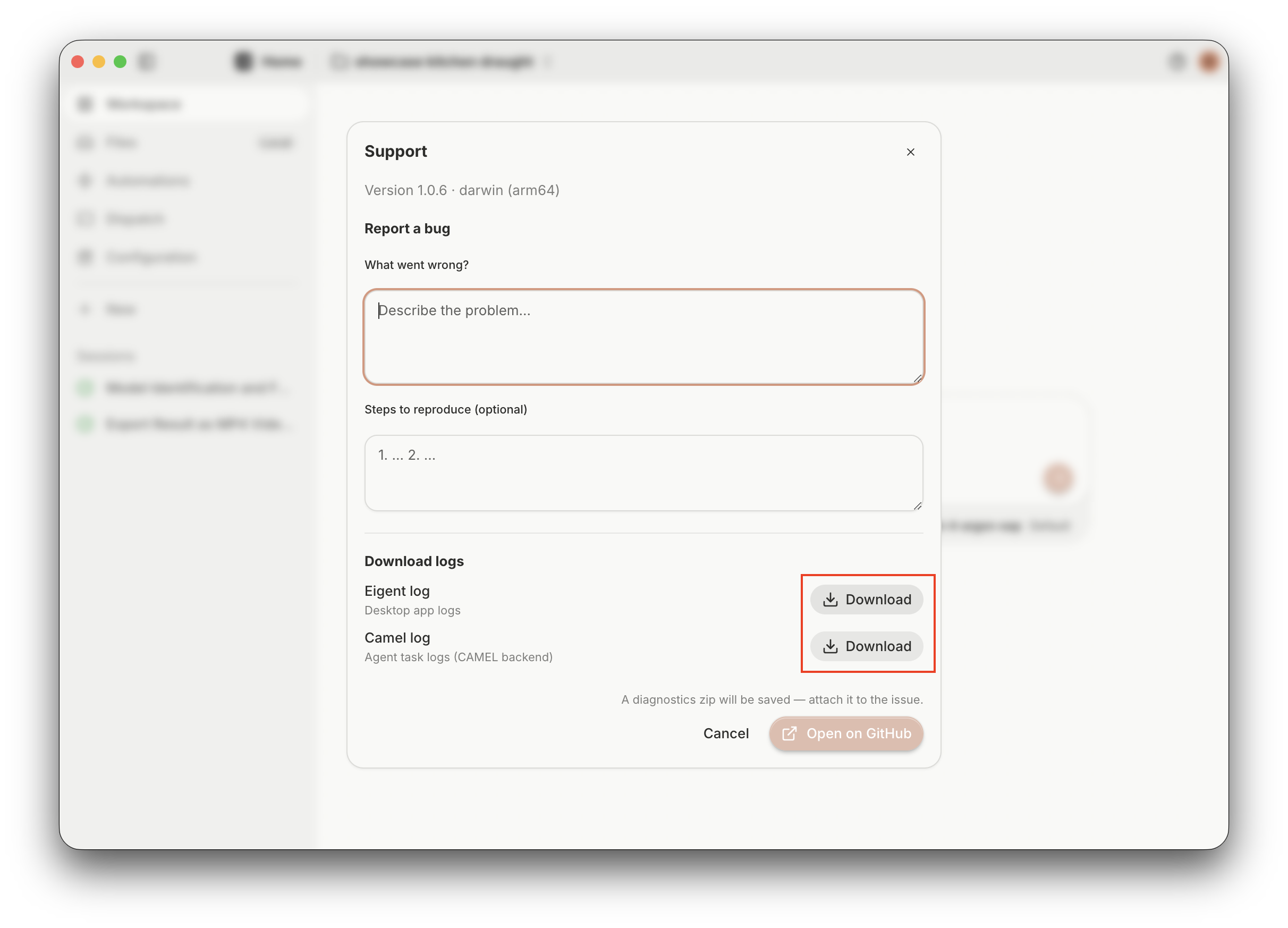
The Support window with the Download buttons for Eigent log and Camel log highlighted

Email support@eigent.ai with:

  • The screenshot of the issue.
  • Both downloaded log files: Eigent log and Camel log.
  • A brief description of what went wrong and the steps that led to it.

هل ما زلت بحاجة إلى مساعدة؟

تواصل مع فريقنا وسنساعدك في حل المشكلة.

support@eigent.aiتواصل معنا

سطح مكتب Open Source Cowork

Eigent منتج مفتوح المصدر، ما يعني أنه يمكنك استضافته بنفسك مجانًا باستخدام مفاتيح API الخاصة بك أو النماذج المحلية.

Eigent

احصل على أحدث التحديثات والدروس حول أتمتة Workforce بالذكاء الاصطناعي.

شكرًا لاشتراكك!

المنتجEigentالبيئاتالأسعارالمؤسسات
استكشافالحلولحالات الاستخدامالمهاراتالإضافاتالمدونةسجل التغييرات
المطورونالوثائقGitHubCAMEL-AIصندوق المصدر المفتوحشريك
تنزيلللإصدار مفتوح المصدر
الشركةمن نحنالعلامة التجاريةالوظائفالدعمشروط الاستخدامسياسة الخصوصيةالأمان والثقةسياسة ملفات تعريف الارتباطسياسة الاسترداد والتجربة

جميع الحقوق محفوظة © 2026 EIGENT UK LTD