
Eigent How-To: Einrichtung deines ersten benutzerdefinierten MCP-Servers
GitHub-Workflows mit dem Multi-Agenten-System von Eigent automatisieren
 Eigent
In Open-Source-Projekten ist Zeit kostbar. Maintainer jonglieren mit Bugfixes, Feature-Anfragen, Community-Support und Dokumentation, während sie gleichzeitig versuchen, den Code sicher und Releases organisiert zu halten. Eine wiederkehrende, aber entscheidende Aufgabe ist das Prüfen von Pull Requests und das Vorbereiten von Release-Updates. Das ist notwendig, kostet aber Stunden, die stattdessen in Innovation fließen könnten.
Was wäre, wenn Automatisierung die mühsame Arbeit für dich übernehmen könnte? Genau hier kommt Eigent ins Spiel und gibt dir einen Eigent Open-Source-Mitarbeiter, der deine GitHub-Workflows zuverlässig unterstützen und automatisieren kann.
Eigent ist die weltweit erste Desktop-Anwendung für eine Multi-Agent Workforce, die dich befähigt, eine benutzerdefinierte KI-Belegschaft zu erstellen, zu verwalten und bereitzustellen, die deine komplexesten Workflows in automatisierte Aufgaben verwandeln kann. Es ist ein modulares Multi-Agenten-System, das komplexe Aufgaben in Teilaufgaben zerlegen und sie durch spezialisierte Agents, die koordiniert zusammenarbeiten, ausführen kann.
Die Multi-Agenten-Koordinationsplattform von Eigent steigert die Produktivität, indem sie deine Workflows in automatisierte Aufgaben verwandelt. Basierend auf dem Open-Source-CAMEL-Framework bringt sie parallele Ausführung, Anpassbarkeit und Datenschutz in deine KI-Automatisierung.
Was kann Eigent für dich tun? Für Erstleser: Betrachte Eigent als flexiblen agentischen Assistenten. Du kannst verschiedene „Worker“ (KI-Agents) mit domänenspezifischen Fähigkeiten erstellen (z. B. Coding, Dokumentation, DevOps) und sie an Aufgaben zusammenarbeiten lassen. Einige Beispiele für technische Workflows, die Eigent vereinfachen kann, sind:
- GitHub-Automatisierung mit KI-Agents: Codeänderungen prüfen, Pull Requests zusammenfassen, Issues priorisieren.
- Generierung von Release Notes: Highlights der Neuerungen in jedem Release automatisch zusammenstellen.
- Dokumentations- und Codeanalyse: Wichtige Punkte aus Dokus oder Codebasen extrahieren, Verbesserungen vorschlagen.
- Open-Source-Workflows: Projektaktivitäten verfolgen, Berichte für Mitwirkende erstellen usw.
In diesem Leitfaden zeigen wir dir, wie du einen benutzerdefinierten GitHub-MCP-Server in Eigent konfigurierst und einen Agenten-Workflow einrichtest, der:
- Neue Pull Requests aus einem Repo abruft
- PR-Daten extrahiert und analysiert
- Die Highlights in releasefähige Notizen formatiert
- Einen kurzen Social-Post generiert (z. B. für Twitter/X)
Lass uns in die Schritt-für-Schritt-Anleitung eintauchen!
Schritt 1: Eigent öffnen und zu den MCP- & Tool-Einstellungen navigieren
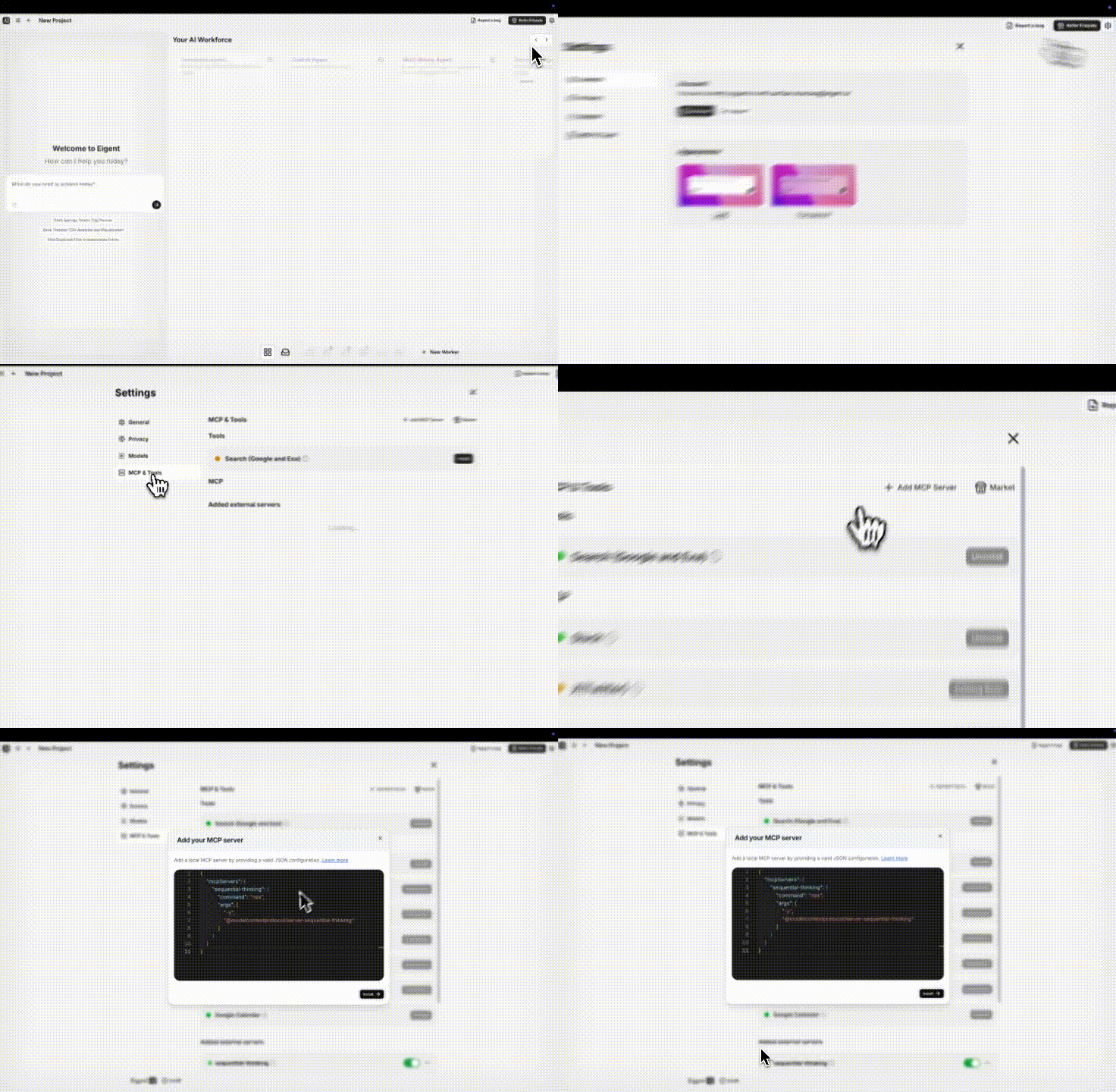
Sobald Eigent läuft, beginne damit, das Einstellungen-Panel zu öffnen. Suche in den Einstellungen den Bereich „MCP & Tools“ und klicke darauf. Hier kannst du externe Tools und Server für deine KI-Agents konfigurieren. Wir nutzen diesen Bereich, um einen neuen benutzerdefinierten MCP-Server für GitHub-Aufgaben hinzuzufügen.
Im Tab MCP & Tools siehst du eine Liste verfügbarer Tools und aller konfigurierten MCP-Server. Um einen eigenen hinzuzufügen, suche nach der Schaltfläche „Add MCP Server“ und klicke darauf. Dadurch öffnet sich ein Dialog, in dem du eine JSON-Konfiguration für den neuen Server eingeben kannst.
Schritt 2: Einen benutzerdefinierten MCP-Server per JSON-Konfiguration hinzufügen
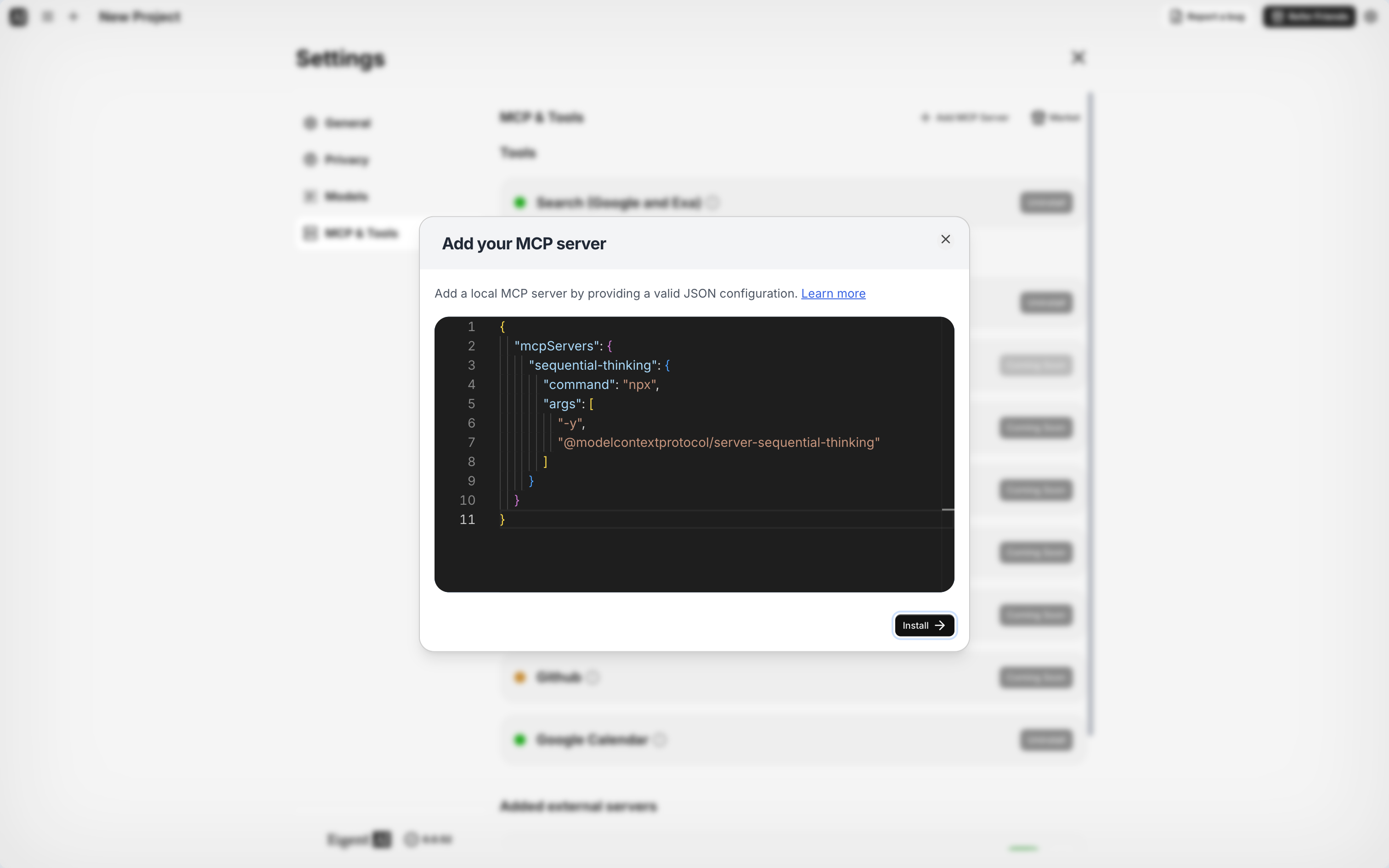
Eigent ermöglicht fortgeschrittenen Nutzern, benutzerdefinierte Agent-Server über eine JSON-Konfiguration hinzuzufügen. Im Dialog Add MCP Server siehst du ein Textfeld zum Einfügen von JSON. Wir fügen einen sequential-thinking-MCP-Server hinzu – eine allgemeine KI-Reasoning-Engine, die Aufgaben koordinieren kann (ideal, um komplexe Prompts zu zerlegen).
Verwende das folgende minimale JSON, um den Server zu registrieren:
{
  "mcpServers": {
    "sequential-thinking": {
      "command": "npx",
      "args": ["-y", "@modelcontextprotocol/server-sequential-thinking"]
    }
  }
}
Schritt 3: Die Einstellungen des GitHub-MCP-Servers konfigurieren (inklusive deines PAT)
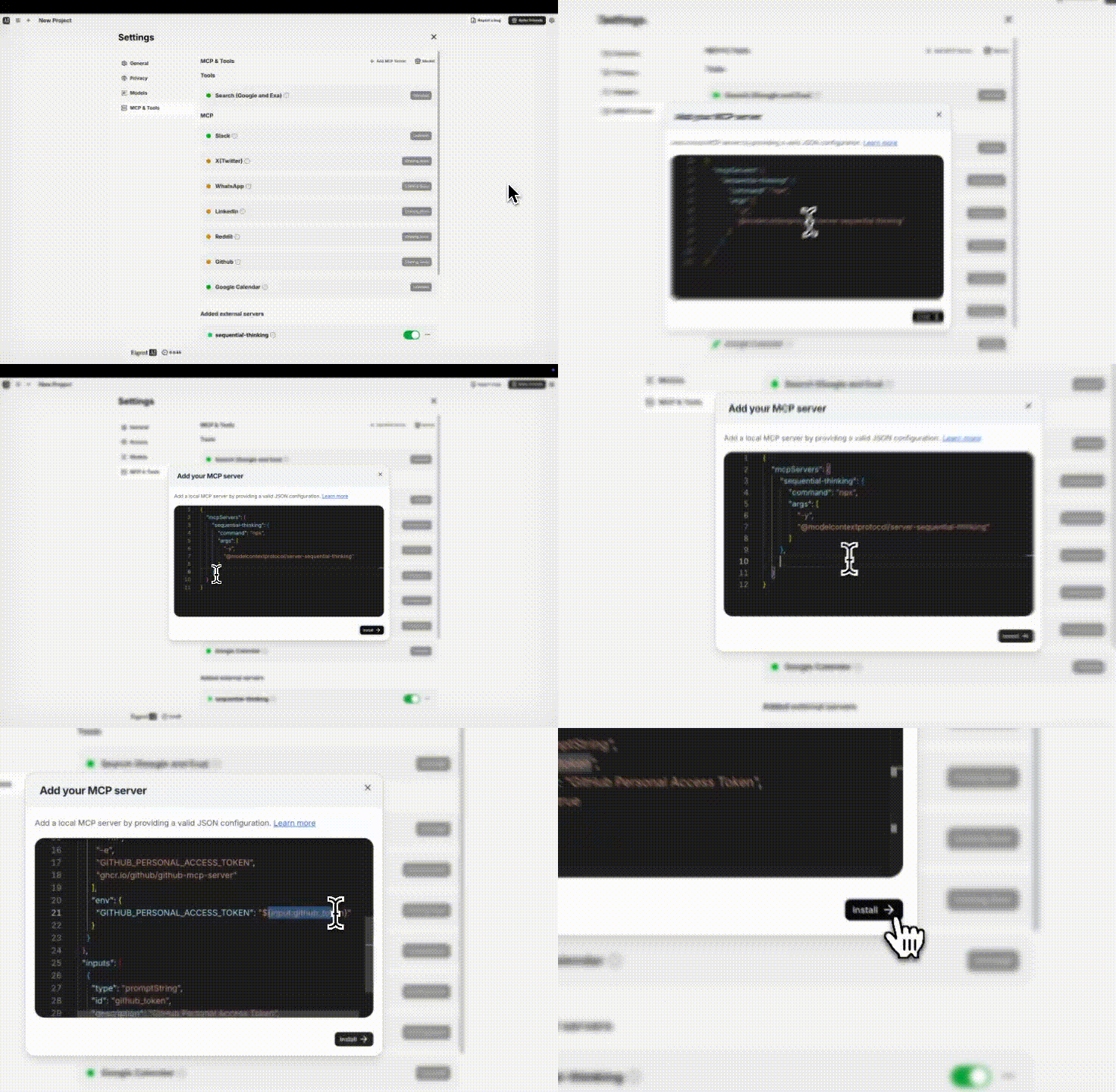
Bevor du die MCP-Server-Einrichtung abschließt, füge dein GitHub Personal Access Token (PAT) in die Konfiguration ein. Dieses Token ermöglicht es dem Agenten, sich bei der GitHub API zu authentifizieren und Repository-Daten abzurufen. Erstelle in deinem GitHub-Konto ein PAT mit den passenden Scopes (für öffentliche Repos reichen die Standard-Scopes für öffentliche Repos aus).
Erweitere die Konfiguration, um den GitHub-Server und dein Token einzuschließen:
{
  "mcpServers": {
    "sequential-thinking": {
      "command": "npx",
      "args": [
        "-y", "@modelcontextprotocol/server-sequential-thinking",
        "ghcr.io/github/github-mcp-server"
      ],
      "env": {
        "GITHUB_PERSONAL_ACCESS_TOKEN": "ghp_yourGitHubTokenHere"
      }
    }
  }
}
Sobald das JSON fertig ist, klicke auf Install oder Add, um den MCP-Server zu speichern. Eigent lädt den Server herunter und initialisiert ihn im Hintergrund. Nach einem Moment solltest du den neuen Server in deinen MCP-Tools sehen.
Schritt 4: Einen GitHub-fokussierten Worker (Agent) mit dem neuen MCP-Server hinzufügen
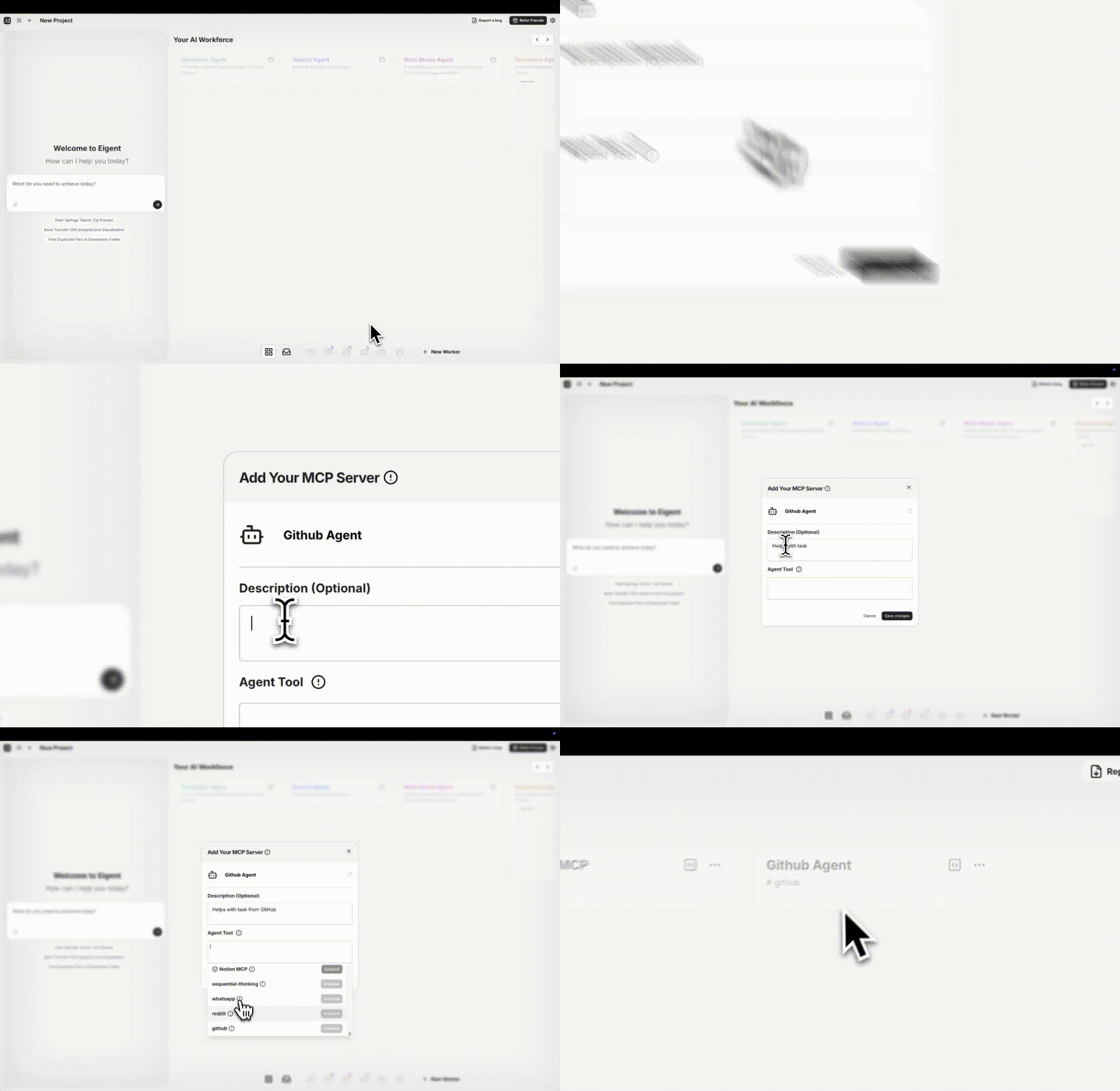
Jetzt, da der MCP-Server konfiguriert ist, erstelle einen Worker, der diesen Server verwendet. In Eigent ist ein „Worker“ eine KI-Agenten-Persona, die Aufgaben mit einem bestimmten Toolset oder MCP-Server ausführen kann. Navigiere zu deinem Workforce/Agents-Bildschirm und wähle Add Worker.
Benenne ihn zum Beispiel „GitHub MCP“ und beschreibe ihn als „Hilft bei GitHub-Aufgaben“. Weise das Agent Tool dem MCP-Server zu, den wir gerade hinzugefügt haben (z. B. „sequential-thinking“). Speichere den Worker, um deinen GitHub-Automatisierungsassistenten zu erstellen.
Schritt 5: Den Agenten auffordern, Pull Requests zusammenzufassen
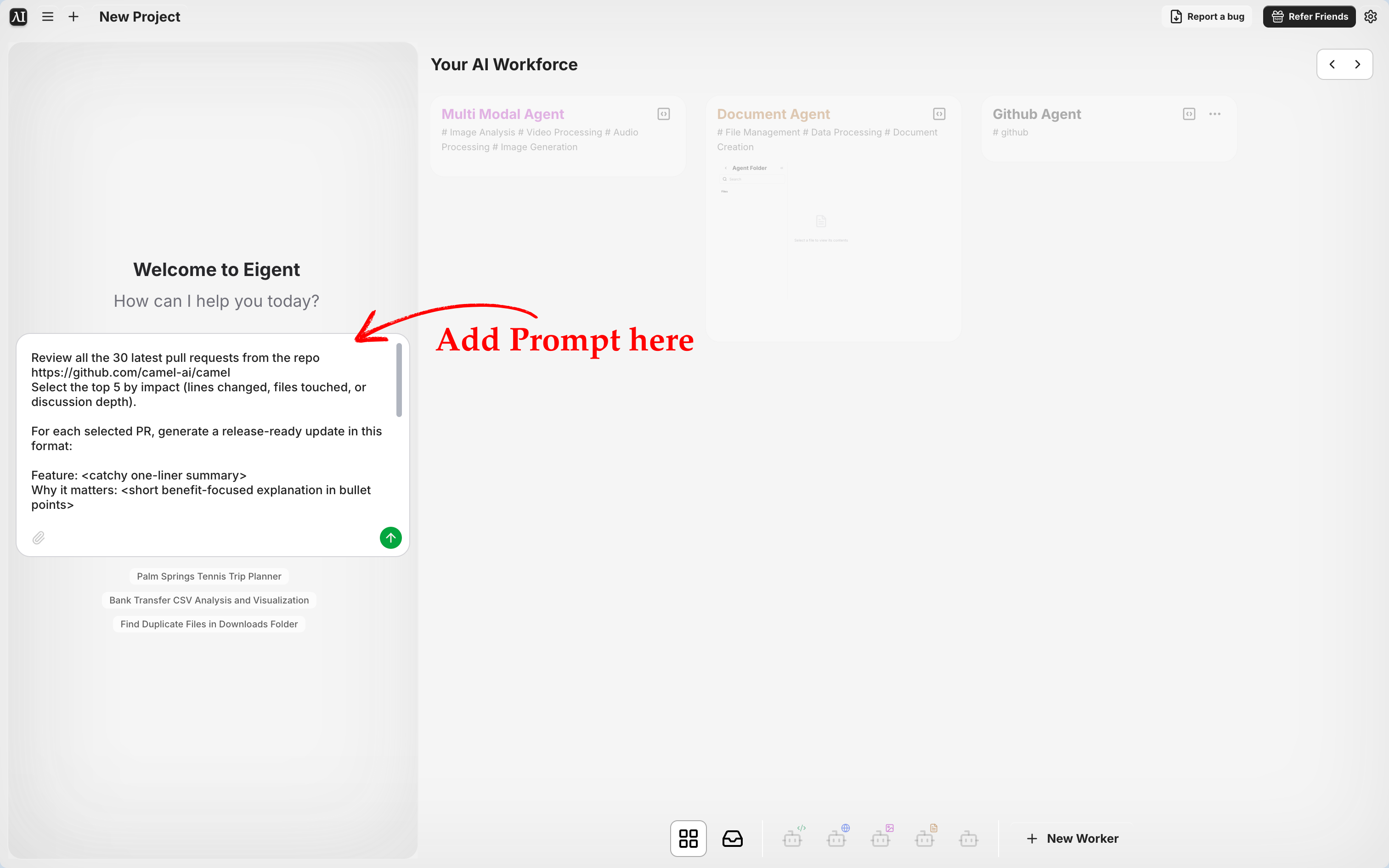
Öffne einen Chat mit deinem neuen Worker und gib einen Aufgaben-Prompt ein, in dem du den Agenten bittest, Pull Requests aus einem Repository zu prüfen und zusammenzufassen.
Probiere einen detaillierten Prompt wie diesen:
Prüfe die neuesten 30 Pull Requests aus dem Repo https://github.com/camel-ai/camel. Wähle die 5 mit dem größten Einfluss aus (geänderte Zeilen, betroffene Dateien oder Tiefe der Diskussion). Erstelle für jeden ausgewählten PR ein releasefähiges Update in diesem Format: ✨ Feature: <prägnante Ein-Satz-Zusammenfassung> \n💡 Warum es wichtig ist: <kurze Erklärung in Stichpunkten> \n🙏 Danke @<GitHubAuthor>.
Dadurch wird der Agent angewiesen, einen gängigen Open-Source-Workflow zu automatisieren: aktuelle Pull Requests zu analysieren und eine Zusammenfassung wichtiger Änderungen vorzubereiten. Du kannst die Repository-URL oder die Kriterien nach Bedarf anpassen.
Schritt 6: Beobachten, wie Eigent die Aufgabe automatisch zerlegt und Daten abruft
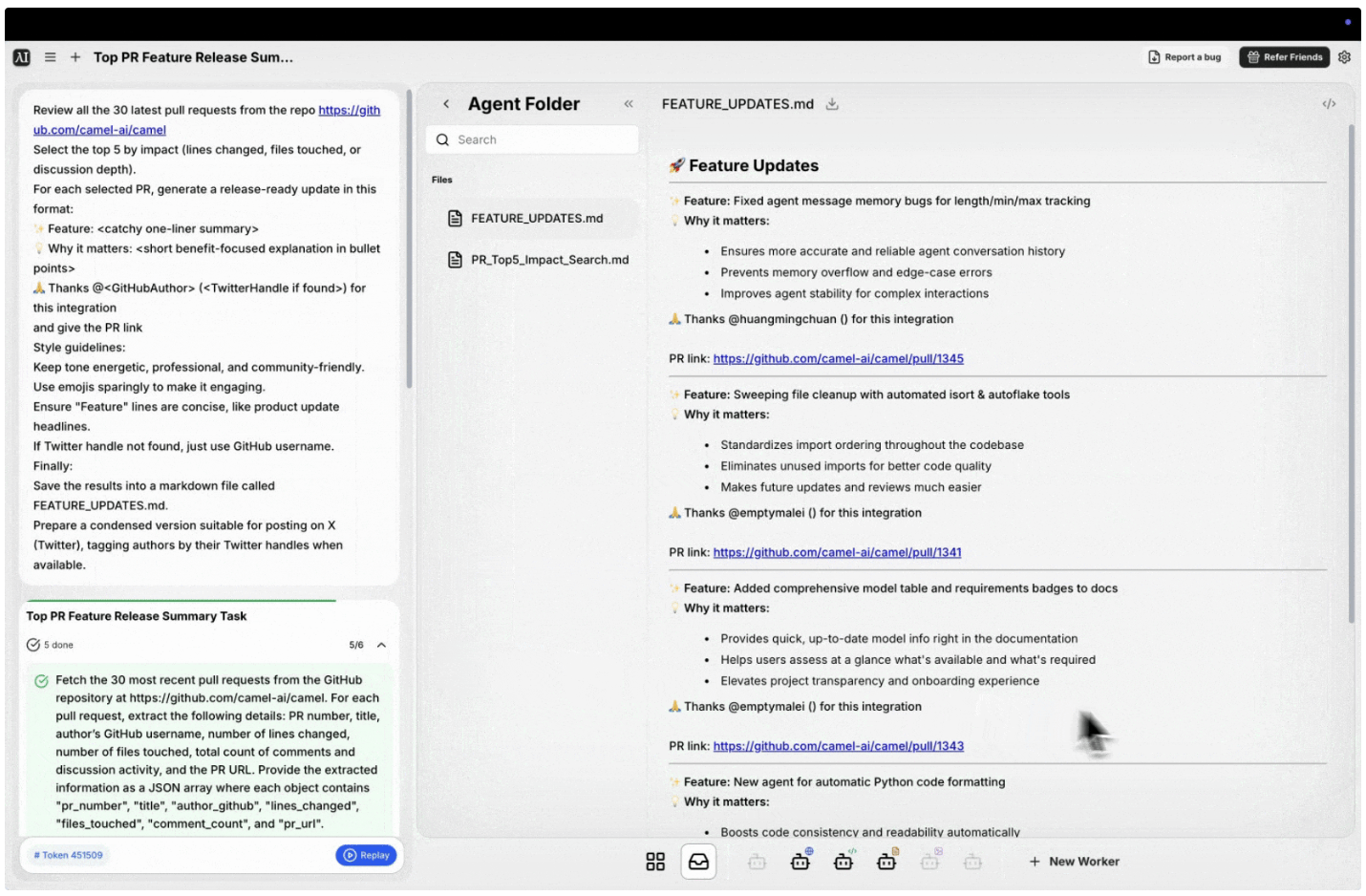
Sobald du den Prompt sendest, springt Eigent’s Multi-Agenten-Engine an. Die Anfrage ist recht komplex, aber Eigent bewältigt sie, indem es die Arbeit in überschaubare Teilaufgaben aufteilt. Im Hintergrund interpretiert der Sequential-Thinking-MCP-Server die Anweisung und erstellt einen Plan. Er kann:
- Die Liste der neuesten 30 PRs aus dem angegebenen Repository abrufen (mit dem GitHub-MCP-Tool).
- Die Metadaten jedes PRs analysieren (geänderte Zeilen, Dateien, Kommentare), um den „Impact“ zu bestimmen.
- Die Top 5 PRs anhand der Kriterien auswählen.
- Für jeden dieser PRs eine Zusammenfassung im gewünschten Format verfassen (✨ Feature, 💡 Warum es wichtig ist, 🙏 Danke...).
- Optional eine gekürzte Version für X (Twitter) vorbereiten, falls gewünscht.
Am Ende erzeugt der Agent die Ausgabe: eine sauber formatierte Reihe releasefähiger Updates für die Top-PRs, oft in Markdown dargestellt.
Open-Source-Workflows mit agentischer Automatisierung stärken
In diesem Tutorial haben wir Eigent so eingerichtet, dass es eine Open-Source-Wartungsaufgabe automatisiert — das Zusammenfassen von GitHub Pull Requests — mithilfe eines KI-Agents. Wir haben einen benutzerdefinierten GitHub-MCP-Server in Eigent eingebunden, einen dedizierten Worker erstellt und Release-Note-Snippets aus Live-Repository-Daten generiert.
Durch die Nutzung von Eigent’s MCP-Integration und Multi-Agenten-Koordination können komplexe Workflows (wie das Priorisieren von Dutzenden PRs) effizient von KI übernommen werden, sodass du dich auf übergeordnete Entscheidungen konzentrieren kannst. Eigent lässt sich für viele Szenarien anpassen, vom Schreiben von Zusammenfassungen und dem Verwalten von Issues bis hin zum Testen von Code oder dem Aktualisieren von Dokumentationen.
Probiere Eigent in deinen eigenen Projekten aus und genieße den Produktivitätsschub, den ein KI-gestütztes Team an deiner Seite bietet! Die Zukunft der Open-Source-Zusammenarbeit könnte einfach eine Mischung aus menschlicher Leidenschaft und unermüdlichen KI-Assistenten sein, die gemeinsam arbeiten. 🚀
Recent Posts
Claude Opus 5.5: Neuerungen, Benchmarks und Preise
Claude Opus 5.5 erklärt: das erste Claude-5.5-Modell, 40 % günstiger als Opus 5, 30 % schnellere Ausgabe, neue agentenbasierte Coding-Benchmarks, Preise und Safety.
Eigent
GPT-6 Sol und Luna: OpenAIs günstigere Coding- und Agentic-Modelle
GPT-6 Sol und Luna erweitern OpenAIs GPT-6-Familie unterhalb von Astra mit deutlichen Preissenkungen und verbessertem Coding. Hier sind die Änderungen, die Benchmarks und wann man welches Modell einsetzt.
Eigent
Periodic Neon: Die im Labor trainierte KI, die Frontier-Modelle in der Wissenschaft übertrifft
Periodic Neon ist eine 1T-Parameter-KI, die auf physischen Labordaten trainiert wurde und GPT-6 Astra bei der Beugungsanalyse übertrifft. Was das Modell leistet und warum es bedeutsam ist.
Eigent


