




Eigent
Pricing
A cream facade with blue windows refracted through fine vertical glass

AI workspace

  • OverviewSee the whole workspace.
  • Spaces and SessionsKeep each project's files and work together.
  • Skills & ConnectorsTeach agents your way of working. Connect your tools.
  • AutomationsRun Tasks on a schedule or a trigger.
  • Remote ControlCheck in from your browser or phone.
  • Use casesSee real work, finished.

Updates

  • ChangelogCatch up on the latest releases.
  • RoadmapFollow what comes next.
  • WindowsDownload Eigent for Windows.
  • MacDownload Eigent for macOS.
  • LinuxDownload Eigent for Linux.
  • Open SourceInspect, adapt, and make it yours.
  • EnterpriseRoll Eigent out across your company.
Concrete balconies and golden railings refracted through fine vertical glass

Enterprise

  • OverviewAn AI workspace for every team, in your environment.
  • MonitoringSee every run, step by step.
  • GovernanceSet who can build, run, and approve.
  • ControlLimit what agents can reach.
  • Security and trustHow we protect your data.
  • Enterprise servicesWe build it with you, then hand it over to your team.
  • Talk to salesPlan a proof of concept for your company.
A sunlit facade and geometric shadows refracted through fine vertical glass

Environments

  • OverviewTrain and test agents on real work.
  • Environment catalogBrowse 30 categories of environments.
  • Request an environmentTell us what your agents need to learn.
  • AgenticRL-BenchCan agents do agentic RL? See the leaderboard. (opens in a new tab)
  • Env-LabCustom RL environments, training data, and benchmarks for real work. (opens in a new tab)
Weathered window frames refracted through fine vertical glass

Learn

  • DocsGet started and go deeper.
  • BlogIdeas, releases, and stories.
  • SupportFind answers and get help.

Company

  • AboutMeet the people behind Eigent.
  • CareersJoin the team building Eigent.

Community

  • CAMEL-AIThe multi-agent research community behind Eigent. (opens in a new tab)

AI workspace

  • OverviewSee the whole workspace.
  • Spaces and SessionsKeep each project's files and work together.
  • Skills & ConnectorsTeach agents your way of working. Connect your tools.
  • AutomationsRun Tasks on a schedule or a trigger.
  • Remote ControlCheck in from your browser or phone.
  • Use casesSee real work, finished.

Updates

  • ChangelogCatch up on the latest releases.
  • RoadmapFollow what comes next.
  • WindowsDownload Eigent for Windows.
  • MacDownload Eigent for macOS.
  • LinuxDownload Eigent for Linux.
  • Open SourceInspect, adapt, and make it yours.
  • EnterpriseRoll Eigent out across your company.

Enterprise

  • OverviewAn AI workspace for every team, in your environment.
  • MonitoringSee every run, step by step.
  • GovernanceSet who can build, run, and approve.
  • ControlLimit what agents can reach.
  • Security and trustHow we protect your data.
  • Enterprise servicesWe build it with you, then hand it over to your team.
  • Talk to salesPlan a proof of concept for your company.

Environments

  • OverviewTrain and test agents on real work.
  • Environment catalogBrowse 30 categories of environments.
  • Request an environmentTell us what your agents need to learn.
  • AgenticRL-BenchCan agents do agentic RL? See the leaderboard. (opens in a new tab)
  • Env-LabCustom RL environments, training data, and benchmarks for real work. (opens in a new tab)

Learn

  • DocsGet started and go deeper.
  • BlogIdeas, releases, and stories.
  • SupportFind answers and get help.

Company

  • AboutMeet the people behind Eigent.
  • CareersJoin the team building Eigent.

Community

  • CAMEL-AIThe multi-agent research community behind Eigent. (opens in a new tab)
Pricing
์ง€์›
๋ฌธ์ œ ํ•ด๊ฒฐ|2026๋…„ 10์›” 19์ผ ์—…๋ฐ์ดํŠธ

How do I download task logs for support?

Learn how to take a screenshot of a problem in your Eigent session, download the Eigent and Camel logs, and email everything to support@eigent.ai for debugging.

์ด ๋ฌธ์„œ๋Š” ํ˜„์žฌ ์˜์–ด๋กœ๋งŒ ์ œ๊ณต๋ฉ๋‹ˆ๋‹ค.

  • 1. Take a screenshot
  • 2. Open Support
  • 3. Download both logs and email support

If you encounter a bug while working on a Task, send our support team a screenshot and both log files so we can investigate.

1. Take a screenshot#

Open the session where you encountered the bug. Take a screenshot showing the affected Task and any error message or unexpected behavior. Keep this session open while you download the logs.

2. Open Support#

Click the Support icon (the question mark) in the top-right corner of the Eigent app.
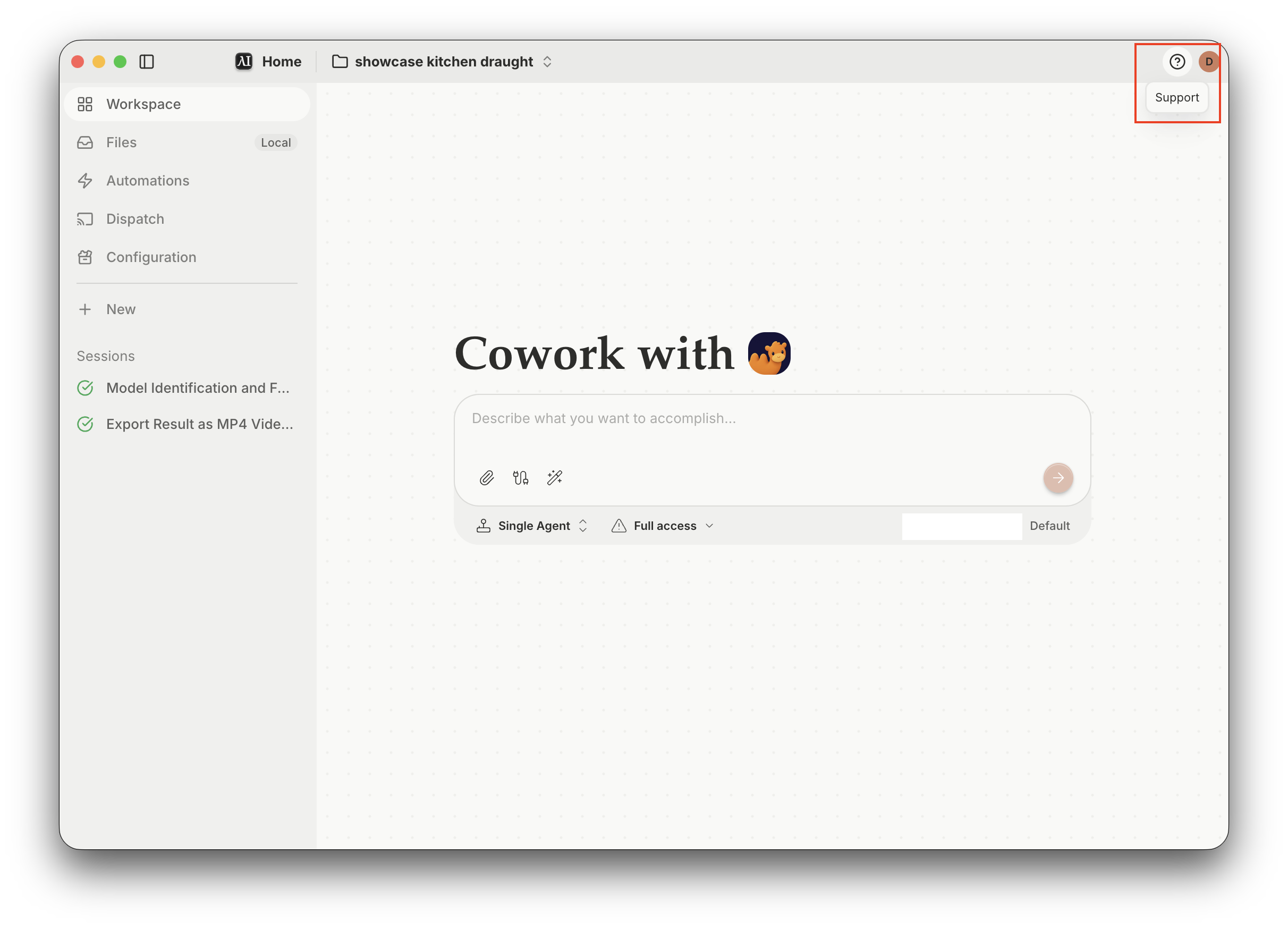
The Eigent app with the Support icon highlighted in the top-right corner

3. Download both logs and email support#

In the Support window, find Download logs and click Download next to each of these:

  • Eigent log โ€” desktop app logs.
  • Camel log โ€” agent task logs from the CAMEL backend.
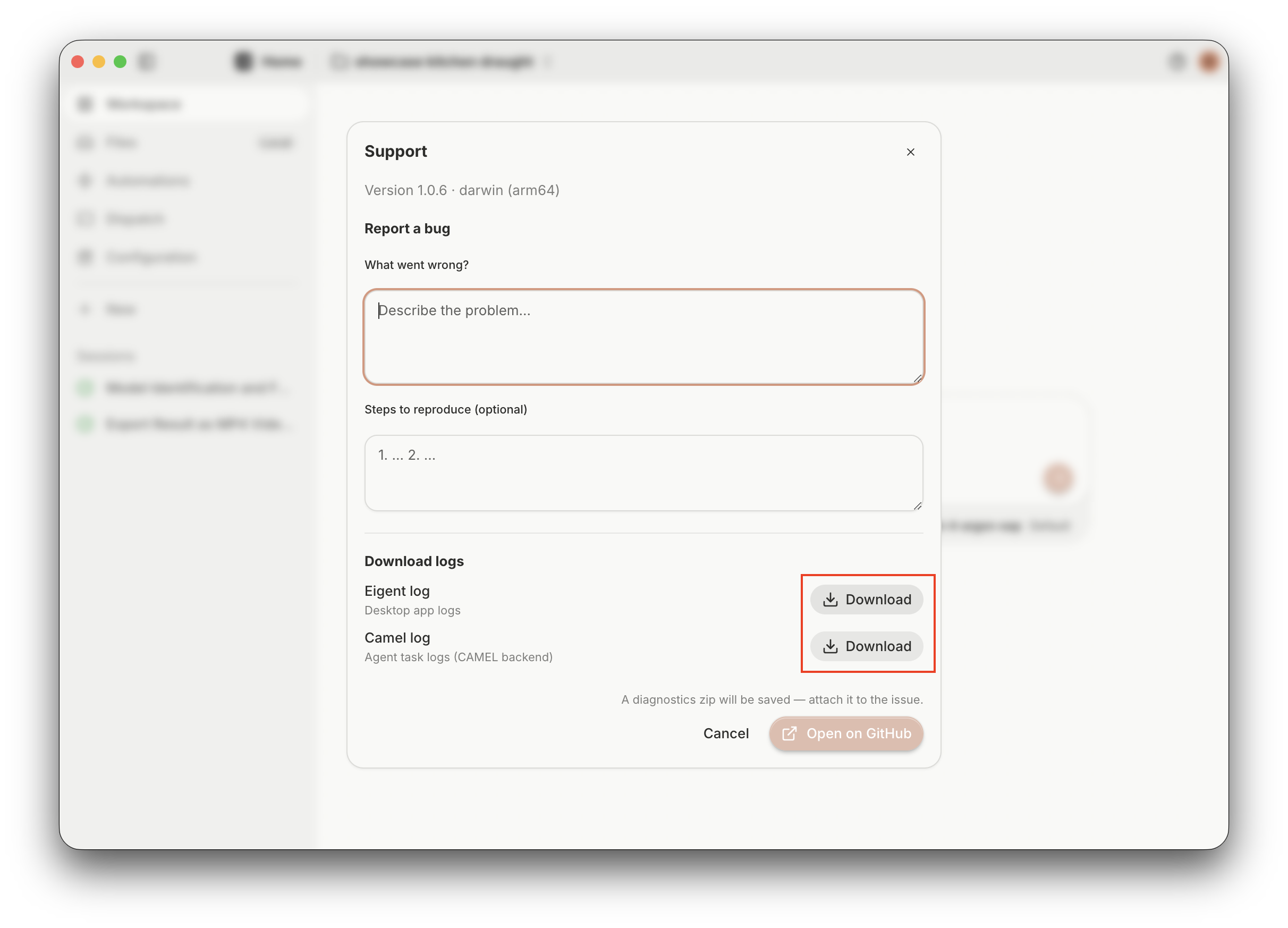
The Support window with the Download buttons for Eigent log and Camel log highlighted

Email support@eigent.ai with:

  • The screenshot of the issue.
  • Both downloaded log files: Eigent log and Camel log.
  • A brief description of what went wrong and the steps that led to it.

์•„์ง ๋„์›€์ด ํ•„์š”ํ•˜์‹ ๊ฐ€์š”?

ํŒ€์— ๋ฌธ์˜ํ•˜์‹œ๋ฉด ํ•ด๊ฒฐํ•  ์ˆ˜ ์žˆ๋„๋ก ๋„์™€๋“œ๋ฆฌ๊ฒ ์Šต๋‹ˆ๋‹ค.

support@eigent.ai๋ฌธ์˜ํ•˜๊ธฐ

Open Source Cowork ๋ฐ์Šคํฌํ†ฑ

100% ์˜คํ”ˆ ์†Œ์Šค - ์ง์ ‘ ํ˜ธ์ŠคํŒ… ๊ฐ€๋Šฅ, ๋ฌด๋ฃŒ, ์ž์ฒด API ํ‚ค ๋˜๋Š” ๋กœ์ปฌ ๋ชจ๋ธ ์‚ฌ์šฉ.

Eigent

AI ์›Œํฌํฌ์Šค ์ž๋™ํ™”์— ๋Œ€ํ•œ ์ตœ์‹  ์†Œ์‹, ํŠœํ† ๋ฆฌ์–ผ, ์ถœ์‹œ ์ •๋ณด๋ฅผ ๋ฐ›์•„๋ณด์„ธ์š”.

๊ตฌ๋…ํ•ด ์ฃผ์…”์„œ ๊ฐ์‚ฌํ•ฉ๋‹ˆ๋‹ค!

์ œํ’ˆEigentํ™˜๊ฒฝ์š”๊ธˆ์—”ํ„ฐํ”„๋ผ์ด์ฆˆ
๋‘˜๋Ÿฌ๋ณด๊ธฐ์†”๋ฃจ์…˜ํ™œ์šฉ ์‚ฌ๋ก€์Šคํ‚ฌํ”Œ๋Ÿฌ๊ทธ์ธ๋ธ”๋กœ๊ทธ์—…๋ฐ์ดํŠธ
๊ฐœ๋ฐœ์ž๋ฌธ์„œGitHubCAMEL-AI์˜คํ”ˆ์†Œ์Šค ํŽ€๋“œํŒŒํŠธ๋„ˆ
๋‹ค์šด๋กœ๋“œ์˜คํ”ˆ ์†Œ์Šค์šฉ
ํšŒ์‚ฌํšŒ์‚ฌ ์†Œ๊ฐœ๋ธŒ๋žœ๋“œ์ฑ„์šฉ์ง€์›์ด์šฉ์•ฝ๊ด€๊ฐœ์ธ์ •๋ณด์ฒ˜๋ฆฌ๋ฐฉ์นจ๋ณด์•ˆ ๋ฐ ์‹ ๋ขฐ์ฟ ํ‚ค ์ •์ฑ…ํ™˜๋ถˆ ๋ฐ ์ฒดํ—˜ ์ •์ฑ…

๋ชจ๋“  ๊ถŒ๋ฆฌ ๋ณด์œ  ยฉ 2026 EIGENT UK LTD