
如何使用任何 LLM(GPT、Grok、Gemini、OpenRouter、本地模型)執行 Claude Cowork 和 Claude Code
Anthropic 的第三方推理功能讓你可以用任何模型驅動 Claude 的 agent harness——毋須每月 US$200 訂閱
 Douglas Lai
如何使用任何 LLM(GPT、Grok、Gemini、OpenRouter、本地模型)執行 Claude Cowork 和 Claude Code
Anthropic 推出了一個幾乎冇乜人留意到嘅功能:而家你可以用任何你揀選的 LLM 去執行 Claude Cowork 和 Claude Code——可以係 GPT-5、Grok、Gemini、透過 OpenRouter 使用嘅 open-weight 模型、你手提電腦上嘅本地模型,或者你嘅企業閘道(Bedrock、Vertex AI、Azure AI Foundry)。agent harness、skills、plugins、MCP servers 同 admin controls 全部都照常保留,只係背後驅動佢哋嘅模型變咗。
呢個功能打開咗兩個好吸引嘅場景。對於已經撞到 Claude Max 計劃用量上限——或者根本唔想每月畀 US$100–US$200——嘅個人用戶,而家可以直接將 Cowork 指向一個免費 OpenRouter 模型,以接近零成本享受完整嘅 agent 體驗。至於已經喺 Bedrock、Vertex 或 Foundry 上運行嘅企業,就可以喺現有合規邊界內部署 Cowork,唔使將資料經過 Anthropic 嘅第一方基礎設施。
呢篇指南會講解第三方推理上的 Cowork 到底係乜、適合邊類人用、點樣一步一步設定,以及點樣排解最常見嘅問題。
乜嘢係第三方推理上的 Cowork?
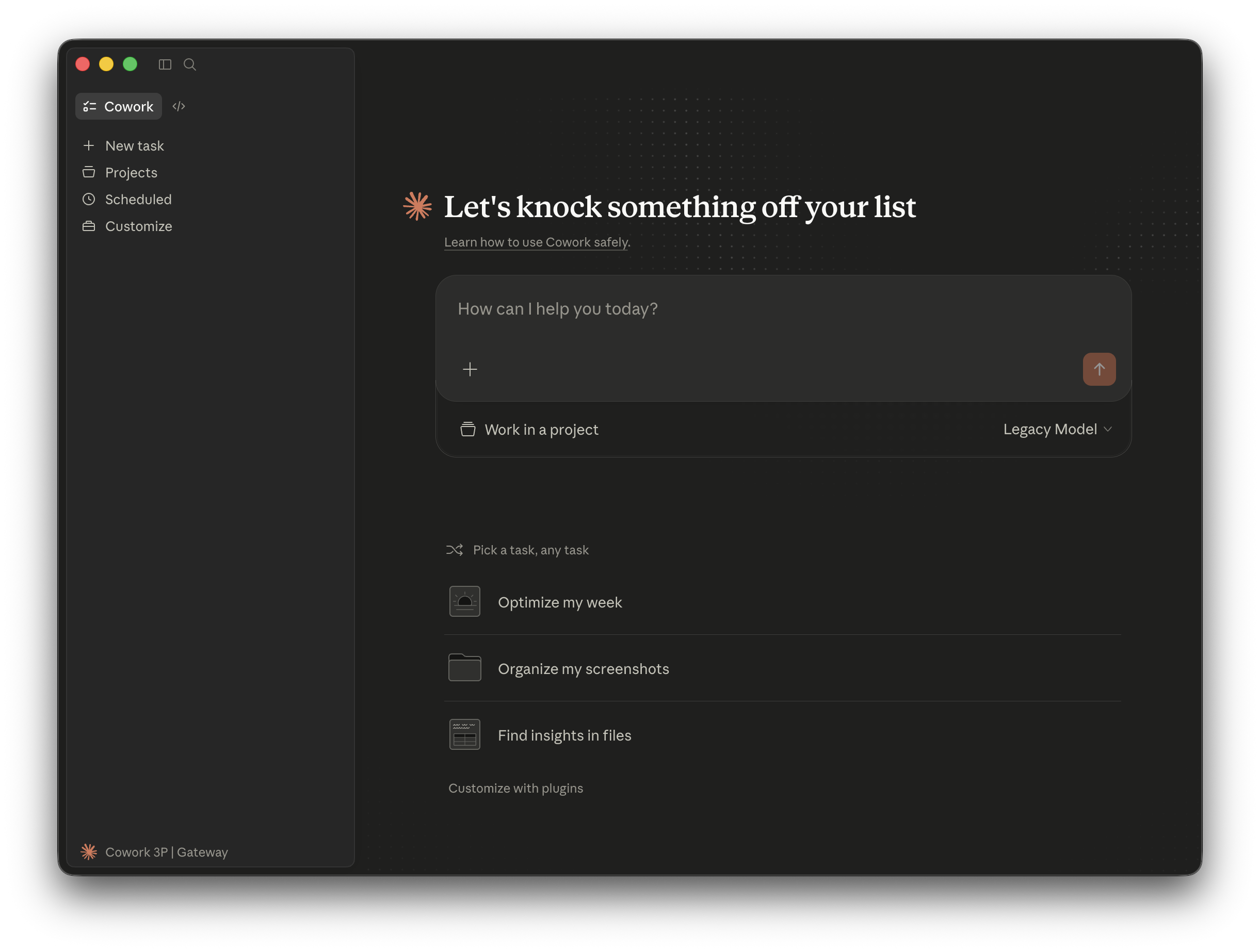
第三方推理上的 Cowork(亦稱「Cowork on 3P」)係一種設定模式,會將驅動 Cowork 的 Claude 模型,替換成任何相容 OpenAI API 的端點。Anthropic 官方文件將佢分成三條部署路徑:
- 受規管行業 — 有資料駐留要求嘅機構
- 企業閘道用戶 — 經 Amazon Bedrock、Google Cloud Vertex AI 或 Azure AI Foundry 運行 Claude 嘅公司
- 試點或評估環境的個人用戶 — 安裝 Claude Desktop 並想試下唔同模型嘅任何人
三條路徑共用同一個設定面板,同一套 admin controls。所有企業級功能(每位用戶 token 上限、MCP allowlist、OpenTelemetry、封鎖自動更新、移除內建工具)都會喺三條路徑提供。
OpenRouter 都可以當作 LLM 閘道使用——Anthropic 雖然冇喺官方文件列出佢,但獨立測試已經確認可行。即係話,OpenRouter 目錄上任何模型(包括好多免費層模型)都可以驅動 Cowork 的完整 agent harness。
以下係一個簡單比較,睇下有乜改變、又有乜保持不變:
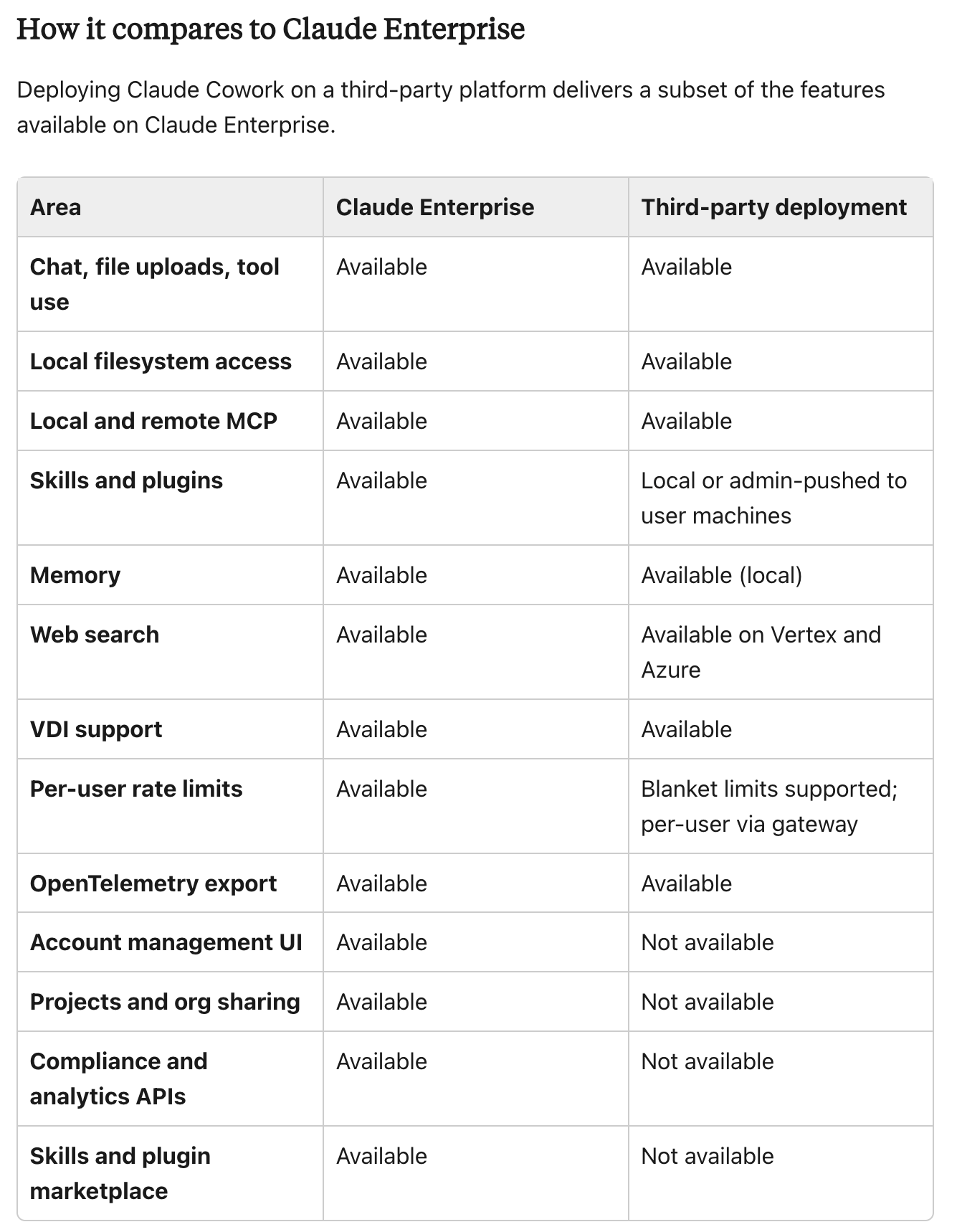
關於資料駐留嘅一個重要提示: 喺呢個研究預覽期間,Azure AI Foundry 上嘅 Claude 仍然會經 Anthropic 嘅基礎設施路由。Amazon Bedrock 同 Google Cloud Vertex AI 先至係提供完整供應商側資料駐留嘅路徑。
邊啲人應該使用呢個功能?
第三方推理對兩類明顯唔同嘅受眾最有幫助,而使用場景亦唔太重疊。
個人用戶 係短期內最大受益者。如果你正因為 Claude Max 計劃每週用量上限而受限、想喺正式訂閱前先評估 Cowork,或者正處理包含專有程式碼、又唔可以發送去任何外部 API 嘅本地模型,Cowork on 3P 可以一次過解決呢三個問題。你今日就可以用 OpenRouter 上一個免費模型,運行完整 agent harness——包括檔案工具、MCP servers、skills 同 plugins。
企業團隊 得到嘅就唔同:可以將 Cowork 保持喺已批准嘅雲供應商邊界內。如果你嘅機構已經喺安全審查中通過 Bedrock、Vertex 或 Foundry,Cowork on 3P 就可以令你向員工部署,而唔需要新增一條去 Anthropic 第一方基礎設施嘅資料流。admin controls(token 上限、MCP allowlist、OpenTelemetry exporter)喺任何供應商後面都一樣運作。
分步設定
1. 連接到 OpenRouter
唔需要 proxy server。你只要將 Claude Desktop 直接指向 OpenRouter 嘅 API 端點。
- 開啟 Claude Desktop → Menu → Developer → Configure Third-Party Inference
- 設定以下值:
- Connection: Gateway
- Gateway base URL:
https://openrouter.ai/api - Gateway API key: 你嘅 OpenRouter API key
- Gateway auth scheme:
x-api-key
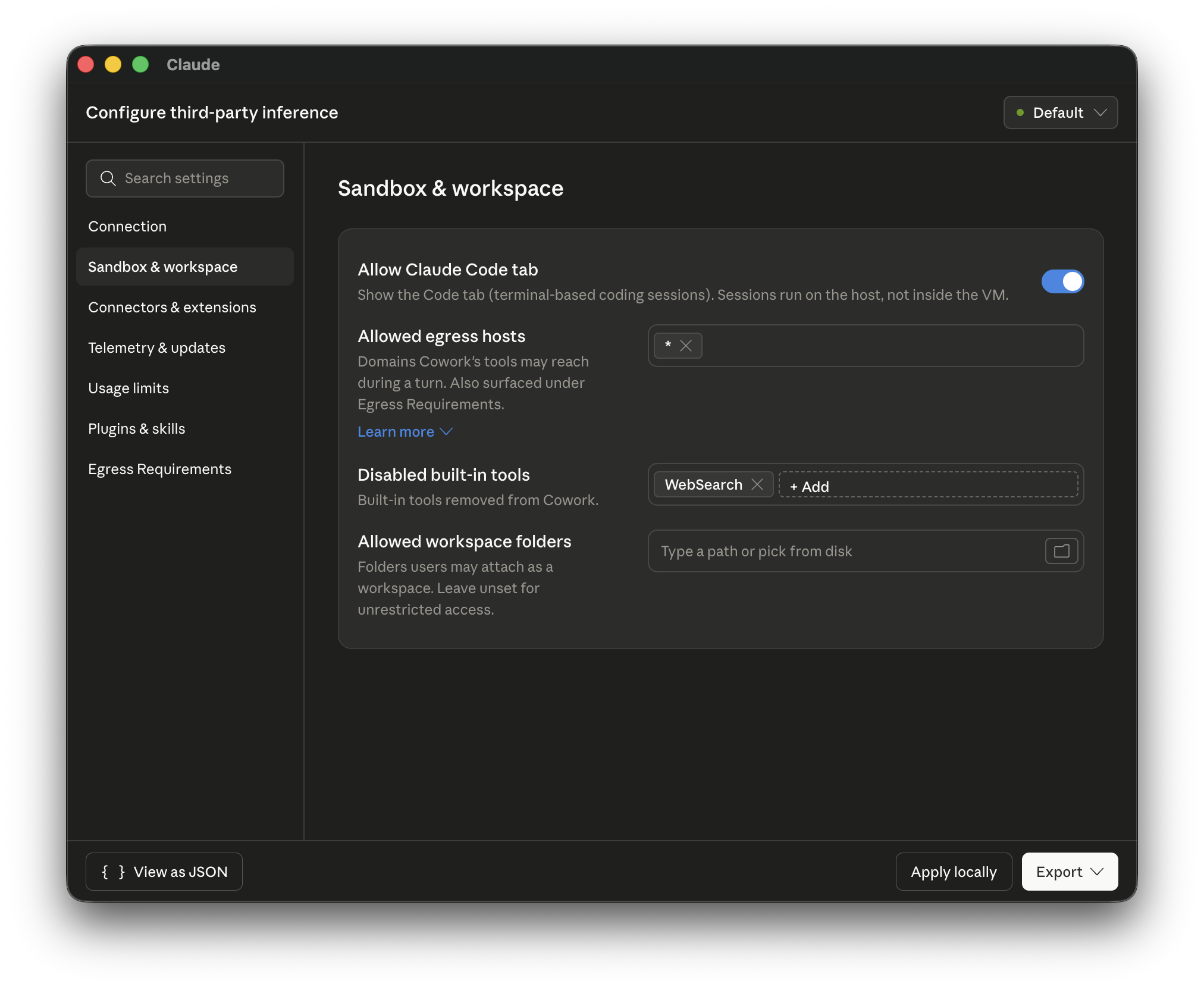
- 喺 Sandbox & workspace 入面,設定 Allowed egress hosts,等你嘅 agents 可以連到網絡。如果想允許所有網站,可以用萬用字元項目。
- 點擊 Apply locally → Relaunch now
- 登出你嘅 Anthropic 帳戶,然後揀 Continue with Gateway
- 你會見到「Setting up Claude's workspace…」——完成後就可以開始對話
要揀模型,請喺 model picker 入面使用 OpenRouter 嘅 model identifier。一個喺 agentic tasks 上表現穩定嘅免費模型係:tencent/hy3-preview:free
本地模型都係同一個模式——透過相容 OpenAI 的 proxy,例如 LiteLLM 或 Ollama 內建嘅 OpenAI endpoint 去路由。
2. 匯入 Anthropic Skills
OpenRouter 設定會令 Customize → Skills 面板保持空白。官方 Anthropic skills(docx、pdf、pptx、xlsx、skill-creator)需要手動安裝。
- 將 Anthropic skills repository 下載成
.zip檔 - 解壓
skills-main.zip - 將你想用嘅每個 skill 資料夾分別壓縮成 zip(例如
docx資料夾會變成docx.zip) - 喺 Claude Desktop:Customize → Skills → Create skill → Upload a skill — 上傳每個
.zip
一個實用提示:只匯入你真正需要嘅 skills。即使冇喺運行中,每個 skill 都會佔用 context window 空間,所以保持清單精簡可以提升較細模型嘅效能。
3. 匯入 Anthropic Plugins
同樣嘅手動匯入模式亦適用於 plugins。有兩個官方 repository 值得拉取:
- Knowledge-work plugins(marketing、product management、legal、finance):github.com/anthropics/knowledge-work-plugins
- Code tab plugins:github.com/anthropics/claude-plugins-official
步驟:
- 將 repo 下載成
.zip並解壓 - 將你想用嘅每個 plugin 資料夾分別壓縮
- 喺 Claude Desktop:Customize → Personal plugins → + → Create plugin → Upload plugin
一開始唔好超過 2–3 個 plugins。對好多工作流程嚟講,零個 plugins 先至係最好答案——精簡 prompt 喺非 Claude 模型上表現更好。
4. 配置 MCP Servers
MCP servers 喺你電腦本機運行,並喺 Settings → Developer 底下配置。
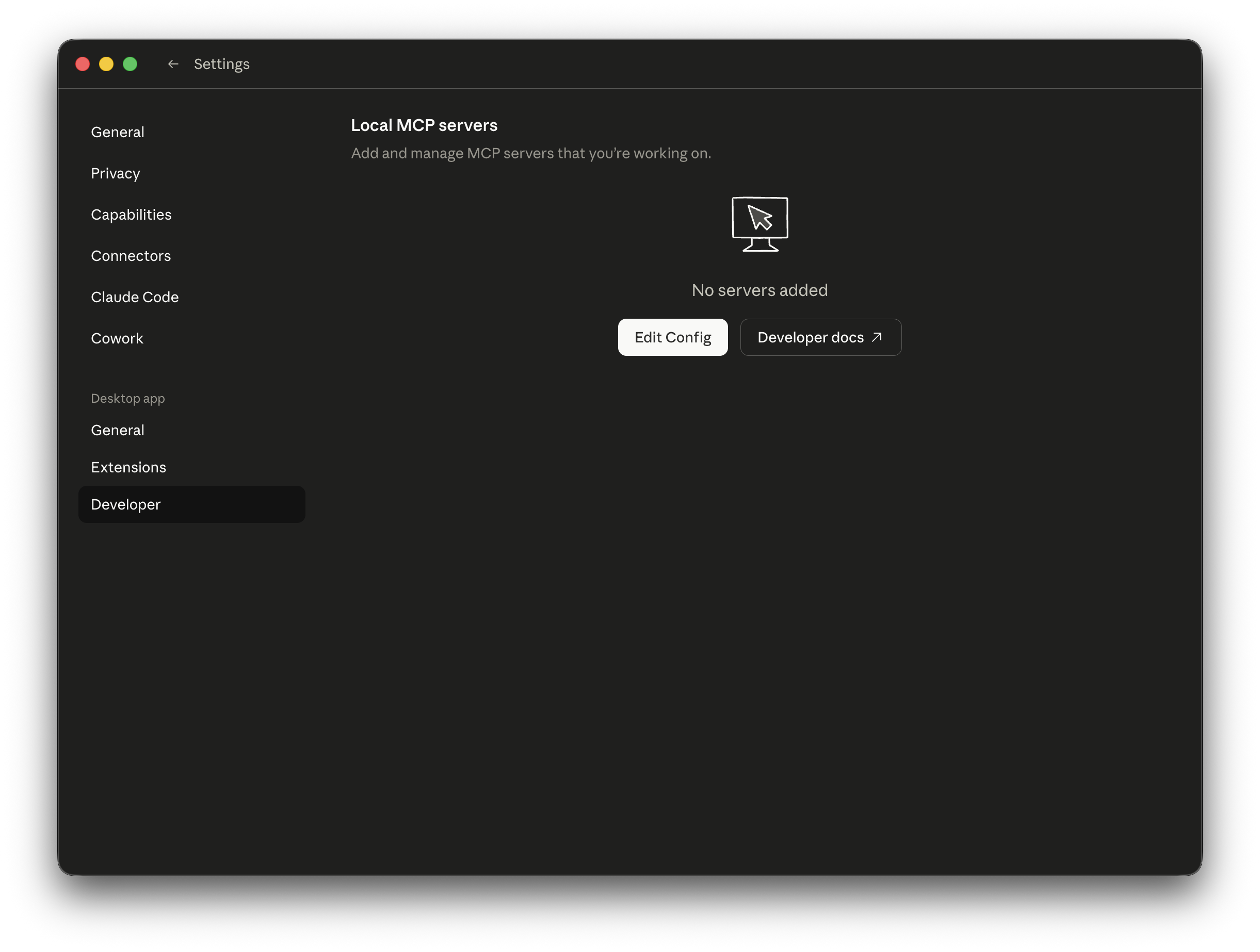
MCP 配置會寫入一個獨立嘅 claude_desktop_config.json 檔案(如果你見唔到 "Local MCP servers" 選項,請睇下面嘅故障排除部分)。官方 MCP server registry 喺 github.com/modelcontextprotocol/servers。
例如,社群提供嘅 mcp-atlassian server 可以透過單一 MCP 連線,令你嘅 agents 同時存取 Jira 同 Confluence——呢個係好常見嘅企業設定。
5. 處理網頁搜尋
OpenRouter 唔支援 Anthropic 原生嘅 web_search 工具。你有三個選擇:
選項 A — 以 Brave Search MCP server 取代(建議)
喺你嘅設定檔加入 disabledBuiltinTools 入面嘅 WebSearch,咁 agent 就唔會嘗試使用原生工具,然後安裝 Brave MCP server。Brave 每月提供 2,000 次免費搜尋,超出之後每 1,000 次收費 US$3。
選項 B — 改用 Vertex AI 或 Azure AI Foundry
兩個供應商都原生支援 Anthropic 嘅 web_search 工具。Amazon Bedrock 目前仍未支援。
選項 C — 等待
OpenRouter 已經討論過將 Anthropic 嘅 web_search 工具路由到 Perplexity 或類似供應商,但呢個能力未正式推出。
故障排除
「Configure Third-Party Inference」喺 Menu → Developer 入面消失咗 更新 Claude Desktop 並重新啟動。之後透過 Help → Troubleshooting → Enable Developer Mode 開啟 developer mode。Corporate 或 Team 計劃用戶回報,即使啟用 developer mode,呢個設定仍然可能保持隱藏——可能係計劃分級限制,或者做緊 A/B 測試。
Cowork on 3P 入面冇見到「Local MCP servers」 解決方法一樣:更新 Claude Desktop、重新啟動,然後啟用 developer mode。
Connectors 顯示為「Unavailable」 呢個係預期行為,唔係 bug。第三方推理代表唔使用 Anthropic 嘅 connector 基礎設施,而 connectors 係依賴嗰一層。請改用 MCP servers 作為替代方案(見上面第 4 步)。
喺非 Claude 模型上 tool calling 唔穩定 模型質素喺 agentic tasks 上差異好大。有啲模型可以順利處理多步 MCP 呼叫;有啲喺複雜流程上會失敗。如果免費模型唔太適合你嘅工作流程,請試下 OpenRouter 付費層較強嘅模型,或者改用供應商託管選項(Bedrock、Vertex)。
Code tab 設定同 Cowork 設定唔一致 呢個係 Anthropic 文件已知問題:部分 Cowork on 3P 配置鍵值暫時未能完全同步到 Code tab session。隨住功能由研究預覽階段移出,預計會修正。
管理控制項反映咩訊號
第三方推理嘅設定面板包含嘅控制項,遠超一般個人用戶所需:
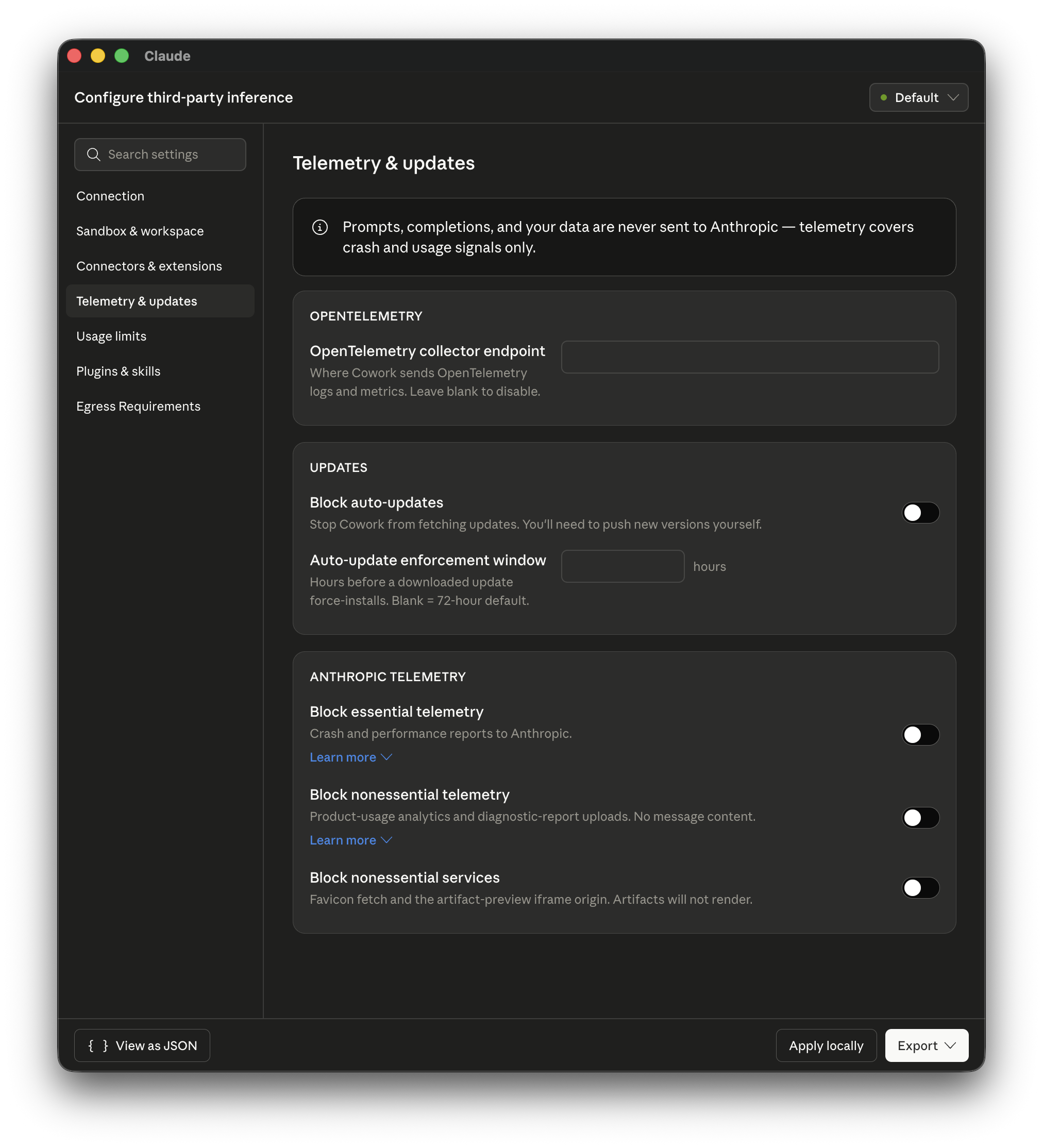
- 每個視窗最大 token 數(每位用戶軟上限)
- 允許用戶新增 MCP servers
- OpenTelemetry collector endpoint
- 封鎖自動更新
- 從 Cowork 移除內建工具
呢啲都係企業管理控制項。配合 Bedrock、Vertex 同 Foundry 支援,Anthropic 官方表述得好清楚:Cowork on 3P 係為咗嗰啲因為安全、法規或合約要求,而唔能夠將資料送到 Anthropic 第一方基礎設施嘅機構而設。
而家文件化嘅個人路徑——唔只係一個邊緣情況——其實已經透露咗產品方向。Claude Desktop 正在演變成一個受管控嘅 agent 平台,而 harness(skills、plugins、MCP servers、sub-agents)先係核心價值,至於由邊個模型去驅動,已經唔再係唯一重點。
主要重點
而家,將 Claude Cowork 同 Claude Code 運行喺第三方 LLM 上,已經係一個有文件支援嘅功能,而唔係 workaround。以下係你要記住嘅重點:
- 今日任何人都可以用。 安裝 Claude Desktop,將 OpenRouter 設定為 gateway,然後由免費模型開始。毋須訂閱。
- 完整 agent harness 都可運作。 Skills、plugins、MCP servers 同檔案工具都會按相同方式運作,唔受背後模型影響。
- 企業路徑支援完善。 Bedrock 同 Vertex AI 提供完整資料駐留;而 Foundry 喺目前研究預覽期間仍會經 Anthropic 基礎設施路由。
- 網頁搜尋需要替代方案。 用 Brave 的 MCP server 取代原生工具,或者改用 Vertex/Foundry。
- 模型質素對 agentic tasks 好重要。 較細或免費模型喺複雜多步工具呼叫上可能表現較弱。喺正式採用某個模型之前,先用你實際工作流程測試。
呢個功能仍然處於研究預覽,但核心設定已經穩定,對大部分使用場景都已經可以視為可投入生產。開始使用大約只需十分鐘。
Cowork on Third-Party API vs. 完全開源 Cowork:有乜分別?
第三方推理上的 Cowork 係朝向模型彈性邁出嘅重要一步,但佢仍然建立喺 Anthropic 專有 harness 之上。像 Eigent 呢類完全開源替代方案,採取咗唔同嘅架構立場——而且視乎你實際需要,呢啲差異相當重要。
核心分別
Claude Cowork on third-party inference 令你可以替換驅動 Anthropic 封閉原始碼 agent 平台嘅模型。你仍然依賴 Anthropic 嘅桌面應用程式、佢哋嘅 skills 同 plugin 格式、session 基礎設施,以及更新週期。改變嘅係模型;平台本身冇變。
Eigent 就係 agent 平台本身——開源(Apache 2.0),建立喺 CAMEL-AI 之上,並設計成可以完全喺你自己機器上運行。冇有專有 harness。每一個組件——編排、工具執行、檔案存取、多 agent 協作——都可以檢視、分支(fork)同自我託管(self-host)。
並排比較
| 維度 | Claude Cowork on 3P API | Eigent(開源) |
|---|---|---|
| 平台原始碼 | 專有(封閉) | Apache 2.0 開源 |
| 模型彈性 | 任何相容 OpenAI 的端點 | Claude、GPT、Gemini、Ollama、任何供應商 |
| 基礎設施 | Anthropic 桌面應用程式 + 雲端連接器 | 完全喺你本機運行 |
| 資料流向 | 連接器會經 Anthropic 基礎設施路由 | 資料從不離開你部機 |
| 多 agent 編排 | 研究預覽,受限制存取 | 經 CAMEL-AI 可投入生產 |
| Skills 與 plugins | Anthropic 格式,3P 需手動安裝 | 開放 skills 系統,可由社群擴充 |
| MCP servers | 支援 | 支援 200+ MCP 工具 |
| 管理控制 | Token 上限、allowlist、OpenTelemetry | 完整自託管控制 |
| 合規邊界 | Bedrock/Vertex 提供資料駐留 | 內部部署,無外部依賴 |
| 成本 | API 推理成本 + Claude Desktop | 免費(Apache 2.0)+ API 推理成本 |
| 更新控制 | 可透過 admin config 選擇封鎖 | 完全控制——你擁有 binary |
| 自訂化 | 只限配置層面 | 完整原始碼存取,可 fork 同擴展 |
何時應該選擇 Cowork on Third-Party API
如果你已經日常使用 Claude Desktop,並想擴展到非 Claude 模型——尤其係出於成本原因,或者你嘅機構已經通過 Bedrock 或 Vertex——Cowork on 3P 係最少阻力嘅路徑。你可以用熟悉嘅介面、既有工作流程,同 Anthropic 打磨過嘅 UX,而底層用另一個模型。
如果你依賴 Claude 原生 connectors(Gmail、Notion、Slack 等),又唔想透過 MCP servers 重建同樣設定,呢個方案都好適合。呢啲 connectors 喺 3P 上唔會運作,但如果你主要目的只係降低模型成本,而你又願意用 Brave MCP 重建搜尋功能,咁呢個取捨都值得。
何時應該選擇完全開源 Cowork
如果資料主權係不可妥協——受規管行業、專有程式碼庫、敏感業務邏輯——用 Eigent 就可以直接消除呢個問題。任何資料都唔會離開你部機。冇 Anthropic 基礎設施層需要信任或者審計。
如果你需要喺同一個工作流程中真正做到模型多樣化,Eigent 嘅架構支援喺同一個 multi-agent 任務內,為唔同 worker 指派唔同 LLM。可以用 Claude Opus 做複雜推理,用本地 Llama 模型做文件解析,再用 GPT 做程式碼審查——全部由同一個 CAMEL-AI orchestrator 協調。
而如果可擴展性好重要——例如喺平台上建構、貢獻代碼,或者精準審視佢到底做咩——開源先係唯一誠實答案。Cowork on 3P 俾你配置選項。Eigent 俾你原始碼。
Eigent 係一個免費、開源嘅多 agent AI 平台,建立喺 CAMEL-AI 之上。佢完全喺你自己機器上運行,支援任何 LLM 供應商,並讓你全面掌控 agent 基礎設施。
Recent Posts
Claude Opus 5.5:新功能、基準測試與定價
Claude Opus 5.5 詳解:首個 Claude 5.5 模型,比 Opus 5 便宜 40%,輸出速度提升 30%,全新代理編程基準測試、定價及安全評分。
 Eigent
Periodic Neon:以實驗室數據訓練、超越前沿模型的科學AI
Periodic Neon 是一個以實體實驗室數據訓練的1兆參數AI,在衍射分析上超越GPT-6 Astra。本文介紹其功能及重要意義。
Eigent
什麼是 Jev?TypeSafe AI 的 System One 模型詳解
TypeSafe AI 的 Jev 是一個 System One 模型,返回帶類型的概率決策而非文字。以下是其工作原理、費用及適用場景。
Eigent


