




Eigent
Pricing
A cream facade with blue windows refracted through fine vertical glass

AI workspace

  • OverviewSee the whole workspace.
  • Spaces and SessionsKeep each project's files and work together.
  • Skills & ConnectorsTeach agents your way of working. Connect your tools.
  • AutomationsRun Tasks on a schedule or a trigger.
  • Remote ControlCheck in from your browser or phone.
  • Use casesSee real work, finished.

Updates

  • ChangelogCatch up on the latest releases.
  • RoadmapFollow what comes next.
  • WindowsDownload Eigent for Windows.
  • MacDownload Eigent for macOS.
  • LinuxDownload Eigent for Linux.
  • Open SourceInspect, adapt, and make it yours.
  • EnterpriseRoll Eigent out across your company.
Concrete balconies and golden railings refracted through fine vertical glass

Enterprise

  • OverviewAn AI workspace for every team, in your environment.
  • MonitoringSee every run, step by step.
  • GovernanceSet who can build, run, and approve.
  • ControlLimit what agents can reach.
  • Security and trustHow we protect your data.
  • Enterprise servicesWe build it with you, then hand it over to your team.
  • Talk to salesPlan a proof of concept for your company.
A sunlit facade and geometric shadows refracted through fine vertical glass

Environments

  • OverviewTrain and test agents on real work.
  • Environment catalogBrowse 30 categories of environments.
  • Request an environmentTell us what your agents need to learn.
  • AgenticRL-BenchCan agents do agentic RL? See the leaderboard. (opens in a new tab)
  • Env-LabCustom RL environments, training data, and benchmarks for real work. (opens in a new tab)
Weathered window frames refracted through fine vertical glass

Learn

  • DocsGet started and go deeper.
  • BlogIdeas, releases, and stories.
  • SupportFind answers and get help.

Company

  • AboutMeet the people behind Eigent.
  • CareersJoin the team building Eigent.

Community

  • CAMEL-AIThe multi-agent research community behind Eigent. (opens in a new tab)

AI workspace

  • OverviewSee the whole workspace.
  • Spaces and SessionsKeep each project's files and work together.
  • Skills & ConnectorsTeach agents your way of working. Connect your tools.
  • AutomationsRun Tasks on a schedule or a trigger.
  • Remote ControlCheck in from your browser or phone.
  • Use casesSee real work, finished.

Updates

  • ChangelogCatch up on the latest releases.
  • RoadmapFollow what comes next.
  • WindowsDownload Eigent for Windows.
  • MacDownload Eigent for macOS.
  • LinuxDownload Eigent for Linux.
  • Open SourceInspect, adapt, and make it yours.
  • EnterpriseRoll Eigent out across your company.

Enterprise

  • OverviewAn AI workspace for every team, in your environment.
  • MonitoringSee every run, step by step.
  • GovernanceSet who can build, run, and approve.
  • ControlLimit what agents can reach.
  • Security and trustHow we protect your data.
  • Enterprise servicesWe build it with you, then hand it over to your team.
  • Talk to salesPlan a proof of concept for your company.

Environments

  • OverviewTrain and test agents on real work.
  • Environment catalogBrowse 30 categories of environments.
  • Request an environmentTell us what your agents need to learn.
  • AgenticRL-BenchCan agents do agentic RL? See the leaderboard. (opens in a new tab)
  • Env-LabCustom RL environments, training data, and benchmarks for real work. (opens in a new tab)

Learn

  • DocsGet started and go deeper.
  • BlogIdeas, releases, and stories.
  • SupportFind answers and get help.

Company

  • AboutMeet the people behind Eigent.
  • CareersJoin the team building Eigent.

Community

  • CAMEL-AIThe multi-agent research community behind Eigent. (opens in a new tab)
Pricing
支援中心
疑難排解|更新於 2026年10月19日

How do I download task logs for support?

Learn how to take a screenshot of a problem in your Eigent session, download the Eigent and Camel logs, and email everything to support@eigent.ai for debugging.

本文目前只提供英文版本。

  • 1. Take a screenshot
  • 2. Open Support
  • 3. Download both logs and email support

If you encounter a bug while working on a Task, send our support team a screenshot and both log files so we can investigate.

1. Take a screenshot#

Open the session where you encountered the bug. Take a screenshot showing the affected Task and any error message or unexpected behavior. Keep this session open while you download the logs.

2. Open Support#

Click the Support icon (the question mark) in the top-right corner of the Eigent app.
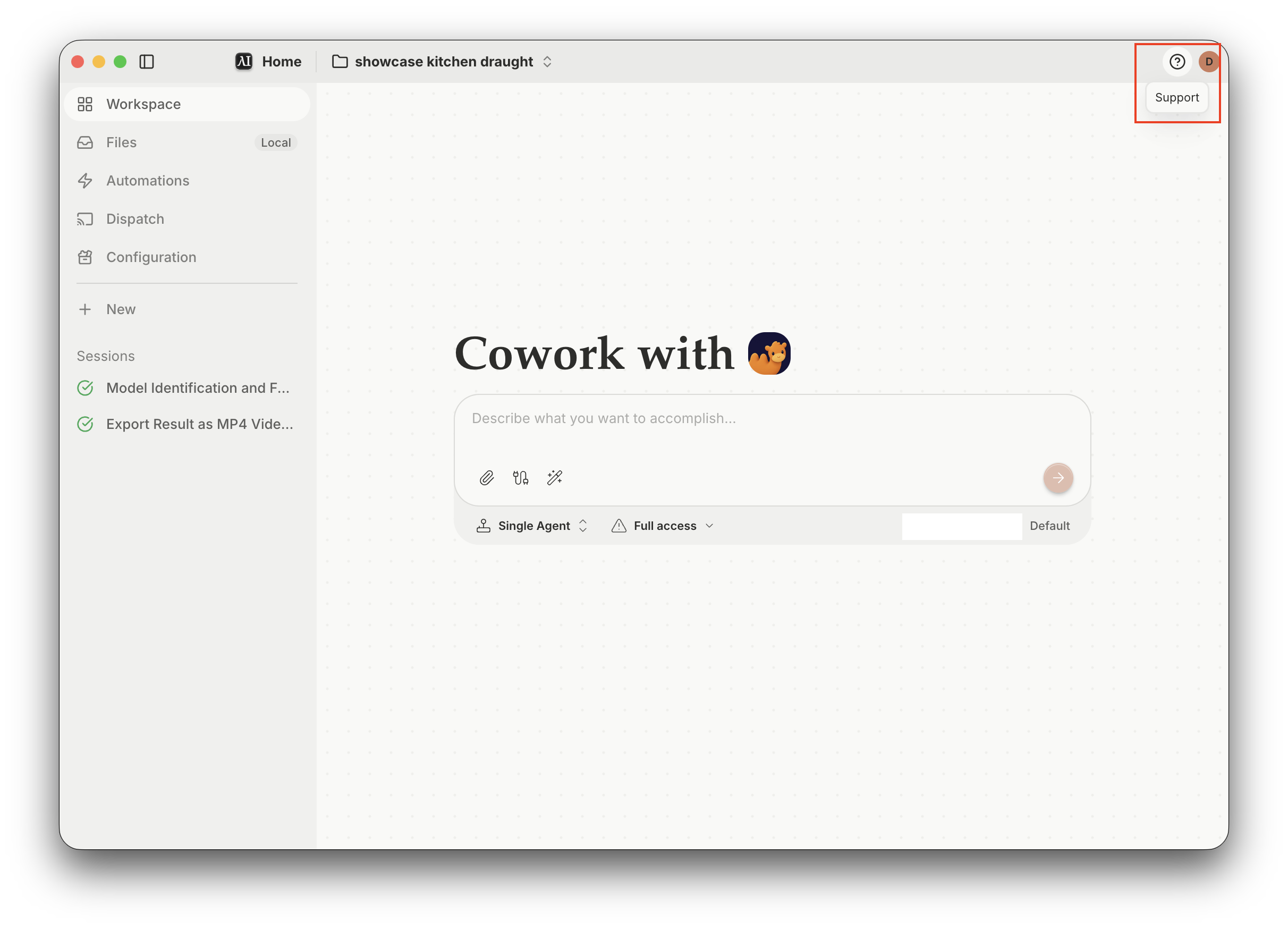
The Eigent app with the Support icon highlighted in the top-right corner

3. Download both logs and email support#

In the Support window, find Download logs and click Download next to each of these:

  • Eigent log — desktop app logs.
  • Camel log — agent task logs from the CAMEL backend.
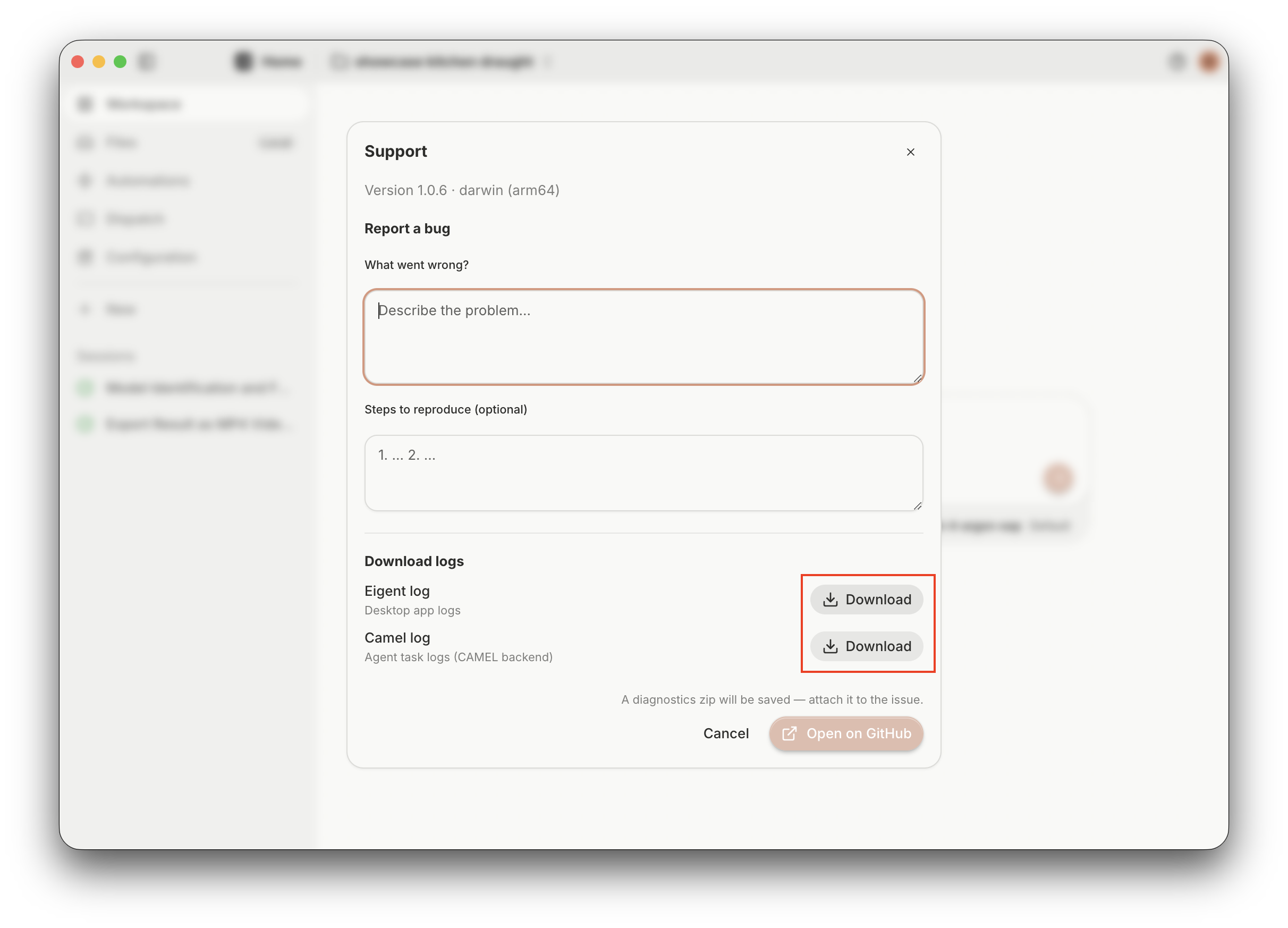
The Support window with the Download buttons for Eigent log and Camel log highlighted

Email support@eigent.ai with:

  • The screenshot of the issue.
  • Both downloaded log files: Eigent log and Camel log.
  • A brief description of what went wrong and the steps that led to it.

仍需要協助?

聯絡我們的團隊,我們會協助你解決問題。

support@eigent.ai聯絡我們

Open Source Cowork 桌面版

100% 開源——可自行託管、完全免費,支援使用你自己的 API keys 或本地模型。

Eigent

獲取 AI workforce 自動化的最新更新、教學與版本消息。

感謝訂閱!

產品Eigent環境定價企業方案
探索解決方案使用案例技能外掛網誌更新日誌
開發者文件GitHubCAMEL-AIOpen Source Fund合作夥伴
下載適用於開源版
公司關於我們品牌招聘支援中心使用條款私隱政策安全與信任Cookie 政策退款與試用政策

版權所有 © 2026 EIGENT UK LTD