
Eigent trifft auf MiniMax M2.1
Enterprise-Browserautomatisierung mit CAMEL Workforce und MiniMax M2.1
 Eigent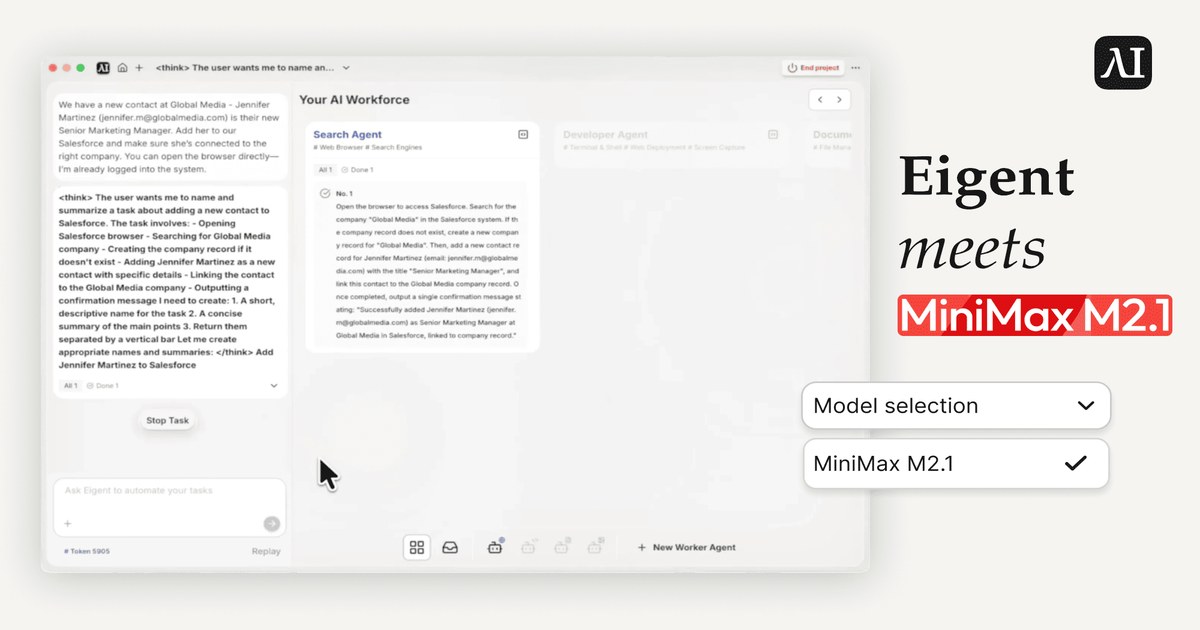
In realen Enterprise-Umgebungen laufen viele interne Tools, Dashboards und Legacy-Systeme vollständig im Browser. Um diese Systeme zu automatisieren, verwenden wir Eigent, eine Open-Source-Multi-Agent-Workforce-Anwendung, die lokal ausgeführt wird und sich vollständig aus dem Quellcode einrichten lässt, mit starkem Fokus auf Browserautomatisierung — effektiv als ein Eigent Open-Source-Cowork, der auf Ihrer eigenen Infrastruktur sitzt.
In diesem Beitrag untersuchen wir, wie Eigent CAMEL Workforce und Browserautomatisierung nutzt, um komplexe, mehrstufige Enterprise-Aufgaben zu bewältigen. Außerdem werfen wir einen genaueren Blick auf MiniMax M2.1, analysieren seine Performance in einem realistischen Enterprise-Workflow und die Architekturmerkmale, die es ermöglichen, in agentischen Browserautomatisierungs-Szenarien mit langem Planungshorizont effektiv zu arbeiten.
Hintergrund: Was ist Eigent und wie es MiniMax M2.1 unterstützt
Eigent ist ein Open-Source-Multi-Agent-Workforce-Produkt, das auf Ihrem Desktop läuft. Es basiert auf einer Multi-Agent-Workforce-Architektur und wird durch allgemeine Fähigkeiten wie Browserautomatisierung, Terminalautomatisierung und MCPs unterstützt. Dieses Design ermöglicht es Agenten in Eigent, Aufgaben ähnlich wie menschliche Mitarbeitende auszuführen und in realen Desktop-Umgebungen zu arbeiten, ohne tiefe API-Integrationen oder ständige Workflow-Neukonfiguration.
Während sich Foundation Models weiterentwickeln, ermöglicht die Integration mit dem Open-Source-Multi-Agent-System von Eigent Entwicklern und Enterprise-Nutzern, LLM-Funktionen schnell und effektiv direkt auf reale Anwendungsfälle anzuwenden. Sie können in Eigent zur Seite Model Settings navigieren, den Abschnitt OpenAI Compatible suchen und dort Ihren API-Schlüssel sowie die URL eingeben. Sobald der Modellname auf MiniMax-M2.1 gesetzt ist, können Sie beginnen. Benötigen Sie Hilfe? Siehe unsere Anleitung zur Konfiguration Ihres MiniMax-API-Schlüssels: https://platform.minimaxi.com/docs/api-reference/text-openai-api.
GitHub-Repository und wie man Eigent einrichtet
GitHub-Repository: https://github.com/eigent-ai/eigent
Schnellstart: Sie können Eigent mit der vorkompilierten Desktop-App für die sofortige Nutzung ausführen oder die Entwicklungsumgebung einrichten, um den Code zu prüfen und die Agenten anzupassen.
Option A: Die Desktop-App ohne Konfiguration
- Laden Sie den Client von https://www.eigent.ai/ herunter.
- Installieren Sie die
.dmg-Datei (macOS) oder.exe-Datei (Windows). - Starten Sie die App, und das lokale Backend wird automatisch gestartet.
Option B: Entwickler-Setup
- Voraussetzungen: Node.js (v18-22) und Python.
- Klonen und installieren:
git clone https://github.com/eigent-ai/eigent.git
cd eigent
npm install
- Starten Sie die Anwendung:
npm run dev
Sobald alles läuft, können Sie Ihre LLM-Anbieter (MiniMax M2.1 und andere) direkt in den Einstellungen konfigurieren. Ausführlichere Informationen zu Konfiguration, erweiterten Funktionen und Fehlerbehebung finden Sie in der offiziellen Dokumentation: https://docs.eigent.ai/get_started/welcome.
Unter der Haube: Eigent Full-Stack und CAMEL-Workforce-Architektur
Überblick über das Eigent-System
Eigent ist eine lokale Desktop-Anwendung mit Multi-Agent-Orchestrierung, die als Kern-Engine von CAMEL Workforce angetrieben wird. Das System implementiert eine entkoppelte Full-Stack-Architektur, die vollständig auf der lokalen Infrastruktur des Nutzers ausgeführt wird. Dieses Design gewährleistet Datensouveränität und vermeidet Datenschutzrisiken, die mit der Ausführung von Agenten in der Cloud verbunden sind.
Das Frontend
Die Benutzeroberfläche dient als Control Plane für die Agentenkonfiguration und das Workflow-Monitoring. Sie ist auf Basis von React und TypeScript innerhalb eines Electron-Frameworks aufgebaut.
Zu den Kernkomponenten gehören:
- State Management: Zustand verarbeitet temporären Zustand mit effizienter Reaktivität.
- Visuelle Orchestrierung: React Flow visualisiert den Agenten-Arbeitsbereich und die Ausführung in Echtzeit.
- Kommunikation: Das Frontend kommuniziert über sichere lokale HTTP-Anfragen mit dem Backend.
Das Backend
Die Kernlogik befindet sich in einem lokalen Python-Server mit FastAPI und Uvicorn, auf dem das CAMEL-Multi-Agent-Framework läuft.
- Laufzeitumgebung: Das Backend läuft auf Python 3.10+ und wird von uv für leistungsstarke Abhängigkeitsauflösung und Umgebungsisolation verwaltet.
- Persistenzschicht: PostgreSQL speichert über SQLModel und SQLAlchemy ORM Audit-Logs, Workflow-Verlauf und Agentenzustände.
- Framework für Multi-Agenten-Systeme: CAMEL übernimmt die Orchestrierungslogik (beispielsweise Workforce) und bindet LLMs an, ob remote (beispielsweise MiniMax) oder lokal (beispielsweise vLLM). CAMEL stellt außerdem Toolkits wie Browser-, Terminal- und Dokumentenerstellungstools bereit.
CAMEL Workforce: Ein Multi-Agenten-System, inspiriert von Organisationsstrukturen
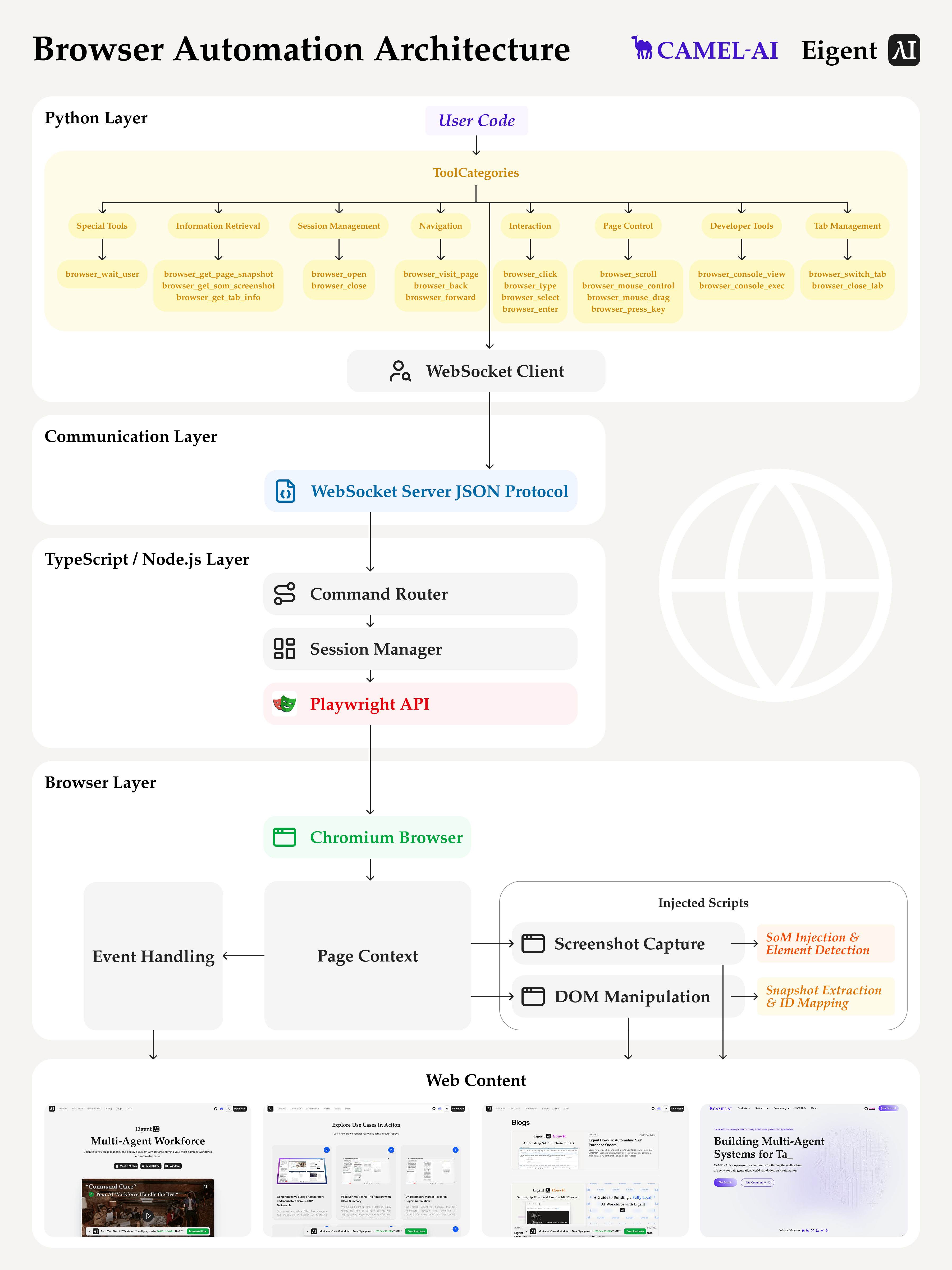
Im Kern von Eigent liegt CAMEL Workforce, ein Multi-Agenten-System, das entwickelt wurde, um komplexe, reale Aufgaben durch dezentrale Zusammenarbeit zu lösen. Das System verwendet ein striktes Producer-Consumer-Muster, vermittelt über einen asynchronen Nachrichtenkanal, um Abhängigkeitsgraphen effizient zu verwalten.
Agentenrollen
- Coordinator Agent: Fungiert als primärer Dispatcher, hält den globalen Zustand aufrecht und weist Teilaufgaben basierend auf Verfügbarkeit und Fähigkeiten zu.
- Task Agent: Verantwortlich für die semantische Zerlegung von hochrangigen Zielen in ausführbare, atomare Einheiten.
- Worker Agent: Führt atomare Teilaufgaben mit domänenspezifischen Tools aus.
Asynchrone Kommunikation: Der TaskChannel
Die Entkopplung zwischen Orchestrierungsschicht und Ausführungsschicht wird über den TaskChannel erreicht. Diese asynchrone Nachrichtenwarteschlange verwaltet die Aufgabenverteilung, ohne den Hauptausführungsthread zu blockieren.
Ausführungsablauf:
- Workforce initiiert eine Aufgabe.
- Worker Nodes prüfen auf Zuweisungen.
- Nach Abschluss werden die Ergebnisse zurückgesendet.
Dynamische DAG-Erzeugung
Enterprise-Workflows sind selten linear. CAMEL Workforce implementiert einen Mechanismus zur dynamischen Erstellung eines gerichteten azyklischen Graphen (DAG). Wenn ein hochrangiger Prompt empfangen wird (beispielsweise „Reiseplan erstellen“), zerlegt der Task Agent dieses Ziel in einzelne Knoten.
Das System bildet Abhängigkeiten ab und ermöglicht dem Scheduler Folgendes:
- Unabhängige Knoten parallel auszuführen (beispielsweise laufen „Flugticket suchen“ und „Hotel suchen“ gleichzeitig).
- Abhängige Knoten zu blockieren, bis ihre Vorgänger den DONE-Zustand erreichen.
Fehlertolerante Mechanismen
Aufgrund der nichtdeterministischen Natur von LLMs behandelt Eigent Fehler als erwartete Zustandsübergänge statt als fatale Ausnahmen. Die Architektur implementiert einen Wiederherstellungsmechanismus mit folgenden Elementen:
- Retry: Führt die Teilaufgabe auf demselben Worker erneut aus, um vorübergehende Fehler zu behandeln.
- Replan: Der Task Agent verändert die ursprüngliche Teilaufgabe anhand des Fehlerprotokolls, bevor er sie erneut einreiht.
- Reassign: Die Teilaufgabe wird zu einem anderen Worker mit kompatiblem Skillset migriert.
- Decompose: Wenn eine Aufgabe aufgrund von Komplexität fehlschlägt, wird sie in kleinere Teilaufgaben zerlegt.
Browserautomatisierungs-Architektur in Eigent
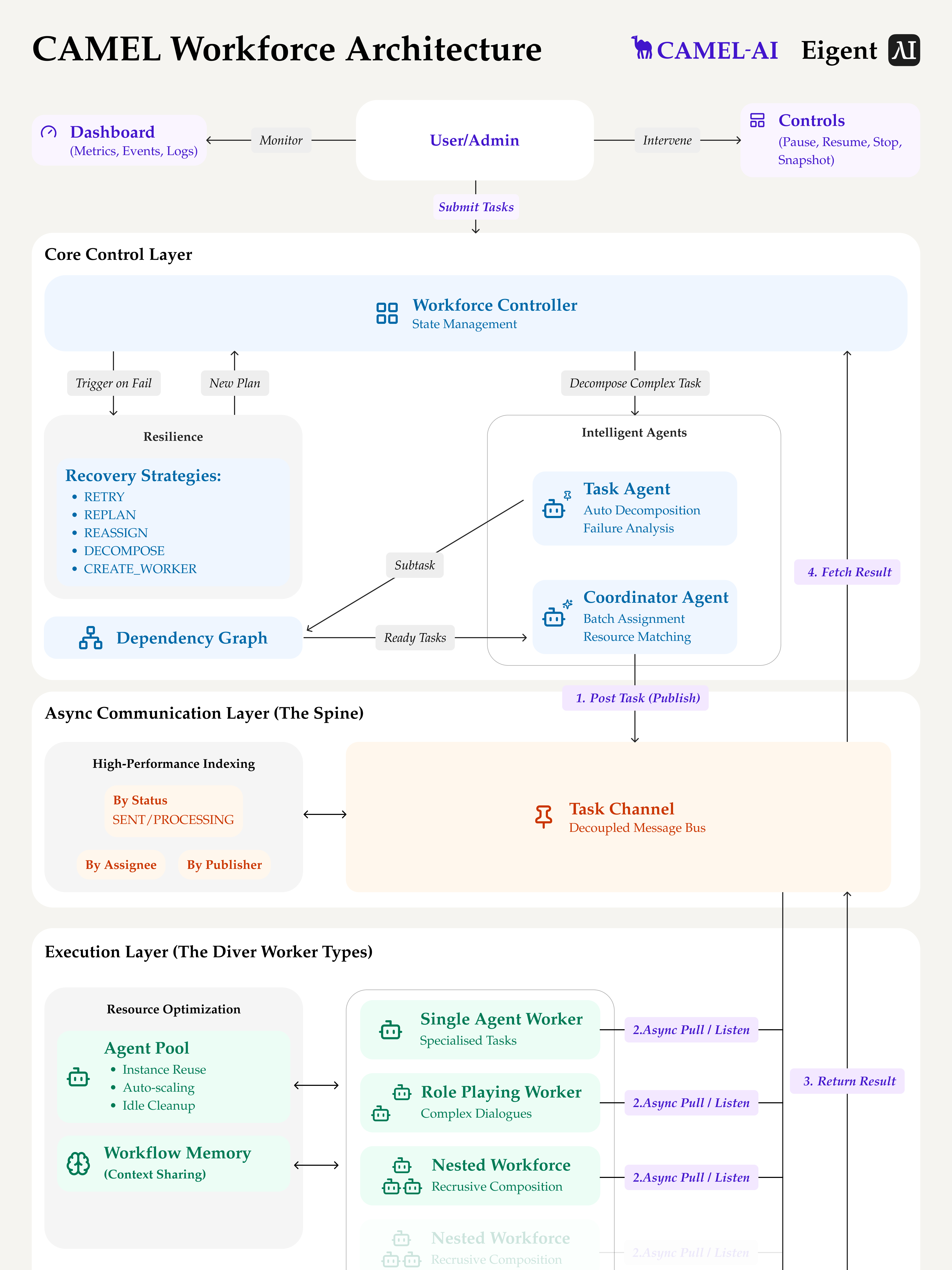
Multi-Agenten-Automatisierung erschließt echten Enterprise-Mehrwert erst dann, wenn sie mit starken allgemeinen Fähigkeiten wie Browserautomatisierung kombiniert wird. Eigent setzt eine zweischichtige Architektur ein, die die Browsersteuerung von der Agentenorchestrierung trennt:
- Die TypeScript-Schicht übernimmt Browserinteraktionen. Sie nutzt native Playwright-APIs, um DOM-Operationen durchzuführen, strukturierte Snapshots zu erfassen, SoM-Screenshots zu generieren, Verdeckungen zu erkennen und fortgeschrittene Browserlogik direkt innerhalb der JavaScript-Runtime zu handhaben. Da Playwright nativ für TypeScript ist, erhält diese Schicht Zugriff auf Funktionen wie
_snapshotForAI()und verbessert Performance und Zuverlässigkeit. - Die Python-Schicht übernimmt die KI-Orchestrierung. Sie verwaltet LLM-Aufrufe, Agentenentscheidungen und Aufgabenplanung.
- Die beiden Schichten kommunizieren asynchron über WebSocket und ermöglichen so nicht blockierende Operationen. Python sendet Browser-Operationsanfragen, TypeScript führt sie aus, und die Ergebnisse werden an die Agentenschleife zurückgegeben.
Diese Architektur verbessert die Performance, erhöht die Präzision von Elementinteraktionen und ermöglicht erweiterte Funktionen wie dynamisches DOM-Filtering, viewport-bewusste Snapshots und SoM-Rendering im Browser. Durch die Auslagerung von Browseraufgaben in den nativen Ausführungskontext schafft Eigent eine robuste Grundlage für agentenbasierte Enterprise-Automatisierung.
Test von MiniMax M2.1 auf realen Enterprise-Aufgaben
Wir haben Eigent mit MiniMax M2.1 getestet, um Vertriebsprozesse mithilfe der Browserautomatisierungsfunktionen von Eigent zu automatisieren. Die Agentenaufgaben deckten reale Phasen des Sales Cycles ab, einschließlich Lead-Erfassung und -Erstellung, Qualifizierung und Pipeline-Management, Angebotserstellung, Verhandlung, Abschluss und Produktmanagement.
Über die Testläufe hinweg zeigte MiniMax M2.1 konsistent drei Stärken:
- Bewältigt komplexe Seitenstrukturen gut, einschließlich iFrames und verschachtelter Elemente.
- Überprüft die eigenen Aktionen, um präzise zu bleiben und Schritte kurz zu halten.
- Nutzt Tools effizient und flexibel und vermeidet unnötige Schritte.
Aufgabe:
"Wir haben einen neuen Kontakt bei Global Media - Jennifer Martinez (jennifer.m@globalmedia.com) ist deren neue Senior Marketing Managerin. Füge sie zu unserem Salesforce hinzu und stelle sicher, dass sie dem richtigen Unternehmen zugeordnet ist."
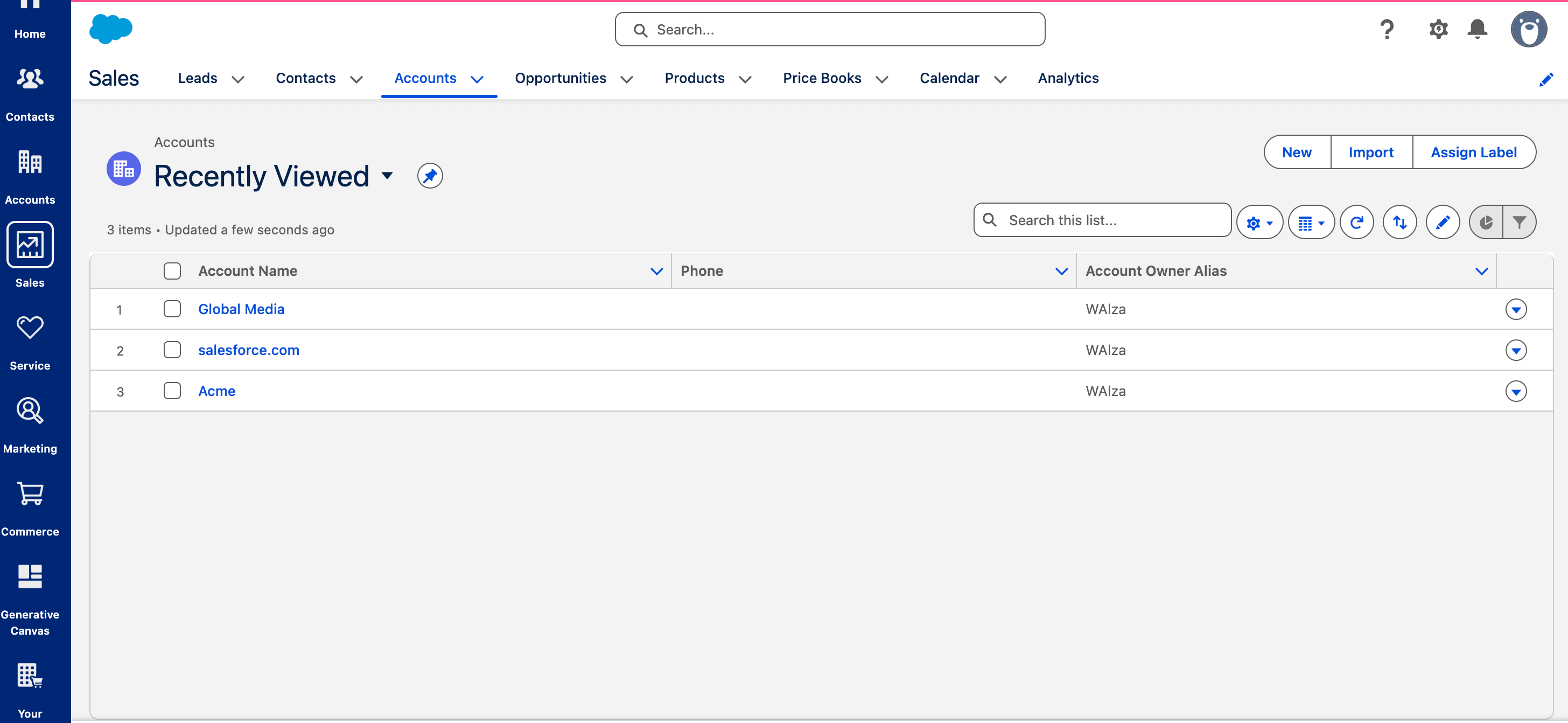
In dieser Aufgabe arbeitete MiniMax M2.1 in einer komplexen Salesforce-Oberfläche, um einen neuen Kontakt, Jennifer Martinez (Senior Marketing Managerin), zu Global Media hinzuzufügen und sicherzustellen, dass sie korrekt dem richtigen Account zugeordnet war. Dafür musste es mehrere UI-Ebenen navigieren, die richtigen Einstiegspunkte identifizieren, den Kontakt anlegen, wichtige Felder ausfüllen und die Account-Verknüpfung validieren.
Die Ergebnisse zeigen, dass MiniMax M2.1 jeden Schritt präzise ohne Fehlklicks oder Unterbrechungen im Workflow ausführte. Das demonstriert die starke Fähigkeit des Modells, komplexe Enterprise-UIs zu verstehen, mehrstufige Aktionen zu planen und End-to-End-Aufgaben zuverlässig auszuführen.
Wie MiniMax M2.1 die Aufgabenleistung verbessert
MiniMax M2.1 ist eine starke Wahl für autonome Enterprise-Agenten. Es bewältigt Aufgaben mit langem Planungshorizont und mehreren Schritten zuverlässig und bietet eine ausgewogene Kombination aus Performance, Effizienz und Vielseitigkeit.
Verbesserte Reasoning-Fähigkeiten und Workflow-Kontinuität
Im Vergleich zum Vorgänger erzeugt M2.1 prägnantere und effizientere Reasoning-Ketten, eine verbesserte Reaktionsfähigkeit und einen geringeren Token-Verbrauch. Es ist auf besseres Kontextmanagement über mehrere Schritte hinweg ausgelegt, hilft dabei, die logische Kontinuität bei Funktionsaufrufen aufrechtzuerhalten, und reduziert die Wahrscheinlichkeit von Fehlern in späteren Workflow-Phasen.
Fähigkeiten zur Generalisierung von Agenten und Tools
M2.1 funktioniert gut über eine Vielzahl von Agenten-Scaffolding-Frameworks und Tooling-Umgebungen hinweg. Es generalisiert zuverlässig mit unterschiedlichen Tools und unterstützt integrierte Workflows, was es für Enterprise-Automatisierung praktisch macht.
Robustheit bei Langzeitplanung
Enterprise-Automatisierung umfasst oft Unsicherheiten wie dynamische UI-Zustände, Ladeverzögerungen und unerwartete Interaktionen. Durch verbesserte Reasoning- und Ausführungseffizienz zeigt M2.1 Widerstandsfähigkeit in längeren Aufgabensequenzen.
Entdecken Sie Eigent und MiniMax M2.1
Eigent ist vollständig Open Source, und wir laden Entwickler, Forschende und Enterprise-Teams ein, es zu erkunden, zu erweitern und beizutragen:
- GitHub: https://github.com/eigent-ai/eigent
- Hugging Face: https://huggingface.co/MiniMaxAI/MiniMax-M2.1
- Discord: https://discord.camel-ai.org/
Recent Posts

Periodic Neon: Die im Labor trainierte KI, die Frontier-Modelle in der Wissenschaft übertrifft
Periodic Neon ist eine 1T-Parameter-KI, die auf physischen Labordaten trainiert wurde und GPT-6 Astra bei der Beugungsanalyse übertrifft. Was das Modell leistet und warum es bedeutsam ist.
Eigent
Was ist Jev? TypeSafe AIs System-One-Modell, erklärt
TypeSafe AIs Jev ist ein System-One-Modell, das typisierte, probabilistische Entscheidungen statt Text zurückgibt. So funktioniert es, was es kostet und wo es seinen Platz hat.
Eigent
Meta Muse: Der persönliche KI-Agent, der bucht, kauft und verhandelt
Meta Muse ist ein persönlicher KI-Agent, der Reisen bucht, Einkäufe erledigt und Rechnungen per Chat verhandelt. Hier erfahren Sie alles über Funktionen, Preise, Sicherheit und Vergleiche.
Eigent


