Über das generische KI-Ästhetik hinaus gestalten
Die meisten KI-Landingpages sehen exakt gleich aus – abgerundete Ecken, sanfte Verläufe und dieselben generischen Illustrationen. Jedes Mal, wenn ich ein neues Tool anschaue, sehe ich dieselbe SaaS-blaue Farbpalette und freundliche, aber schnell vergessene Visuals. Es fühlt sich an, als würden wir die Kante verlieren, die High-Performance-Engineering-Tools früher hatten.
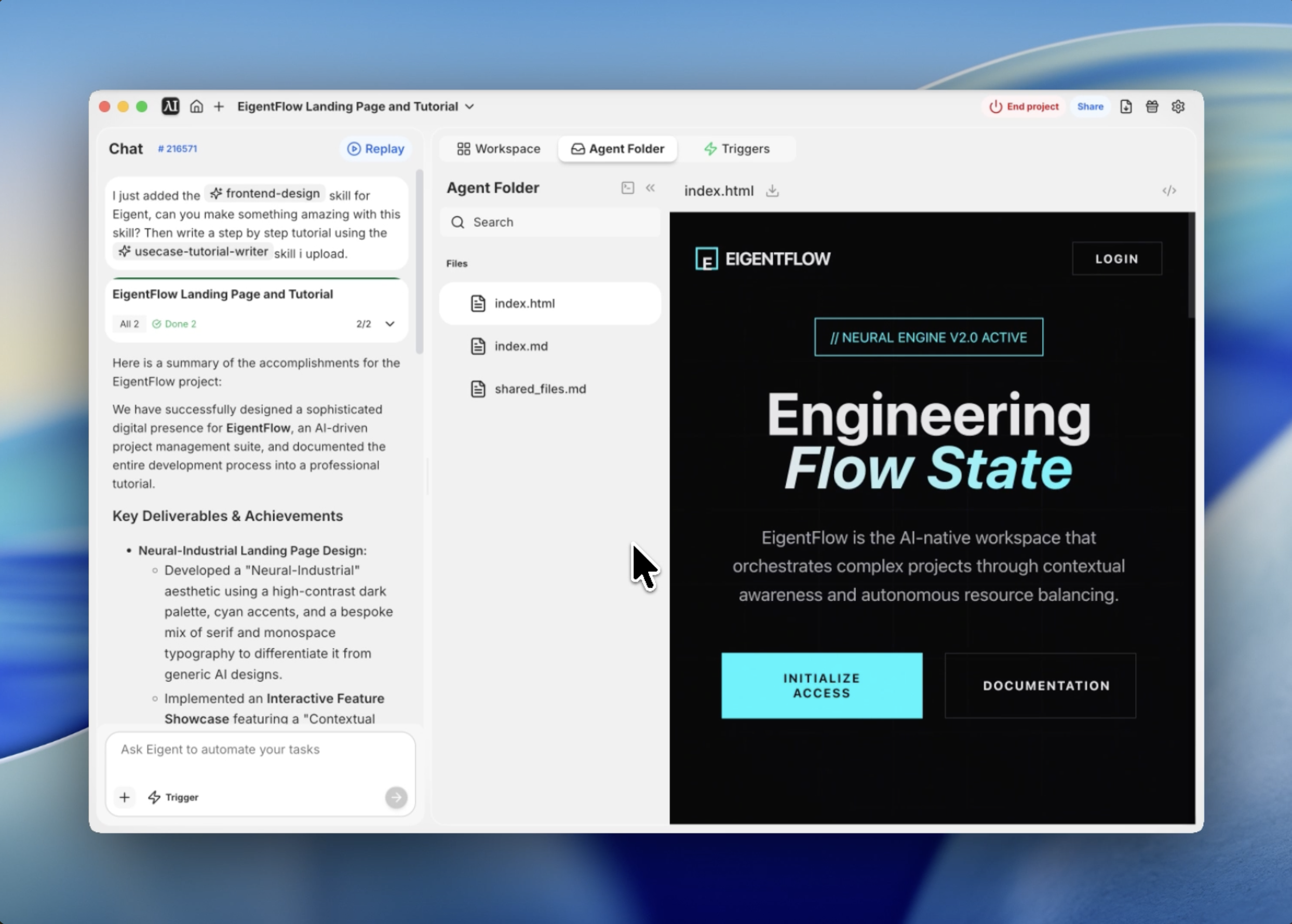
Als ich begann, die Oberfläche für EigentFlow zu entwickeln – eine fiktive, KI-gesteuerte Projektmanagement-Suite – wollte ich etwas anderes. Sie sollte sich wie eine hochwertige IDE oder ein terminalbasiertes Command Center anfühlen, aber mit dem Feinschliff einer modernen Web Experience. Ich nenne diese Ästhetik Neural Industrial.
Ich habe Eigents Frontend-Design-Funktion genutzt, um die Lücke zwischen dieser abstrakten Designphilosophie und einer produktionsreifen Umsetzung zu schließen. So habe ich es aufgebaut.
Die visuelle Identität definieren
Der erste Schritt bestand darin, die Rahmenbedingungen für das Designsystem festzulegen. Ich wollte keinen generischen Light Mode; ich wollte einen tiefen, obsidian-schwarzen Hintergrund mit kontrastreichen Cyan-Akzenten, die wie leuchtende Schaltkreise wirken.
Ich begann damit, ein System aus CSS-Variablen zu definieren, das das gesamte Projekt steuern würde. Wir entschieden uns für eine dunkle Palette (#0A0A0B) und ein lebendiges „Neural Cyan“ (#00F5FF). Für die Typografie kombinierte ich eine Serifenschrift für Überschriften, um einen exklusiven, editorialen Eindruck zu erzeugen, mit einer Monospace-Schrift für technische Details.
Den Agenten prompten
Anstatt das Grundgerüst selbst zu schreiben, gab ich Eigent einen sehr spezifischen Prompt, der die Designphilosophie und die erforderlichen interaktiven Module enthielt.
Nutze die Frontend-Design-Funktion, um eine produktionsreife Landingpage für EigentFlow zu entwerfen und zu bauen. Verwende ein Neural-Industrial-Theme mit dunkler Farbpalette, Cyan-Akzenten und einer Mischung aus Playfair Display- und JetBrains Mono-Schriften. Füge ein interaktives Showcase-Modul hinzu, in dem Nutzer die Contextual Density anpassen können.
Eigent begann sofort mit der Architektur der Struktur und priorisierte einen Single-File-Ansatz, um sicherzustellen, dass das gesamte Erlebnis in sich geschlossen und leicht bereitzustellen ist.
Tiefe mit Textur erzeugen
Ein großes Problem bei Dark-Mode-Designs ist, dass sie flach wirken können. Um das zu lösen, ließ ich Eigent ein Grain-Overlay und einen radialen Grid-Hintergrund implementieren.
Das Grain-Overlay ist eine SVG-Noise-Textur, die mit geringer Deckkraft an den Viewport geheftet ist – sie verleiht dem Bildschirm eine physische, haptische Qualität. Darunter liegt ein dynamischer Grid-Hintergrund, der von einem radialen Verlauf maskiert wird, sodass die Linien zu den Rändern des Bildschirms hin auslaufen und den Blick des Nutzers zur Mitte lenken. Diese subtilen Details unterscheiden eine „Vorlage“ von einem individuellen Design.
Das Hero-Erlebnis technisch umsetzen
Der Hero-Bereich muss mehr tun als nur eine Überschrift zu zeigen; er muss den Rhythmus der Seite festlegen. Ich nutzte gestaffelte Scroll-Reveal-Animationen, um die Elemente nacheinander einzuführen.
Eigent schrieb dafür ein benutzerdefiniertes Intersection-Observer-Skript in Vanilla JS. Beim Scrollen erscheint zuerst das Tag „Neural Engine Status“, gefolgt von der kursiven Überschrift und den Call-to-Action-Buttons. Dieses bewusste Timing lässt das Tool leistungsstark und durchdacht wirken, statt nur wie eine statische Seite.
Das interaktive Engine-Showcase bauen
Das Herzstück der Landingpage ist das Showcase „Autonomous Task Architecture“. Ich wollte, dass Nutzer mit dem internen Zustand der KI „interagieren“ können.
Wir entwickelten ein Modul mit einem Range-Slider mit der Beschriftung „Contextual Density“. Wenn der Nutzer den Slider bewegt, löst das zugrunde liegende JavaScript visuelle Aktualisierungen aus: Ein per CSS animierter Neural-Kreis dehnt sich aus und zieht sich zusammen, und ein simulierter Datenstrom im Hintergrund beschleunigt sich. Das ist nicht nur hübsch anzusehen – es demonstriert die „Fluidität“ der KI-Engine auf eine Weise, die Worte nicht leisten können.
Auf Performance optimieren
Zum Schluss stellte ich sicher, dass die gesamte Codebasis optimiert ist. Selbst mit den benutzerdefinierten Animationen und der intensiven Nutzung von Schriften ist die finale index.html-Datei leichtgewichtig und hoch responsiv.
Durch die Verwendung von CSS-Variablen für alle Design-Tokens lässt sich die Markenfarbe später unglaublich einfach anpassen. Eigent hat sogar Lucide-Icons über CDN eingebunden, wodurch der Asset-Footprint minimal bleibt und gleichzeitig hochwertige Vektor-Visuals über alle Gerätgrößen hinweg sichergestellt werden.
Warum das wichtig ist
Dieser Workflow zeigt etwas Grundlegendes darüber, wie Eigent funktioniert: Die eigentliche Stärke von KI-Agenten liegt nicht nur darin, Code zu generieren – sondern darin, hochlevelige ästhetische Vorgaben zu interpretieren und in eine kohärente technische Architektur zu übersetzen.
Ich musste im ersten Prompt nicht jeden Hex-Code oder jede Animationsdauer angeben. Da die Frontend-Design-Funktion Designprinzipien versteht, konnte sie die Lücken zwischen meiner Vision für ein Neural-Industrial-Theme und der tatsächlichen CSS-Implementierung füllen.
Was Sie als Nächstes ausprobieren können
Erstellen Sie ein Dark-Theme-Analytics-Dashboard mit demselben Neural-Industrial-Designsystem. Entwickeln Sie eine Dokumentationsseite für die EigentFlow-API, die zur Typografie und Farbpalette dieser Landingpage passt. Fügen Sie einen „Terminal Mode“-Schalter hinzu, der die Serifenschriften auf der gesamten Website durch JetBrains Mono ersetzt.
Jede dieser Ideen nutzt dieselben Design-Tokens und dieselbe ästhetische Logik — keine zusätzliche Einrichtung erforderlich.
Tipps für bessere Ergebnisse
- Verwenden Sie designorientierte Adjektive. Wörter wie Neural Industrial, Obsidian oder Cinematic helfen Eigent, den ästhetischen Rahmen besser einzugrenzen als nice oder modern.
- Geben Sie Schriftarten-Kombinationen an. Wenn Sie eine bestimmte Wirkung möchten, sagen Sie Eigent, welche Schriften kombiniert werden sollen (z. B. Serif für Überschriften, Monospace für Daten).
- Bitten Sie ausdrücklich um Tiefe. Wenn das Design flach wirkt, bitten Sie Eigent, Grain-Texturen, radiale Masken oder subtile Schlagschatten hinzuzufügen.
- Einzeldatei-Auslieferung. Wenn Sie eine Single-File-Lösung (HTML/CSS/JS in einer Datei) anfordern, lässt sich die gesamte UI viel einfacher sofort prüfen und testen.