
Einen AMI-Forschungsbericht mit hochgeladener Docx-Skill generieren
 Tao Sun
 Celine Xie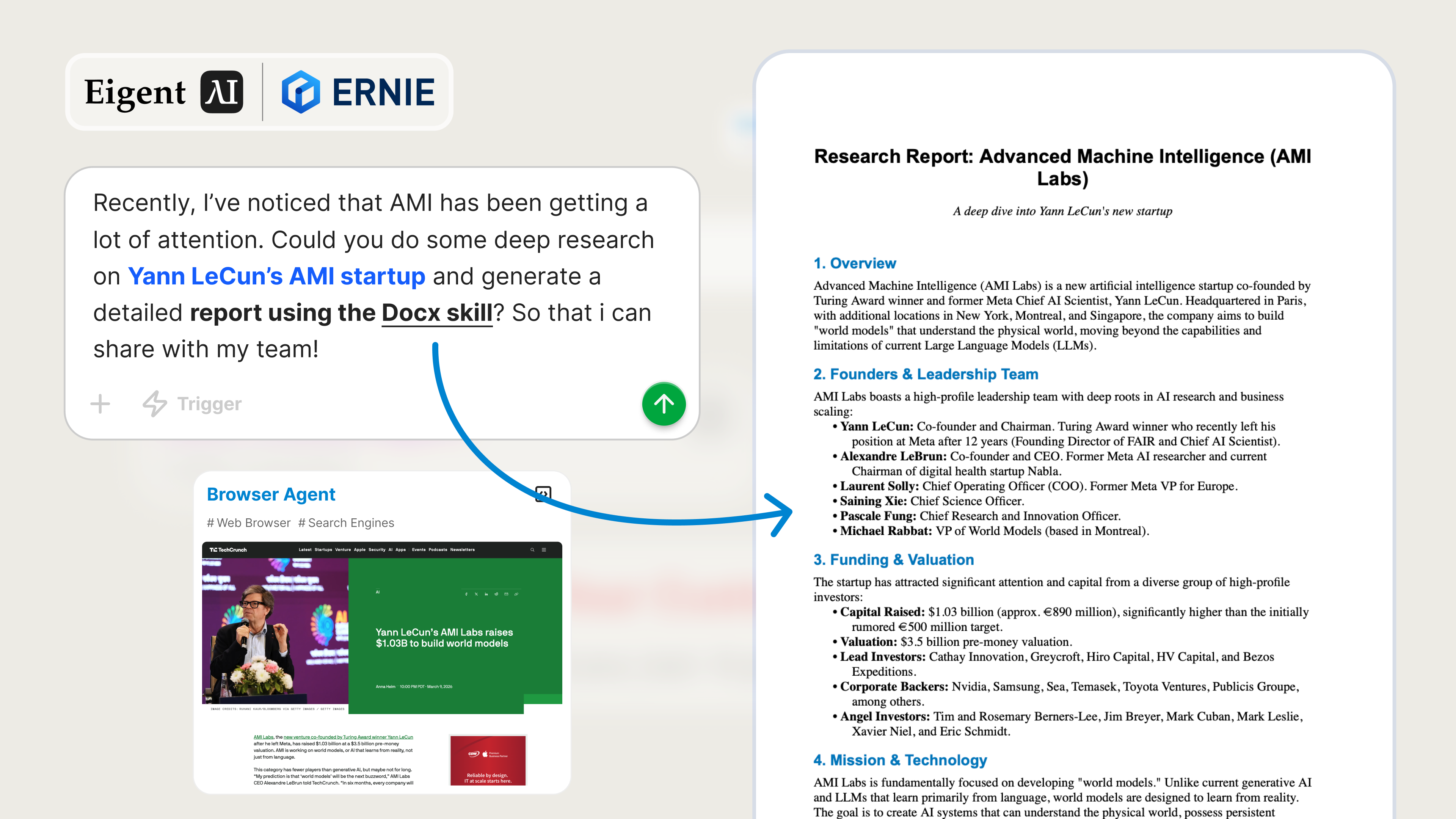
Einen gemeinsam nutzbaren Forschungsbericht erstellen, ohne den Chat zu verlassen
Es gibt ein wiederkehrendes Muster in der Teamrecherche: Jemand bemerkt, dass ein Unternehmen Aufmerksamkeit bekommt, öffnet zwanzig Tabs, sammelt verstreute Notizen und verbringt dann noch eine Stunde damit, grobe Erkenntnisse in etwas zu verwandeln, das andere Menschen tatsächlich lesen können. Die Recherche ist nur die halbe Arbeit. Die andere Hälfte besteht darin, sie in einen nutzbaren Bericht zu verpacken.
Genau hier ist Eigent nützlich. Sie laden eine einzelne Skill zur Dokumentenerstellung hoch, beschreiben das Thema und lassen Eigent die Webrecherche und die Erstellung des Berichts end-to-end übernehmen. In diesem Beispiel besteht die Aufgabe darin, Yann LeCuns AMI-Startup gründlich zu recherchieren und einen detaillierten Bericht im Word-Format zu erstellen, der mit dem Team geteilt werden kann.
Die Docx-Skill hinzufügen
Eigent unterstützt benutzerdefinierte Skills, sodass Sie es über das Standard-Toolset hinaus für bestimmte Ausgaben erweitern können. In diesem Fall fügen wir eine Docx-Skill hinzu, damit Eigent einen ausgefeilten .docx-Bericht erstellen kann, statt Sie nur mit rohen Notizen im Chat zurückzulassen.
Gehen Sie zu Einstellungen → Agents → Skills → Beispiel-Skills und suchen Sie die Docx-Skill, um sie zu installieren. Sie können auch unseren Skill Hub - Docx Skill für die Docx-Skill und Installationsdetails durchsehen. Nach der Installation kann Eigent auch für zukünftige Workflows strukturierte Word-Dokumente erstellen, nicht nur für diesen einen.
Geben Sie Eigent die Forschungsaufgabe
Anstatt AMI manuell zu recherchieren und einen Bericht von Grund auf neu zu schreiben, können Sie den gesamten Workflow mit einem einzigen Prompt an Eigent übergeben. Hier ist der Prompt, der für dieses Beispiel verwendet wurde:
Kürzlich ist mir aufgefallen, dass AMI viel Aufmerksamkeit bekommt. Könntest du eine gründliche Recherche zu Yann LeCuns AMI-Startup durchführen und mithilfe der Docx-Skill einen detaillierten Bericht erstellen? Damit ich ihn mit meinem Team teilen kann!
Das funktioniert, weil die Anfrage auf die richtige Weise spezifisch ist: Sie definiert das Thema, fordert Deep Research an und nennt klar das gewünschte Ausgabeformat.
Den Browser-Agenten den Kontext sammeln lassen
Für eine Anfrage wie diese braucht Eigent kein hochgeladenes Quelldokument, um loszulegen. Der Browser-Agent kann selbstständig Kontext aus öffentlichen Quellen sammeln, indem er AMI, Yann LeCuns Beteiligung, die Positionierung des Unternehmens, die jüngste Aufmerksamkeit rund um das Startup und weitere relevante technische oder marktbezogene Einordnungen recherchiert.
Wenn Sie bereits internen Kontext haben, können Sie ihn trotzdem bereitstellen. Presseberichte, ein Beitrag des Gründers, Ihre eigenen Notizen, Wettbewerbsvergleiche oder Fragen aus der Führungsebene können alle dabei helfen, den endgültigen Bericht zu steuern. Aber auch ohne diese Materialien kann Eigent eigenständig einen soliden ersten Entwurf auf Basis von Webrecherche zusammenstellen.
Forschung in ein echtes Ergebnis verwandeln
Sobald Eigent genug Kontext hat, wechselt es vom Browsen zur Dokumentenerstellung. Die hochgeladene Docx-Skill nimmt das gesammelte Material und formatiert es in einen detaillierten Word-Bericht mit einer strukturierteren Erzählweise, als Sie sie in einer rohen Chat-Antwort erhalten würden.
Das ist wichtig für das Teilen im Team. Ein ordentliches Dokument lässt sich leichter verteilen, überprüfen, kommentieren und in Folgediskussionen wiederverwenden. Anstatt Erkenntnisse aus einer Unterhaltung herauszukopieren, erhalten Sie eine Datei, die bereits für die Zusammenarbeit vorbereitet ist.
Den Ausgabeordner prüfen
Nachdem die Aufgabe abgeschlossen ist, öffnen Sie den Ausgabeordner des Agents und Sie finden den generierten Bericht zusammen mit den unterstützenden Artefakten aus dem Workflow. Je nach Ausführung kann das das Word-Dokument selbst, Zwischennotizen und Spuren der Browser-Recherche umfassen, die zur Erstellung des endgültigen Berichts verwendet wurden.
Von dort aus können Sie den Bericht prüfen, bei Bedarf bearbeiten und an den Rest des Teams senden. Die Lücke zwischen „Wir sollten dieses Startup untersuchen“ und „Hier ist ein Bericht, den jeder lesen kann“ wird in einen einzigen Workflow komprimiert.
Warum dieser Workflow nützlich ist
Bei diesem Anwendungsfall geht es um mehr als Marktanalyse. Er zeigt, wie Eigent zwei wichtige Fähigkeiten kombiniert:
- Der Browser-Agent kann selbstständig Kontext aus dem Web sammeln.
- Hochgeladene Skills verwandeln diesen Kontext in ein konkretes Ausgabeformat wie ein Word-Dokument.
Diese Kombination macht Eigent für echte Arbeit praktisch. Forschung ist nützlich, aber Forschung, die als wiederverwendbares Ergebnis aufbereitet ist, ist noch viel wertvoller.
Was Sie als Nächstes ausprobieren können
Sobald der erste AMI-Bericht generiert wurde, können Sie ihn mit Folgeprompts weiter ausbauen, zum Beispiel:
Erstelle eine kürzere Executive-Summary-Version dieses Berichts.
Schreibe diesen Bericht für eine interne Produktstrategie-Diskussion um.
Wandle den Bericht in eine Wettbewerbsübersicht um, die AMI mit benachbarten KI-Startups vergleicht.
Erweitere den Bericht um einen Abschnitt zu technischen Implikationen und Marktrisiken.
Jeder dieser Prompts nutzt dieselbe Docx-Skill wieder, sodass der Workflow nach der ersten Einrichtung schneller wird.
Tipps für bessere Ergebnisse
- Seien Sie beim Umfang explizit. Wenn Sie eine Finanzierungsanalyse, Produktpositionierung, Wettbewerbskontext oder technische Analyse möchten, sagen Sie es im Prompt.
- Geben Sie nach Möglichkeit Teamkontext an. Wenn Ihr Team AMI für Investitionen, eine Partnerschaft oder internes Lernen bewertet, verbessert das die Struktur des Berichts.
- Nutzen Sie den ersten Entwurf als Arbeitsdokument. Eigent kann schnell einen starken Bericht erstellen, und Sie können mit enger gefassten Prompts nachfassen, um ihn für verschiedene Zielgruppen zu verfeinern.





