

Erstelle in Minuten ein Launch-Deck mit einem einzigen hochgeladenen Skill
Jedes Produktteam, mit dem ich gearbeitet habe, hat denselben Engpass: Jemand muss ein Deck erstellen. Es spielt keine Rolle, ob es sich um eine Launch-Ankündigung, ein Board-Update oder ein Team-Standup handelt — der Prozess ist immer derselbe. Man verbringt 30 Minuten mit Recherche, dann noch eine Stunde mit der Formatierung der Folien, und dann bittet jemand darum, es „etwas ausgefeilter“ zu machen. Schon ist ein halber Tag weg.
Ich entwickle Eigent genau, um solche Workflows zu lösen, und dieser Anwendungsfall gehört zu meinen Favoriten. Du lädst einen einzigen Skill hoch, beschreibst deine Aufgabe, und Eigent übernimmt die Recherche und die Folienerstellung von Anfang bis Ende. So funktioniert es.
Lade den PPTX-Skill hoch
Eigent unterstützt benutzerdefinierte Skills, was bedeutet, dass du das, was dein Open-Source-Coworker kann, über seine Standardfunktionen hinaus erweitern kannst. In diesem Fall fügen wir einen PowerPoint-Skill hinzu, der Eigent die Fähigkeit gibt, Folienpräsentationen zu erstellen und zu strukturieren.
Gehe zu Einstellungen → Agents → Skills und lade dein Skill-Paket hoch. PPTX-Skill herunterladen: pptx.zip
Sobald er installiert ist, weiß Eigent, wie man Präsentationen generiert, und du kannst diesen Skill für jede zukünftige Präsentation wiederverwenden, ohne ihn erneut hochzuladen.
Beschreibe, was du möchtest
Hier wird es interessant. Anstatt PowerPoint zu öffnen und auf eine leere Folie zu starren, sagst du Eigent einfach, was du brauchst. Das war der Prompt, den ich verwendet habe:
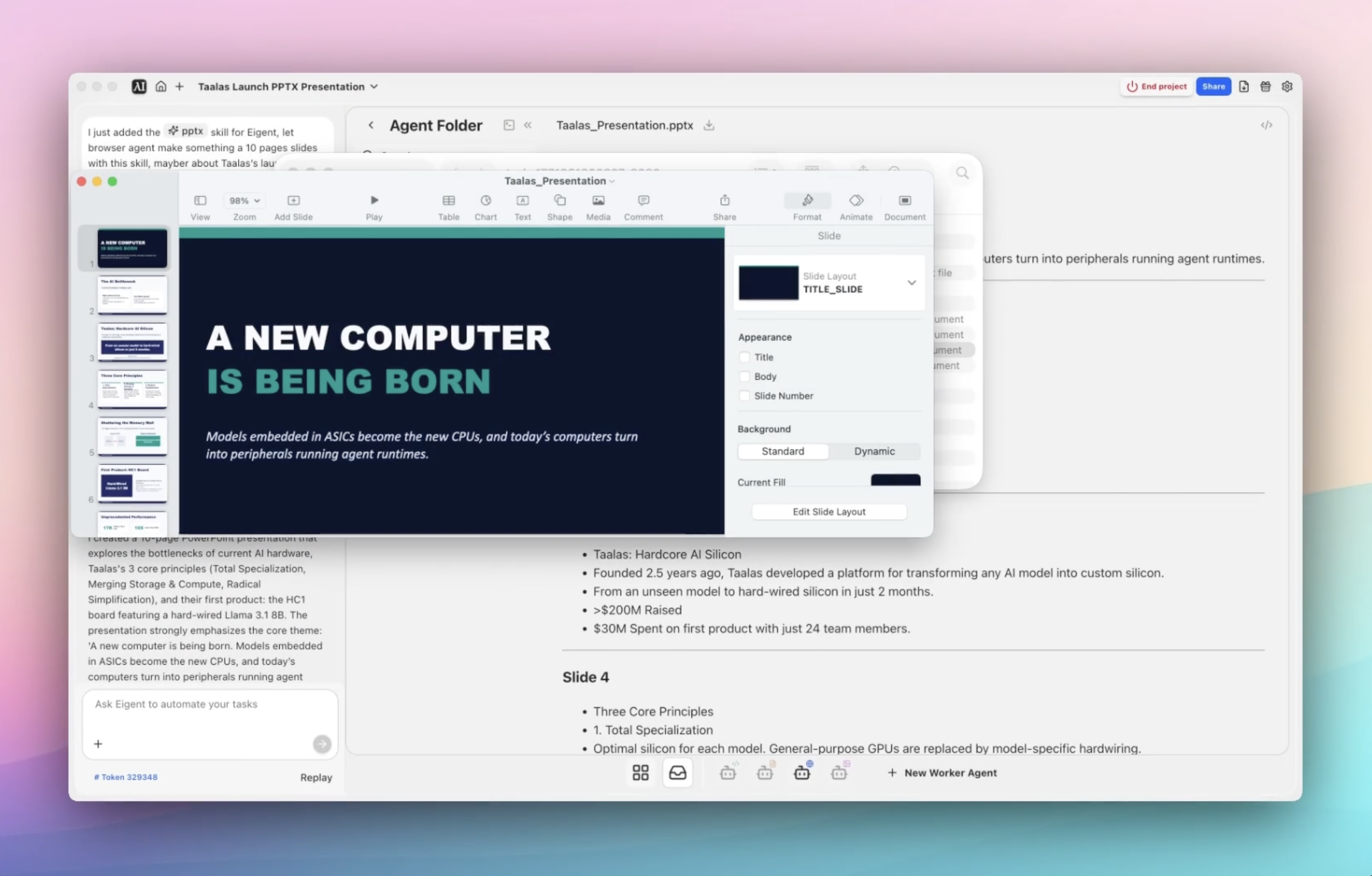
Ich habe gerade den PPTX-Skill für Eigent hinzugefügt. Bitte verwende den Browser-Agenten, um mit diesem Skill eine 10-seitige Präsentation über den Launch von Taalas zu erstellen. Es fühlt sich an, als würde ein neuer Computer geboren: Modelle, die in ASICs eingebettet sind, werden zu den neuen CPUs, und die heutigen Computer werden zu Peripheriegeräten, die Agenten-Runtimes ausführen. Ich würde das gern mit dem Team teilen.
Das war’s. Keine Vorlagen, kein Drag-and-drop-Formatieren, kein Googeln nach den neuesten Statistiken. Du beschreibst die Aufgabe und lässt Eigent die Struktur herausfinden.
Gib Eigent Kontext (oder auch nicht)
Für diese Aufgabe werden keine Dateien benötigt. Eigent kann alles, was es braucht, über den Browser-Agenten aus dem Web sammeln. Du kannst das Ergebnis jedoch jederzeit verbessern, indem du zusätzlichen Kontext hinzufügst — ein Launch-Briefing, Notizen zum bevorzugten Ton deines Teams, Markenrichtlinien oder wichtige Punkte, die unbedingt enthalten sein sollen.
Je mehr Kontext du gibst, desto besser passt das Ergebnis. Aber auch ohne ihn leistet Eigent solide Arbeit dabei, relevante Informationen zusammenzutragen und in etwas Präsentierbares zu strukturieren.
Lass Eigent die Arbeit machen
Hier passiert die Magie. Eigent startet den Browser-Agenten, um den Launch von Taalas zu recherchieren — und öffnet mehrere Browsersitzungen parallel, um Kontext aus relevanten Quellen zu sammeln. Sobald genügend Material vorhanden ist, führt es den hochgeladenen PPTX-Skill aus, um die eigentliche Präsentation zu generieren.
Der gesamte Workflow läuft autonom. Du musst ihn nicht beaufsichtigen, keine Links kopieren und keine Recherche manuell in Folien organisieren. Eigent übernimmt die Recherche, strukturiert die Erzählung und gibt ein fertiges Deck aus, das lokal auf deinem Desktop gespeichert wird.
Überprüfe, was Eigent erstellt hat
Nachdem der Workflow abgeschlossen ist, öffne den Ausgabeordner des Agents, und du findest alles, was Eigent generiert hat: eine 10-seitige Präsentation, den vom Browser-Agenten gesammelten Recherchekontext und alle zugehörigen Artefakte. Von dort aus kannst du alles überprüfen, anpassen und teilen.
Von der „Idee“ zum „teilbaren Deck“ in einem einzigen Ablauf zu gelangen — ohne manuelle Recherche und Formatierung — ist genau die Art von Workflow, die früher einen halben Tag gedauert hat und jetzt nur Minuten braucht.
Warum das wichtig ist
Hier geht es nicht nur darum, Folien schneller zu erstellen. Dieser Workflow zeigt etwas Grundlegendes darüber, wie Eigent funktioniert: Skills machen es anpassbar.
Anstatt dich auf einen festen Satz von Aktionen zu verlassen, lädst du einen Skill hoch und verwandelst Eigent in einen Teamkollegen, der zu deinem Workflow passt. Heute erstellt es Decks. Morgen könnte es Berichte generieren, Dokumente entwerfen oder jede andere wiederkehrende Aufgabe automatisieren, die in deinem Team anfällt.
Was du als Nächstes ausprobieren kannst
Sobald du dein erstes Deck erstellt hast, versuche den Workflow mit anschließenden Prompts zu erweitern:
Erstelle eine zweite Version dieses Decks für Investoren.
Erstelle eine kürzere 5-Folien-Version für das interne Standup.
Wandle diese Präsentation in ein einseitiges Launch-Briefing um.
Nutze denselben Stil, um ein Produkt-Roadmap-Deck zu erstellen.
Jede dieser Varianten nutzt denselben hochgeladenen Skill — keine zusätzliche Einrichtung erforderlich. Dein Workflow wird jedes Mal schneller, wenn du ihn wiederverwendest.
Tipps für bessere Ergebnisse
-
Sei präzise beim Output. Sag Eigent, wie viele Folien du möchtest, wer die Zielgruppe ist und welchen Ton es haben soll — internes Team, Executive-Update oder Investor-Publikumsformat führen alle zu sehr unterschiedlichen Decks.
-
Füge Kontext hinzu, wenn du ihn hast. Eigent kann im Web recherchieren, aber ein Launch-Link oder eigene Notizen helfen dabei, die finale Präsentation stärker an deiner tatsächlichen Botschaft auszurichten.
-
Wiederverwende Skills über Workflows hinweg. Sobald ein Skill hochgeladen ist, bleibt er für alle zukünftigen Aufgaben verfügbar. Je mehr du Eigent nutzt, desto schneller werden deine Workflows — und das wirkt sich mit der Zeit immer stärker aus.





