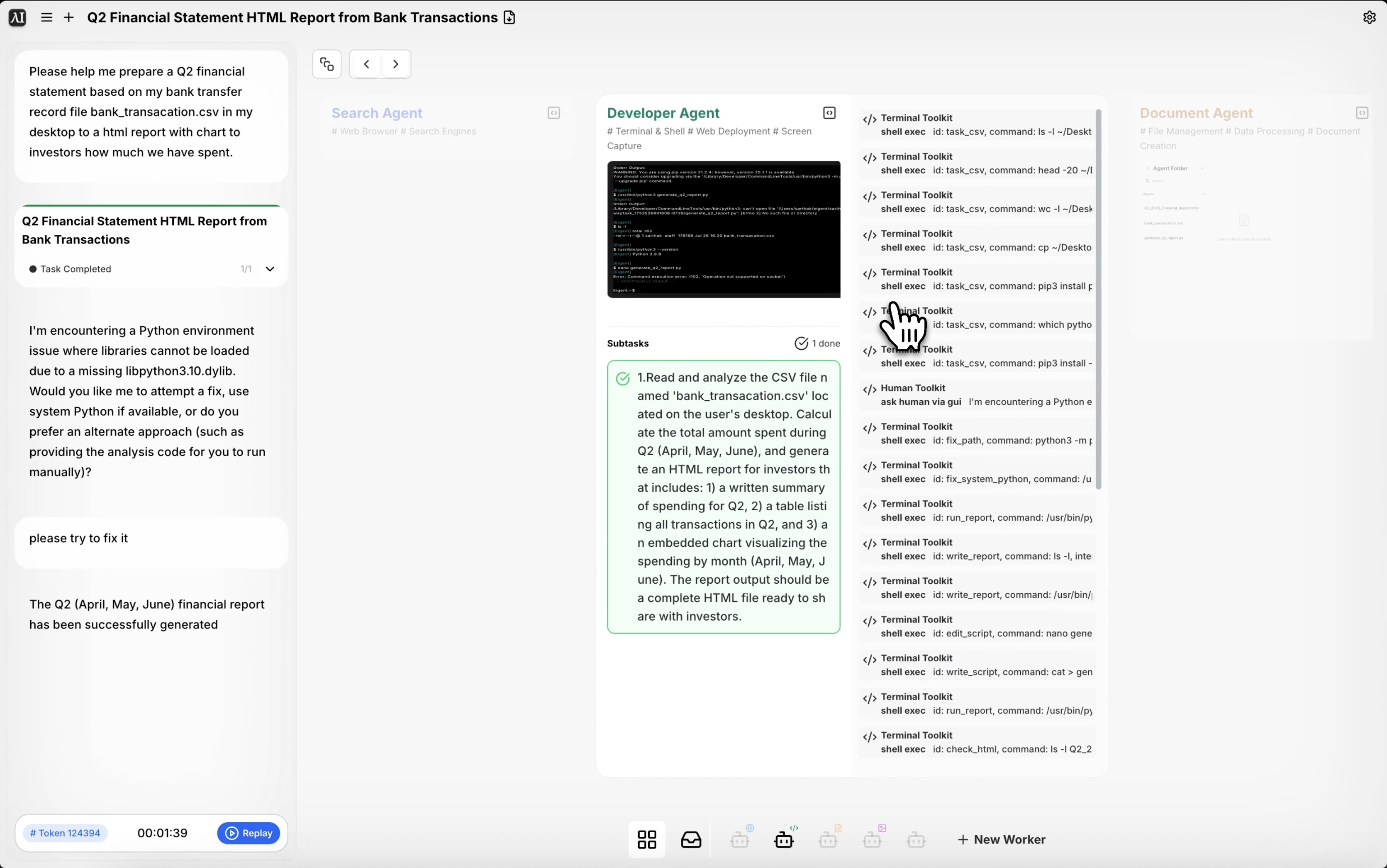
Rohdaten der Bank in einen investorenreifen Finanzbericht verwandeln
Jedes Finanzteam kennt dasselbe Ritual zum Quartalsende: Transaktionen aus der Bank exportieren, sie in einer Tabellenkalkulation aufbereiten, ein Diagramm erstellen, den Bericht formatieren und hoffen, dass die Zahlen mit dem übereinstimmen, was in das Deck eingeflossen ist. Eigent reduziert diese gesamte Abfolge auf einen einzigen Prompt — von der rohen CSV-Datei bis zum ausgearbeiteten HTML-Bericht, der sofort mit Investoren geteilt werden kann.
Bereiten Sie Ihre Bankdatendatei vor
Exportieren Sie Ihre Banktransaktionsdaten als CSV-Datei und speichern Sie sie auf Ihrem Desktop. Die in diesem Workflow verwendete Datei heißt bank_transacation.csv — Eigent erkennt sie anhand des Namens auf Ihrem Desktop, also stellen Sie sicher, dass der Dateiname mit dem übereinstimmt, worauf Sie im Prompt verweisen, oder beschreiben Sie ihn eindeutig.
Die CSV-Datei muss nicht vorab bereinigt werden. Eigent kann rohe Exportformate der meisten großen Banken und Buchhaltungstools verarbeiten.
Geben Sie Eigent die Berichtaufgabe
Der Prompt ist direkt:
Bitte helfen Sie mir, auf Grundlage meiner Banküberweisungsdatei bank_transacation.csv auf meinem Desktop eine Q2-Finanzübersicht zu erstellen. Erstellen Sie einen HTML-Bericht mit Diagrammen, der Investoren zeigt, wie viel wir ausgegeben haben.
Sie können den Prompt erweitern, um Kategorien (Gehaltsabrechnung, Infrastruktur, Marketing), Datumsbereiche oder die gewünschte Gruppierung der Daten festzulegen. Je mehr Kontext Sie bereitstellen, desto strukturierter und nützlicher wird die Ausgabe.
Eigent analysiert und interpretiert die Daten
Eigent liest die CSV-Datei und verarbeitet die Transaktionsdaten — es parst Datumsangaben, Beträge und Kategorien. Es identifiziert Q2-Transaktionen (April bis Juni), berechnet Summen und gruppiert Ausgaben anhand der Transaktionsbeschreibungen in sinnvolle Kategorien.
Wenn Ihre CSV-Datei benutzerdefinierte Spalten oder Kategorien enthält, erwähnen Sie diese im Prompt, damit Eigent weiß, wie die Daten zu interpretieren sind.
Bericht- und Diagrammerstellung
Nachdem die Daten analysiert wurden, erstellt Eigent einen HTML-Bericht mit einer Ausgabenübersicht, Kategorienaufstellungen und interaktiven Diagrammen. Der Bericht ist für Investoren aufbereitet — klare Überschriften, ein Zusammenfassungsabschnitt und visuelle Darstellungen davon, wohin das Geld im Laufe des Quartals geflossen ist.
Die HTML-Datei wird auf Ihrem Desktop gespeichert und lässt sich direkt in jedem Browser öffnen.
Überprüfen und verfeinern
Öffnen Sie den HTML-Bericht und überprüfen Sie die Zahlen und Diagramme. Wenn Sie die Darstellung anpassen möchten — das Farbschema ändern, einen bestimmten Abschnitt hinzufügen oder eine bestimmte Ausgabenkategorie aufschlüsseln — geben Sie Eigent eine Rückmeldung:
Fügen Sie einen Abschnitt hinzu, der den Ausgabentrend von Monat zu Monat für Q2 zeigt.
Schlüsseln Sie die Kategorie "infrastructure" nach Anbieter auf.
Warum das wichtig ist
Einen Finanzbericht manuell vorzubereiten — Daten zu exportieren, sie zu bereinigen, Pivot-Tabellen zu erstellen, Diagramme zu gestalten, das Layout zu formatieren — ist die Art von Aufgabe, die einen halben Tag dauert und unter Zeitdruck erledigt wird. Eigent komprimiert das auf Minuten. Und weil die Ausgabe eine HTML-Datei ist, ist sie portabel, per Link teilbar und erfordert keine bestimmte Software zum Öffnen.
Was Sie als Nächstes ausprobieren sollten
Erstellen Sie denselben Bericht für Q1 und vergleichen Sie ihn Seite an Seite mit Q2.
Erstellen Sie eine Version dieses Berichts, die nach Abteilung statt nach Kategorie gruppiert ist.
Exportieren Sie diese Ausgabenübersicht als PDF für die Vorstandssitzung.
Identifizieren Sie die 10 größten Transaktionen in dieser CSV-Datei und markieren Sie alle, die ungewöhnlich aussehen.
Tipps für bessere Ergebnisse
-
Benennen Sie Ihre Datei im Prompt eindeutig. Eigent arbeitet am besten, wenn der Dateiname im Prompt mit der tatsächlichen Datei auf Ihrem Desktop übereinstimmt. Wenn es mehrere CSV-Dateien gibt, geben Sie den genauen Namen an.
-
Geben Sie den Datumsbereich an. Wenn Ihre CSV-Datei ein ganzes Jahr umfasst, stellt die Angabe „Fokus auf Q2 — April bis Juni“ sicher, dass Eigent die richtigen Transaktionen filtert.
-
Bitten Sie um eine narrative Zusammenfassung. Ein Prompt wie „fügen Sie oben eine zweiparagrafige Executive Summary hinzu“ macht den Bericht nützlicher für Investoren, die nicht jede Zeile der Daten lesen werden.