
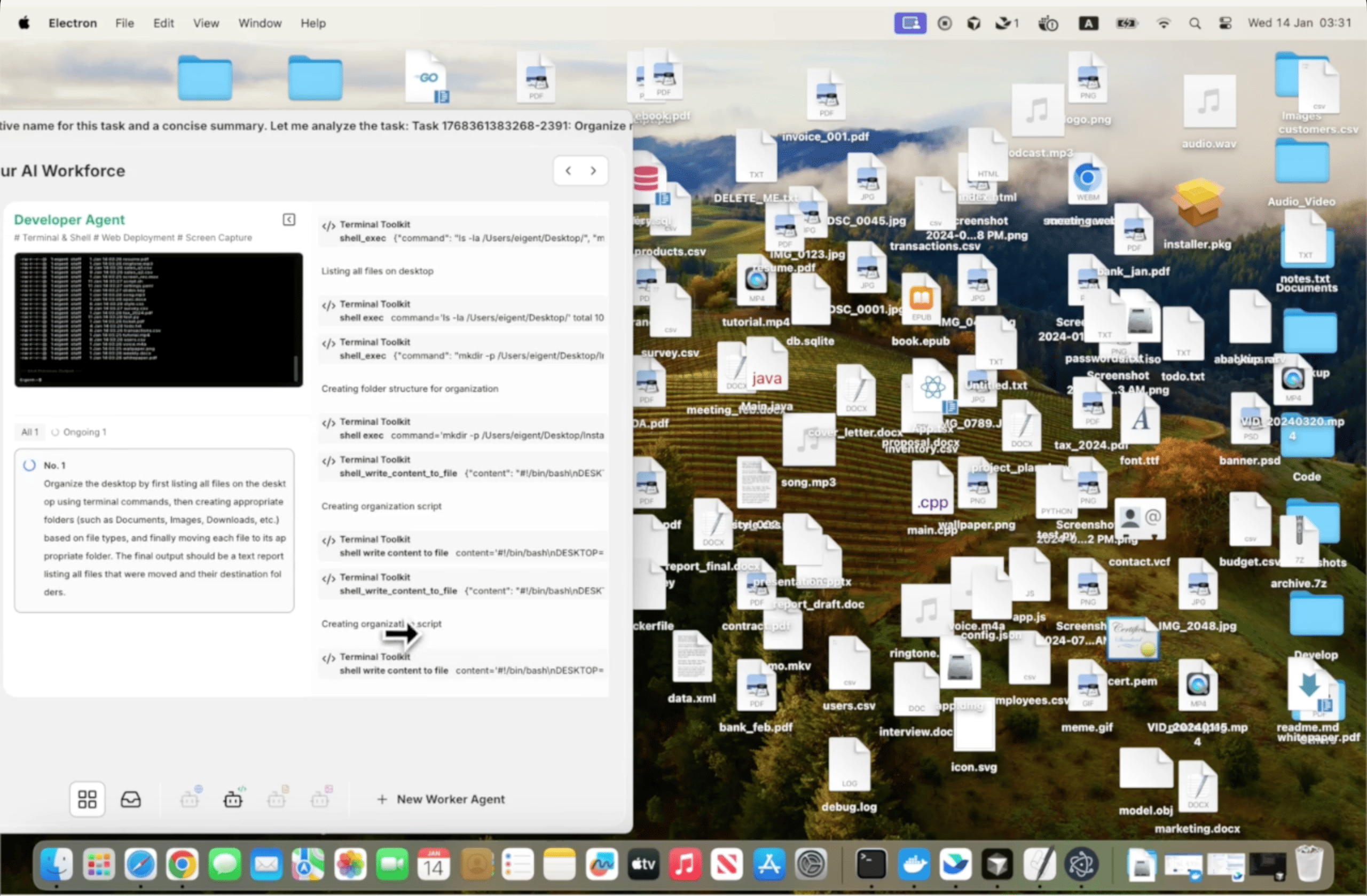
Räumen Sie Ihren Desktop in Sekunden auf
Ein unordentlicher Desktop ist ein universelles Problem. Screenshots, Downloads, halb fertige Dokumente, Installer-Dateien — sie sammeln sich schneller an, als jemand sie aufräumt, und sie manuell neu zu ordnen bedeutet, Finder oder Explorer zu öffnen und viel zu ziehen und zu entscheiden. Eigent erledigt das für Sie mit nur einem einzigen Prompt.
Öffnen Sie Eigent und beschreiben Sie die Aufgabe
Für diesen Anwendungsfall brauchen Sie keinen detaillierten Prompt. Die einfachste Version reicht:
Hilf mir, meinen Desktop zu organisieren.
Eigent bewertet, was sich auf Ihrem Desktop befindet, leitet sinnvolle Kategorien anhand von Dateitypen und Dateinamen ab und schlägt eine Organisationsstruktur vor, bevor Änderungen vorgenommen werden.
Eigent prüft Ihren Desktop
Bevor etwas verschoben wird, verschafft sich Eigent einen Überblick über den Inhalt. Es betrachtet Dateitypen, Erstellungsdaten und Dateinamen, um zu verstehen, mit welcher Art von Unordnung Sie es zu tun haben. Zu den häufigen Kategorien, die erkannt werden, gehören:
- Screenshots und Bilder
- Heruntergeladene Installer und Archivdateien
- Dokumente, PDFs und Tabellen
- Code-Dateien und Projektordner
- Temporäre Dateien oder nicht identifizierte Elemente
Dateien werden in Ordner sortiert
Eigent erstellt Unterordner und verschiebt Dateien je nach Kategorie dorthin. Die Ordnerstruktur ist intuitiv — Dinge wie „Screenshots“, „Dokumente“, „Installer“ und „Archive“ — sodass Sie alles später leicht wiederfinden, auch wenn Sie das System nicht selbst entworfen haben.
Wenn Sie die Kategorien anpassen möchten, fügen Sie das dem Prompt hinzu:
Hilf mir, meinen Desktop zu organisieren. Lege alle Screenshots in einen Ordner namens "Captures", alle PDFs in "Reading" und verschiebe alles, was älter als 3 Monate ist, in einen Ordner "Archive".
Prüfen Sie, was verschoben wurde
Sobald die Aufgabe abgeschlossen ist, berichtet Eigent, was es getan hat — welche Dateien verschoben wurden, welche Ordner erstellt wurden und ob etwas an seinem Platz geblieben ist, weil es unklar war. Sie können das Ergebnis überprüfen und Eigent anweisen, Anpassungen vorzunehmen:
Verschiebe die Projektdateien, die du in "Documents" abgelegt hast, stattdessen in einen separaten Ordner namens "Projects".
Warum das wichtig ist
Dies ist die einfachstmögliche Version einer Workflow-Automatisierung: ein Prompt, eine Aufgabe, erledigt. Aber sie zeigt etwas Wichtiges — Sie müssen nicht jeden einzelnen Schritt beschreiben, den Eigent ausführen soll. Zu sagen „Hilf mir, meinen Desktop zu organisieren“ reicht aus, damit Eigent die Absicht versteht, die Situation einschätzt und die Arbeit ausführt. Dasselbe Prinzip lässt sich auf weitaus komplexere Aufgaben übertragen.
Was Sie als Nächstes ausprobieren können
Organisiere meinen Downloads-Ordner auf die gleiche Weise.
Sortiere die Dateien auf meinem Desktop nach Projekt und erstelle für jedes Projekt einen Ordner.
Archiviere alles auf meinem Desktop, was ich in den letzten 30 Tagen nicht geöffnet habe.
Sag mir nach dem Organisieren die fünf größten Dateien auf meinem Desktop, damit ich entscheiden kann, ob ich sie behalten möchte.
Tipps für bessere Ergebnisse
-
Fügen Sie Präferenzen hinzu, wenn Sie welche haben. „Lass alle Dateien, die 'final' im Namen haben, auf dem Desktop“ oder „fass den Ordner 'Active Projects' nicht an“ gibt Eigent Leitplanken, die zu Ihrem tatsächlichen Workflow passen.
-
Führen Sie es regelmäßig aus. Desktop-Organisation ist etwas, das immer wieder passieren muss, nicht nur einmal. Sobald Sie die gewünschte Ordnerstruktur festgelegt haben, hält erneutes Ausführen desselben Prompts Ihren Desktop dauerhaft ordentlich.
-
Bitten Sie um einen Zusammenfassungsbericht. Wenn Sie hinzufügen: „Sag mir, was du verschoben hast und wohin, wenn du fertig bist“, haben Sie eine klare Aufzeichnung der Änderungen, falls Sie später etwas wiederfinden müssen.