

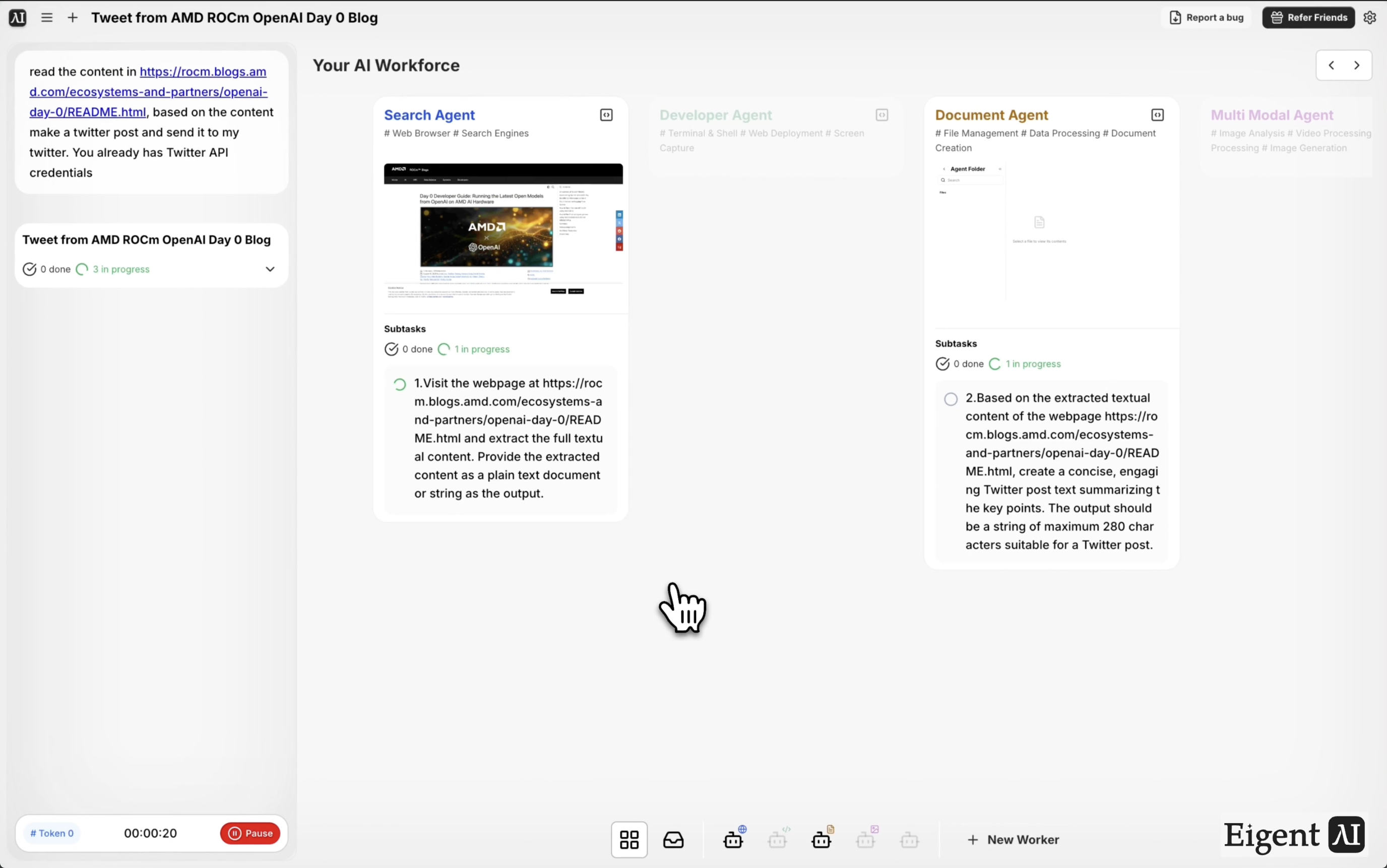
Einen technischen Blog lesen und einen Tweet posten — mit einem lokalen Modell
Dieser Workflow demonstriert drei von Eigens fortschrittlichen Funktionen, die zusammenarbeiten: ein angepasstes MCP-Tool, das Eigent den Zugriff auf Twitter ermöglicht, ein maßgeschneiderter Twitter-Agent, der die Inhaltserstellung übernimmt, und ein lokales Open-Source-Modell, das die Intelligenzschicht ausführt — ohne dass deine Inhalte an eine Cloud-API gesendet werden. Das Ergebnis ist eine vollständig automatisierte Pipeline von der Blog-URL bis zum veröffentlichten Tweet, die komplett auf deiner eigenen Infrastruktur läuft.
Twitter MCP und lokales Modell einrichten
Für diesen Workflow müssen vor dem Start zwei Dinge in Eigent konfiguriert sein:
- Twitter MCP: Ein angepasster Connector, der Eigent die Möglichkeit gibt, in deinem Namen auf Twitter/X zu posten. Richte ihn unter Einstellungen → Connectoren mit deinen Twitter-API-Zugangsdaten ein.
- Lokales Modell: Eigent kann diese Aufgabe über ein Open-Source-Modell ausführen, das du lokal bereitgestellt hast (z. B. über Ollama oder eine ähnliche Runtime). Konfiguriere deinen lokalen Endpunkt unter Einstellungen → Modelle und wähle ihn für diese Sitzung als aktives Modell aus.
Sobald beides eingerichtet ist, läuft der gesamte Workflow lokal — der Bloginhalt wird gelesen, der Tweet entworfen und der Beitrag gesendet, ohne dass Daten dein Gerät verlassen.
Den Blog-zu-Tweet-Prompt formulieren
Weise Eigent auf den Quell-Blog hin und beschreibe die Aufgabe:
Lies den Inhalt unter https://rocm.blogs.amd.com/ecosystems-and-partners/openai-day-0/README.html. Erstelle auf Basis des Inhalts einen Twitter-Post und sende ihn an meinen Twitter-Account.
Der Browser-Agent von Eigent ruft den Seiteninhalt ab und übergibt ihn zur Verarbeitung an den Twitter-Agenten.
Der Browser-Agent liest den Blog
Eigent ruft den AMD-ROCm-Blogbeitrag über die OpenAI-Day-0-Unterstützung ab — ein technischer Beitrag darüber, wie der ROCm-Software-Stack von AMD Day-0-Kompatibilität mit den neuesten Modellen von OpenAI erreicht hat. Der Browser-Agent extrahiert die wichtigsten Punkte: die zentrale Erkenntnis, was „Day 0“ in diesem Kontext bedeutet, und die am besten zitierbare technische Einsicht.
Das lokale Modell entwirft den Tweet
Der extrahierte Bloginhalt wird an dein lokal bereitgestelltes Modell übergeben, das als Twitter-Agent arbeitet. Das Modell liest das Material, identifiziert die am besten teilbare Erkenntnis oder den relevantesten Befund und entwirft einen Tweet, der innerhalb der Zeichenbegrenzung bleibt und sich für ein technisches Publikum natürlich liest.
Da dies auf einem lokalen Modell läuft, hast du volle Kontrolle über die Modellauswahl, den System-Prompt und darüber, wie der Agent seine Ausgabe formatiert. Du kannst den Agenten so feinabstimmen, dass er zu deiner Markenstimme oder Zielgruppe passt.
Tweet per MCP veröffentlicht
Der entworfene Tweet wird über das angepasste MCP-Tool an Twitter gesendet, das die Authentifizierung und den API-Aufruf übernimmt. Du erhältst eine Bestätigung mit der URL des Live-Posts, sobald der Tweet veröffentlicht wurde.
Warum das wichtig ist
Eine Content-Pipeline vollständig auf lokaler Infrastruktur auszuführen, ist für Organisationen bedeutsam, die mit sensiblen Themen arbeiten, in eingeschränkten Umgebungen operieren oder einfach Cloud-API-Abhängigkeiten vermeiden möchten. Dieser Workflow zeigt, dass der komplette Ablauf — lesen, entwerfen, veröffentlichen — ohne externe Modell-API-Aufrufe ausgeführt werden kann. Die angepasste MCP- und maßgeschneiderte Agentenarchitektur macht ihn außerdem wiederverwendbar: Tausche die Blog-URL aus und dieselbe Pipeline veröffentlicht Inhalte aus jeder Quelle.
Was du als Nächstes ausprobieren kannst
Lies diese Woche die drei beliebtesten Beiträge aus diesem Blog und poste zu jedem einen Tweet.
Passe diese Pipeline an, um statt auf Twitter auf LinkedIn zu posten.
Prüfe nach dem Posten nach 24 Stunden das Engagement des Tweets und gib mir eine Rückmeldung.
Führe denselben Workflow für einen Blogbeitrag auf Deutsch aus und übersetze den Tweet vor dem Posten ins Englische.
Tipps für bessere Ergebnisse
-
Optimiere den Prompt des lokalen Modells. Der Standard-Prompt des Twitter-Agenten erzeugt neutrale, faktenbasierte Tweets. Wenn du einen meinungsstärkeren oder pointierteren Stil möchtest, passe den System-Prompt des Agenten an deine Sprache an.
-
Teste zuerst mit einem Prüfschritt. Füge deinem Prompt für die ersten paar Durchläufe „zeige mir den Entwurf vor dem Posten“ hinzu, damit du die Qualität der Ausgabe des lokalen Modells prüfen kannst, bevor du das Veröffentlichen automatisierst.
-
Passe das Modell an den Inhaltstyp an. Technische Blogbeiträge wie dieser AMD-ROCm-Beitrag profitieren von einem Modell mit starkem technischem Verständnis. Für Marketing- oder Lifestyle-Inhalte kann ein Allzweckmodell besser geeignet sein.





