

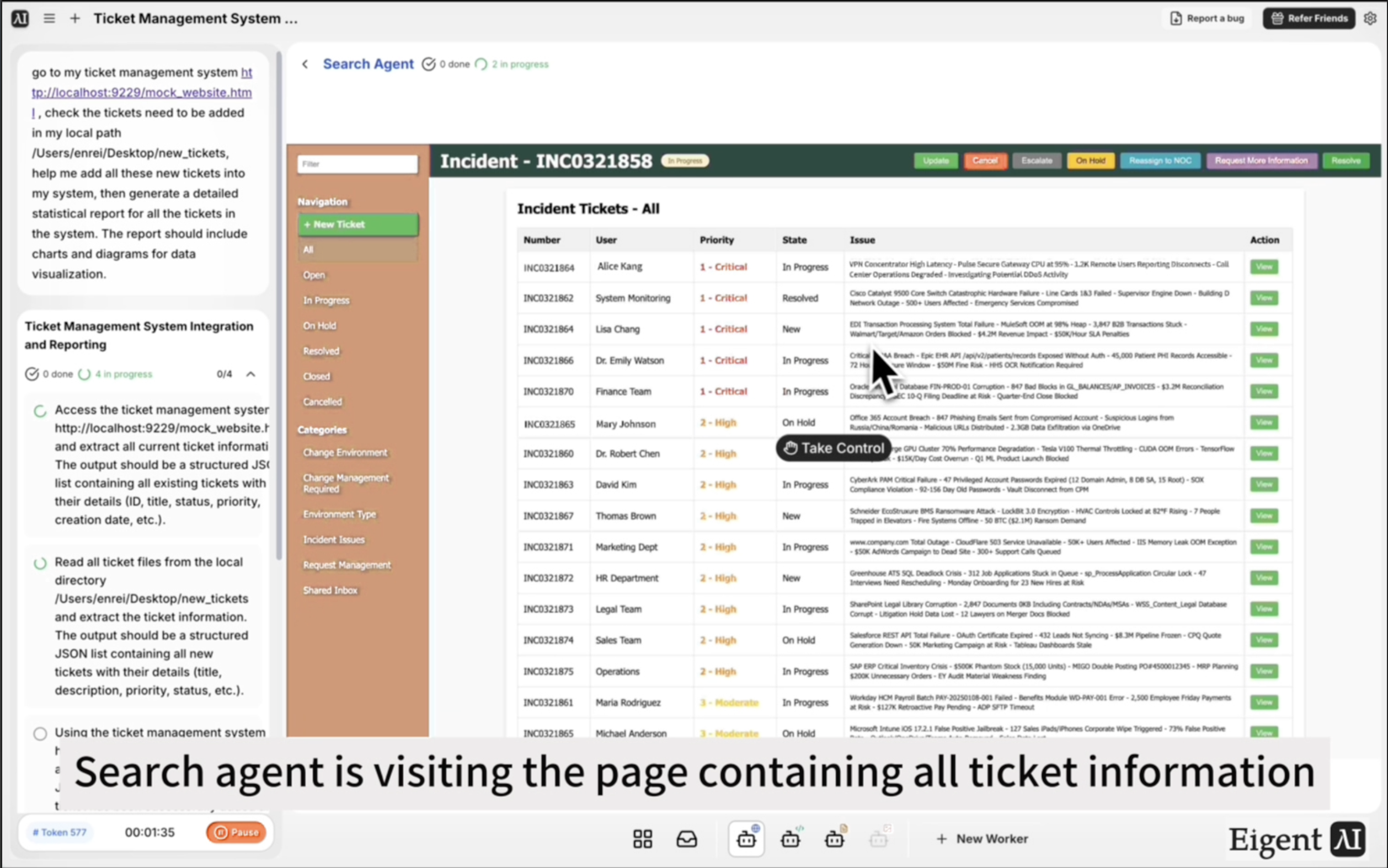
Importer des tickets et générer un rapport statistique — Sans toucher à l’interface
Les équipes IT et opérations sont souvent confrontées au même goulot d’étranglement : de nouveaux tickets arrivent dans des fichiers plats ou des feuilles de calcul exportées, et quelqu’un doit les saisir manuellement un par un dans le système de tickets. Ensuite, séparément, quelqu’un d’autre doit extraire un rapport du système avec des graphiques pour la revue hebdomadaire. Eigent gère les deux étapes — importation des tickets et génération du rapport — dans un seul workflow.
Configurez votre système de tickets et vos fichiers locaux
Pour ce workflow, vous avez besoin de deux éléments prêts :
- Votre système de gestion des tickets accessible via navigateur (dans ce cas, à
http://localhost:9229/mock_website.html) - Un dossier local contenant les nouveaux fichiers de tickets à importer (dans ce cas, à
/Users/enrei/Desktop/new_tickets)
Adaptez ces chemins pour correspondre à l’URL réelle de votre système et à l’emplacement de vos fichiers de tickets. Les tickets peuvent être dans n’importe quel format lisible — JSON, CSV ou fichiers texte.
Rédigez le prompt d’importation et de rapport
Le prompt couvre l’ensemble du workflow :
Accédez à mon système de gestion des tickets à http://localhost:9229/mock_website.html. Vérifiez les tickets à ajouter depuis mon chemin local /Users/enrei/Desktop/new_tickets. Ajoutez tous ces nouveaux tickets dans le système. Puis générez un rapport statistique détaillé pour tous les tickets du système. Le rapport doit inclure des graphiques et des diagrammes pour la visualisation des données.
Eigent lira les fichiers locaux, naviguera vers le système de tickets dans le navigateur, saisira chaque ticket, puis extraiera l’ensemble des données pour générer le rapport.
Eigent lit les nouveaux fichiers de tickets
Avant d’interagir avec le système de tickets, Eigent lit tous les fichiers dans le dossier local spécifié. Il analyse les détails de chaque ticket — titre, description, priorité, assigné, catégorie, ou tout autre champ utilisé par votre système — et les organise pour une importation séquentielle.
Importation des tickets via le navigateur
L’agent navigateur d’Eigent ouvre votre système de gestion des tickets et ajoute chaque nouveau ticket via l’interface — en naviguant vers le formulaire de nouveau ticket, en remplissant les champs et en soumettant. Il le fait pour chaque fichier du dossier local, un par un, en confirmant chaque soumission avant de passer au suivant.
Si votre système dispose d’une fonction d’importation en lot, vous pouvez demander à Eigent de l’utiliser à la place :
Si le système prend en charge l’importation en lot, utilisez-la au lieu d’ajouter les tickets un par un.
Génération du rapport statistique
Une fois tous les nouveaux tickets importés, Eigent extrait l’ensemble des données de tickets du système et génère un rapport statistique. Le rapport inclut des graphiques et des diagrammes couvrant des métriques comme le volume de tickets par catégorie, la répartition des statuts (ouvert, en cours, fermé), la répartition des priorités, le temps moyen de résolution et les tendances dans le temps.
Le rapport est enregistré sous forme de fichier HTML et ouvert dans votre navigateur pour révision.
Pourquoi c’est important
La saisie manuelle des tickets et le reporting sont deux des tâches administratives les plus chronophages dans les opérations IT. Elles sont toutes deux suffisamment mécaniques pour être entièrement automatisées — la seule raison pour laquelle elles sont restées manuelles si longtemps est que l’automatisation nécessitait des intégrations personnalisées. Eigent utilise la même interface de navigateur qu’un humain, ce qui signifie qu’il fonctionne avec n’importe quel système de tickets disposant d’une interface web, sans nécessiter d’accès API ni de code personnalisé.
Ce que vous pouvez essayer ensuite
Vérifiez s’il existe des tickets dans le système ouverts depuis plus de 14 jours et générez un rapport de suivi.
Importez les tickets de ce nouveau dossier et envoyez une notification Slack lorsque l’importation est terminée.
Filtrez le rapport statistique pour n’afficher que les tickets prioritaires des 30 derniers jours.
Exportez la liste complète des tickets du système vers un CSV sur mon bureau.
Conseils pour de meilleurs résultats
-
Nommez vos champs de tickets de manière cohérente. Si vos fichiers locaux utilisent "priority: high" mais que votre système de tickets utilise "Priority Level: High", mentionnez-le dans le prompt afin qu’Eigent puisse mapper correctement les champs.
-
Lancez d’abord l’importation sur un petit lot. Testez avec deux ou trois tickets avant d’exécuter l’ensemble du dossier, afin de vérifier que le mapping des champs est correct avant de valider l’importation complète.
-
Demandez un résumé de l’importation. Ajouter « après l’importation, dites-moi combien de tickets ont été ajoutés avec succès et si certains ont échoué » vous donne une trace d’audit claire de l’exécution de l’importation.





