
Eigent & Gemini 3 Pro로 엔터프라이즈 에이전트 실행하기
Gemini 3 Pro와 함께하는 Eigent의 실제 엔터프라이즈 브라우저 자동화
 Eigent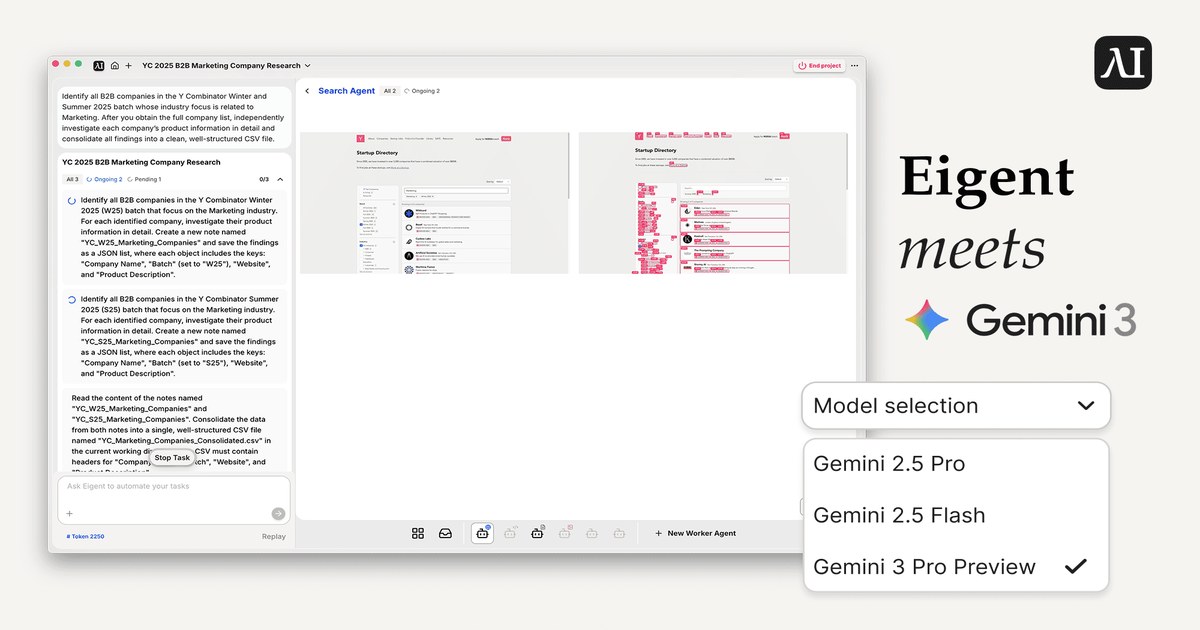
개요
실제 엔터프라이즈 환경에서는 많은 내부 도구, 대시보드, 레거시 시스템이 전부 브라우저에서 동작하며, 일상적인 비즈니스 운영의 중추를 이룹니다. 이러한 복잡한 시스템을 자동화하기 위해, 우리는 로컬에서 실행되고 소스부터 완전하게 설정할 수 있으며 브라우저 자동화에 강하게 초점을 맞춘 오픈소스 멀티 에이전트 워크포스 애플리케이션인 Eigent를 소개합니다. 본질적으로 이는 엔터프라이즈 워크플로를 위한 Eigent 오픈소스 동료로 볼 수 있습니다.
이 글에서는 Eigent가 CAMEL의 Workforce 아키텍처와 브라우저 자동화를 활용해 복잡한 다단계 엔터프라이즈 작업을 처리하는 방법을 살펴봅니다. 또한 Gemini 3 Pro의 성능을 실제 엔터프라이즈 작업 3가지에서 분석하고, 장기적이고 에이전틱한 브라우저 자동화 시나리오에서 효과적으로 작동하게 하는 아키텍처적 특징도 함께 살펴봅니다.
배경: Eigent란 무엇이며 Gemini 3 Pro를 어떻게 지원하는가
Eigent는 데스크톱에서 실행되는 오픈소스 멀티 에이전트 워크포스 제품입니다. 브라우저 자동화, 터미널 자동화, MCP와 같은 일반 기능을 지원하는 멀티 에이전트 워크포스 아키텍처로 구축되었습니다. 이 설계는 깊은 API 통합이나 지속적인 워크플로 재구성 없이도 실제 데스크톱 환경에서 사람처럼 작업을 수행할 수 있게 합니다.
파운데이션 모델이 계속 발전함에 따라, 이를 Eigent의 오픈소스 멀티 에이전트 시스템과 통합하면 개발자와 엔터프라이즈 사용자가 LLM 기능을 실제 사용 사례에 빠르고 효과적으로 직접 적용할 수 있습니다. 그렇기 때문에 Eigent는 출시 직후 Gemini 3 Pro를 통합했습니다.
Cloud Mode에서 시작하려면 상단 드롭다운에서 Gemini 3 Pro를 선택하면 됩니다. 또는 Bring Your Own Key 방식을 선호한다면, Eigent의 Model Settings 페이지로 이동해 Gemini 섹션을 찾은 뒤 API 키를 입력하세요. 모델 이름이 Gemini 3 Pro로 설정되면 바로 시작할 수 있습니다. 도움이 필요하신가요? [Google Gemini API 키 설정하기] 가이드를 확인해 보세요.
단계별 안내는 아래 비디오 튜토리얼을 확인하세요.
Github 저장소 및 Eigent 설정 방법
GitHub 저장소: https://github.com/eigent-ai/eigent
빠른 시작: 환경 설정
Eigent를 실행하는 방법은 두 가지입니다. 바로 사용할 수 있는 사전 컴파일된 데스크톱 앱을 사용하거나, 코드를 살펴보고 에이전트를 커스터마이즈할 수 있도록 개발 환경을 구성하는 방법입니다.
옵션 A: "Zero-Config" 데스크톱 앱
코드를 건드리지 않고 즉시 작업 자동화를 시작하고 싶은 사용자에게 적합합니다:
- 공식 웹사이트에서 클라이언트를 다운로드합니다.
.dmg(macOS) 또는.exe(Windows)를 설치합니다.- 앱을 실행하면 로컬 백엔드가 자동으로 시작됩니다.
옵션 B: 개발자 설정
소스 코드를 확인하고 개발 목적으로 시스템을 로컬에서 실행하려면 다음 단계를 따르세요:
1. 사전 요구 사항 Node.js (v18-22)와 Python이 설치되어 있는지 확인하세요.
2. 복제 및 설치
# 저장소 복제
git clone https://github.com/eigent-ai/eigent.git
cd eigent

# 프런트엔드 의존성 설치
npm install
3. 애플리케이션 실행
# 루트로 돌아가 dev 모드 실행
npm run dev
실행이 완료되면 설정에서 LLM 공급자(Gemini 3 Pro 등)를 직접 구성할 수 있습니다. 설정, 고급 기능, 문제 해결에 대한 더 자세한 정보는 공식 문서를 참고하세요.
내부 구조: Eigent 전체 스택과 CAMEL Workforce 아키텍처
Eigent 시스템 개요
Eigent는 CAMEL Workforce를 핵심 엔진으로 사용하는, 멀티 에이전트 오케스트레이션이 가능한 로컬 우선(local-first) 데스크톱 애플리케이션입니다. 이 시스템은 사용자의 로컬 인프라에서만 동작하는 분리형 full-stack 아키텍처를 구현합니다. 이러한 설계는 데이터 주권을 엄격하게 보장하며, 클라우드 상에서 에이전트를 실행할 때 발생하는 개인정보 보호 위험을 제거합니다.
1. 프런트엔드
사용자 인터페이스는 에이전트 설정과 워크플로 모니터링을 위한 제어 평면(control plane) 역할을 합니다. React와 TypeScript로 구축되었으며 Electron 프레임워크 기반입니다.
주요 기술 구성 요소는 다음과 같습니다:
- 상태 관리: Zustand는 일시적인 애플리케이션 상태를 처리하는 데 사용되며, 효율적인 반응성을 보장합니다.
- 시각적 오케스트레이션: React Flow가 통합되어 에이전트 워크스페이스를 시각화하고 실시간 에이전트 실행을 추적합니다.
- 통신: 프런트엔드는 보안이 적용된 로컬 HTTP 요청을 통해 백엔드와 통신합니다.
2. 백엔드
핵심 로직은 FastAPI와 Uvicorn을 사용하는 로컬 Python 서버에 있으며, CAMEL 멀티 에이전트 프레임워크의 호스트 환경 역할을 합니다.
- 런타임 환경: 백엔드는 Python 3.10+에서 실행되며, 고성능 의존성 해결과 환경 격리를 위해 uv로 관리됩니다.
- 영속성 계층: SQLModel/SQLAlchemy ORM을 통해 연결되는 PostgreSQL은 감사 로그, 워크플로 이력, 에이전트 상태를 위한 견고한 구조화 데이터 저장소를 제공합니다.
- 멀티 에이전트 프레임워크: CAMEL 프레임워크는 에이전트 오케스트레이션 로직(예: workforce)을 처리하며, 원격(예: Gemini) 또는 로컬(예: vLLM을 통한) Large Language Model(LLM)과 연동해 에이전트를 실행합니다. 또한 CAMEL 프레임워크는 browser toolkit, terminal toolkit, document generation toolkit과 같은 풍부한 툴킷도 제공합니다.
CAMEL Workforce: 조직 구조에서 영감을 받은 멀티 에이전트 시스템
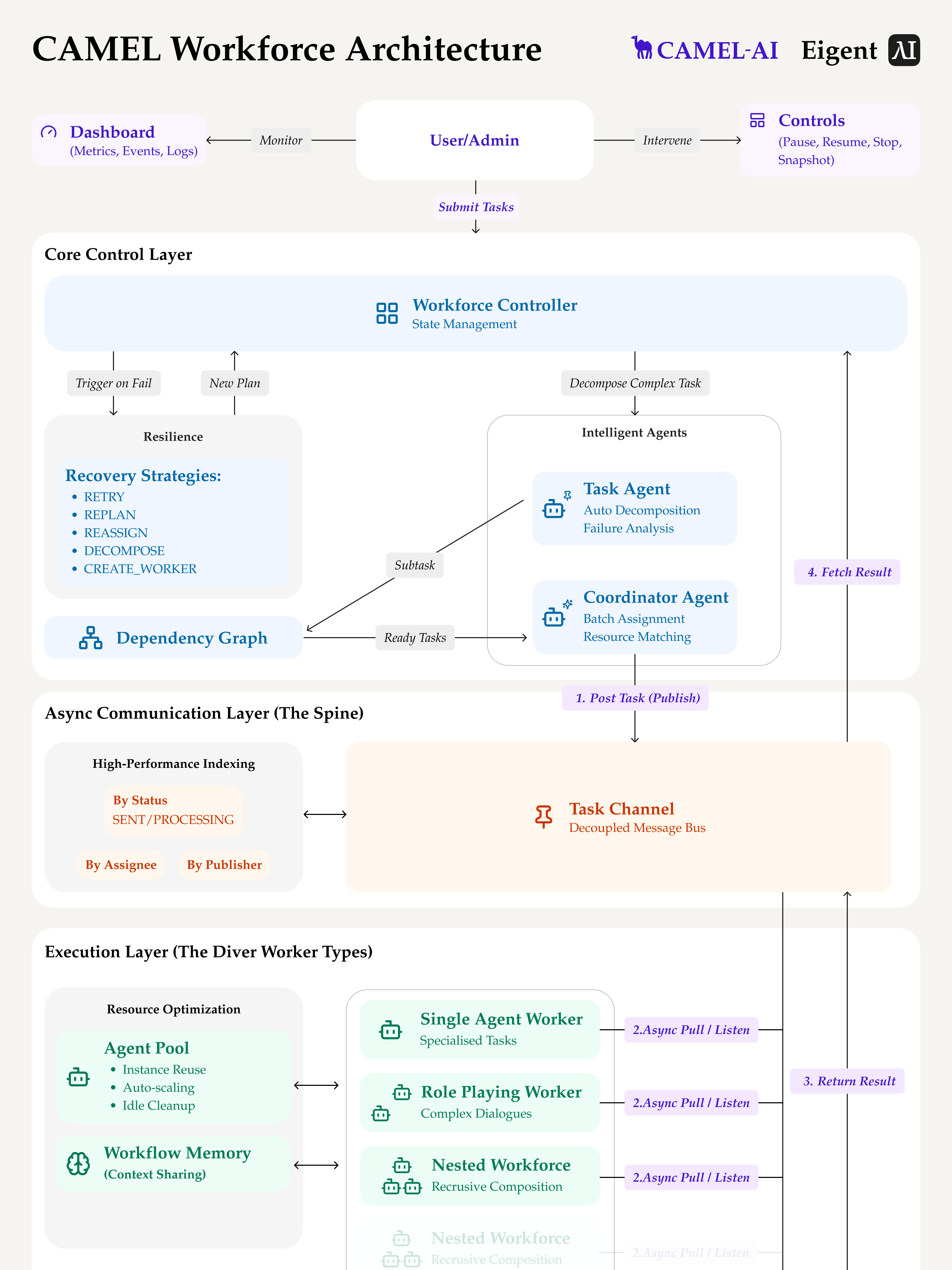
Eigent의 핵심에는 분산 협업을 통해 복잡한 실제 작업을 해결하도록 설계된 멀티 에이전트 시스템인 CAMEL Workforce가 있습니다. 이 시스템은 비동기 메시지 채널을 통해 관리되는 엄격한 Producer-Consumer 패턴을 사용해 의존성 그래프를 효율적으로 처리합니다.
1. 에이전트 역할
- Coordinator Agent: 주요 디스패처 역할을 합니다. 전역 상태를 유지하고 가용성과 역량에 따라 특정 워커에게 하위 작업을 할당합니다.
- Task Agent: 상위 수준 목표를 실행 가능한 원자 단위로 의미적으로 분해하는 역할을 맡습니다.
- Worker Agent: 전문 실행 단위로 작동합니다. Worker 에이전트는 원자 하위 작업을 소비하고 도메인별 도구를 사용해 이를 수행합니다.
2. 비동기 통신: TaskChannel
조정 계층과 실행 계층의 분리는 TaskChannel을 통해 이루어집니다. 이 비동기 메시지 큐는 메인 실행 스레드를 차단하지 않으면서 작업 배분을 관리합니다.
실행 흐름:
- Workforce가 작업을 시작합니다.
- Worker 노드가 할당을 폴링합니다.
- 완료되면 결과가 다시 전송됩니다.
3. 동적 DAG 구성
엔터프라이즈 워크플로는 대부분 선형적이지 않습니다. CAMEL Workforce는 동적 Directed Acyclic Graph (DAG) 구성 메커니즘을 구현합니다. 상위 수준 프롬프트(예: "Create Travel Plan")를 받으면 Task Agent가 이 목표를 개별 노드로 분해합니다.
시스템은 의존성을 명시적으로 매핑하여 스케줄러가 다음을 수행할 수 있게 합니다:
- 독립적인 노드는 병렬로 실행합니다(예: Search Flight Ticket과 Search Hotel이 동시에 실행됨).
- 종속 노드는 이전 노드가
DONE상태에 도달할 때까지 대기시킵니다.
4. 장애 허용 메커니즘
LLM의 비결정적 특성을 고려할 때, Eigent는 실패를 치명적 예외가 아니라 예상된 상태 전환으로 취급합니다. 이 아키텍처는 다음 전략을 활용하는 강력한 복구 메커니즘을 구현합니다:
- RETRY: 일시적 오류를 처리하기 위해 동일한 워커에서 하위 작업을 다시 실행합니다.
- REPLAN: Task Agent가 실패 로그를 바탕으로 원래 하위 작업을 수정한 뒤 다시 큐에 넣습니다.
- REASSIGN: 하위 작업을 현재 워커에서 호환되는 기술을 가진 다른 에이전트로 이동시킵니다.
- DECOMPOSE: 작업이 과도한 복잡성으로 실패하면, 더 작은 하위 작업으로 재귀적으로 분해합니다.
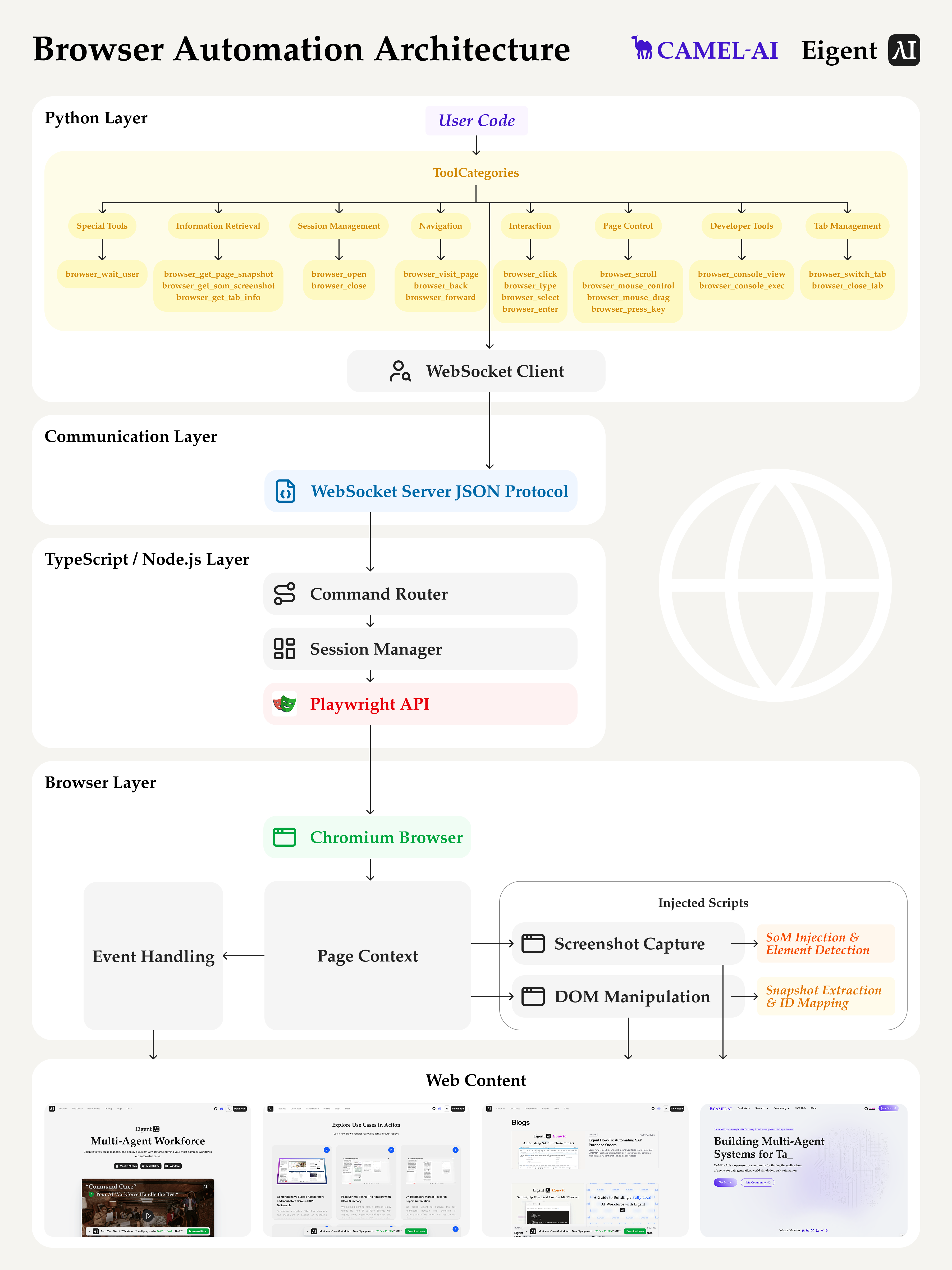
Eigent의 브라우저 자동화 아키텍처
그러나 멀티 에이전트 워크포스 아키텍처는 브라우저 자동화와 같은 범용 기능의 강점이 함께할 때 비로소 진정한 엔터프라이즈 자동화를 실현할 수 있습니다. 그렇기 때문에 우리는 엄격한 API 통합에만 의존하지 않고, 실제 비즈니스 환경 안에서 직접 작동할 수 있는 에이전트를 구축하는 데 중점을 둡니다.
Eigent는 브라우저 제어와 에이전트 오케스트레이션을 분리하는 2계층 아키텍처를 채택합니다:
- TypeScript 계층은 모든 브라우저 상호작용을 담당합니다. 네이티브 Playwright API를 활용해 DOM 작업 수행, 구조화된 스냅샷 캡처, SoM 스크린샷 생성, 가림(occlusion) 탐지, 고급 브라우저 로직 처리를 JavaScript 런타임 내에서 직접 수행합니다. Playwright가 TypeScript로 네이티브하게 구축되어 있기 때문에, 이 계층은
_snapshotForAI()같은 최첨단 기능에 접근할 수 있으며 더 나은 성능, 안정성, 개발자 경험을 보장합니다. - Python 계층은 AI 오케스트레이션을 처리합니다. LLM 호출, 에이전트 의사결정, 작업 계획을 관리합니다. 이 분리는 Python이 에이전트 로직에 집중하도록 해주며, Python 생태계가 AI와 워크플로 오케스트레이션에서 강점을 발휘할 수 있게 합니다.
- 두 계층은 WebSocket을 통해 비동기적으로 통신하여 논블로킹(non-blocking) 작업을 가능하게 합니다. Python이 브라우저 작업 요청을 보내면 TypeScript가 이를 실행하고 결과를 반환합니다. 이 상호작용은 최종 사용자에게 투명하며 동시 작업 실행을 지원합니다.
이 아키텍처는 성능을 개선하고 요소 상호작용의 정확성을 높이며, 동적 DOM 필터링, 뷰포트 인식 스냅샷, 브라우저 내부 SoM 렌더링과 같은 고급 기능을 가능하게 합니다. 또한 높은 지연 시간, 브라우저 내부 구조에 대한 제한된 접근, 복잡한 이미지 처리 로직과 같은 Python 전용 구현의 한계를 피할 수 있습니다. 브라우저 작업을 네이티브 실행 컨텍스트에 위임함으로써, Eigent는 에이전트 기반 엔터프라이즈 자동화를 위한 견고한 기반을 보장합니다.
엔터프라이즈 자동화 시나리오에서 멀티 에이전트 실행을 수행할 때, 브라우저 기반 자동화는 프로세스 가시성 측면에서 자연스러운 장점을 제공합니다. 모든 단계가 투명하고, 검토 가능하며, 디버깅하기 쉬워 복잡하고 변화하는 워크플로에 훨씬 실용적입니다.
Eigent 브라우저 자동화를 활용해 실제 엔터프라이즈 작업에서 Gemini 3 Pro 테스트하기
우리는 Eigent 브라우저 자동화 기능을 사용해 영업 프로세스를 자동화하기 위해 Gemini 3 Pro와 함께 Eigent를 테스트했습니다. 에이전트의 작업은 리드 캡처 및 생성, 자격 검증 및 파이프라인 관리, 견적, 협상, 마감, 제품 관리 등 실제 영업 사이클의 다양한 단계를 자동화하는 것입니다.
실험 결과 전반에서 Gemini 3 Pro는 일관되게 세 가지 핵심 강점을 보여주었습니다:
- iframe과 중첩 요소를 포함한 복잡한 페이지 구조를 잘 처리합니다: 복잡한 레이아웃에서도 올바른 콘텐츠와 버튼을 안정적으로 찾을 수 있습니다.
- 자기 행동을 점검해 정확성을 유지하고 단계를 간결하게 만듭니다: 피드백 루프를 사용해 실수를 수정하고 작업이 실제로 올바르게 완료되었는지 확인합니다.
- 도구를 효율적이고 유연하게 사용합니다: 불필요한 단계를 피하고 필요할 때 도구를 스마트하게 조합하는 방법을 알고 있습니다.
샘플 작업 1:
마케팅과 관련된 산업 분야를 가진 Y Combinator Winter 및 Summer 2025 배치의 모든 B2B 회사를 식별하세요. 전체 회사 목록을 얻은 후, 각 회사의 제품 정보를 개별적으로 자세히 조사하고 모든 결과를 깔끔하고 구조화된 CSV 파일로 정리하세요.
이 작업은 에이전트가 반복적인 탐색과 동적 데이터 추출을 처리할 수 있음을 보여줍니다. 단순한 단일 페이지 스크래핑과 달리, 이 워크플로는 먼저 Y Combinator 디렉터리와 상호작용해 특정 필터(Batch, Industry, B2B 태그)를 적용한 뒤, "List-to-Detail" 패턴을 실행해야 합니다.
여기서의 핵심 과제는 맥락을 유지하는 것입니다. 에이전트는 개별 회사 프로필로 들어가 특정 제품 정보를 추출한 다음, 위치를 잃거나 항목을 중복하지 않고 메인 목록으로 돌아와야 합니다. Gemini 3 Pro는 이 루프를 성공적으로 오케스트레이션하여, 다양한 랜딩 페이지 레이아웃을 파싱하고 구조화되지 않은 정보를 수동 개입 없이 깔끔한 CSV 형식으로 정규화했습니다.
샘플 작업 2:
salesforce.com - 200 Widgets 거래가 순조롭게 진행 중입니다. 이를 'Needs Analysis'에서 'Proposal' 단계로 이동하고, “Mark as Current Stage’를 클릭한 다음 "Contact Roles"를 클릭해 연락처 이름과 전화번호를 알려주세요. 다시 Opportunities 페이지로 돌아가 이 Next Step을 “book a meeting with + 연락처 이름 and phone number.”로 수정하세요.
이 브라우저 자동화 작업은 일반 모델에게 도전 과제를 제시합니다. 먼저 Salesforce 홈페이에서 관련 Opportunity를 찾아야 합니다. 둘째, Opportunity의 단계를 업데이트하고, 특정 페이지로 이동해 연락처 정보를 가져온 뒤, 마지막으로 해당 정보 내의 'Next Step' 필드를 수정해야 합니다.
따라서 이 작업에서는 안정적인 장기 과제 수행, 복잡한 작업에 대한 깊은 이해, 논리적인 작업 계획, Salesforce 환경 내에서 안정적인 교차 페이지 작업을 수행할 수 있는 역량을 입증해야 합니다.
또한 정량적 분석(예: 각 단계의 작업을 페이지 영역에 매핑하고, 실패/재시도 횟수를 추적하는 방식)을 통해 브라우저 작업 참조를 스냅샷의 요소와 항목별로 정렬할 수 있습니다. 이를 통해 도구 호출과 브라우저 작업의 정확성 및 효과성 측면에서 Gemini 3 Pro의 성능을 더 깊이 분석할 수 있습니다:
| 실행 | 총 브라우저 작업 수 | 사용된 기타 작업 | 시퀀스 특성 | 의미 |
|---|---|---|---|---|
| 1차 실행 | 23 | 없음 | 간결한 시퀀스 (open → type → 반복 클릭 → snapshot → click → visit_page → click …). | 동일한 컨트롤에 대한 반복 클릭/입력이 없음. 낮은 중복의 단방향 진행. |
| 2차 실행 | 18 | note / screenshots | 대상 영역에 도달하기 위해 open 이후 여러 번 click/snapshot 단계를 사용하며, 이후 상태 기록과 확인을 위해 append_note/create_note/browser_get_page_snapshot를 도입함. | 브라우저 작업 수가 더 적음; 보조 도구를 외부 메모리와 검증 수단으로 사용. |
| 3차 실행 | 15 | 없음 | 여러 번 open/visit_page로 시작한 뒤, 연속 클릭과 마지막 1회의 type으로 마무리함. | 보조 도구 없음; 재시도/롤백 없음. 가장 간결한 작업 체인. |
세 번의 실행 결과를 바탕으로, Gemini 3 Pro가 장기 브라우저 작업 시나리오에서 높은 견고성과 감사 가능성을 보여준다는 것을 확인할 수 있습니다.
- 실행 흐름: 파싱된 작업 목표와 환경 상태를 바탕으로 실행 경로를 안정적으로 계획합니다.
- 안정성 및 견고성: 현재 작업의 브라우저 페이지는 최대 13단계의 중첩을 포함하고 있었지만, Gemini 3 Pro는 작업 수행 중 낮은 재시도, 무한 루프 없음을 유지했습니다.
- 효율성: 세 세트의 로그에서 중복 도구 호출이 거의 없었고, 여러 번의 클릭이나 반복 입력이 나타나지 않았습니다. 이러한 효율성은 유연한 보조 도구(Note/Screenshot)와 결합되어 더 적고 더 안정적인 브라우저 작업을 만들어냈습니다.
샘플 작업 3:
“ 월간 영업 검토를 준비하고 있습니다. 제 forecast로 들어가서 Global Media 계정 아래의 Commit 단계에 있는 Opportunity를 찾고, Close Date를 11월 26일로 업데이트해 주세요. ”
작업의 웹페이지 복잡성을 더 높이면 어떻게 될까요?
다음 작업은 Salesforce Forecast 페이지에서 수행됩니다. Forecast 페이지는 영업팀이 통계와 개요를 확인하는 데 사용되며, 브라우저 페이지는 매우 복잡해 한 번의 스냅샷에서 약 4,763개 요소를 포함합니다. 다단계 디코딩 후 스냅샷은 1,222줄로 구성되며, 최대 중첩 깊이는 18단계, 평균 깊이는 약 14.33입니다. 즉, 이 페이지는 단순히 요소 수가 많은 것뿐 아니라, List → List Item → Link/Button → Icon → Paragraph/Grid Row와 같은 다층 구조를 가진 매우 깊게 중첩된 계층을 특징으로 합니다.
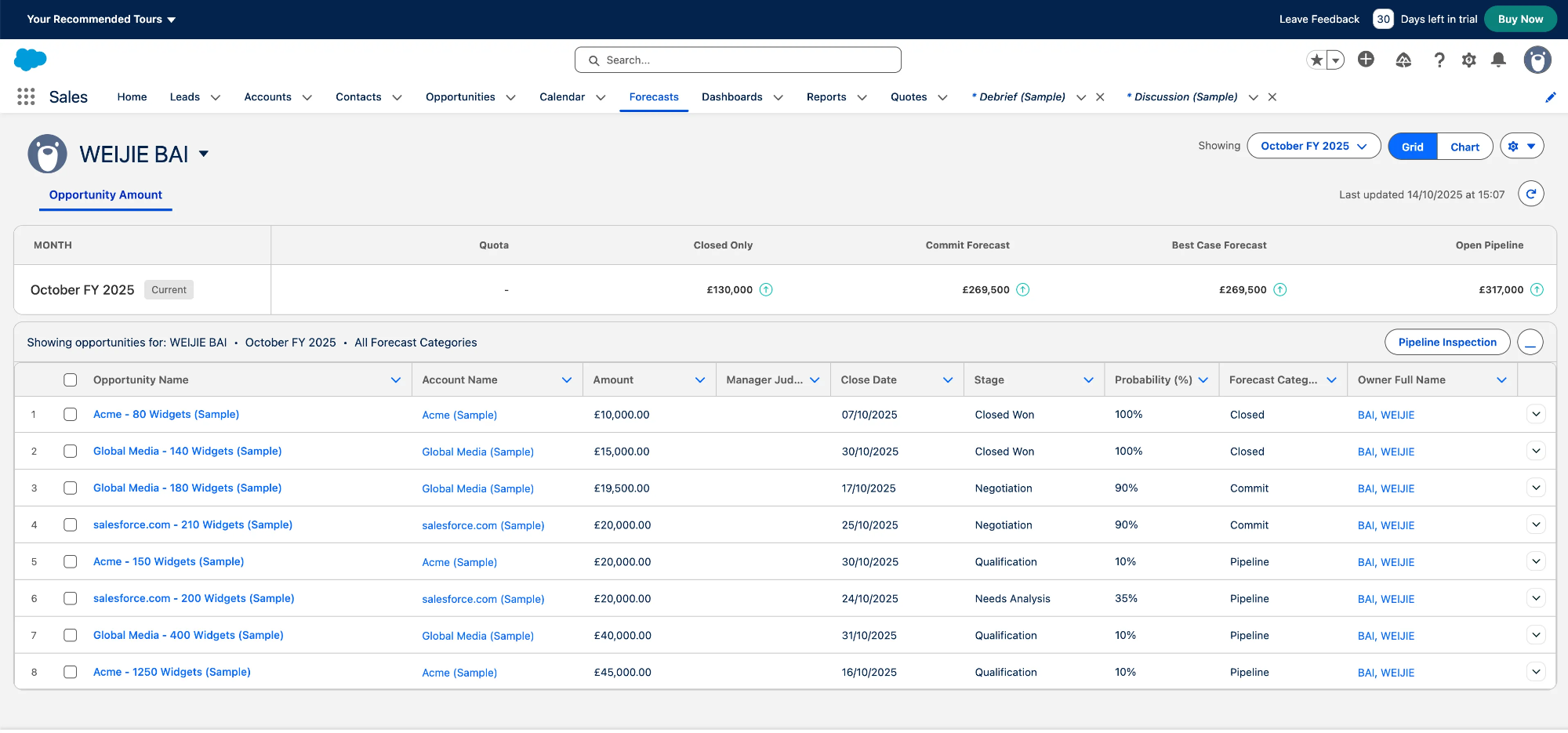
Salesforce Forecasts Webpage
우리의 테스트에서 Gemini 3는 이 작업을 세 번 모두 완벽하게 수행했습니다. 이렇게 밀집되고 매우 중첩된 페이지 안에서 필드를 올바르게 업데이트하면서도 대상 Opportunity(Global Media 180 Widgets)를 정확히 식별하고 Close Date 업데이트를 완료할 수 있는 능력은, 브라우저 활용 시나리오에서 Gemini 3 Pro의 강력한 파싱, 경로 계획, 안정적인 실행 역량을 입증합니다.
Gemini 3 Pro가 작업 성능을 향상시키는 방법
Gemini 3 Pro는 자율 엔터프라이즈 에이전트를 위한 균형 잡힌 선택지로 돋보입니다. 실제 작업에서 장기 브라우저 기반 워크플로를 높은 신뢰도로 일관되게 처리합니다. 여기에 우수한 비용 대비 성능까지 더해져, 엔터프라이즈 환경에서 에이전트 기반 자동화를 확장하기 위한 실용적인 옵션이 됩니다.
"State Continuity"의 장점 (Thought Signatures) 우리가 관찰한 주요 기술적 차별점은 Gemini 3 Pro의 Thought Signatures 구현입니다. 기존 LLM 상호작용에서는 모델이 turn 사이의 맥락을 재구성하기 위해 대화 기록 텍스트에 전적으로 의존합니다. 복잡하고 장기적인 워크플로에서는 여러 브라우저 상호작용 이후 에이전트가 원래 의도를 잃는 "context drift"가 발생할 수 있습니다. Gemini 3 Pro는 각 단계 후 내부 추론 상태의 암호화된 표현인 thoughtSignature를 반환함으로써 이를 해결합니다.
Eigent에 미치는 영향
에이전트가 "Check flight status" 뒤에 "Book Taxi"와 같은 순차 작업을 수행할 때, 이 시그니처는 모델로 다시 전달됩니다. 우리의 테스트에서는 이 메커니즘이 다단계 함수 호출 동안 에이전트가 더 나은 논리적 연속성을 유지하도록 도와, 유사 모델에 비해 워크플로 후반 단계에서의 논리 오류율을 줄였습니다.
장기 계획에서의 견고성
엔터프라이즈 자동화는 종종 로그인 화면, 로딩 상태, 예기치 않은 팝업 등을 처리하면서 불확실성을 헤쳐 나가야 합니다.
Gemini 3 Pro는 긴 세션(10+ 단계)에서 높은 회복력을 보였습니다. 이는 장기 계획을 평가하는 Vending-Bench 2 같은 벤치마크에서의 성능과도 일치합니다.
일반적인 문의에서는 최상위 모델 간 성능 차이가 미미할 수 있습니다. 그러나 상태 유지와 오류 복구가 핵심인 Agentic Automation에서는, Gemini 3 Pro가 현재 Eigent 플랫폼에 신뢰할 수 있는 기반을 제공합니다. Thought Signatures를 통해 "reasoning state"를 보존할 수 있는 능력은 복잡한 다단계 엔터프라이즈 워크플로에 실용적인 선택이 되게 합니다.
결론 및 다음 단계
이 블로그를 통해 우리는 Eigent가 CAMEL의 멀티 에이전트 워크포스 아키텍처와 브라우저 수준 기능을 기반으로, 실제로 엔터프라이즈 시스템 내부에서 작동할 수 있는 프로덕션급 AI 에이전트 배포 환경을 어떻게 만드는지 살펴보았습니다. 도구 수준의 자율성과 사용자가 오버라이드할 수 있는 워크플로를 결합함으로써, 이 시스템은 제어 가능하고, 관찰 가능하며, 감사 가능하게 유지됩니다. 이는 모든 B2B 대상 배포에 중요한 속성입니다.
또한 Gemini 3 Pro를 Eigent에 통합했을 때 추론 능력, 안정성, 비용 효율성의 이상적인 균형을 제공한다는 점도 보여주었습니다. 특히 Thought Signatures와 같은 기능을 통해 멀티 에이전트 실행과 구조적으로 잘 맞기 때문에, 엔터프라이즈 사용 사례에서 흔한 고위험 장기 워크플로에 매우 적합합니다.
앞으로도 우리는 계속해서 다음을 수행할 예정입니다:
- 실제 엔터프라이즈 배포에서의 실패 사례를 표면화하여, 현재 파운데이션 모델이 상태 추적, 오류 복구, 도구 grounding에서 어려움을 겪는 작업 패턴을 식별합니다.
- 표준화된 엔터프라이즈 브라우저 자동화 벤치마크를 구축하여, 이메일 클라이언트, 메시징 시스템, 문서, 브라우저 UI, ERP/CRM 플랫폼 등 현실적인 엔터프라이즈 자동화 작업 시나리오를 수집합니다.
- 브라우저 기반 엔터프라이즈 워크플로를 위한 강화 학습 환경을 구축하여, 작업 기반 보상, 궤적 추적, 장기 행동 분석을 통해 에이전트를 위한 강화 학습을 가능하게 합니다.
Eigent는 완전한 오픈소스이며, 개발자, 연구자, 엔터프라이즈 팀이 이를 탐색하고 확장하며 기여하기를 바랍니다:
👉 GitHub: https://github.com/eigent-ai/eigent
👉 Discord 커뮤니티 참여: https://discord.camel-ai.org
Recent Posts

Periodic Neon: 실험실 훈련 AI로 최첨단 모델을 능가하는 과학 AI
Periodic Neon은 물리적 실험실 데이터로 훈련된 1조 파라미터 AI로, 회절 분석에서 GPT-6 Astra를 능가합니다. 이 모델이 무엇을 하는지, 왜 중요한지 알아보세요.
Eigent
Jev란 무엇인가? TypeSafe AI의 System One 모델 설명
TypeSafe AI의 Jev는 텍스트 대신 타입이 지정된 확률적 결정을 반환하는 System One 모델입니다. 작동 방식, 비용, 그리고 활용 위치를 알아보세요.
Eigent
Meta Muse: 예약, 구매, 협상까지 처리하는 개인 AI 에이전트
Meta Muse는 채팅으로 여행 예약, 쇼핑, 요금 협상까지 처리하는 개인 AI 에이전트입니다. 기능, 가격, 보안, 비교 분석을 확인하세요.
Eigent


