
logo
  • 환경
  • 엔터프라이즈
  • 요금제
BusinessJul 25, 2025

Create and Submit Purchase Order in SAP S/4HANA

EigentEigent
Create and Submit Purchase Order in SAP S/4HANA
Automate Everything with
AI Workforce on Desktop
Download Eigent

Automate SAP Purchase Orders Without Touching the Interface

Enterprise ERP systems like SAP S/4HANA are powerful, but navigating them manually is slow and error-prone. Creating a purchase order requires navigating to the right module, filling in the correct fields in the right sequence, and importing line items from existing documents — all before submitting. One wrong field and the order fails validation.

Eigent can navigate SAP's browser interface just like a human would, following a precise set of steps from start to finish — without you ever opening the ERP yourself.

1Set Up Browser Access to SAP

Make sure your SAP S/4HANA instance is accessible in a browser and that you're logged in (or Eigent has the credentials it needs). For this workflow, the target URL is:

https://my426318.s4hana.cloud.sap/ui?sap-language=EN&help-mixedLanguages=false&help-autoStartTour=PR_28A0E50CC77DAF91#Shell-home

If you're working with your own SAP instance, substitute your organization's URL in the prompt.

2Give Eigent the Full Procurement Task

This workflow is detailed, so your prompt should be too. Here's the one used in this use case:

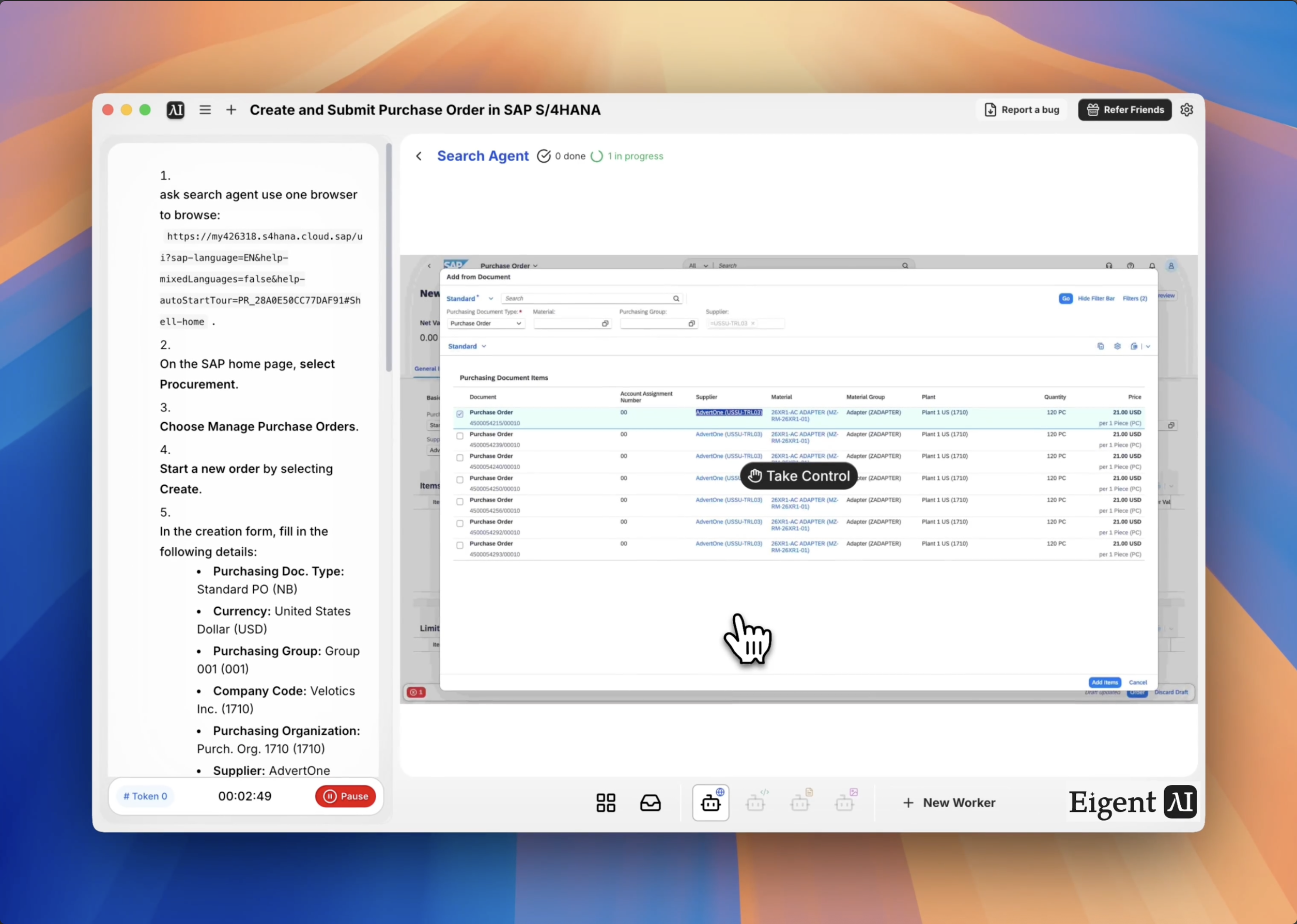
Open your browser and go to the SAP home page. Select Procurement → Manage Purchase Orders → Create. Fill in: Purchasing Doc. Type: Standard PO (NB), Currency: USD, Purchasing Group: Group 001 (001), Company Code: Velotics Inc. (1710), Purchasing Organization: Purch. Org. 1710 (1710), Supplier: AdvertOne (USSU-TRL03). In the Items table, select Add from Document, run the search by selecting Go, and check the box for the first purchase order in results. Confirm with Add Items, then submit with Order.

The more precise your instructions, the more reliably Eigent can execute the workflow without needing to pause and ask questions.

3Eigent Navigates the SAP Interface

Eigent's browser agent opens SAP in a controlled session and follows your instructions step by step — clicking through menus, populating form fields, running searches, and selecting records. It operates exactly as a trained SAP user would, just without the manual effort. You can watch the browser session in real time or let it run in the background.

4Line Item Import from Existing Document

One of the more complex parts of SAP PO creation is pulling line items from a prior document. Eigent handles this by selecting "Add from Document" in the Items table, running the search dialog, selecting the correct purchase order from the results list, and confirming the selection to populate the line items. This eliminates manual re-entry and the risk of transcription errors across fields.

5Submit and Confirm

Once all fields are populated, Eigent selects Order to submit the purchase order. It captures the confirmation screen and reports back the PO number so you have a reference for your records.

6Why This Matters

SAP workflows are a major time sink for procurement and finance teams. A single PO creation that takes 10–15 minutes manually can be completed in seconds with Eigent — with consistent accuracy across every field. And because Eigent follows explicit instructions, the workflow is auditable: you always know what was entered and why.

7What to Try Next

Create five purchase orders from the order data in this spreadsheet.

Check the status of all open purchase orders and list any that are past their delivery date.

Submit a goods receipt for PO number 4500000123.

Generate a summary report of all purchase orders created this month.

8Tips for Better Results

  • Use exact SAP field values. SAP is strict about dropdown values and codes. Provide the exact display text (e.g., "Standard PO (NB)" not just "Standard PO") to avoid validation errors.

  • Confirm browser session stability. SAP sessions can time out. If you're running a long workflow, make sure your session timeout is set appropriately before starting.

  • Add error handling to the prompt. You can tell Eigent: "If any step fails, stop and tell me what went wrong before continuing." This prevents partial submissions from going unnoticed.

Other use cases

Long-Horizon Task: GLM-5.1 vs GLM-5.2 on Eigent

Long-Horizon Task: GLM-5.1 vs GLM-5.2 on Eigent

Do a deep-dive research on 26 companies in the AI infrastructure ecosystem — the most certain main thread of the entire AI value chain. Cover these 6 sub-sectors (pick representative companies in each, from large-cap leaders down to smaller players): AI Data Center (compute infrastructure / build-out); GPU / AI Chips (training & inference silicon, ASICs, IP); Servers, Networking & Optical Modules (switches, NICs, optical interconnect); Power, Liquid Cooling & Energy Storage (power supply, thermal, energy management); AI Cloud / Compute Platform (hyperscalers, GPU clouds, compute-rental platforms); Supporting Ecosystem (HBM / advanced packaging, foundry, connectors & other critical components). For each company, research: company name, sub-sector, HQ / country; core products and its specific role in the AI chain; public or private (ticker + exchange if listed; if private, note latest valuation / funding round); market cap or valuation size (used for ranking); positioning and moat in the ecosystem (1–2 sentences); key customers / competitors. Ordering: within each sub-sector, rank from largest to smallest (by market cap / valuation). Structure the whole thing top-down: from the full hardware-ecosystem landscape → down to each individual company. Output requirements: First, generate a structured data file ai_infra_data.json — containing all 26 companies with the fields above, the 6 sub-sector classifications, a public/private flag, and a cross-company comparison matrix (sub-sector × key dimensions). Then generate a polished HTML report from that JSON: include an ecosystem landscape / layered diagram, sector sections, company cards, a clear visual indicator for public vs. private (tags or color coding), a market-cap ranking chart, and a sortable/filterable comparison table. Make the design professional, information-dense, and interactive. Verify the research data for accuracy first (listing status, tickers, valuations — use the latest figures and cite sources), then generate the report. Send the task in single-agent mode.

Build 10 Chinese New Year HTML5 Games with Eigent

Build 10 Chinese New Year HTML5 Games with Eigent

Build 10 separate and COMPLETE games with topics related to 2026 Chinese New Year (Horse) in HTML, CSS and JS (no libraries). Games must be fun, original, polished, mobile-friendly. Include scoring, scaling difficulty, restart buttons, and smooth visuals. Cover: arcade, puzzle, endless runner, reaction, strategy, memory, 2-player local, idle, retro pixel, and 1 experimental game.

Build a 3D Snow Bros Platformer with Gemini 3.1 Pro

Build a 3D Snow Bros Platformer with Gemini 3.1 Pro

Create a modern 3D side-scrolling platformer inspired by Mario, combined with Snow Bros mechanics. The player can shoot snow projectiles to freeze monsters into snowballs, then kick them to chain into other enemies. Include a scoring system, lives display, scaling difficulty, and a restart function with rich 3D layered environments.

Automate everything with AI workforce on desktop
Download Eigent

오늘 Eigent를 사용해보세요

오픈 소스 데스크톱 앱을 다운로드하세요. 여러분의 AI 워크포스가 여러분의 기기에서 실행됩니다.

Eigent 다운로드
Eigent

AI 워크포스 자동화에 대한 최신 소식, 튜토리얼, 출시 정보를 받아보세요.

제품Eigent환경요금엔터프라이즈
둘러보기솔루션활용 사례스킬플러그인블로그
개발자문서GitHubCAMEL-AI오픈소스 펀드파트너
다운로드오픈 소스용
회사회사 소개브랜드채용이용약관개인정보처리방침보안 및 신뢰쿠키 정책환불 및 체험 정책

모든 권리 보유 © 2026 EIGENT UK LTD

Eigent 1.0 새 버전 출시!download


