
logo
  • 環境
  • 企業方案
  • 價格
PersonalMay 29, 2026

Organize Your Desktop & Get an HTML Daily Report

EigentEigent
Desktop File Organization + HTML Daily Report
Automate Everything with
AI Workforce on Desktop
Download Eigent

Your End-of-Day Workflow, Handled Automatically

The end of the workday comes with a predictable set of chores: tidy up the desktop, figure out what you actually accomplished, write some kind of summary. It's low-value work that still takes real time. This workflow shows how Eigent handles both tasks in parallel — cleaning your desktop and generating an HTML daily report — while you close your laptop.

1One Prompt, Two Tasks Running at Once

There's no need to separate the requests. Tell Eigent what you want at the end of your day:

Off work now! Please help me organize the work files on my desktop into today's folder, and then write an HTML daily report summarizing what I did today.

Eigent immediately splits this into two independent tasks and runs them simultaneously — one agent handling file operations, another generating the report.

2Task Split: Developer Agent + Document Agent

Eigent's AI Workforce assigns work based on capability:

  • Developer Agent — handles system operations via terminal commands. It creates the dated folder, identifies work files, and moves everything into place using shell commands.
  • Document Agent — handles content creation. It generates the HTML daily report based on the files it identifies and any task context available.

Both agents run concurrently, which means the total time is roughly the time it takes for the slower of the two — not the sum of both.

3The Developer Agent Organizes Your Files

The Developer Agent scans your desktop for work files — documents, spreadsheets, markdown notes, CSVs, project plans — and groups them for relocation. It then:

  • Creates a new folder named with today's date (e.g., 2026-01-15)
  • Moves all identified work files into that folder using mv commands
  • Runs ls -la to verify the operation completed correctly
  • Reports back with a list of every file moved and its new location

Files that look unrelated to work (system files, personal items) are left untouched.

4The Document Agent Writes the HTML Report

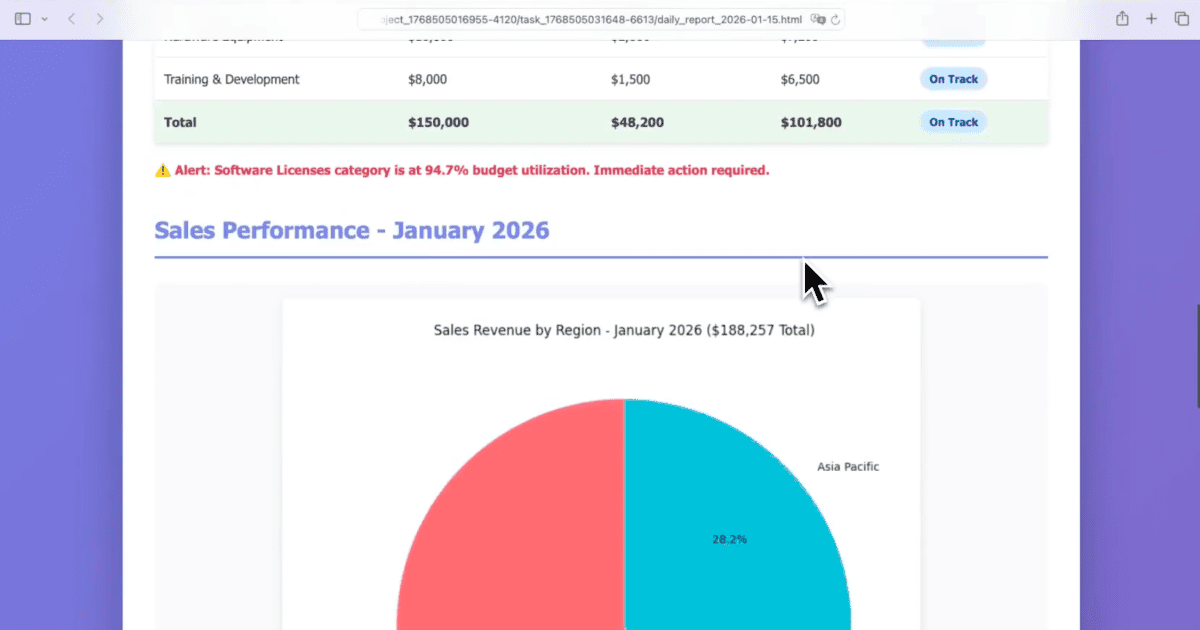
While the Developer Agent is handling the file system, the Document Agent independently writes daily_report_2026-01-15.html — a formatted HTML document containing:

  • The date and a summary of the day's work activity
  • A structured list of files that were organized, grouped by type
  • A clean, readable layout ready to open in any browser

The report is saved to the workspace directory and referenced in the task output.

5Both Tasks Complete Together

The Eigent UI shows both tasks progressing side by side, and both resolve within the same session. The result: a clean desktop with all work files in a dated folder, plus an HTML report documenting the activity — produced without switching between apps or writing a single line of code.

6Customizing the Workflow

The default behavior works out of the box, but you can tailor it precisely:

Organize my desktop files into today's folder. Create subfolders for Documents, Spreadsheets, and Code files. In the daily report, include a section for "Completed Tasks" and "Open Items" with a placeholder for me to fill in.

Move only files created or modified today. Leave older files on the desktop.

Save the daily report to my Google Drive folder instead of the desktop.

7What to Try Next

Run this same workflow every weekday at 6pm automatically.

After organizing, identify the five largest files on my desktop and ask me whether to archive or delete them.

Generate the daily report as a PDF instead of HTML.

Check if any of the files moved today are duplicates of files already in my Documents folder.

8Tips for Better Results

  • Run it consistently. The dated folder structure (YYYY-MM-DD) creates a natural archive you can search by date. After a month of running this workflow, your desktop will stay consistently clean.

  • Ask for a preview first. Adding "show me which files you plan to move before you move them" gives you a review step on the first run, so you can confirm the agent's categorization logic before it becomes automated.

  • Expand the report template. If you want the daily report to include more than file activity — tasks completed, meetings attended, links visited — include that context in your prompt or connect additional data sources like your calendar or notes app.

Other use cases

Long-Horizon Task: GLM-5.1 vs GLM-5.2 on Eigent

Long-Horizon Task: GLM-5.1 vs GLM-5.2 on Eigent

Do a deep-dive research on 26 companies in the AI infrastructure ecosystem — the most certain main thread of the entire AI value chain. Cover these 6 sub-sectors (pick representative companies in each, from large-cap leaders down to smaller players): AI Data Center (compute infrastructure / build-out); GPU / AI Chips (training & inference silicon, ASICs, IP); Servers, Networking & Optical Modules (switches, NICs, optical interconnect); Power, Liquid Cooling & Energy Storage (power supply, thermal, energy management); AI Cloud / Compute Platform (hyperscalers, GPU clouds, compute-rental platforms); Supporting Ecosystem (HBM / advanced packaging, foundry, connectors & other critical components). For each company, research: company name, sub-sector, HQ / country; core products and its specific role in the AI chain; public or private (ticker + exchange if listed; if private, note latest valuation / funding round); market cap or valuation size (used for ranking); positioning and moat in the ecosystem (1–2 sentences); key customers / competitors. Ordering: within each sub-sector, rank from largest to smallest (by market cap / valuation). Structure the whole thing top-down: from the full hardware-ecosystem landscape → down to each individual company. Output requirements: First, generate a structured data file ai_infra_data.json — containing all 26 companies with the fields above, the 6 sub-sector classifications, a public/private flag, and a cross-company comparison matrix (sub-sector × key dimensions). Then generate a polished HTML report from that JSON: include an ecosystem landscape / layered diagram, sector sections, company cards, a clear visual indicator for public vs. private (tags or color coding), a market-cap ranking chart, and a sortable/filterable comparison table. Make the design professional, information-dense, and interactive. Verify the research data for accuracy first (listing status, tickers, valuations — use the latest figures and cite sources), then generate the report. Send the task in single-agent mode.

Build 10 Chinese New Year HTML5 Games with Eigent

Build 10 Chinese New Year HTML5 Games with Eigent

Build 10 separate and COMPLETE games with topics related to 2026 Chinese New Year (Horse) in HTML, CSS and JS (no libraries). Games must be fun, original, polished, mobile-friendly. Include scoring, scaling difficulty, restart buttons, and smooth visuals. Cover: arcade, puzzle, endless runner, reaction, strategy, memory, 2-player local, idle, retro pixel, and 1 experimental game.

Build a 3D Snow Bros Platformer with Gemini 3.1 Pro

Build a 3D Snow Bros Platformer with Gemini 3.1 Pro

Create a modern 3D side-scrolling platformer inspired by Mario, combined with Snow Bros mechanics. The player can shoot snow projectiles to freeze monsters into snowballs, then kick them to chain into other enemies. Include a scoring system, lives display, scaling difficulty, and a restart function with rich 3D layered environments.

Automate everything with AI workforce on desktop
Download Eigent

立即試用 Eigent

下載開源桌面 app。你的 AI workforce,直接在你電腦上運行。

下載 Eigent
Eigent

獲取 AI workforce 自動化的最新更新、教學與版本消息。

產品Eigent環境定價企業方案
探索解決方案使用案例技能外掛網誌
開發者文件GitHubCAMEL-AIOpen Source Fund合作夥伴
下載適用於開源版
公司關於我們品牌招聘使用條款私隱政策安全與信任Cookie 政策退款與試用政策

版權所有 © 2026 EIGENT UK LTD

Eigent 1.0 新版本已發佈!download


