
Research and Build a Themed HTML Report on Google Gemma Using a Self-Hosted Gemma 4 Model
Researching a new AI model family means juggling multiple sources, synthesizing findings, and then formatting everything into a presentable deliverable. This workflow shows how Eigent eliminates that entire pipeline — powered by a locally hosted Gemma 4 31B model running via vLLM, it orchestrates multiple agents to research, write, style, and deliver a polished HTML page from a single prompt.
What makes this demo remarkable is that the entire workflow — multi-agent orchestration, live web research, skill-based document generation, and themed HTML output — is driven by an open-weight 31B parameter model running on your own hardware.
Configure Gemma 4 as Your Model in Eigent
Go to Settings → Agents → vLLM and set the Model Endpoint URL to your locally hosted instance (e.g., http://localhost:8000/v1) and set the Model Type to gemma4-31b.
This tells Eigent to route all agent tasks through your self-hosted Gemma 4 instance instead of a cloud API, keeping your data local and your inference costs at zero.
Download and Import the Agent Skills
Head over to the Eigent Skills Hub at eigent.ai/skills and download the doc-coauthoring and theme-factory skill packages as zip files.
Back in Eigent, go to Settings → Agents → Skills and use the Add Skill dialog to drag and drop both zip files. Each skill package contains a SKILL.md file that tells Eigent when and how to activate the skill. The theme-factory skill also includes 10 pre-built theme definitions with curated color palettes and font pairings.
Submit the Research Prompt
With skills imported and Gemma 4 configured, type your task prompt into Eigent's chat input:
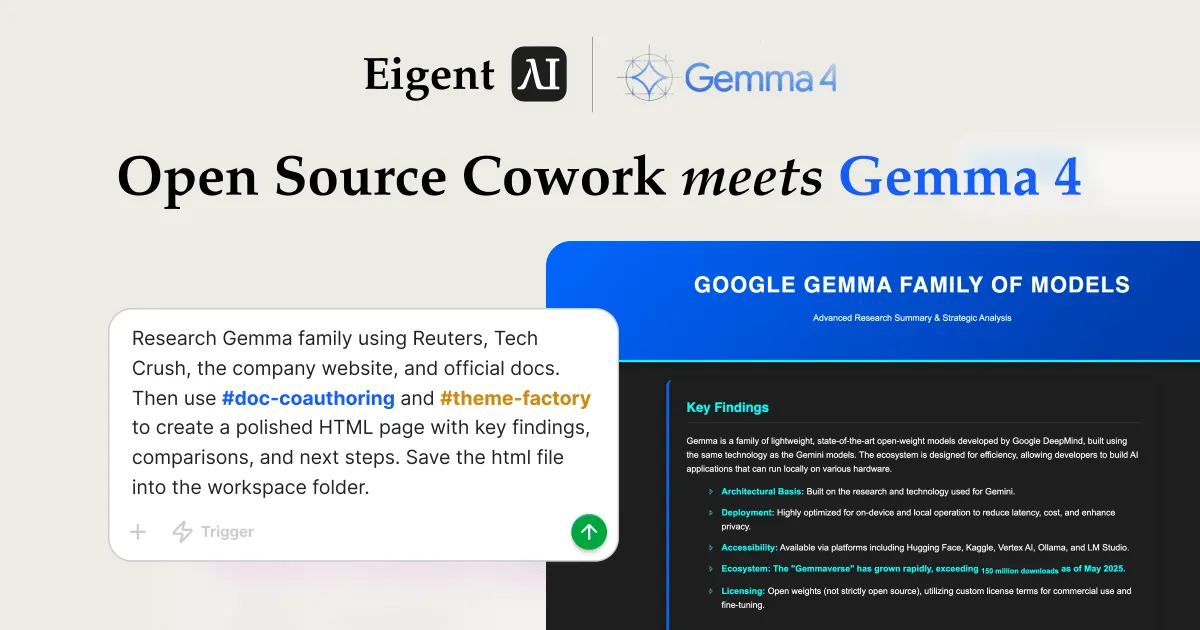
Research Gemma family using Reuters, TechCrunch, the company website, and official docs. Then use {{doc-coauthoring}} and {{theme-factory}} to create a polished HTML page with key findings, comparisons, and next steps. Save the html file into the workspace folder.
The {{doc-coauthoring}} and {{theme-factory}} references tell Eigent to activate both skills for this workflow. Eigent immediately begins planning the execution.
Watch Eigent Decompose and Plan the Task
Gemma 4 analyzes the prompt and breaks it into two sequential tasks:
-
Research Task: Research the Gemma family of models using Reuters, TechCrunch, the official Google website, and official documentation. Extract key findings, model comparisons, and recommended next steps. Output a detailed research summary in markdown format containing three sections: "Key Findings", "Comparisons", and "Next Steps".
-
HTML Generation Task: Using the provided research summary, use the
doc-coauthoringandtheme-factoryskills to create a polished, professional HTML page. Save the final HTML file to the working directory.
This task decomposition happens automatically — Gemma 4 understands the dependencies and sequences the work accordingly.
Multi-Agent Orchestration Kicks Off
Eigent spins up multiple specialized agents in parallel to execute the plan:
-
Browser Agent launches concurrent browser sessions to research across the web. It visits Google search, Reuters, TechCrunch, the official Google DeepMind page for Gemma, and the Google AI blog — all simultaneously to maximize throughput.
-
Developer Agent stands by with its pending task, waiting for the research summary before proceeding to HTML generation.
The Browser Agent flexes Gemma 4's large context window by processing multiple web pages concurrently, extracting relevant information about the Gemma model family's architecture, deployment options, ecosystem, and licensing.
Browser Agent Delivers the Research Summary
After visiting all specified sources, the Browser Agent produces a structured Completion Report containing the synthesized research. The report covers:
-
Key Findings: Gemma is a family of lightweight, state-of-the-art open-weight models developed by Google DeepMind, built using the same technology as the Gemini models. The ecosystem is designed for efficiency, allowing developers to build AI applications that can run locally on various hardware.
-
Core Characteristics: Architectural basis built on Gemini research; highly optimized for on-device and local operation; accessible via Hugging Face, Kaggle, Vertex AI, Ollama, and LM Studio; ecosystem growth exceeding 110 million downloads; open-weight licensing with custom license terms for commercial use.
-
Comparisons with GPT-4: While GPT-4 is a large-scale multimodal model typically accessed via API or cloud, Gemma provides an open-weights alternative allowing for local deployment, full fine-tuning control, and offline operation.
-
Next Steps: Recommended actions including development integration, on-device deployment testing, specialized use cases, and scaling options.
This markdown research summary is automatically passed to the Developer Agent as input for the next phase.
Developer Agent Ingests Skills and Generates the HTML
The Developer Agent receives the research summary and activates both skills. It reads the doc-coauthoring SKILL.md to understand the structured document workflow, and the theme-factory SKILL.md to access the curated theme collection.
Using the terminal, the Developer Agent:
- Looks up available skills to find doc-coauthoring and theme-factory
- Reads the theme showcase to select an appropriate visual theme
- Creates the project directory in the workspace
- Writes a complete, self-contained HTML file that combines the research content with the selected theme's color palette and typography
The Developer Agent applies the theme's hex codes, font pairings, and visual identity across all sections — headings, body text, card components, and background elements — producing a deliverable that looks hand-designed by a professional.
Review the Final Themed HTML Report
The finished HTML page is saved directly into the workspace folder. Opening it reveals a polished, dark-themed report titled "Google Gemma Family of Models — Advanced Research Summary & Strategic Analysis" with:
- A Key Findings section with styled bullet points covering Gemma's architecture, deployment characteristics, accessibility, ecosystem growth, and licensing terms
- A Comparisons matrix contrasting Gemma against cloud-based alternatives like GPT-4
- A Next Steps section with actionable recommendations for development integration, on-device deployment, specialized use cases, and scaling
- A professional footer with source attribution
The entire page is responsive, self-contained in a single HTML file, and ready to share with stakeholders or publish internally — all generated by a 31B open-weight model running on local hardware.
Why This Workflow Matters
This demo showcases three capabilities working together:
- Open-weight model power: Gemma 4 31B, running locally via vLLM, handles complex multi-agent orchestration, live web research, and code generation — tasks typically associated with much larger cloud-hosted models.
- Skill composition: The doc-coauthoring and theme-factory skills compose seamlessly. Neither skill knows about the other; Eigent orchestrates them into a single pipeline.
- Multi-agent parallelism: The Browser Agent researches concurrently across multiple sources while the Developer Agent waits for the structured handoff, maximizing throughput without sacrificing quality.
What to Try Next
Once the first report is generated, you can build on it with follow-up prompts like:
Swap the theme to "Arctic Frost" and regenerate the same report.
Replace the Gemma research with a deep dive into a different AI model family.
Add the pptx skill to generate a slide deck from the same research.
Run the same workflow with a different Gemma variant to compare output quality across model sizes.
Tips for Better Results
- Name your sources explicitly. Specifying Reuters, TechCrunch, and official docs gives the Browser Agent a clear research path instead of relying on open-ended search.
- Use double-brace skill references. Writing
{{doc-coauthoring}}and{{theme-factory}}in your prompt explicitly activates those imported skills. - Specify the output location. Asking to "save the HTML file into the workspace folder" tells the Developer Agent exactly where to write the final deliverable.
- Let the model plan. Gemma 4's task decomposition is most effective when you describe the desired outcome rather than prescribing individual steps.




