
logo
  • 環境
  • 企業方案
  • 價格
DeveloperJul 20, 2025

Tweet from AMD ROCm OpenAI Day 0 Blog

EigentEigent
Tweet from AMD ROCm OpenAI Day 0 Blog
Automate Everything with
AI Workforce on Desktop
Download Eigent

Read a Technical Blog and Post a Tweet — Using a Local Model

This workflow demonstrates three of Eigent's advanced capabilities working together: a customized MCP tool that gives Eigent Twitter access, a tailored Twitter Agent that handles content creation, and a local open-source model that runs the intelligence layer — without sending your content to a cloud API. The result is a fully automated pipeline from blog URL to published tweet, running entirely on your own infrastructure.

1Set Up the Twitter MCP and Local Model

This workflow requires two things to be configured in Eigent before you start:

  • Twitter MCP: A customized connector that gives Eigent the ability to post to Twitter/X on your behalf. Set this up in Settings → Connectors with your Twitter API credentials.
  • Local model: Eigent can route this task through an open-source model you've deployed locally (e.g., via Ollama or a similar runtime). Configure your local endpoint in Settings → Models and select it as the active model for this session.

Once both are in place, the entire workflow runs locally — the blog content is read, the tweet is drafted, and the post is sent, without any data leaving your machine.

2Write the Blog-to-Tweet Prompt

Point Eigent at the source blog and describe the task:

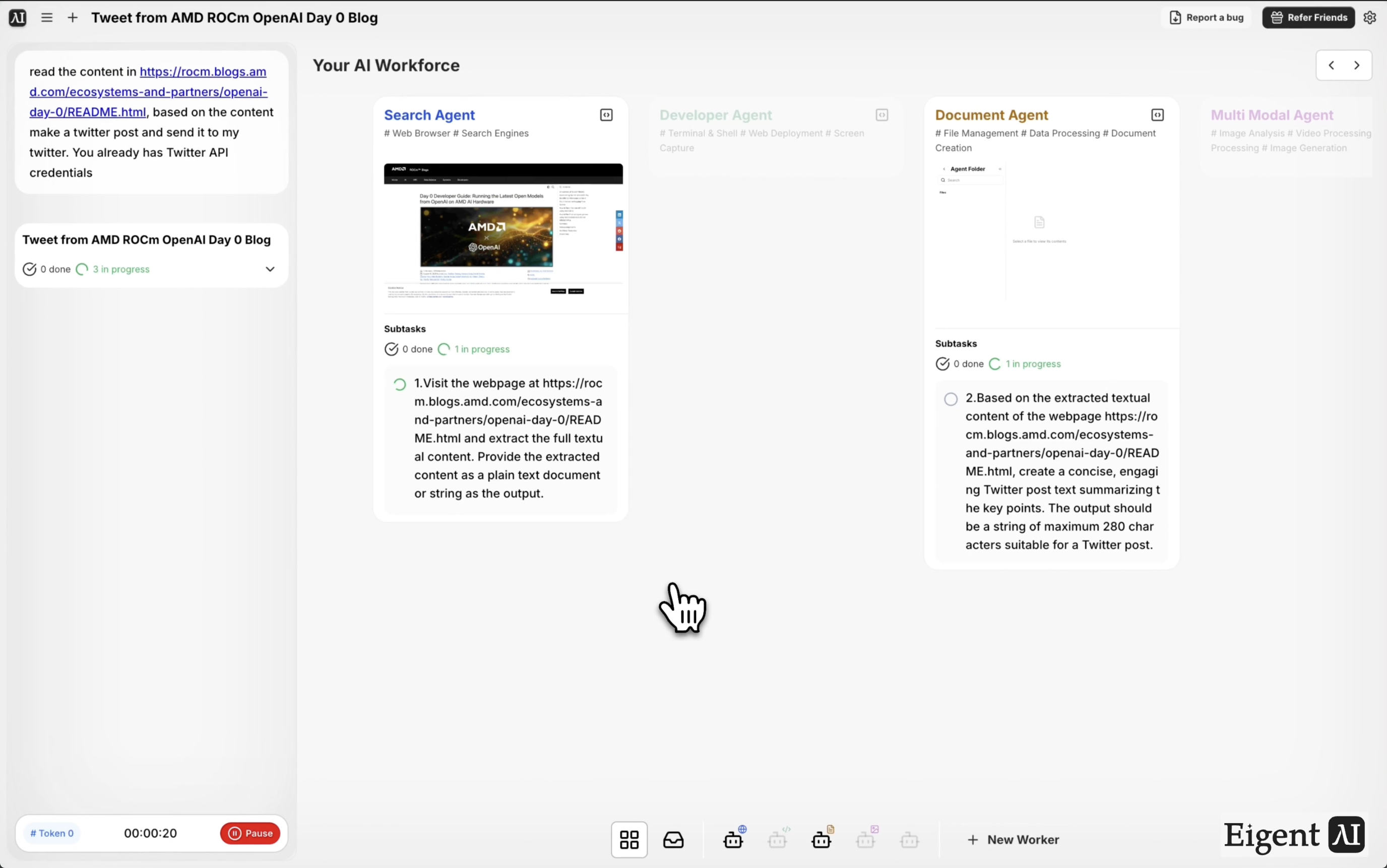
Read the content at https://rocm.blogs.amd.com/ecosystems-and-partners/openai-day-0/README.html. Based on the content, create a Twitter post and send it to my Twitter account.

Eigent's browser agent will fetch the page content and pass it to the Twitter Agent for processing.

3The Browser Agent Reads the Blog

Eigent fetches the AMD ROCm blog post about OpenAI Day 0 support — a technical post covering how AMD's ROCm software stack achieved Day 0 compatibility with OpenAI's latest models. The browser agent extracts the key points: the headline finding, what "Day 0" means in context, and the most quotable technical insight.

4The Local Model Drafts the Tweet

The extracted blog content is passed to your locally deployed model, which runs as the Twitter Agent. The model reads the material, identifies the most shareable insight or finding, and drafts a tweet that fits within the character limit and reads naturally for a technical audience.

Because this runs on a local model, you have full control over the model choice, the system prompt, and how the agent formats its output. You can tune the agent to match your brand voice or audience.

5Tweet Published via MCP

The drafted tweet is sent to Twitter via the customized MCP tool, which handles authentication and the API call. You'll receive a confirmation with the live post URL once the tweet is published.

6Why This Matters

Running a content pipeline entirely on local infrastructure is significant for organizations that handle sensitive topics, operate in restricted environments, or simply want to avoid cloud API dependencies. This workflow shows that the full loop — read, draft, publish — can run without any external model API calls. The customized MCP and tailored agent architecture also makes it reusable: swap the blog URL and the same pipeline publishes content from any source.

7What to Try Next

Read the top three posts from this blog this week and post a tweet for each one.

Adapt this pipeline to post to LinkedIn instead of Twitter.

After posting, check the tweet's engagement after 24 hours and report back.

Run the same workflow for a blog post in German and translate the tweet to English before posting.

8Tips for Better Results

  • Tune the local model prompt. The default Twitter Agent prompt produces neutral, factual tweets. If you want a more opinionated or punchy style, customize the agent's system prompt to match your voice.

  • Test with a review step first. Add "show me the draft before posting" to your prompt for the first few runs, so you can verify the local model's output quality before automating publishing.

  • Match the model to the content type. Technical blog posts (like this AMD ROCm post) benefit from a model with strong technical comprehension. For marketing or lifestyle content, a general-purpose model may work better.

Other use cases

Long-Horizon Task: GLM-5.1 vs GLM-5.2 on Eigent

Long-Horizon Task: GLM-5.1 vs GLM-5.2 on Eigent

Do a deep-dive research on 26 companies in the AI infrastructure ecosystem — the most certain main thread of the entire AI value chain. Cover these 6 sub-sectors (pick representative companies in each, from large-cap leaders down to smaller players): AI Data Center (compute infrastructure / build-out); GPU / AI Chips (training & inference silicon, ASICs, IP); Servers, Networking & Optical Modules (switches, NICs, optical interconnect); Power, Liquid Cooling & Energy Storage (power supply, thermal, energy management); AI Cloud / Compute Platform (hyperscalers, GPU clouds, compute-rental platforms); Supporting Ecosystem (HBM / advanced packaging, foundry, connectors & other critical components). For each company, research: company name, sub-sector, HQ / country; core products and its specific role in the AI chain; public or private (ticker + exchange if listed; if private, note latest valuation / funding round); market cap or valuation size (used for ranking); positioning and moat in the ecosystem (1–2 sentences); key customers / competitors. Ordering: within each sub-sector, rank from largest to smallest (by market cap / valuation). Structure the whole thing top-down: from the full hardware-ecosystem landscape → down to each individual company. Output requirements: First, generate a structured data file ai_infra_data.json — containing all 26 companies with the fields above, the 6 sub-sector classifications, a public/private flag, and a cross-company comparison matrix (sub-sector × key dimensions). Then generate a polished HTML report from that JSON: include an ecosystem landscape / layered diagram, sector sections, company cards, a clear visual indicator for public vs. private (tags or color coding), a market-cap ranking chart, and a sortable/filterable comparison table. Make the design professional, information-dense, and interactive. Verify the research data for accuracy first (listing status, tickers, valuations — use the latest figures and cite sources), then generate the report. Send the task in single-agent mode.

Build 10 Chinese New Year HTML5 Games with Eigent

Build 10 Chinese New Year HTML5 Games with Eigent

Build 10 separate and COMPLETE games with topics related to 2026 Chinese New Year (Horse) in HTML, CSS and JS (no libraries). Games must be fun, original, polished, mobile-friendly. Include scoring, scaling difficulty, restart buttons, and smooth visuals. Cover: arcade, puzzle, endless runner, reaction, strategy, memory, 2-player local, idle, retro pixel, and 1 experimental game.

Build a 3D Snow Bros Platformer with Gemini 3.1 Pro

Build a 3D Snow Bros Platformer with Gemini 3.1 Pro

Create a modern 3D side-scrolling platformer inspired by Mario, combined with Snow Bros mechanics. The player can shoot snow projectiles to freeze monsters into snowballs, then kick them to chain into other enemies. Include a scoring system, lives display, scaling difficulty, and a restart function with rich 3D layered environments.

Automate everything with AI workforce on desktop
Download Eigent

立即試用 Eigent

下載開源桌面 app。你的 AI workforce,直接在你電腦上運行。

下載 Eigent
Eigent

獲取 AI workforce 自動化的最新更新、教學與版本消息。

產品Eigent環境定價企業方案
探索解決方案使用案例技能外掛網誌
開發者文件GitHubCAMEL-AIOpen Source Fund合作夥伴
下載適用於開源版
公司關於我們品牌招聘使用條款私隱政策安全與信任Cookie 政策退款與試用政策

版權所有 © 2026 EIGENT UK LTD

Eigent 1.0 新版本已發佈!download


