

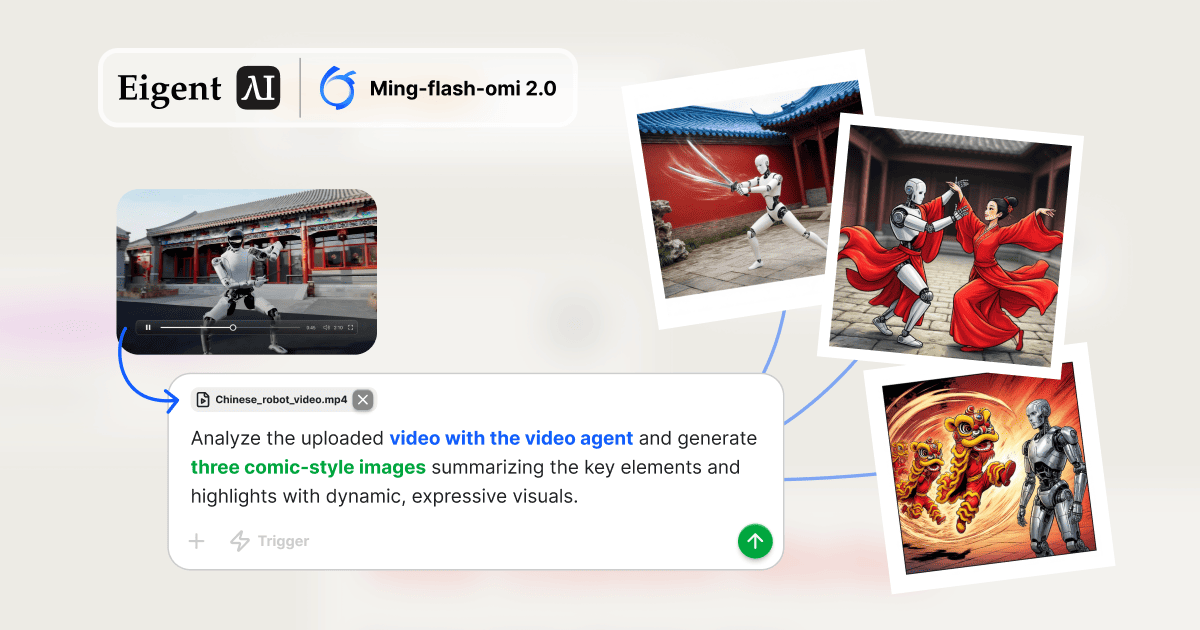
Jedes Video automatisch in Comic-Kunst verwandeln
Videoinhalte sind reich an visuellen Momenten, die es verdienen, festgehalten und geteilt zu werden. Doch diese Momente herauszufiltern, zu verstehen, was sie überzeugend macht, und sie in nutzbare kreative Assets zu verwandeln, ist ein mehrstufiger Prozess, der normalerweise manuelle Schnittwerkzeuge und Designkenntnisse erfordert. Dieser Workflow zeigt Eigent dabei, alles nacheinander zu erledigen: das Video analysieren, die wichtigsten Highlights extrahieren, Comic-Style-Bilder generieren — ganz ohne auch nur ein einziges Frame manuell zu bearbeiten.
Ming-Flash-Omni 2.0 für multimodale Aufgaben konfigurieren
Dieser Workflow erfordert ein Modell, das sowohl Videoverständnis als auch Bilderzeugung beherrscht. Inclusion Ming-Flash-Omni 2.0 ist ein multimodales Modell, das beide Fähigkeiten nativ unterstützt. Konfiguriere es in Eigent unter Settings → Models → Custom Models und wähle es dann als Standard aus.
Sobald es konfiguriert ist, aktiviert Eigent für diese Aufgabe zwei spezialisierte Agenten:
- Video Agent — ausgestattet mit Terminal Toolkit und Ming Omni Skills für die Videobearbeitung
- Image Agent — ausgestattet mit Terminal Toolkit und Ming Omni Skills für die Bilderzeugung
Video anhängen und den Prompt schreiben
Hänge deine Videodatei an und beschreibe das gewünschte kreative Ergebnis:
Analysiere das hochgeladene Video mit dem Video Agent und generiere drei Comic-Style-Bilder, die die wichtigsten Elemente und Highlights mit dynamischen, ausdrucksstarken Visuals zusammenfassen.
Eigent teilt dies sofort in zwei aufeinanderfolgende Aufgaben auf — die Bilderzeugung hängt vom Analyseergebnis ab, daher läuft der Video Agent zuerst.
Aufgabe 1 — Video Agent extrahiert strukturierte Daten
Der Video Agent verarbeitet die hochgeladene Videodatei und erzeugt ein strukturiertes JSON-Objekt mit folgenden Inhalten:
- Wichtige Szenen mit Zeitstempeln — die visuell bedeutendsten Momente im Video
- Hauptaktionen und Ereignisse — bestimmte Bewegungen oder Interaktionen, die den Inhalt prägen
- Visuelle und emotionale Themen — die ästhetischen und tonalen Elemente, die sich am besten für eine Comic-Adaption eignen
Diese Ausgabe ist das „Creative Brief“, das an den Image Agent weitergegeben wird. Anstatt Bilder blind direkt aus dem Rohvideo zu generieren, extrahiert die Pipeline zuerst die Bedeutung — und liefert dadurch deutlich bewusstere und relevantere Ergebnisse.
Aufgabe 2 — Image Agent generiert drei Comic-Panels
Der Image Agent liest das JSON der Videoanalyse und leitet für jedes der drei identifizierten Schlüsselelemente einen eigenen Text-Prompt ab. Mit diesen Prompts generiert er drei Comic-Style-PNG-Bilder — jeweils stilisiert, ausdrucksstark und visuell dynamisch.
Die Ausgabedateien werden im Arbeitsverzeichnis des Agents gespeichert:
comic_summary_1.pngcomic_summary_2.pngcomic_summary_3.png
Jedes Bild erfasst eine andere Dimension des Ausgangsvideos — eine bestimmte Bewegung, einen Charaktermoment, ein thematisches Element — und macht die Sammlung sowohl als narrative Sequenz als auch als eigenständige Social-Media-Assets nutzbar.
Wo dieser Workflow eingesetzt werden kann
Diese Video-zu-Bild-Pipeline eröffnet eine Reihe praktischer Anwendungen für die Content-Erstellung:
- Social-Media-Umnutzung: Verwandle ein langes Video ohne manuelle Bearbeitung in teilbare Bild-Posts
- Storyboard-Erstellung: Extrahiere visuelle Aufschlüsselungen wichtiger Szenen aus Aufnahmen für die Produktionsplanung
- Produktdemos: Konvertiere einen Screenrecording- oder Produkt-Rundgang in illustrierte Zusammenfassungskarten
- Event-Highlights: Analysiere eine Präsentation oder Konferenzaufzeichnung und generiere illustrierte Recap-Bilder
Die Pipeline funktioniert mit jedem Video-Input — nicht nur mit Robotertanz-Aufnahmen. Der Analyseschritt abstrahiert die Struktur jedes Videos in semantisch reichhaltige Daten, auf die der Bildgenerator reagieren kann.
Was du als Nächstes ausprobieren kannst
Analysiere ein Produktdemo-Video und generiere drei Werbebilder, die die gezeigten Hauptfunktionen hervorheben.
Nimm ein 30-minütiges aufgezeichnetes Meeting und generiere fünf Comic-Panel-Zusammenfassungen der wichtigsten getroffenen Entscheidungen.
Generiere sowohl Comic-Style- als auch fotorealistische Versionen derselben Video-Highlights für A/B-Tests.
Erstelle nach dem Generieren der Bilder für jedes einzelne einen Social-Media-Post mit einem vorgeschlagenen Caption-Text.
Tipps für bessere Ergebnisse
-
Verwende klares, gut ausgeleuchtetes Video. Die Szenenerkennung des Video Agent funktioniert am besten mit Aufnahmen mit klaren visuellen Momenten und eindeutigem Inhalt. Video mit geringer Qualität oder schnellen Schnitten kann eine weniger präzise Analyse erzeugen.
-
Gib den Kunststil vor. „Comic-Style“ deckt ein breites Spektrum ab — von Manga über amerikanische Superhelden bis hin zu Zeitungscartoons. Wenn du einen bevorzugten visuellen Stil hast, füge ihn im Prompt hinzu, um die Ausgabe des Image Agent zu steuern.
-
Iteriere beim Analyseschritt. Bevor du Bilder generierst, kannst du Eigent bitten, dir das JSON der Videoanalyse zu zeigen und zu bestätigen, dass die richtigen Highlights erfasst wurden. Das ist besonders nützlich für längere oder komplexere Videos.





