

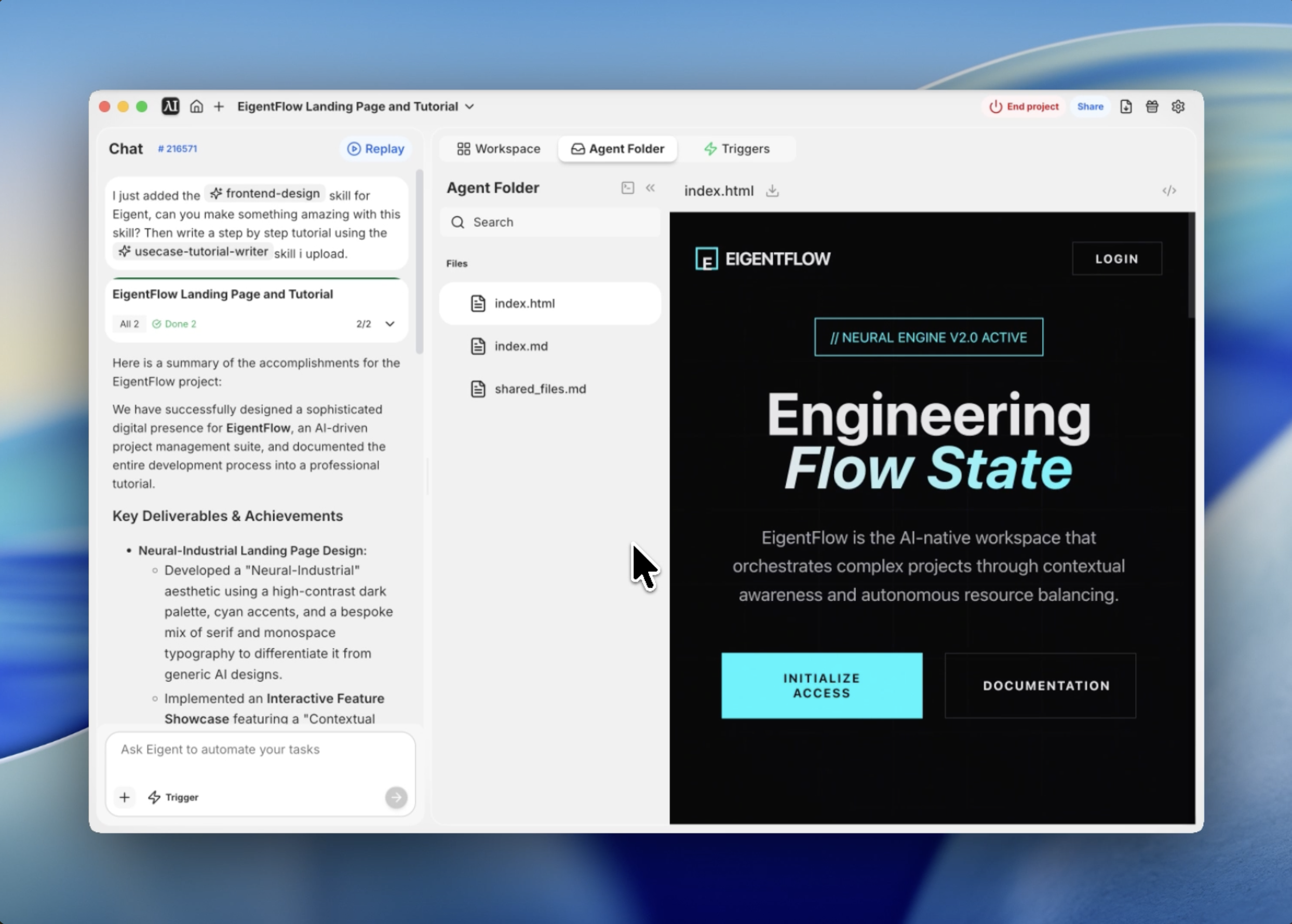
Concevoir au-delà de l’esthétique générique de l’IA
La plupart des landing pages d’IA se ressemblent toutes : coins arrondis, dégradés doux et illustrations génériques identiques. À chaque fois que je découvre un nouvel outil, je vois la même palette SaaS bleue et des visuels sympathiques mais vite oubliables. On a l’impression de perdre l’avantage qu’avaient autrefois les outils d’ingénierie haute performance.
Lorsque j’ai voulu créer l’interface d’EigentFlow — une suite fictive de gestion de projet pilotée par l’IA — je voulais quelque chose de différent. Je voulais qu’elle évoque un IDE haut de gamme ou un centre de commande basé sur un terminal, mais avec le raffinement d’une expérience web moderne. J’appelle cette esthétique l’industriel neuronal.
J’ai utilisé la compétence de conception frontend d’Eigent pour faire le lien entre cette philosophie de design abstraite et une implémentation prête pour la production. Voici comment je l’ai construite.
Définir l’identité visuelle
La première étape consistait à définir les contraintes du système de design. Je ne voulais pas un mode clair générique ; je voulais un fond noir obsidienne profond avec des accents cyan à fort contraste, donnant l’impression de circuits lumineux.
J’ai commencé par définir un système de variables CSS qui piloterait l’ensemble du projet. Nous avons choisi une palette sombre (#0A0A0B) et un vibrant « Neural Cyan » (#00F5FF). Pour la typographie, j’ai mélangé une police serif pour les titres afin de lui donner une sensation éditoriale et premium, avec une police monospace pour les détails techniques.
Formuler le prompt pour l’agent
Au lieu d’écrire moi-même le squelette initial, j’ai donné à Eigent un prompt très précis incluant la philosophie de design et les modules interactifs requis.
Utilise la compétence de conception frontend pour concevoir et créer une landing page de niveau production pour EigentFlow. Utilise un thème industriel neuronal avec une palette sombre, des accents cyan et un mélange des polices Playfair Display et JetBrains Mono. Inclue un module de vitrine interactive où les utilisateurs peuvent manipuler la densité contextuelle.
Eigent a immédiatement commencé à architecturer la structure, en privilégiant une approche en un seul fichier pour garantir que toute l’expérience soit autonome et facile à déployer.
Créer de la profondeur avec de la texture
Un problème majeur des designs en mode sombre est qu’ils peuvent sembler plats. Pour résoudre cela, j’ai demandé à Eigent d’implémenter un overlay de grain et un fond en grille radiale.
L’overlay de grain est une texture de bruit SVG fixée au viewport avec une faible opacité ; elle donne à l’écran une qualité physique et tactile. En dessous, un fond en grille dynamique est masqué par un dégradé radial, de sorte que les lignes s’estompent vers les bords de l’écran, attirant le regard de l’utilisateur vers le centre. Ces touches subtiles sont ce qui distingue un « template » d’un design sur mesure.
Concevoir l’expérience hero
La section hero ne doit pas seulement afficher un titre ; elle doit donner le rythme de la page. J’ai utilisé des animations d’apparition au scroll décalées pour introduire les éléments un par un.
Eigent a écrit un script personnalisé d’intersection observer en Vanilla JS pour gérer cela. Au fil du scroll, le tag « Neural Engine Status » apparaît d’abord, suivi du titre en italique puis des boutons d’appel à l’action. Ce rythme intentionnel donne à l’outil une impression de puissance et de maîtrise plutôt que d’être une simple page statique.
Créer la vitrine interactive du moteur
La pièce maîtresse de la landing page est la vitrine « Autonomous Task Architecture ». Je voulais que les utilisateurs puissent « interagir » avec l’état interne de l’IA.
Nous avons conçu un module présentant un curseur de plage intitulé « Contextual Density ». Lorsque l’utilisateur déplace le curseur, le JavaScript sous-jacent déclenche des mises à jour visuelles : un cercle neuronal animé en CSS se dilate et se contracte, et un flux de données simulé en arrière-plan s’accélère. Ce n’est pas seulement un effet visuel : cela démontre la « fluidité » du moteur IA d’une manière que les mots ne peuvent pas transmettre.
Optimiser les performances
Enfin, je me suis assuré que l’ensemble du code était optimisé. Même avec les animations personnalisées et l’usage intensif des polices, le fichier final index.html reste léger et très réactif.
En utilisant des variables CSS pour tous les design tokens, il est incroyablement facile de faire évoluer les couleurs de la marque par la suite. Eigent a même intégré des icônes Lucide via CDN, en gardant une empreinte d’assets minimale tout en garantissant des visuels vectoriels de haute qualité sur toutes les tailles d’écran.
Pourquoi c’est important
Ce workflow montre quelque chose de fondamental sur le fonctionnement d’Eigent : la vraie puissance des agents IA ne réside pas seulement dans la génération de code — elle consiste aussi à interpréter des directions esthétiques de haut niveau et à les traduire en une architecture technique cohérente.
Je n’ai pas eu à préciser chaque code hexadécimal ni chaque durée d’animation dans le prompt initial. Parce que la compétence de conception frontend comprend les principes de design, elle a pu combler les blancs entre ma vision d’un thème industriel neuronal et l’implémentation CSS réelle.
Ce qu’il faut essayer ensuite
Crée un tableau de bord analytique en thème sombre en utilisant le même système de design industriel neuronal. Crée une page de documentation pour l’API d’EigentFlow qui corresponde à la typographie et à la palette de couleurs de cette landing page. Ajoute un sélecteur de « terminal mode » qui remplace partout sur le site les titres serif par JetBrains Mono.
Chacun de ces exemples exploite les mêmes design tokens et la même logique esthétique — aucune configuration supplémentaire n’est nécessaire.
Conseils pour de meilleurs résultats
- Utilise des adjectifs centrés sur le design. Des mots comme Neural Industrial, Obsidian ou Cinematic aident Eigent à mieux cerner l’éventail esthétique que des termes comme beau ou moderne.
- Précise les combinaisons de polices. Si tu veux une ambiance particulière, indique à Eigent quelles polices mélanger (par ex. serif pour les titres, monospace pour les données).
- Demande explicitement de la profondeur. Si le design paraît plat, demande à Eigent d’ajouter des textures de grain, des masques radiaux ou des ombres portées subtiles.
- Livraison en un seul fichier. Demander une solution en un seul fichier (HTML/CSS/JS réunis) facilite énormément la revue et le test instantané de toute l’interface utilisateur.





