
Rechercher et créer un rapport HTML thématique sur Google Gemma à l'aide d'un modèle Gemma 4 auto-hébergé
Rechercher une nouvelle famille de modèles d'IA implique de jongler avec plusieurs sources, de synthétiser les résultats, puis de tout mettre en forme dans un livrable présentable. Ce workflow montre comment Eigent élimine tout ce pipeline — propulsé par un modèle Gemma 4 31B hébergé localement et exécuté via vLLM, il orchestre plusieurs agents pour rechercher, rédiger, styliser et livrer une page HTML soignée à partir d'une seule invite.
Ce qui rend cette démonstration remarquable, c'est que l'ensemble du workflow — orchestration multi-agents, recherche web en direct, génération de documents basée sur des skills et sortie HTML thématique — est piloté par un modèle open-weight de 31B paramètres exécuté sur votre propre matériel.
Configurez Gemma 4 comme votre modèle dans Eigent
Accédez à Settings → Agents → vLLM et définissez le Model Endpoint URL sur votre instance hébergée localement (par exemple, http://localhost:8000/v1) et définissez le Model Type sur gemma4-31b.
Cela indique à Eigent de faire passer toutes les tâches des agents par votre instance Gemma 4 auto-hébergée plutôt que par une API cloud, ce qui garde vos données en local et vos coûts d'inférence à zéro.
Téléchargez et importez les skills d'agent
Rendez-vous sur le Skills Hub d'Eigent à l'adresse eigent.ai/skills et téléchargez les packages de skills doc-coauthoring et theme-factory sous forme de fichiers zip.
De retour dans Eigent, allez dans Settings → Agents → Skills et utilisez la boîte de dialogue Add Skill pour faire glisser-déposer les deux fichiers zip. Chaque package de skill contient un fichier SKILL.md qui indique à Eigent quand et comment activer le skill. Le skill theme-factory inclut également 10 définitions de thèmes préconçues avec des palettes de couleurs et des associations de polices sélectionnées.
Soumettez l'invite de recherche
Une fois les skills importés et Gemma 4 configuré, saisissez votre invite de tâche dans l'entrée de chat d'Eigent :
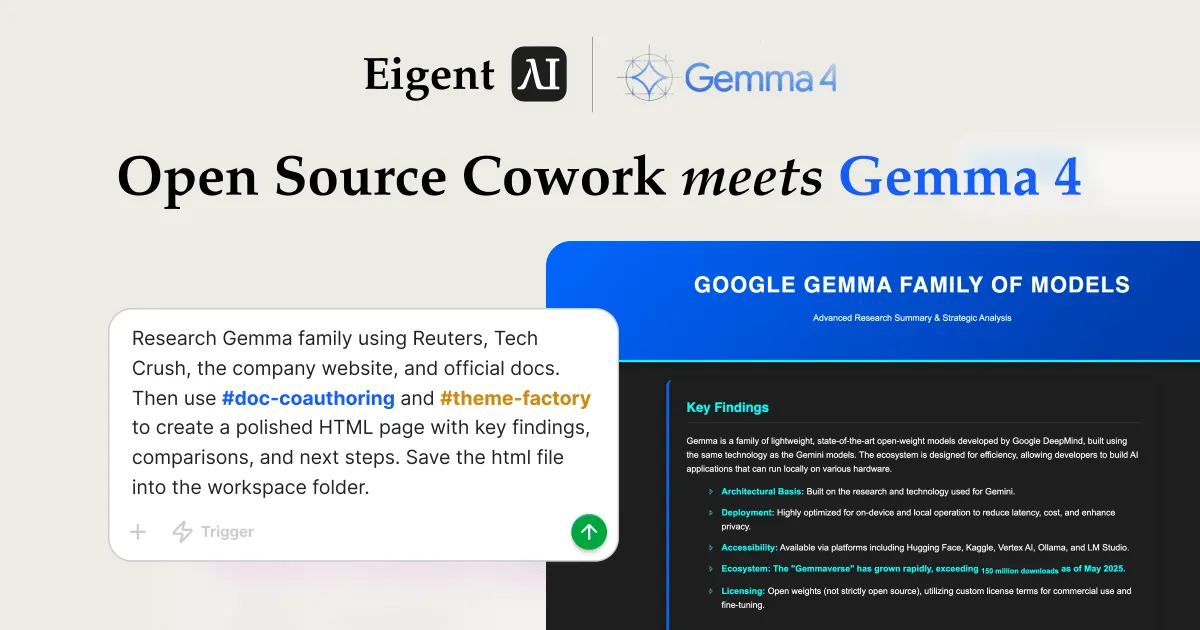
Recherchez la famille Gemma à l'aide de Reuters, TechCrunch, du site de l'entreprise et de la documentation officielle. Puis utilisez {{doc-coauthoring}} et {{theme-factory}} pour créer une page HTML soignée avec les principaux enseignements, des comparaisons et les prochaines étapes. Enregistrez le fichier html dans le dossier workspace.
Les références {{doc-coauthoring}} et {{theme-factory}} indiquent à Eigent d'activer ces deux skills pour ce workflow. Eigent commence immédiatement à planifier l'exécution.
Observez Eigent décomposer et planifier la tâche
Gemma 4 analyse l'invite et la découpe en deux tâches séquentielles :
-
Tâche de recherche : Rechercher la famille de modèles Gemma à l'aide de Reuters, TechCrunch, du site officiel de Google et de la documentation officielle. Extraire les principaux enseignements, les comparaisons entre modèles et les prochaines étapes recommandées. Produire un résumé de recherche détaillé au format markdown contenant trois sections : "Key Findings", "Comparisons" et "Next Steps".
-
Tâche de génération HTML : À partir du résumé de recherche fourni, utiliser les skills
doc-coauthoringettheme-factorypour créer une page HTML soignée et professionnelle. Enregistrer le fichier HTML final dans le répertoire de travail.
Cette décomposition des tâches se produit automatiquement — Gemma 4 comprend les dépendances et enchaîne le travail en conséquence.
L'orchestration multi-agents démarre
Eigent déploie plusieurs agents spécialisés en parallèle pour exécuter le plan :
-
Browser Agent lance des sessions de navigateur concurrentes pour effectuer des recherches sur le web. Il visite Google Search, Reuters, TechCrunch, la page officielle Google DeepMind dédiée à Gemma et le blog Google AI — le tout simultanément afin de maximiser le débit.
-
Developer Agent reste en attente avec sa tâche en suspens, attendant le résumé de recherche avant de passer à la génération HTML.
Le Browser Agent exploite la grande fenêtre de contexte de Gemma 4 en traitant plusieurs pages web en parallèle, en extrayant des informations pertinentes sur l'architecture, les options de déploiement, l'écosystème et les licences de la famille de modèles Gemma.
Le Browser Agent livre le résumé de recherche
Après avoir visité toutes les sources spécifiées, le Browser Agent produit un Completion Report structuré contenant la recherche synthétisée. Le rapport couvre :
-
Key Findings : Gemma est une famille de modèles open-weight légers et à la pointe de la technologie, développée par Google DeepMind, construite avec la même technologie que les modèles Gemini. L'écosystème est conçu pour l'efficacité, permettant aux développeurs de créer des applications d'IA capables de fonctionner localement sur divers matériels.
-
Core Characteristics : base architecturale issue de la recherche Gemini ; fortement optimisée pour l'exécution sur appareil et en local ; accessible via Hugging Face, Kaggle, Vertex AI, Ollama et LM Studio ; croissance de l'écosystème dépassant 110 millions de téléchargements ; licence open-weight avec des conditions de licence personnalisées pour l'usage commercial.
-
Comparisons with GPT-4 : alors que GPT-4 est un modèle multimodal à grande échelle généralement accessible via API ou dans le cloud, Gemma propose une alternative open-weights permettant le déploiement local, un contrôle complet du fine-tuning et un fonctionnement hors ligne.
-
Next Steps : actions recommandées incluant l'intégration au développement, les tests de déploiement sur appareil, les cas d'usage spécialisés et les options de montée en charge.
Ce résumé de recherche en markdown est automatiquement transmis au Developer Agent comme entrée pour la phase suivante.
Le Developer Agent ingère les skills et génère le HTML
Le Developer Agent reçoit le résumé de recherche et active les deux skills. Il lit le fichier SKILL.md de doc-coauthoring pour comprendre le workflow de document structuré, ainsi que le SKILL.md de theme-factory pour accéder à la collection de thèmes sélectionnés.
À l'aide du terminal, le Developer Agent :
- Consulte les skills disponibles pour trouver doc-coauthoring et theme-factory
- Lit la galerie de thèmes pour sélectionner un thème visuel approprié
- Crée le répertoire du projet dans le workspace
- Écrit un fichier HTML complet et autonome qui combine le contenu de recherche avec la palette de couleurs et la typographie du thème sélectionné
Le Developer Agent applique les codes hexadécimaux du thème, les associations de polices et l'identité visuelle sur toutes les sections — titres, texte principal, composants de cartes et éléments d'arrière-plan — produisant un livrable qui semble conçu à la main par un professionnel.
Examinez le rapport HTML thématique final
La page HTML terminée est enregistrée directement dans le dossier workspace. En l'ouvrant, on découvre un rapport soigné à thème sombre intitulé "Google Gemma Family of Models — Advanced Research Summary & Strategic Analysis" avec :
- Une section Key Findings avec des puces stylisées couvrant l'architecture de Gemma, ses caractéristiques de déploiement, son accessibilité, la croissance de son écosystème et ses conditions de licence
- Une matrice Comparisons opposant Gemma à des alternatives basées sur le cloud comme GPT-4
- Une section Next Steps avec des recommandations concrètes pour l'intégration au développement, le déploiement sur appareil, les cas d'usage spécialisés et la mise à l'échelle
- Un pied de page professionnel avec attribution des sources
L'ensemble de la page est responsive, autonome dans un seul fichier HTML, et prêt à être partagé avec les parties prenantes ou publié en interne — le tout généré par un modèle open-weight de 31B exécuté sur du matériel local.
Pourquoi ce workflow est important
Cette démonstration met en avant trois capacités qui fonctionnent ensemble :
- Puissance du modèle open-weight : Gemma 4 31B, exécuté localement via vLLM, gère l'orchestration multi-agents complexe, la recherche web en direct et la génération de code — des tâches généralement associées à des modèles cloud bien plus grands.
- Composition de skills : Les skills doc-coauthoring et theme-factory se composent de manière fluide. Aucun des deux ne connaît l'existence de l'autre ; Eigent les orchestre en un seul pipeline.
- Parallélisme multi-agents : Le Browser Agent effectue des recherches simultanées sur plusieurs sources tandis que le Developer Agent attend la transmission structurée, maximisant le débit sans sacrifier la qualité.
Que tester ensuite
Une fois le premier rapport généré, vous pouvez l'enrichir avec des invites de suivi comme :
Remplacez le thème par "Arctic Frost" et régénérez le même rapport.
Remplacez la recherche sur Gemma par une analyse approfondie d'une autre famille de modèles d'IA.
Ajoutez le skill pptx pour générer un jeu de diapositives à partir de la même recherche.
Exécutez le même workflow avec une autre variante de Gemma pour comparer la qualité de sortie entre différentes tailles de modèle.
Conseils pour de meilleurs résultats
- Nommez explicitement vos sources. Préciser Reuters, TechCrunch et la documentation officielle donne au Browser Agent un chemin de recherche clair au lieu de s'appuyer sur une recherche ouverte.
- Utilisez des références de skills entre doubles accolades. Écrire
{{doc-coauthoring}}et{{theme-factory}}dans votre invite active explicitement ces skills importés. - Spécifiez l'emplacement de sortie. Demander d'« enregistrer le fichier HTML dans le dossier workspace » indique au Developer Agent exactement où écrire le livrable final.
- Laissez le modèle planifier. La décomposition des tâches de Gemma 4 est plus efficace lorsque vous décrivez le résultat souhaité plutôt que d'indiquer chaque étape individuellement.





