

Créez un deck de lancement en quelques minutes avec une seule skill importée
Chaque équipe produit avec laquelle j’ai travaillé rencontre le même goulot d’étranglement : quelqu’un doit créer un deck. Peu importe qu’il s’agisse d’une annonce de lancement, d’une mise à jour pour le conseil d’administration ou d’un point d’équipe — le processus est toujours le même. Vous passez 30 minutes à faire des recherches, encore une heure à mettre en forme les diapositives, puis quelqu’un vous demande de « le rendre un peu plus soigné ». Voilà déjà une demi-journée perdue.
J’ai conçu Eigent pour résoudre exactement ce genre de workflows, et ce cas d’usage est l’un de mes préférés. Vous importez une seule skill, vous décrivez votre tâche, et vous laissez Eigent gérer la recherche et la génération des diapositives de bout en bout. Voici comment cela fonctionne.
Importez la skill PPTX
Eigent prend en charge les skills personnalisées, ce qui signifie que vous pouvez étendre ce que votre collègue open source peut faire au-delà de ses capacités par défaut. Dans ce cas, nous ajoutons une skill PowerPoint qui donne à Eigent la capacité de créer et de structurer des decks de diapositives.
Rendez-vous dans Paramètres → Agents → Skills et importez votre package de skill. Télécharger la skill PPTX : pptx.zip
Une fois installée, Eigent sait comment générer des présentations, et vous pouvez réutiliser cette skill pour chaque deck futur sans la réimporter.
Décrivez ce que vous voulez
C’est là que les choses deviennent intéressantes. Au lieu d’ouvrir PowerPoint et de fixer une diapositive vide, vous dites simplement à Eigent ce dont vous avez besoin. Voici le prompt que j’ai utilisé :
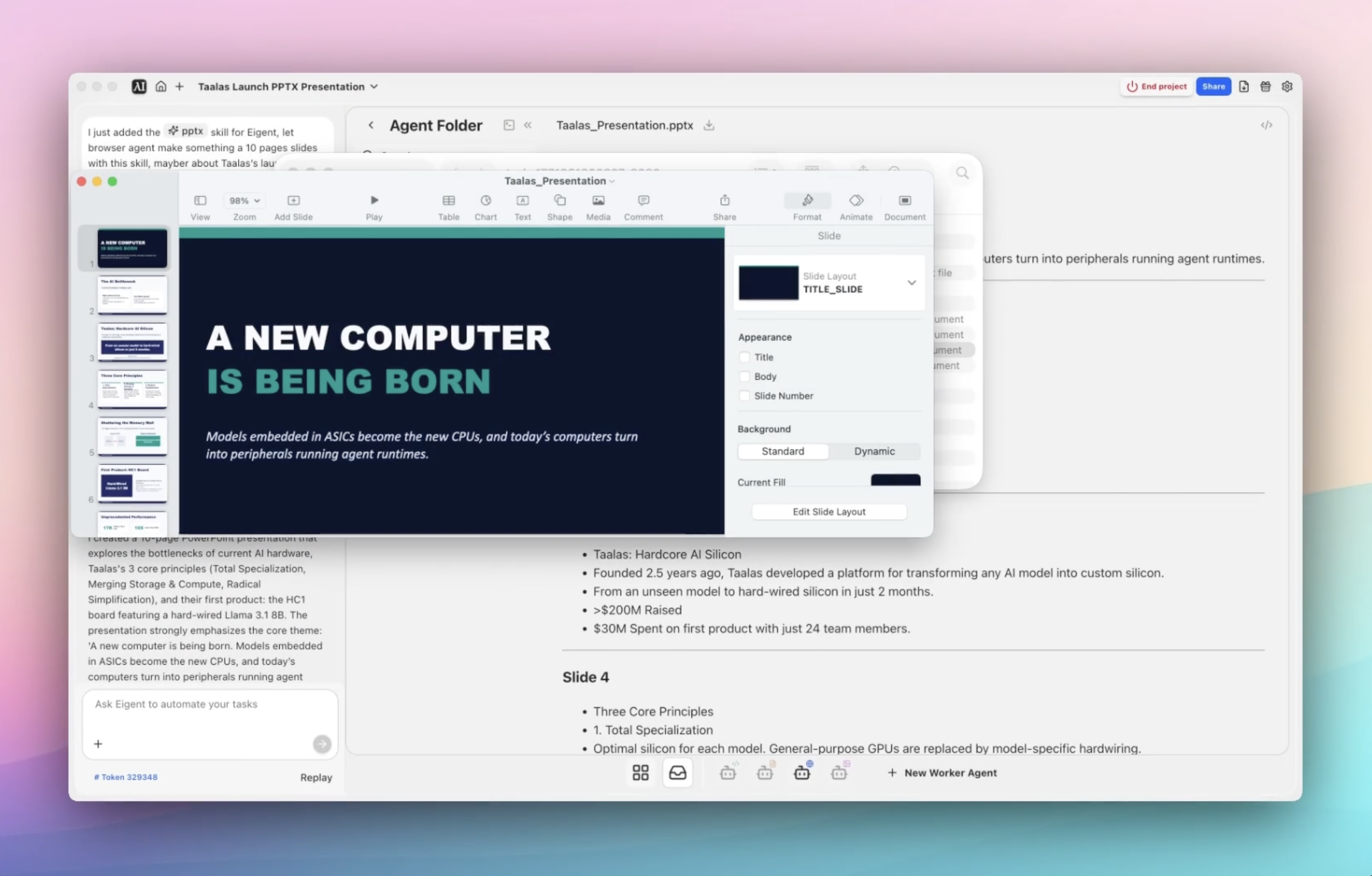
Je viens d’ajouter la skill PPTX pour Eigent. Utilise l’agent navigateur pour créer avec cette skill une présentation de 10 diapositives sur le lancement de Taalas. On a l’impression qu’un nouvel ordinateur est en train de naître : les modèles intégrés dans des ASIC deviennent les nouveaux CPU, et les ordinateurs d’aujourd’hui se transforment en périphériques exécutant des runtimes d’agents. J’aimerais partager cela avec l’équipe.
C’est tout. Pas de modèles, pas de mise en forme par glisser-déposer, pas de recherche Google pour trouver les dernières statistiques. Vous décrivez la tâche et laissez Eigent déterminer la structure.
Donnez du contexte à Eigent (ou pas)
Pour cette tâche précise, aucun fichier n’est nécessaire. Eigent peut collecter tout ce dont il a besoin sur le web à l’aide de l’agent navigateur. Cela dit, vous pouvez toujours améliorer le résultat en ajoutant du contexte supplémentaire — un brief de lancement, des notes sur le ton préféré de votre équipe, des guidelines de marque ou les points clés à absolument inclure.
Plus vous donnez de contexte, plus le résultat sera aligné. Mais même sans cela, Eigent fait un bon travail pour rassembler des informations pertinentes et les structurer en quelque chose de présentable.
Laissez Eigent faire le travail
C’est là que la magie opère. Eigent lance l’agent navigateur pour rechercher le lancement de Taalas — en ouvrant plusieurs sessions de navigateur en parallèle pour recueillir du contexte à partir de sources pertinentes. Une fois qu’il dispose de suffisamment de matière, il exécute la skill PPTX importée pour générer la présentation réelle.
L’ensemble du workflow s’exécute de manière autonome. Vous n’avez pas besoin de le surveiller, de copier-coller des liens ou d’organiser manuellement la recherche en diapositives. Eigent s’occupe de la recherche, structure le récit et produit un deck final enregistré localement sur votre desktop.
Passez en revue ce qu’Eigent a construit
Une fois le workflow terminé, ouvrez le dossier de sortie de l’agent et vous trouverez tout ce qu’Eigent a généré : une présentation de 10 diapositives, le contexte de recherche recueilli par l’agent navigateur et tous les artefacts associés. À partir de là, vous pouvez relire, ajuster et partager.
Passer de « l’idée » à un deck partageable en un seul flux — sans recherche ni mise en forme manuelles — est le genre de workflow qui prenait autrefois une demi-journée et qui prend maintenant quelques minutes.
Pourquoi c’est important
Il ne s’agit pas seulement de créer des diapositives plus vite. Ce workflow démontre quelque chose de fondamental sur le fonctionnement d’Eigent : les skills le rendent personnalisable.
Au lieu de dépendre d’un ensemble fixe d’actions, vous importez une skill et transformez Eigent en coéquipier qui s’adapte à votre workflow. Aujourd’hui, il crée des decks. Demain, il pourra générer des rapports, rédiger des documents ou automatiser toute autre tâche répétitive à laquelle votre équipe est confrontée.
Que tester ensuite
Une fois votre premier deck créé, essayez d’étendre le workflow avec des prompts de suivi :
Crée une deuxième version de ce deck pour les investisseurs.
Fais une version plus courte de 5 diapositives pour le point d’équipe interne.
Transforme cette présentation en brief de lancement d’une page.
Utilise le même style pour créer un deck de roadmap produit.
Chacun de ces cas exploite la même skill importée — aucune configuration supplémentaire n’est nécessaire. Votre workflow devient plus rapide à chaque réutilisation.
Conseils pour de meilleurs résultats
-
Soyez précis sur le résultat attendu. Dites à Eigent combien de diapositives vous voulez, qui est le public cible et quel ton utiliser — équipe interne, mise à jour pour dirigeants ou présentation aux investisseurs produiront des decks très différents.
-
Ajoutez du contexte quand vous en avez. Eigent peut faire des recherches sur le web, mais lui donner un lien de lancement ou vos propres notes rend le deck final plus aligné avec votre message réel.
-
Réutilisez les skills d’un workflow à l’autre. Une fois qu’une skill est importée, elle reste disponible pour toutes les futures tâches. Plus vous utilisez Eigent, plus vos workflows deviennent rapides — et cet effet se cumule avec le temps.





