

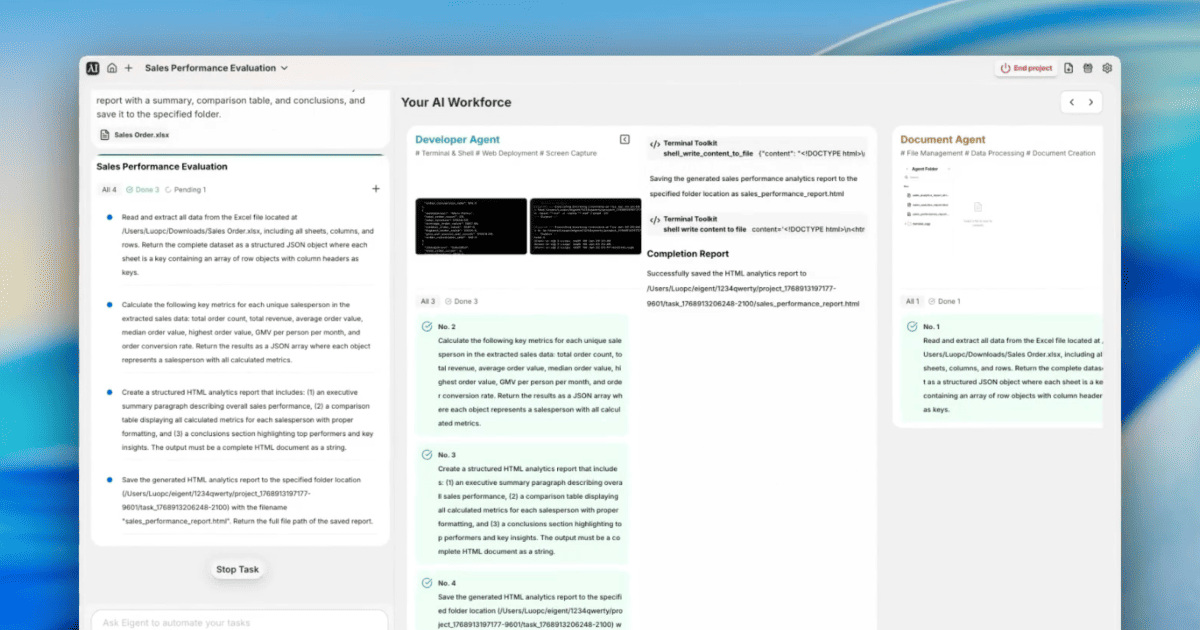
Des données Excel brutes à un rapport d’analyse prêt pour le comité de direction
Les revues de performance commerciale commencent toujours de la même façon : télécharger les données, ouvrir Excel, écrire des formules, mettre un tableau en forme, le copier dans un rapport, ajouter quelques conclusions. Cela prend des heures. Ce workflow — Eigent propulsé par Kimi K2.5 — fait tout cela à partir d’une seule instruction et d’une pièce jointe au format tableur, en produisant un rapport d’analyse HTML complet avec un résumé exécutif, un tableau comparatif et des recommandations stratégiques.
Configurez Kimi K2.5 comme modèle
Kimi K2.5 (de Moonshot AI) est un modèle de grande capacité, bien adapté aux tâches intensives en données. Pour l’utiliser dans Eigent, allez dans Settings → Models → Custom Models, ajoutez Kimi avec ces paramètres :
- API Host:
https://api.moonshot.ai/v1 - Model:
kimi-k2.5
Validez et définissez-le comme Default. Eigent confirme la prise en charge du function calling avant l’enregistrement.
Joignez le fichier Excel et rédigez l’instruction
Joignez directement votre fichier Sales Order.xlsx à l’instruction :
Nous réalisons une évaluation des performances commerciales. Analysez les données de vente de ce système et comparez tous les commerciaux selon des indicateurs clés, notamment le nombre de commandes, le chiffre d’affaires total, la valeur moyenne/médiane/la plus élevée des commandes, le GMV par personne et par mois, ainsi que le taux de conversion des commandes. Générez un rapport d’analyse HTML structuré avec un résumé, un tableau comparatif et des conclusions, puis enregistrez-le dans le dossier spécifié.
Aucun prétraitement. Aucun tableau croisé dynamique. Juste le fichier et la demande.
Trois agents, trois tâches
Eigent répartit le travail en trois tâches séquentielles :
Tâche 1 — Document Agent : lit chaque ligne et chaque colonne de Sales Order.xlsx et renvoie l’ensemble des données sous forme de JSON structuré, avec chaque feuille comme clé et les lignes comme objets indexés par en-tête de colonne.
Tâche 2 — Developer Agent : prend l’ensemble de données JSON et calcule, pour chaque commercial :
- Nombre total de commandes
- Chiffre d’affaires total
- Valeur moyenne, médiane et la plus élevée des commandes
- GMV par personne et par mois
- Taux de conversion des commandes
Les résultats sont renvoyés sous forme de tableau JSON.
Tâche 3 — Developer Agent : prend le JSON des métriques et génère un rapport HTML complet :
- Paragraphe de résumé exécutif
- Tableau comparatif avec tous les commerciaux et toutes les métriques côte à côte
- Principaux enseignements et conclusions stratégiques
- Enregistré sous
sales_performance_report.html
Ce que révèle le rapport
Le rapport généré fait ressortir des enseignements qui peuvent prendre des heures à découvrir manuellement. Dans cet exemple de jeu de données, l’analyse a révélé :
- Meilleur performer : Mitchell Admin — responsable de 89 % du chiffre d’affaires total de l’équipe, avec une valeur moyenne de commande de 15 095 $
- Concentration du chiffre d’affaires : Mitchell génère 9 fois plus de revenus que le deuxième meilleur performer
- Taux de conversion de 100 % pour les trois commerciaux — chaque commande passée a été finalisée
- Répartition volume vs valeur : Marc Demo arrive en tête pour le nombre de commandes (35 commandes) mais affiche une valeur moyenne de commande plus faible
- Opportunité de croissance : OdooBot présente une valeur moyenne raisonnable avec un faible nombre de commandes, ce qui indique un potentiel inexploité
Chaque insight s’accompagne d’une recommandation stratégique correspondante — conception d’un programme de mentorat, analyse de redistribution du territoire, partage des méthodes — prête à être utilisée dans une revue de performance.
Pourquoi c’est important
Les pipelines Excel vers rapport font partie des goulets d’étranglement les plus courants dans les opérations commerciales. La combinaison de l’extraction des données, du calcul des métriques et de la génération narrative est exactement le type de travail analytique multi-étapes qu’Eigent prend en charge nativement — sans que l’utilisateur ait à écrire du Python, configurer un outil BI ou mettre en forme un tableau manuellement.
Kimi K2.5 apporte un solide raisonnement quantitatif à ce workflow, ce qui le rend fiable sur différentes structures de tableurs et différents volumes de données.
Que tester ensuite
Exécutez la même analyse sur le fichier Excel du trimestre dernier et comparez-la à celle-ci — montrez-moi quels commerciaux se sont améliorés.
Générez le rapport au format PDF et envoyez-le par e-mail à l’équipe commerciale.
Ajoutez un graphique en barres montrant le chiffre d’affaires par commercial dans le rapport HTML.
Signalez tout commercial dont le taux de conversion a baissé de plus de 10 % par rapport au mois dernier.
Conseils pour de meilleurs résultats
-
Nettoyez vos en-têtes de colonnes. Le Document Agent associe les lignes aux noms des en-têtes de colonnes. Des en-têtes cohérents et descriptifs (comme "Order Value" plutôt que "Col_D") rendent les calculs de métriques plus précis et les libellés du rapport plus lisibles.
-
Précisez le chemin de sortie. Inclure "enregistrez-le dans le dossier spécifié" dans votre instruction, ou indiquer un chemin absolu, garantit que le rapport arrive exactement là où vous en avez besoin — et non dans le répertoire de travail de l’agent.
-
Demandez des données prêtes pour les graphiques. Ajouter "exportez également les métriques au format CSV en parallèle du rapport HTML" vous donne un jeu de données structuré que vous pouvez intégrer dans n’importe quel outil BI pour des visualisations supplémentaires.





