

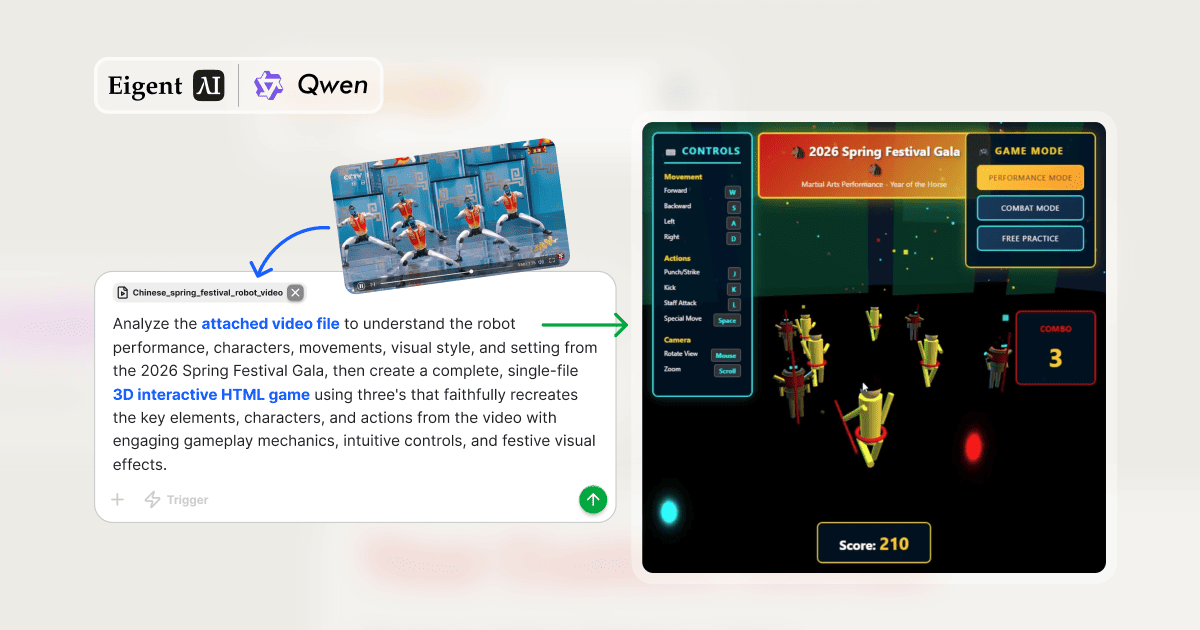
De la vidéo au jeu jouable — sans écrire une seule ligne de code
Et si vous pouviez pointer n’importe quelle vidéo et dire « transformez-la en jeu » ? Ce workflow fait exactement cela. L’agent multimodal d’Eigent regarde des images du Gala de la Fête du Printemps 2026 — une spectaculaire performance d’arts martiaux par des robots — en extrait les personnages, les mouvements et le style visuel, puis transmet cette analyse structurée à un agent développeur qui construit autour d’elle un jeu Three.js complet. L’ensemble du pipeline fonctionne à partir d’une seule invite et d’un seul fichier vidéo.
Le pipeline à deux agents
Ce workflow nécessite deux agents spécialisés qui travaillent en séquence :
- Agent multimodal — gère l’analyse d’images, le traitement vidéo, le traitement audio et la génération d’images. Il regarde la vidéo et produit des données structurées sur ce qu’il voit.
- Agent développeur — gère le terminal et le shell, le déploiement web et la capture d’écran. Il prend l’analyse structurée et construit le jeu.
L’idée clé est le relais : l’agent développeur ne reçoit pas la vidéo brute — il reçoit un document textuel structuré décrivant les personnages, les mouvements, les couleurs, le décor et les thèmes. C’est cette étape de traduction qui permet d’obtenir un rendu fidèle plutôt que générique.
Joignez la vidéo et rédigez l’invite
Joignez Martial Arts.mp4 et décrivez ce que vous voulez :
Analysez le fichier vidéo joint pour comprendre la performance des robots, les personnages, les mouvements, le style visuel et le décor du Gala de la Fête du Printemps 2026, puis créez un jeu HTML interactif 3D complet, en un seul fichier, utilisant Three.js, qui recrée fidèlement les éléments clés, les personnages et les actions de la vidéo avec des mécaniques de jeu captivantes, des contrôles intuitifs et des effets visuels festifs.
Deux tâches sont générées immédiatement — la seconde étant bloquée jusqu’à la fin de la première.
Tâche 1 — L’agent multimodal regarde la vidéo
L’agent multimodal traite Martial Arts.mp4 image par image à l’aide du Video Downloader Toolkit pour extraire des captures d’écran aux moments clés. Il analyse ensuite ces images et produit une analyse écrite complète, enregistrée sous martial_arts_video_analysis.txt :
- Personnages et robots : apparence physique, proportions, palette de couleurs (or et rouge), nombre de participants
- Mouvements et actions : techniques d’arts martiaux spécifiques observées — coups de poing, coups de pied, attaques au bâton, enchaînements chorégraphiés
- Style visuel : éclairage de scène, palette de couleurs, style de décoration festive, profondeur et échelle de l’espace de performance
- Décor et arrière-plan : environnement de scène, conception du fond, éléments atmosphériques
- Éléments festifs : décorations spécifiques au Nouvel An chinois (CNY), motifs symboliques, effets utilisés pendant la performance
Ce document devient le brief créatif — une description structurée que l’agent développeur peut exploiter avec précision.
Tâche 2 — L’agent développeur construit le jeu
Avec l’analyse en main, l’agent développeur lit les notes du Note Taking Toolkit et construit spring_festival_martial_arts_game.html — un seul fichier autonome contenant tout le HTML, le CSS et le JavaScript en ligne.
Le jeu implémente fidèlement tout ce que l’agent multimodal a identifié :
- Personnages robots 3D rendus dans Three.js avec la palette or/rouge de la vidéo
- Animations d’arts martiaux reproduisant les coups de poing, les coups de pied et les attaques au bâton observés
- Environnement de scène correspondant au décor visuel de la performance du Gala de la Fête du Printemps
- Effets de particules festifs — lanternes, étincelles, décorations CNY
- Modes de jeu multiples : Mode Performance, Mode Combat, Entraînement libre
Le jeu finalisé
Ouvrir spring_festival_martial_arts_game.html dans un navigateur offre une expérience complète :
- Écran titre : Gala de la Fête du Printemps 2026 — Performance d’arts martiaux — Année du Cheval
- Contrôles : W/S/A/D pour se déplacer · J Coup de poing/attaque · K Coup de pied · L Attaque au bâton · Espace Mouvement spécial · Souris pour la caméra · Molette pour zoomer
- HUD : compteur de score (527 affiché dans la démo), compteur de combo, indicateur de mode
- Visuel : personnages robots 3D en or/rouge, arrière-plan de scène festif, effets de particules
Nombre total de jetons utilisés : environ 467 000 — ce qui reflète la profondeur combinée de l’analyse vidéo et de la génération du jeu Three.js.
Pourquoi la vidéo-vers-le-jeu est une nouvelle catégorie de workflow
Ce pipeline établit quelque chose de nouveau : l’utilisation de la compréhension vidéo comme outil de spécification de conception. Au lieu de rédiger un document de conception de jeu, vous enregistrez ou trouvez des images de l’esthétique, des personnages et des interactions que vous souhaitez — puis vous laissez l’agent multimodal les traduire en spécifications prêtes à être implémentées.
Les applications vont bien au-delà des jeux. Le même pipeline vidéo → analyse structurée → code fonctionne pour la recréation de maquettes d’interface, la conception de systèmes d’animation, la génération de démonstrations interactives et tout contexte où la vidéo capture mieux l’intention que le texte.
Que tester ensuite
Analysez une vidéo de déballage de produit et générez un visualiseur de produit 3D interactif qui recrée l’objet à partir des images.
Regardez une vidéo de cuisine et générez une application de recette interactive étape par étape qui correspond au style visuel de la vidéo.
Analysez un montage des meilleurs moments d’un sport et générez un mini-jeu basé sur le sport montré.
Prenez le jeu de la Fête du Printemps et ajoutez un mode multijoueur où deux joueurs s’affrontent en incarnant différents robots de la performance.
Conseils pour de meilleurs résultats
-
Utilisez des images sources de haute qualité. L’extraction de scènes par l’agent multimodal est plus précise avec une vidéo nette et bien éclairée. Les vidéos de performance avec des personnages et des mouvements bien distincts — comme cette vidéo du Gala — produisent une analyse plus riche que des contenus au montage rapide ou à faible résolution.
-
Demandez à revoir l’analyse avant la construction. Ajouter « montrez-moi le document d’analyse vidéo avant de créer le jeu » vous donne un point de contrôle pour vérifier que l’agent a bien compris la vidéo avant de lancer la construction.
-
Demandez un seul fichier. Préciser « jeu HTML interactif 3D en un seul fichier » garantit que tout est autonome et immédiatement partageable, sans étape de build ni serveur.





