

logo
  • Środowiska
  • Dla firm
  • Cennik
PersonalAug 1, 2025

Add PDF Signature

Wendong FanWendong Fan
Add PDF Signature
Automate Everything with
AI Workforce on Desktop
Download Eigent

Sign Any PDF Without Leaving Your Workflow

PDF signatures used to require a specialized tool — Adobe Acrobat, DocuSign, or a paid subscription just to stamp your name on a document. Most of the time, you just want to drop an image of your signature into the right box and move on. With Eigent, you describe the task, point it to your files, and it handles the rest — including using OCR to find the signature areas automatically.

1Prepare Your Files

Before you start, make sure you have two things ready on your desktop:

  • The PDF file you need to sign
  • Your signature image (PNG or JPG works best)

If you don't already have a signature image, you can sign on paper, take a photo, and crop it to just the signature. A transparent background produces the cleanest result.

2Open Eigent and Describe the Task

Start a new session in Eigent and type your request:

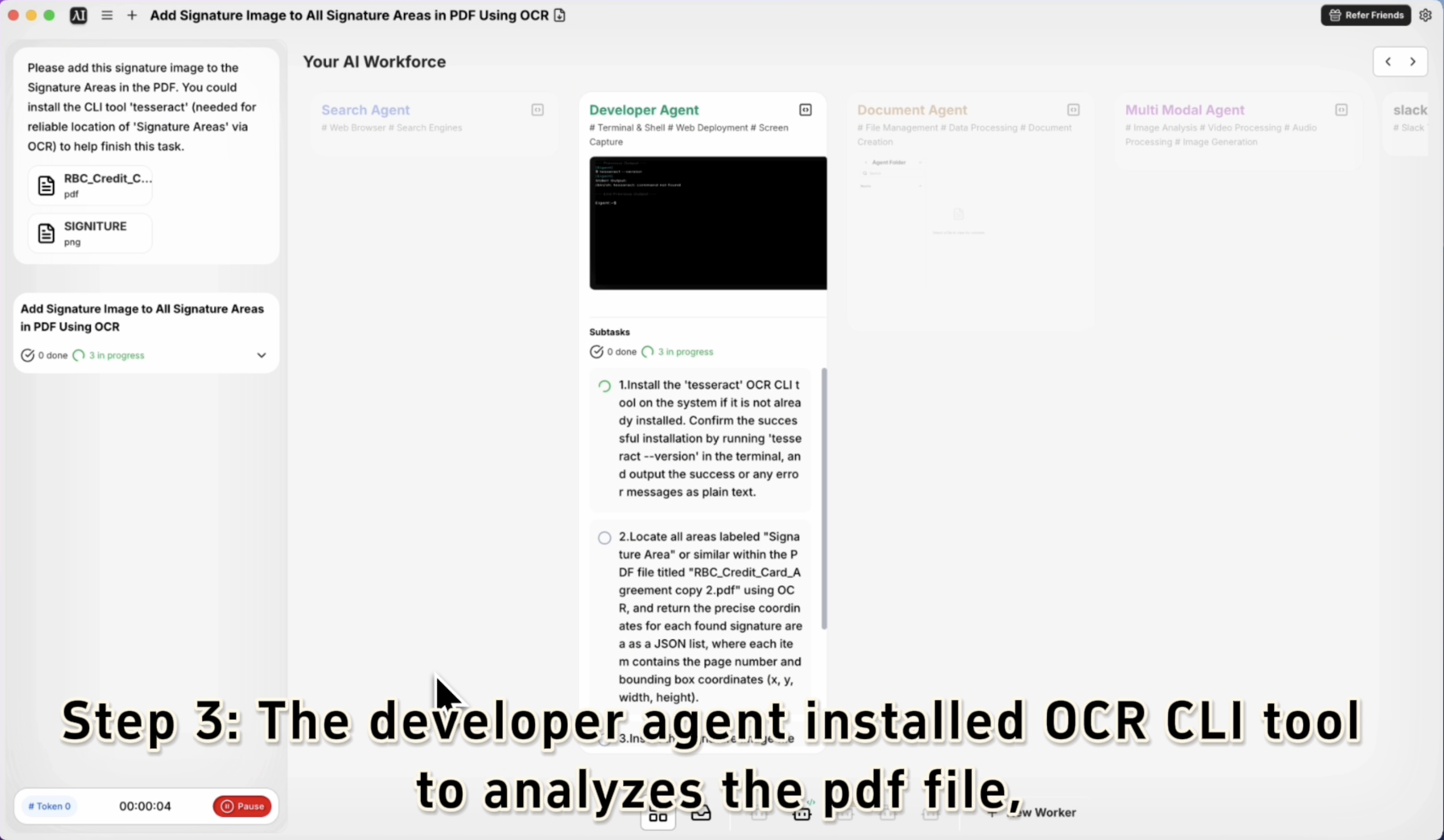
Please add this signature image to the Signature Areas in the PDF.

Drag and drop both files — the PDF and the signature image — into the Eigent chat, or reference their file paths directly. Eigent will understand which file is which based on context.

3Let Eigent Locate the Signature Areas

This is where OCR comes in. Eigent can optionally install tesseract, a command-line OCR tool, to reliably detect where "Signature Area" labels appear in the PDF. If you're working with a standard form, Eigent will scan for these markers and position your signature image precisely.

If tesseract isn't already installed, Eigent will handle the installation automatically before proceeding — or you can prompt it explicitly:

You could install the CLI tool 'tesseract' to help locate the Signature Areas more reliably.

4Eigent Applies the Signature

Once the signature areas are located, Eigent overlays your signature image at each marked location, resizing and positioning it to fit within the designated field. The output is a signed PDF saved to your desktop — ready to send.

No manual dragging, no resizing in a PDF editor, no subscription required.

5Review the Output

Open the signed PDF to confirm everything looks right. If the positioning is off or the size needs adjustment, follow up with Eigent:

The signature on page 2 is a bit too large. Can you resize it to fit within the signature box?

Eigent will reapply the signature with the adjusted parameters.

6Why This Matters

Signing PDFs is one of those tasks that should take 30 seconds but usually takes five minutes — opening the right software, figuring out the interface, resizing things manually. Eigent reduces this to a single instruction. More importantly, it handles the intelligent part: finding where the signature goes, even when the form layout isn't standard.

7What to Try Next

Add my signature to all PDFs in this folder.

Place my initials at each "Initial Here" field and my full signature at the final "Signature" line.

Sign this NDA and save a copy with today's date in the filename.

Create a signed copy with today's date stamped next to each signature.

8Tips for Better Results

  • Use a clean signature image. A PNG with a transparent background produces the cleanest overlay. If your image has a white background, it may cover form text beneath it.

  • Name your files clearly. If you have multiple PDFs and signature files open, give them descriptive names so Eigent can disambiguate without asking.

  • Mention tesseract for non-standard layouts. Prompting Eigent to use the OCR tool gives it more precision when label text isn't in a predictable location on the form.

Other use cases

Long-Horizon Task: GLM-5.1 vs GLM-5.2 on Eigent

Long-Horizon Task: GLM-5.1 vs GLM-5.2 on Eigent

Do a deep-dive research on 26 companies in the AI infrastructure ecosystem — the most certain main thread of the entire AI value chain. Cover these 6 sub-sectors (pick representative companies in each, from large-cap leaders down to smaller players): AI Data Center (compute infrastructure / build-out); GPU / AI Chips (training & inference silicon, ASICs, IP); Servers, Networking & Optical Modules (switches, NICs, optical interconnect); Power, Liquid Cooling & Energy Storage (power supply, thermal, energy management); AI Cloud / Compute Platform (hyperscalers, GPU clouds, compute-rental platforms); Supporting Ecosystem (HBM / advanced packaging, foundry, connectors & other critical components). For each company, research: company name, sub-sector, HQ / country; core products and its specific role in the AI chain; public or private (ticker + exchange if listed; if private, note latest valuation / funding round); market cap or valuation size (used for ranking); positioning and moat in the ecosystem (1–2 sentences); key customers / competitors. Ordering: within each sub-sector, rank from largest to smallest (by market cap / valuation). Structure the whole thing top-down: from the full hardware-ecosystem landscape → down to each individual company. Output requirements: First, generate a structured data file ai_infra_data.json — containing all 26 companies with the fields above, the 6 sub-sector classifications, a public/private flag, and a cross-company comparison matrix (sub-sector × key dimensions). Then generate a polished HTML report from that JSON: include an ecosystem landscape / layered diagram, sector sections, company cards, a clear visual indicator for public vs. private (tags or color coding), a market-cap ranking chart, and a sortable/filterable comparison table. Make the design professional, information-dense, and interactive. Verify the research data for accuracy first (listing status, tickers, valuations — use the latest figures and cite sources), then generate the report. Send the task in single-agent mode.

Build 10 Chinese New Year HTML5 Games with Eigent

Build 10 Chinese New Year HTML5 Games with Eigent

Build 10 separate and COMPLETE games with topics related to 2026 Chinese New Year (Horse) in HTML, CSS and JS (no libraries). Games must be fun, original, polished, mobile-friendly. Include scoring, scaling difficulty, restart buttons, and smooth visuals. Cover: arcade, puzzle, endless runner, reaction, strategy, memory, 2-player local, idle, retro pixel, and 1 experimental game.

Build a 3D Snow Bros Platformer with Gemini 3.1 Pro

Build a 3D Snow Bros Platformer with Gemini 3.1 Pro

Create a modern 3D side-scrolling platformer inspired by Mario, combined with Snow Bros mechanics. The player can shoot snow projectiles to freeze monsters into snowballs, then kick them to chain into other enemies. Include a scoring system, lives display, scaling difficulty, and a restart function with rich 3D layered environments.

Automate everything with AI workforce on desktop
Download Eigent

Wypróbuj Eigent już dziś

Pobierz open-source’ową aplikację desktopową. Twoja SI workforce, działająca na Twoim komputerze.

Pobierz Eigent
Eigent

Otrzymuj najnowsze aktualizacje, poradniki i wydania dotyczące automatyzacji SI workforce.

ProduktEigentŚrodowiskaCennikDla firm
OdkrywajRozwiązaniaPrzypadki użyciaUmiejętnościWtyczkiBlogi
DeweloperzyDokumentacjaGitHubCAMEL-AIFundusz Open SourcePartner
PobierzDla open source
FirmaO nasBrandKarieraWarunki korzystaniaPolityka prywatnościBezpieczeństwo i zaufaniePolityka plików cookiePolityka zwrotów i wersji próbnej

Wszelkie prawa zastrzeżone © 2026 EIGENT UK LTD

Wydano nową wersję Eigent 1.0!download


