

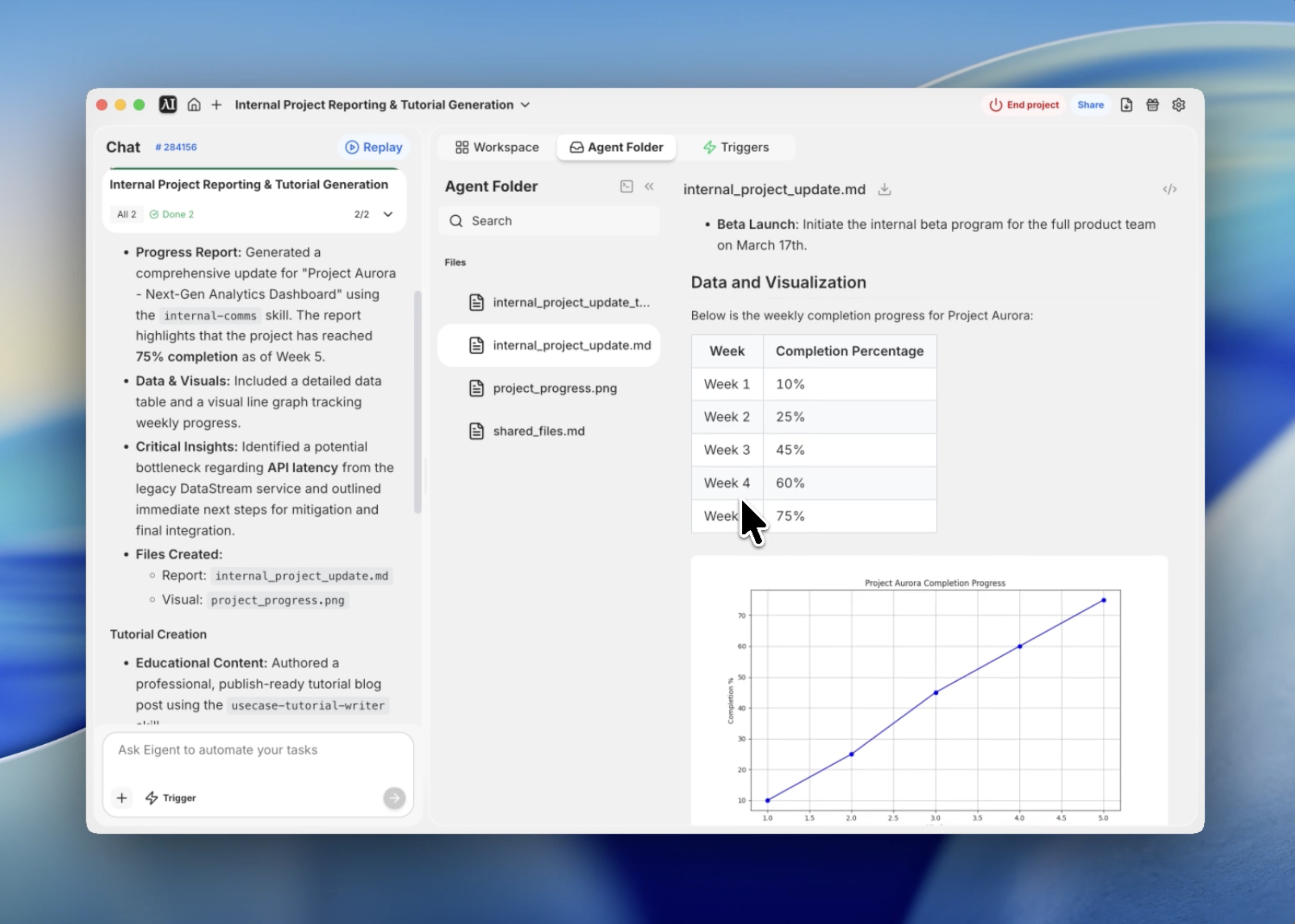
Zamień raporty statusowe z uciążliwego obowiązku w oparte na danych wnioski
Każdy lider zespołu zna ten poniedziałkowy dreszcz: trzeba odszukać procenty postępu, zidentyfikować blokery i sprawić, by arkusz kalkulacyjny wyglądał dobrze dla kierownictwa. To powracające wąskie gardło, które pochłania godziny cennego czasu tylko po to, by raportować pracę zamiast ją wykonywać.
Użyłem Eigent, aby zautomatyzować cały ten proces. Wykorzystując umiejętność internal-comms oraz kilka prostych promptów, mogę w kilka sekund wygenerować ustrukturyzowaną aktualizację 3P — Progress, Problems, Plans — wraz z wizualnymi wykresami.
Oto, jak ten workflow się składa.
Przygotuj środowisko komunikacji
Zanim zaczniesz, Eigent potrzebuje odpowiednich frameworków do komunikacji korporacyjnej. Załadowałem umiejętność internal-comms, która zawiera predefiniowane szablony raportów statusowych, newsletterów i aktualizacji incydentów. Dzięki temu wynik spełnia profesjonalne standardy, bez konieczności każdorazowego podawania szczegółów formatowania.
Opisz stan projektu
Przekazałem Eigent prompt na wysokim poziomie, opisujący, czego potrzebuję w aktualizacji. Celem było stworzenie aktualizacji dashboardu dla „Project Aurora”, która sprawiałaby wrażenie realistycznej — z konkretnymi kamieniami milowymi, techniczną przeszkodą i planami na przyszłość.
Wygeneruj przykładową wewnętrzną aktualizację projektu dla zespołu produktowego. Uwzględnij bieżący postęp, jeden potencjalny problem i następny krok, wraz z wykresem i danymi. Zapisz to jako raport dokumentu.
Wygeneruj ustrukturyzowane dane projektu
Eigent nie tylko pisze tekst — on strukturyzuje dane. Automatycznie wygenerował tygodniową tabelę ukończenia projektu, śledząc postęp od 1. tygodnia do 5. tygodnia. Ta ilościowa podstawa sprawia, że późniejszy raport jest znacznie bardziej wiarygodny niż zwykłe tekstowe podsumowanie.
Zwizualizuj postęp za pomocą automatycznego tworzenia wykresów
Aby raport był „gotowy dla zarządu”, potrzebowałem wizualizacji. Eigent wykorzystał swoje możliwości terminala, aby napisać i uruchomić skrypt Python, który wygenerował wykres liniowy danych postępu. Powstały obraz, project_progress.png, został zapisany bezpośrednio w katalogu projektu, aby można było odwołać się do niego w końcowym raporcie.
Przygotuj aktualizację 3P
Korzystając z wytycznych internal-comms, Eigent sformatował raport według frameworku 3P: Progress, Problems i Plans. Ta struktura jest standardem branżowym nie bez powodu — jest zwięzła i koncentruje się dokładnie na tym, co interesariusze muszą wiedzieć. Eigent zidentyfikował przykładowy problem „API Latency” i zaproponował rozwiązanie „Redis caching”, pokazując swoją zdolność do pracy z technicznym kontekstem.
Wyeksportuj końcowy raport Markdown
Ostatnim krokiem było zebranie wszystkiego w jeden, przejrzysty plik Markdown. Eigent podlinkował wygenerowany wykres, sformatował tabelę danych i uporządkował sekcje za pomocą wyraźnych nagłówków. Rezultat to profesjonalny dokument gotowy do umieszczenia w repozytorium Git lub na kanale Slack zespołu.
Dlaczego to ma znaczenie
Ten workflow pokazuje siłę łączenia specjalistycznych umiejętności z autonomicznym korzystaniem z narzędzi. Eigent nie tylko „napisał raport” — działał jednocześnie jako analityk danych, grafik i specjalista ds. komunikacji.
Prawdziwa wartość Eigent polega na zdolności do łączenia surowych danych z profesjonalną prezentacją bez ręcznej ingerencji.
Co przetestować dalej
Wygeneruj raport ponownie, ale zmień odbiorców na „Executive Leadership” i skup się na budżecie oraz ROI. Dodaj drugi wykres porównujący postęp tego projektu z harmonogramem „Project Nebula”. Przekształć raport Markdown w prezentację PowerPoint z 5 slajdami, używając umiejętności pptx.
Każda z tych opcji wykorzystuje tę samą konfigurację internal-comms — bez potrzeby dodatkowej konfiguracji.
Wskazówki dla lepszych rezultatów
- Bądź precyzyjny w kwestii blockerów. Jeśli masz rzeczywisty problem, wspomnij o nim w prompcie, aby uzyskać bardziej dopasowaną sekcję „Plans”.
- Ustal ton. Używaj promptów typu „Zachowaj ton zachęcający, ale transparentny”, aby dopasować się do kultury zespołu.
- Wykorzystaj ponownie dane. Możesz poprosić Eigent o zapisanie wygenerowanej tabeli jako CSV do użycia w innych arkuszach kalkulacyjnych.
- Odwołaj się do istniejących dokumentów. Użyj funkcji „context”, aby wskazać Eigent swoje prawdziwe eksporty z Jira lub Trello i uzyskać w 100% dokładne raportowanie.





