

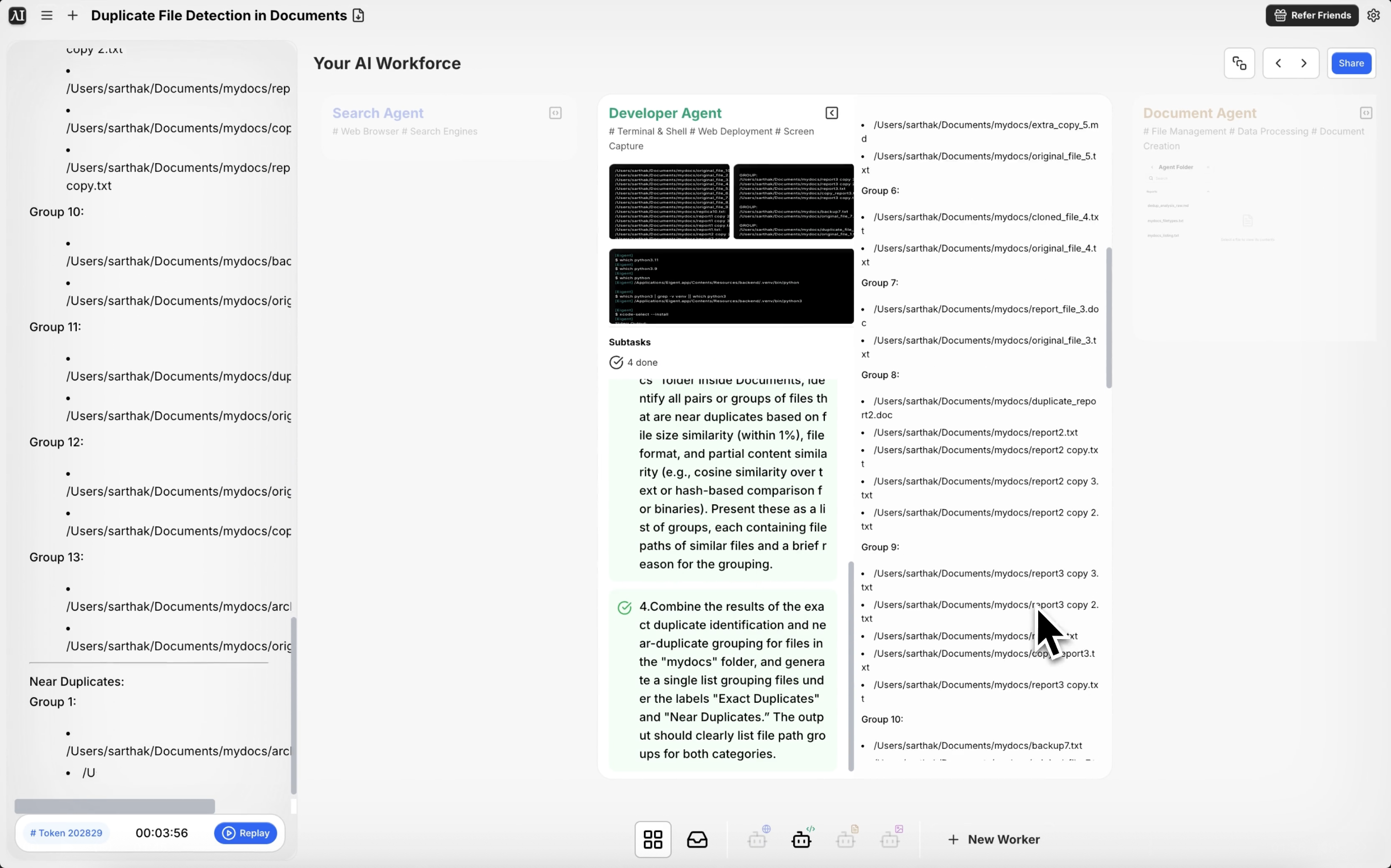
Znajdź każdy zduplikowany plik w swoim folderze — bez otwierania ani jednego
Większość osób wie, że gdzieś mają zduplikowane pliki. Kopie tego samego PDF-a z nieco innymi nazwami, obrazy zapisane dwa razy z różnych źródeł, dokumenty eksportowane i ponownie eksportowane przez miesiące iteracji. Ręczne znajdowanie i porządkowanie ich oznacza otwieranie wszystkiego, porównywanie rozmiarów i zawartości oraz nadzieję, że przypadkiem nie usuniesz czegoś ważnego.
Eigent skanuje Twój folder, identyfikuje duplikaty we wszystkich wymiarach porównania i prezentuje wyniki pogrupowane oraz wyraźnie oznaczone — dzięki czemu możesz zdecydować, co zachować, a co usunąć.
Zidentyfikuj folder do skanowania
Upewnij się, że folder, który chcesz przeskanować, jest dostępny na pulpicie lub w katalogu Dokumenty. W tym przepływie pracy docelowym folderem jest folder o nazwie mydocs wewnątrz katalogu Dokumenty. Możesz dostosować prompt do dowolnej ścieżki folderu na swoim komputerze.
Napisz prompt skanowania
Powiedz Eigent, czego ma szukać:
Mam folder o nazwie mydocs w katalogu Dokumenty. Proszę przeskanuj go i zidentyfikuj wszystkie pliki, które są dokładnymi lub niemal identycznymi duplikatami — w tym te z identyczną zawartością, rozmiarem pliku lub formatem (nawet jeśli nazwy plików lub rozszerzenia się różnią). Wypisz je jasno, pogrupowane według podobieństwa.
Kluczowym zwrotem jest tutaj „nawet jeśli nazwy plików lub rozszerzenia się różnią” — to wychwytuje przypadki, w których ten sam plik został zapisany pod inną nazwą albo gdy .jpg i .jpeg to ten sam obraz.
Eigent skanuje i porównuje
Eigent analizuje folder, korzystając z wielu metod porównywania:
- Dokładne dopasowanie zawartości: Pliki o identycznej zawartości bajt po bajcie, niezależnie od nazwy pliku
- Dopasowanie rozmiaru pliku: Pliki o tym samym rozmiarze (przydatne do szybkiego wykrywania prawdopodobnych duplikatów)
- Grupowanie według formatu: Identyfikowanie plików tego samego typu i prawdopodobnych duplikatów na podstawie analizy zawartości
W przypadku plików graficznych Eigent może również używać perceptual hashing (haszowania percepcyjnego), aby wykrywać niemal identyczne obrazy, które zostały ponownie zapisane z nieco innym poziomem kompresji.
Przejrzyj pogrupowane wyniki
Eigent zwraca uporządkowaną listę grup duplikatów. Każda grupa pokazuje wszystkie pliki, które wydają się być duplikatami, wraz z ich pełnymi ścieżkami i odpowiednimi metadanymi. Na pierwszy rzut oka możesz zobaczyć, które pliki są kopiami i gdzie znajdują się w strukturze Twojego folderu.
Zdecyduj, co usunąć
Eigent identyfikuje duplikaty, ale decyzję o usunięciu pozostawia Tobie. Gdy przejrzysz listę, możesz powiedzieć Eigent, które z nich ma usunąć:
Zachowaj w każdej grupie plik ostatnio zmodyfikowany i przenieś pozostałe do folderu o nazwie "Duplicates for Review".
Usuń wszystkie duplikaty o identycznej zawartości, ale zachowaj jedną kopię każdego pliku.
Dlaczego to ma znaczenie
Porządkowanie zduplikowanych plików to jedno z tych zadań, o których wszyscy wiedzą, że trzeba je zrobić, a prawie nikt nigdy się za nie nie zabiera. Jest żmudne, ryzykowne (nie chcesz usunąć złej wersji) i trudno je wykonywać ręcznie w sposób systematyczny. Eigent sprawia, że jest bezpieczne, ponieważ przed działaniem pokazuje wszystko do weryfikacji — i szybkie, bo automatycznie wykonuje porównania.
Co przetestować następnie
Przeskanuj cały mój folder Pobrane i zidentyfikuj wszystkie zduplikowane pliki.
Znajdź wszystkie zduplikowane obrazy w mojej bibliotece Zdjęcia i pokaż mi, które z nich są niemal identyczne.
Po uporządkowaniu duplikatów pokaż mi 10 największych plików pozostałych w tym folderze.
Przenieś wszystkie zduplikowane pliki do folderu "Review" zamiast je usuwać.
Wskazówki dla lepszych wyników
-
Bądź precyzyjny, co liczy się jako duplikat. „Ta sama zawartość” to coś innego niż „ta sama nazwa pliku”. Doprecyzuj w promptcie, które kryteria są najważniejsze dla Twojego przypadku użycia.
-
Skanuj jeden folder naraz. W przypadku bardzo dużych katalogów zawierających dziesiątki tysięcy plików zacznij od konkretnego podfolderu, aby zweryfikować wyniki przed skanowaniem wszystkiego.
-
Poproś Eigent o utworzenie raportu. Dodanie „zapisz wyniki jako CSV” daje trwały zapis tego, co znaleziono, co jest przydatne do późniejszego audytu porządkowania.





