
Automatyczna synchronizacja wiadomości Slack z Odoo CRM za pomocą triggerów Eigent
 Eigent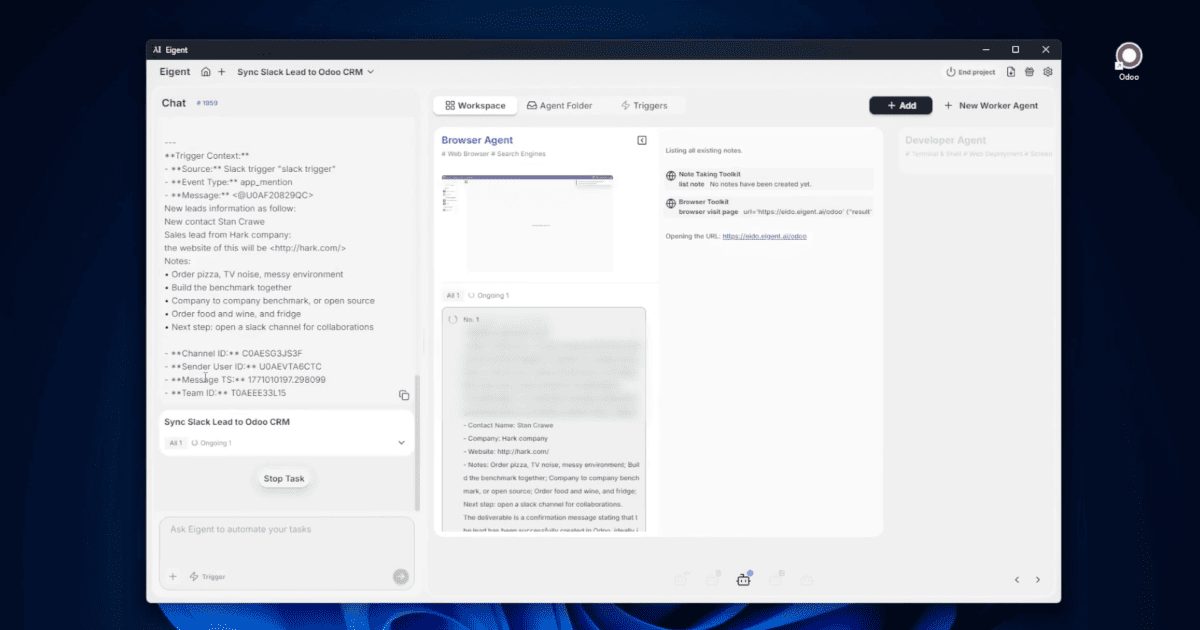
Zamień każdą wiadomość Slack w lead CRM — automatycznie
Twój zespół sprzedaży wrzuca do Slacka dane leadów. Twój CRM powinien już je mieć. Zwykle połączenie tych dwóch systemów oznacza budowę workflow w Zapier, napisanie webhooka albo pogodzenie się z tym, że część leadów nie zostanie zarejestrowana. Funkcja Triggers w Eigent całkowicie eliminuje tę lukę: każda wiadomość opublikowana na wyznaczonym kanale Slack automatycznie uruchamia workflow Eigent, który tworzy lub aktualizuje lead w Odoo CRM — bez klikania czegokolwiek przez kogokolwiek.
Poznaj Eigent Triggers
Triggers to funkcja w Eigent, która zamienia go w platformę automatyzacji działającą non stop. Zamiast czekać na prompt użytkownika, Eigent nasłuchuje zdarzeń zewnętrznych i reaguje automatycznie.
Dostępne są dwa typy triggerów:
- Schedule — uruchamia workflow cyklicznie w określonych odstępach czasu (co godzinę, codziennie, co tydzień)
- App Trigger — uruchamia się, gdy w połączonej aplikacji zewnętrznej wystąpi zdarzenie (np. nowa wiadomość na Slacku)
W tym workflow użyjesz App Trigger ze Slackiem jako źródłem.
Utwórz aplikację Slack i zdobądź dane uwierzytelniające
Eigent łączy się ze Slackiem przez oficjalne API Slack. Przed skonfigurowaniem triggera musisz utworzyć aplikację Slack na api.slack.com.
W ustawieniach aplikacji Slack:
- Przejdź do OAuth & Permissions i skopiuj Bot User OAuth Token (
xoxb-...) - Przejdź do Basic Information i skopiuj Signing Secret
- Włącz Event Subscriptions i dodaj URL webhooka Eigent jako endpoint
- Zainstaluj aplikację w swoim workspace Slack
Te dane uwierzytelniające są tym, czego Eigent używa do nasłuchiwania przychodzących wiadomości z Twojego workspace.
Skonfiguruj App Trigger w Eigent
Otwórz zakładkę Triggers w interfejsie Eigent (obok Workspace i Agent Folder) i kliknij + Create:
- Trigger Type: App Trigger
- App: Slack
- Slack Bot Token: wklej swój token OAuth
xoxb-... - Slack Signing Secret: wklej swój signing secret
- Project Name:
Sync Slack Lead to Odoo CRM
Po zapisaniu tych danych uwierzytelniających Eigent zacznie nasłuchiwać w Twoim workspace Slack przez webhook.
Skonfiguruj docelowy kanał Slack
Utwórz prywatny kanał Slack o nazwie #sales-team (albo użyj istniejącego kanału). Dodaj do kanału aplikację-bota Eigent — Eigent musi być członkiem kanału, aby odbierać z niego wiadomości.
Gdy bot zostanie dodany, każda wiadomość opublikowana na #sales-team uruchomi trigger Eigent.
Automatyzacja w praktyce
Gdy wiadomość pojawi się na #sales-team, Eigent uruchamia się automatycznie — bez potrzeby używania promptu:
- Browser Agent budzi się i odczytuje przychodzącą wiadomość ze Slacka
- Parsuje wiadomość pod kątem informacji o leadzie — nazwy firmy, danych kontaktowych, kontekstu szansy sprzedażowej lub dowolnych ustrukturyzowanych danych zawartych w wiadomości
- Otwiera Odoo CRM w przeglądarce (już zalogowane)
- Tworzy nowy rekord leada — albo aktualizuje istniejący — na podstawie sparsowanych informacji
- Zwraca potwierdzenie do wątku czatu Eigent
Cały proces działa w tle. Zanim sprawdzisz CRM, lead już tam będzie.
Dlaczego to ma znaczenie dla zespołów sprzedaży
Dbanie o jakość danych w CRM to jeden z najtrudniejszych nawyków do wyegzekwowania w zespole sprzedaży. Im więcej kroków dzieli rozmowę od zapisania wpisu w CRM, tym więcej danych ginie po drodze. Automatyzacja oparta na triggerach całkowicie usuwa potrzebę wyrobienia nawyku: jeśli lead został wspomniany na Slacku, jest w Odoo. Bez wyjątków, bez ręcznego wprowadzania, bez przypomnień o uzupełnieniu.
Ta sama architektura triggerów sprawdza się także w innych scenariuszach. Możesz używać App Triggers do synchronizowania wiadomości z dowolnego kanału Slack z dowolnym CRM, systemem ticketowym lub bazą danych, do której Eigent ma dostęp przez przeglądarkę.
Co wypróbować dalej
Skonfiguruj drugi trigger na kanale #support-tickets, który automatycznie tworzy zgłoszenia pomocy technicznej w Odoo.
Po zsynchronizowaniu leada z Odoo spraw, aby Eigent odpowiedział w wątku Slacka z potwierdzeniem i linkiem do CRM.
Utwórz trigger Schedule, który każdego ranka sprawdza w Odoo leady, z którymi nie nawiązano kontaktu od 48 godzin, i publikuje podsumowanie na #sales-team.
Połącz drugi App Trigger z innym kanałem Slack i synchronizuj leady do innego etapu lejka Odoo w zależności od tego, z którego kanału pochodzi wiadomość.
Wskazówki dla lepszych rezultatów
-
Utrzymuj spójny format wiadomości na Slacku. Browser Agent parsuje wiadomości swobodne, ale działa najlepiej, gdy wiadomości mają jednolity format — np. „Nowy lead: [Firma], [Imię i nazwisko], [Email], [Uwagi].” Zachęcenie zespołu do korzystania z szablonu sprawia, że parsowanie jest bardziej niezawodne.
-
Najpierw testuj na dedykowanym kanale testowym. Zanim skierujesz trigger na aktywny kanał
#sales-team, utwórz kanał#sales-team-testi zweryfikuj cały przepływ end-to-end. Sprawdź utworzony rekord w Odoo i potwierdź, że wszystkie pola zostały poprawnie zmapowane. -
Użyj triggera Schedule jako zabezpieczenia. Połącz App Trigger z codziennym triggerem Schedule, który audytuje ostatnie wiadomości ze Slacka pod kątem leadów w Odoo — wyłapując wiadomości, które mogły zostać pominięte podczas przestoju lub ograniczeń rate limiting.





