
Codzienny raport z amerykańskiego rynku akcji z SambaNova i umiejętnościami PPT
 Xiangyu Shi
 Douglas Lai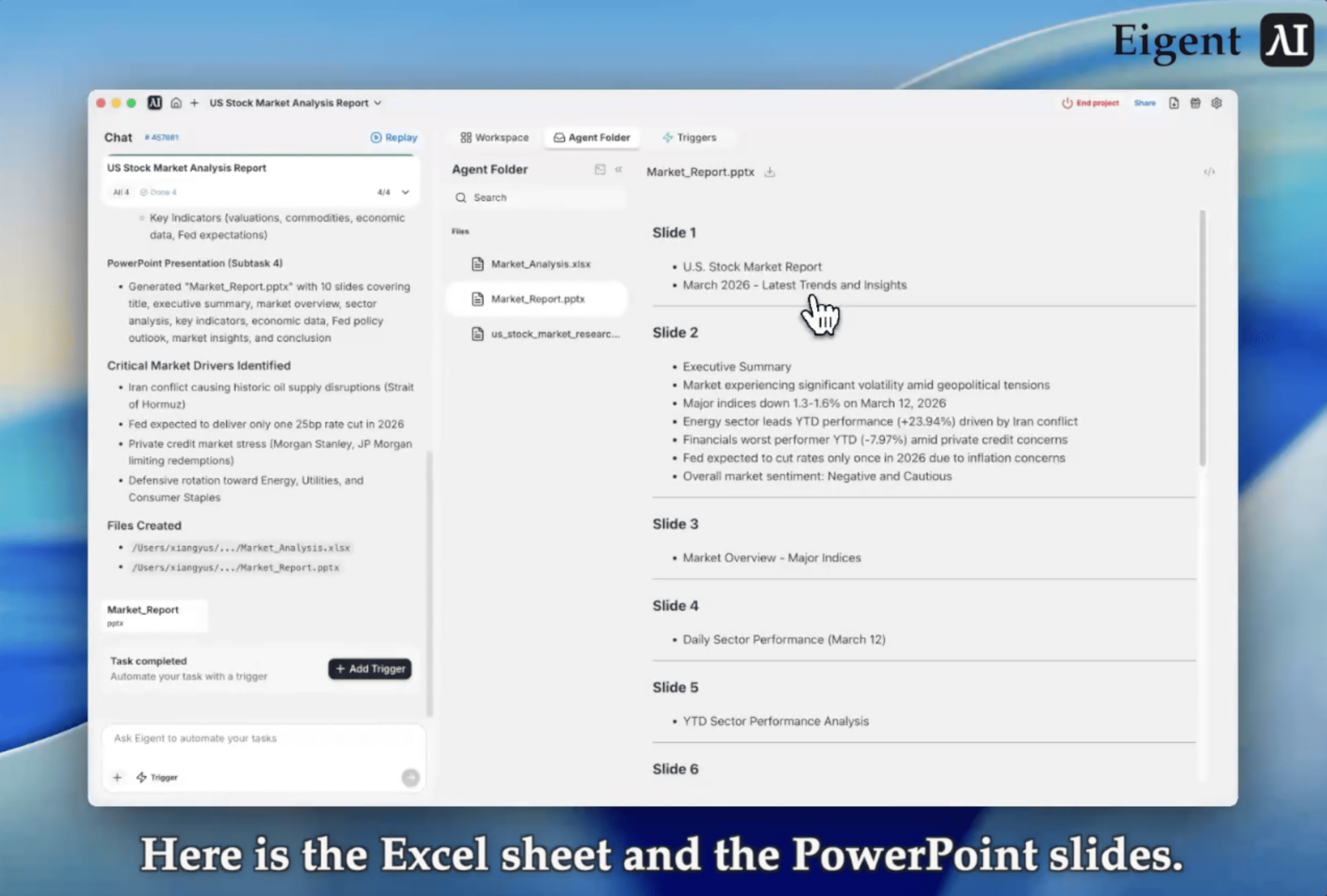
Twój poranny briefing rynkowy, w pełni zautomatyzowany
Każdy dzień handlowy zaczyna się tak samo: sprawdzenie indeksów, analiza wyników sektorów, przegląd kluczowych wskaźników, aktualizacja arkusza kalkulacyjnego i przygotowanie podsumowania dla zespołu. Zanim kończysz tę rutynę, rynek już się porusza, a Ty zużyłeś pierwszą godzinę dnia na obróbkę danych zamiast na podejmowanie decyzji.
To zastosowanie całkowicie eliminuje ten narzut. Konfigurujesz w Eigent cykliczny wyzwalacz — open source cowork, który wykonuje wieloetapową pracę na komputerze za Ciebie — uruchamiany każdego ranka o 9:45. Pobiera najnowsze dane o amerykańskim rynku akcji, aktualizuje arkusz do monitoringu i generuje dopracowany raport PowerPoint, wszystko zanim wypijesz kawę. Oto jak to działa z Minimax M2.5 od SambaNova, umiejętnością Excel i umiejętnością PowerPoint.
Skonfiguruj SambaNova Minimax M2.5 jako swój model
Ten workflow wykorzystuje SambaNova Minimax M2.5 do zbierania danych rynkowych, analizy i generowania raportów. Przejdź do Settings → Agents → Model, wybierz SambaNova jako dostawcę i Minimax M2.5 jako aktywny model. Silne możliwości rozumowania i generowania uporządkowanych wyników w Minimax M2.5 sprawiają, że doskonale nadaje się on do analizy danych finansowych i tworzenia raportów.
Wbudowane umiejętności Excel i PowerPoint
Eigent ma wbudowane umiejętności Excel i PowerPoint od razu po instalacji. Są one domyślnie włączone, bez potrzeby instalacji czy konfiguracji. Umiejętność Excel pozwala Eigent czytać, zapisywać i aktualizować arkusze Excel: otwierać skoroszyty, aktualizować komórki, dodawać wiersze, stosować formatowanie i zapisywać zmiany. Umiejętność PowerPoint daje Eigent możliwość tworzenia i modyfikowania prezentacji: dodawania slajdów, wykresów, tabel, układów, tekstu i obrazów, a następnie eksportowania gotowej prezentacji.
Dzięki włączonym obu umiejętnościom Eigent może obsłużyć cały łańcuch od danych do gotowego materiału: uporządkowane dane trafiają do arkusza kalkulacyjnego, a dopracowany raport powstaje jako prezentacja.
Skonfiguruj cykliczny wyzwalacz
To tutaj pojawia się automatyzacja. Zamiast ręcznie uruchamiać workflow każdego ranka, używamy funkcji wyzwalacza w Eigent, aby uruchamiać go według harmonogramu.
Przejdź do Triggers, utwórz nowy wyzwalacz i ustaw go jako Recurring z harmonogramem everyday at 9:45 AM. Wklej prompt:
Zbierz informacje z Bloomberg / FactSet, przeanalizuj wyniki amerykańskiego rynku akcji, zaktualizuj kluczowe wskaźniki w arkuszu Excel, a następnie wygeneruj raport PowerPoint podsumowujący najnowsze trendy i wnioski rynkowe.
Po zapisaniu wyzwalacz uruchamia się każdego dnia roboczego o 9:45 rano, dając Ci świeży, kompleksowy briefing rynkowy dokładnie wtedy, gdy go potrzebujesz.
Zbieranie i analiza danych rynkowych
Gdy wyzwalacz się uruchomi, Eigent używa Minimax M2.5 do zebrania najnowszych danych o amerykańskim rynku akcji z Bloomberg, FactSet i Fidelity. To uporządkowane badanie obejmuje:
- Główne indeksy: S&P 500, DJIA, Nasdaq Composite i NYSE Composite: ceny zamknięcia, dzienne zmiany, ruchy procentowe i 1-roczne stopy zwrotu
- Wskaźniki wyceny: Forward P/E ratio pochodzący z FactSet Earnings Insight
- Podział sektorowy: wagi kapitalizacji rynkowej i rankingi wyników (YTD i dzienne) we wszystkich 11 sektorach GICS
- Kluczowe dane makroekonomiczne: CPI, wnioski o zasiłek dla bezrobotnych, rozpoczęte budowy domów, bilans handlowy i inne wskaźniki makro
- Wydarzenia wpływające na rynek: ryzyka geopolityczne, oczekiwania dotyczące polityki Fed, zmiany taryf i trendy w guidance wynikowym
Minimax M2.5 syntetyzuje to wszystko w spójną narrację rynkową, identyfikując, co poruszyło rynek, dlaczego się to stało i co to oznacza dla nadchodzącego dnia handlowego.
Zaktualizuj tracker w Excelu
Po zakończeniu analizy Eigent wywołuje umiejętność Excel, aby utworzyć i zaktualizować Market_Analysis.xlsx. Arkusz kalkulacyjny rejestruje wyniki indeksów, podział sektorowy według kapitalizacji rynkowej i wag, rankingi sektorów YTD i dzienne, kluczowe dane ekonomiczne oraz podsumowanie istotnych wydarzeń rynkowych.
Z czasem ten arkusz staje się Twoim bieżącym rejestrem wyników rynku: czystym, uporządkowanym zbiorem danych, który jest zawsze aktualny bez ręcznego wprowadzania danych.
Wygeneruj raport PowerPoint
Na koniec Eigent wywołuje umiejętność PowerPoint, aby wygenerować Market_Report.pptx, dopracowaną prezentację podsumowującą całą analizę. Prezentacja zawiera:
- Slajd tytułowy z datą i ogólnym obrazem rynku
- Podsumowanie wyników indeksów z tabelą porównawczą głównych indeksów
- Podział sektorowy obejmujący wagi kapitalizacji rynkowej i rankingi wyników
- Kluczowe wskaźniki ekonomiczne z najnowszymi danymi makro
- Wydarzenia wpływające na rynek podsumowujące ryzyka geopolityczne, zmiany polityki i trendy wynikowe
Prezentacja jest zapisana i gotowa do udostępnienia zespołowi lub do wrzucenia na poranne spotkanie.
Dlaczego to ma znaczenie
Ten workflow pokazuje, jak w praktyce wygląda konfiguracja cowork: Minimax M2.5 od SambaNova do inteligentnego zbierania i analizy danych, dwie specjalistyczne umiejętności (Excel i PowerPoint) do uporządkowanego tworzenia wyników oraz cykliczny wyzwalacz do automatyzacji bez użycia rąk — wszystko w ramach Eigent, open source cowork, który możesz uruchomić na własnym komputerze i rozszerzać o kolejne umiejętności.
Kluczowa obserwacja: umiejętności zamieniają aplikacje desktopowe w narzędzia dostępne dla agentów, a cykliczne wyzwalacze zamieniają jednorazowe zadania w zautomatyzowane rutyny. Twój arkusz Excel staje się żywą bazą danych, którą agent utrzymuje. Twoje prezentacje PowerPoint stają się automatycznie generowanymi materiałami. A cykliczny wyzwalacz sprawia, że wszystko dzieje się zgodnie z harmonogramem, każdego dnia handlowego, bez konieczności ręcznej interwencji.
Dla specjalistów z branży finansowej oznacza to mniej czasu poświęcanego na zbieranie i formatowanie danych, a więcej na analizę i decyzje, które naprawdę mają znaczenie.
Co wypróbować dalej
Gdy uruchomisz już codzienny briefing, spróbuj rozszerzyć workflow:
Oznacz dni z ważnymi publikacjami danych makroekonomicznych i dodaj notatkę do arkusza Excel.
Dodaj trzeci slajd podsumowujący kontrakty terminowe przed otwarciem rynku i nocne ruchy na rynkach międzynarodowych.
Po utworzeniu automatycznie wyślij wygenerowany PowerPoint na kanał Slack.
Zbuduj tygodniowe podsumowanie, które agreguje pięć dziennych arkuszy Excel w jeden skoroszyt zbiorczy.
Każde z tych rozszerzeń opiera się na tym samym cyklicznym wyzwalaczu i tych samych umiejętnościach — bez dodatkowej konfiguracji.
Wskazówki dla lepszych wyników
-
Dostosuj czas wyzwalacza. 9:45 AM daje rynkowi 15 minut od otwarcia przed uruchomieniem raportu, co pozwala uchwycić początkowy ruch cen. Dostosuj to do porannej rutyny swojego zespołu.
-
Precyzyjnie określ zakres źródeł danych. Im dokładniej wskażesz, z których punktów końcowych Bloomberg lub FactSet mają być pobierane dane, tym bardziej spójny będzie wynik z dnia na dzień.
-
Utrzymuj stabilną strukturę Excela. Jeśli kolumny arkusza zmieniają się między uruchomieniami, formuły lub wykresy zależne mogą się uszkodzić. Zablokuj spójny schemat od samego początku.
-
Używaj PowerPoint jako szablonu. Po pierwszym uruchomieniu otwórz wygenerowaną prezentację i dostosuj układ do swojej marki. Eigent będzie utrzymywać tę strukturę przy kolejnych uruchomieniach.





