
Workforce
Understand core concepts and features that power Eigent.
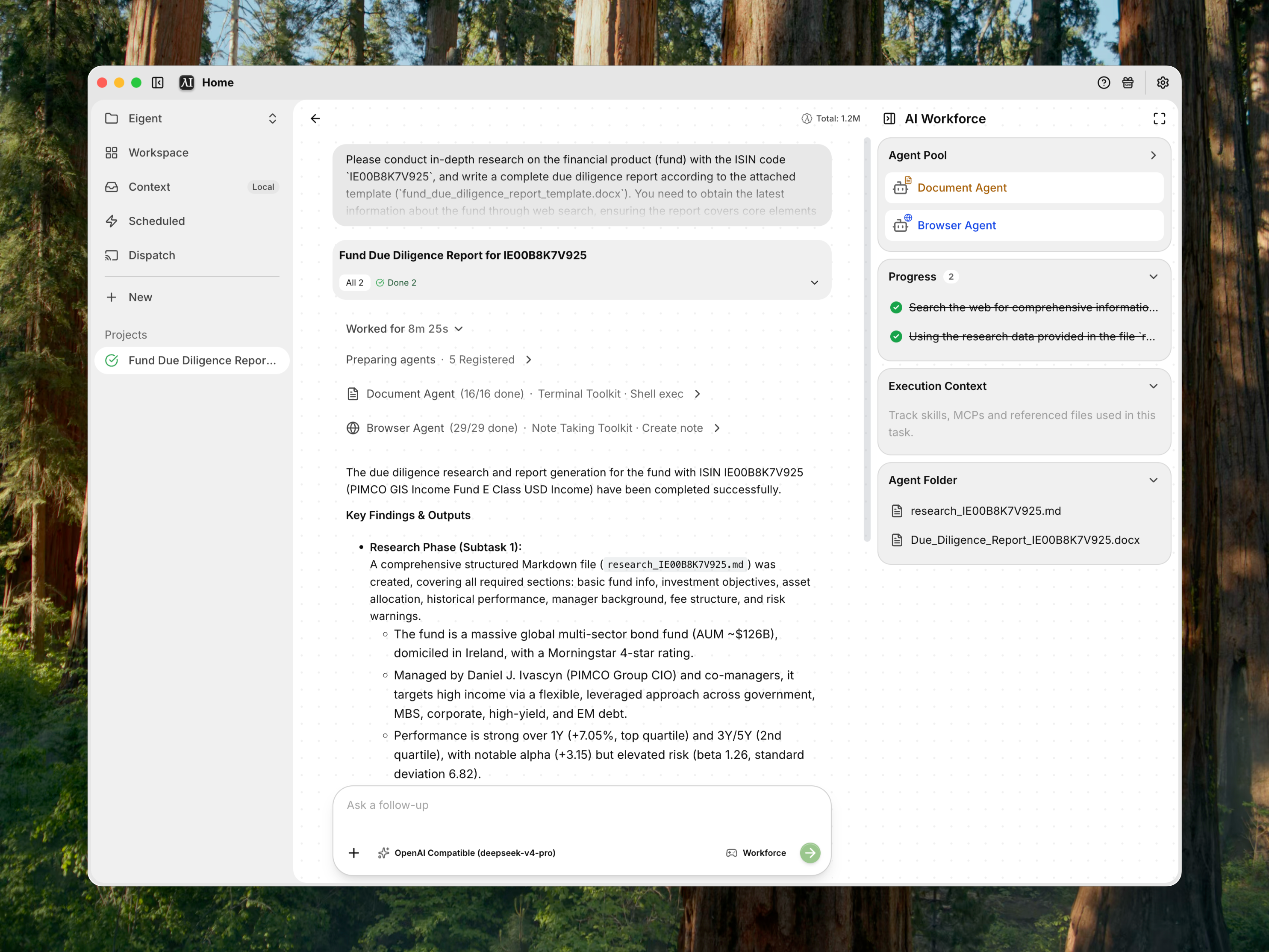
Workforce is CAMEL-AI's multi-agent teamwork engine.
Concept: what is a Workforce?
Instead of relying on a single agent, Workforce lets you organize a team of specialized agents—each with its own strengths—under a single, coordinated system. You can quickly assemble, configure, and launch collaborative agent "workforces" for any task that needs parallelization, diverse expertise, or complex workflows.
With Workforce, agents plan, solve, and verify work together—like a project team in an organization, but fully automated.
Workforce handles Tasks within a Session. Open a Space, choose New session, select Workforce, and describe the Task. Related Tasks stay together in that Session, following the Space → Session → Task hierarchy.
📌 Key advantages of Workforce:
- Instantly scale from single-agent to multi-agent workflows
- Built-in coordination, planning, and failure recovery
- Ideal for hackathons, evaluations, code review, brainstorming, and more
- Configure roles, toolsets, and communication patterns for any scenario
System design
Architecture: how Workforce works
Workforce uses a hierarchical, modular design for real-world team problem-solving.
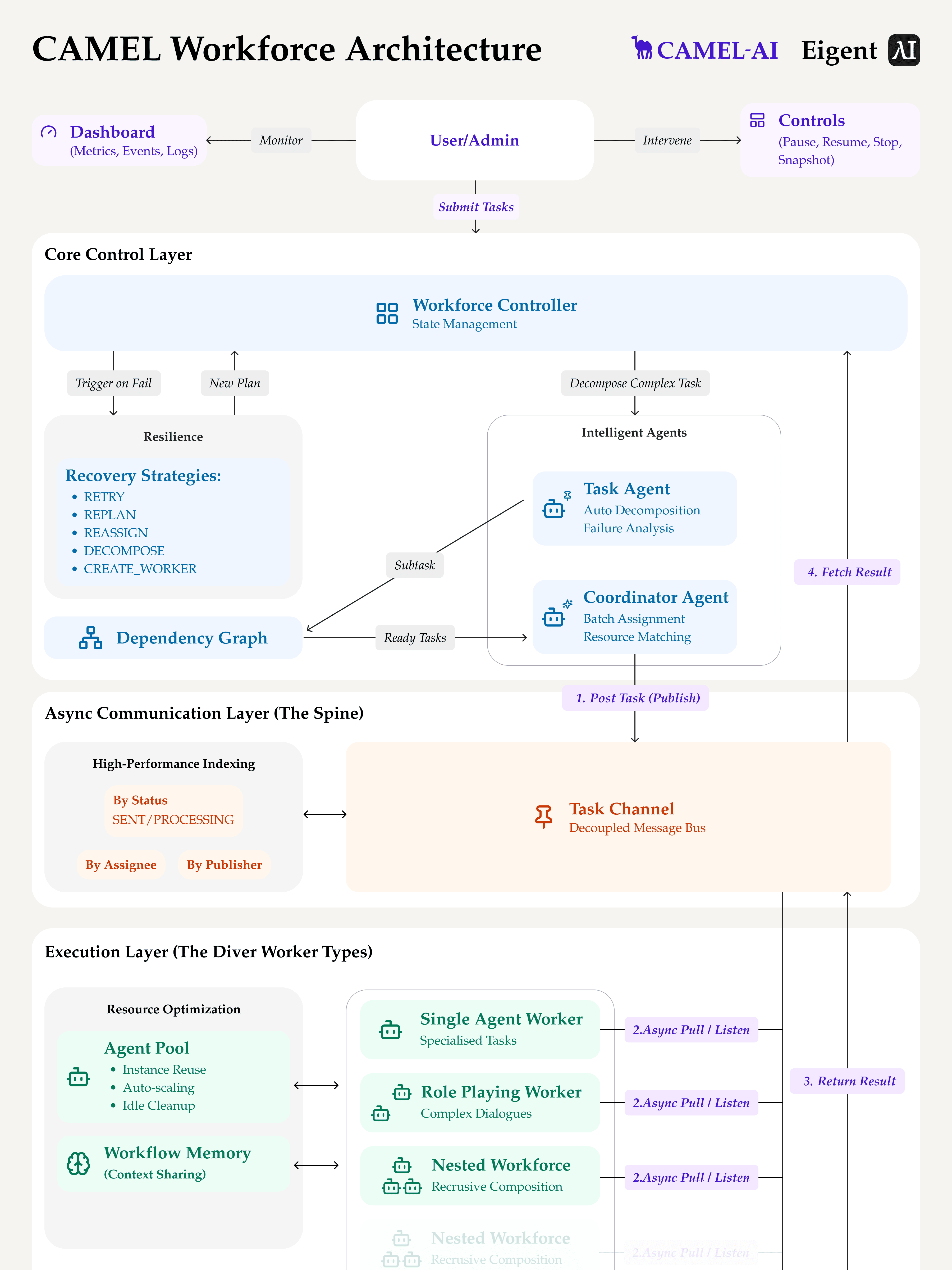
See how the coordinator and task planner agents orchestrate a multi-agent workflow:
- Workforce: The “team” as a whole.
- Worker nodes: Individual contributors—each node can contain one or more agents, each with their own capabilities.
- Coordinator agent: The “project manager”—routes tasks to worker nodes based on their role and skills.
- Task planner agent: The “strategy lead”—breaks down big jobs into smaller, doable subtasks and organizes the workflow.
Communication: a shared Task channel
Every Workforce gets a shared task channel when it’s created. How it works:
- All tasks are posted into this channel.
- Worker nodes “listen” and accept their assigned tasks.
- Results are posted back to the channel, where they’re available as dependencies for the next steps.
This design lets agents build on each other’s work and ensures no knowledge is lost between steps.
Failure handling: built-in robustness
Workforce is designed to handle failures and recover gracefully.
If a worker fails a task, the coordinator agent will:
- Decompose and retry: Break the task into even smaller pieces and reassign.
- Escalate: If the task keeps failing, create a new worker designed for that problem. To prevent infinite loops, if a task has failed or been decomposed more than a set number of times (default: 3), Workforce will automatically halt that workflow.
Worker nodes
Eigent comes with a set of pre-configured agents, each designed for a specific domain of expertise. These agents are equipped with a curated set of toolkits to make them effective right out of the box.
1. DeveloperAgent
A skilled coding assistant that can write and execute code, run terminal commands, and verify solutions to complete tasks.
Equipped Toolkits:
- HumanToolkit
- TerminalToolkit
- NoteTakingToolkit
- WebDeployToolkit
- SkillToolkit
2. BrowserAgent
Can search the web, extract webpage content, simulate browser actions, and provide relevant information to solve the given task.
Equipped Toolkits:
- SearchToolkit
- HybridBrowserToolkit
- HumanToolkit
- NoteTakingToolkit
- TerminalToolkit
- SkillToolkit
3. DocumentAgent
A document processing assistant for creating, modifying, and managing various document formats, including presentations.
Equipped Toolkits:
- FileToolkit
- PPTXToolkit
- HumanToolkit
- MarkItDownToolkit
- ExcelToolkit
- NoteTakingToolkit
- TerminalToolkit
- GoogleDriveMCPToolkit
- SearchToolkit
- SkillToolkit
4. Multi-ModalAgent
A multi-modal processing assistant for analyzing and generating media content like audio and images.
Equipped Toolkits:
- VideoDownloaderToolkit
- AudioAnalysisToolkit
- OpenAIImageToolkit
- HumanToolkit
- TerminalToolkit
- NoteTakingToolkit
- SearchToolkit
- SkillToolkit
5. Custom worker
Configure a system prompt and add any MCP-supported toolkit you want.
Toolkit reference
Toolkits are the collections of functions that give your agents their powers. Here is a reference for the toolkits used by the pre-configured agents.
(in alphabetical order)
AudioAnalysisToolkit
Provides tools for audio processing and analysis.
This toolkit allows an agent to process audio files. It can take an audio file (from a local path or URL) and transcribe the speech into text. It can also answer specific questions about the content of an audio file, enabling agents to extract information from podcasts, meetings, or voice notes.
ExcelToolkit
Enables agents to create, read, and manipulate Excel spreadsheets.
This toolkit provides comprehensive functions for interacting with Excel files (.xlsx/.xls/. csv). Agents can create new workbooks, add or delete worksheets, read data from specific cells or ranges, write data to the spreadsheet, and convert data into Markdown formatted table.
FileToolkit
A toolkit for creating, writing, and modifying text in files.
This toolkit gives an agent the ability to create and write to files on the local file system (macOS, Linux, Windows). It provides support for writing to various file formats (Markdown, DOCX, PDF, and plaintext), replacing text in existing files, automatic filename uniquification to prevent overwrites, custom encoding and enhanced formatting options for specialized formats.
GoogleDriveMCPToolkit
Connects to Google Drive to manage files and folders.
This toolkit allows agents to interact with a user's Google Drive. It can read files and folders from Google Drive. It acts as a bridge between the agent's local environment and cloud storage.
HumanToolkit
Allows an agent to pause its task and ask the user for help.
This is a critical toolkit for handling situations that require human intervention. When an agent is stuck, needs credentials, or requires a subjective decision, it can use this toolkit to send a prompt to the user and wait for a response before continuing its task.
HybridBrowserToolkit
Provides a powerful, stateful browser for web navigation and interaction.
This toolkit gives an agent a fully-featured web browser that it can control programmatically. Unlike simple web scraping, this toolkit maintains a session, allowing the agent to click, type, hover, screenshot, and live Take Control from the UI.
MarkItDownToolkit
A specialized toolkit for converting content into clean Markdown.
This toolkit is designed to scrape content from a list of local files and convert each into a structured Markdown format. The conversion is performed in parallel for efficiency. Supported file formats include: PDF, Office, EPUB, HTML, Images (ORC), Audio, Text, ZIP.
NoteTakingToolkit
A toolkit for managing and interacting with Markdown note files.
This toolkit provides tools for creating, reading, appending to, and listing notes. All notes are stored as .md files in a dedicated working directory and are tracked in a registry. An agent can use it to write down any important information. Other agents can then read these notes to get context and build upon previous work, facilitating effective collaboration.
OpenAIImageToolkit
Generates images from text prompts using OpenAI's DALL-E models.
This toolkit allows an agent to create new images based on a descriptive text prompt. It leverages models like DALL-E 3 to generate high-quality visuals, which can then be saved locally. This is essential for creative tasks, generating illustrations for documents, or any workflow requiring original image content.
PPTXToolkit
Enables agents to create and write Microsoft PowerPoint presentations.
This toolkit provides a suite of functions for building PowerPoint (.pptx) files. An agent can create a new presentation, add title and content slides, format text, create lists, and insert tables and images. It allows for the automated creation of professional-looking presentations.
SearchToolkit
Provides access to various web search engines.
This toolkit is the primary tool for web research. It allows an agent to search information on engines like Google, Wikipedia, Bing, and Baidu. The agent can submit a query and receive a list of relevant URLs and snippets, which it can then use as a starting point for deeper investigation with the HybridBrowserToolkit.
SkillToolkit
Loads custom Skills assigned to the current agent.
This toolkit gives agents access to enabled Skills from the user's or Session's Skill configuration. Skills can add reusable instructions, domain knowledge, or procedures, and can be scoped globally or to selected agents.
TerminalToolkit
A toolkit for terminal operations across multiple operating systems.
This toolkit gives an agent access to a command-line interface. It supports terminal operations such as searching for files by name or content, executing shell commands, and managing terminal sessions.
VideoDownloaderToolkit
Allows an agent to download and process videos from popular platforms.
This toolkit enables an agent to download video content from URLs (e.g., from YouTube) and optionally split them into chunks. The saved video can then be analyzed by other tools, such as the AudioAnalysisToolkit for transcription.
WebDeployToolkit
Provides tools to deploy web content on a local server.
This toolkit allows the DeveloperAgent to instantly host web applications or static files. It can serve a single HTML file or an entire folder (like a built React app) on a local port, making it easy to preview and test web development work.