
상태 보고서를 번거로운 업무에서 데이터 기반 인사이트로 전환하세요
모든 팀 리더는 월요일 아침의 그 막막함을 잘 압니다. 진행률을 찾아내고, 장애 요소를 식별하며, 스프레드시트를 경영진에게 보여줄 수 있게 다듬어야 하니까요. 이는 반복적으로 발생하는 병목으로, 실제 업무를 하는 대신 보고를 준비하는 데만 귀중한 시간을 몇 시간씩 잡아먹습니다.
저는 이 전체 과정을 자동화하기 위해 Eigent를 사용했습니다. internal-comms 스킬과 몇 가지 간단한 프롬프트를 활용하면, 진행 상황(Progress), 문제(Problems), 계획(Plans)으로 구성된 구조화된 3P 업데이트를 몇 초 만에 시각적 차트와 함께 생성할 수 있습니다.
작업 흐름은 다음과 같이 구성됩니다.
커뮤니케이션 환경을 준비합니다
시작하기 전에, Eigent에는 기업 커뮤니케이션에 맞는 적절한 프레임워크가 필요합니다. 저는 상태 보고서, 뉴스레터, 장애 대응 업데이트를 위한 사전 정의된 템플릿이 포함된 internal-comms 스킬을 불러왔습니다. 이렇게 하면 매번 형식 세부 사항을 지정하지 않아도 전문적인 기준을 따르는 출력이 보장됩니다.
프로젝트 상태를 설명합니다
업데이트에 필요한 내용을 설명하는 상위 수준의 프롬프트를 Eigent에 전달했습니다. 목표는 구체적인 마일스톤, 기술적 장애물, 향후 계획을 포함해 실제처럼 느껴지는 "Project Aurora" 대시보드 업데이트를 만드는 것이었습니다.
제품 팀을 위한 모의 내부 프로젝트 업데이트를 생성하세요. 현재 진행 상황, 잠재적 이슈 하나, 다음 단계를 그래프와 데이터와 함께 포함하세요. 문서 보고서로 저장하세요.
구조화된 프로젝트 데이터를 생성합니다
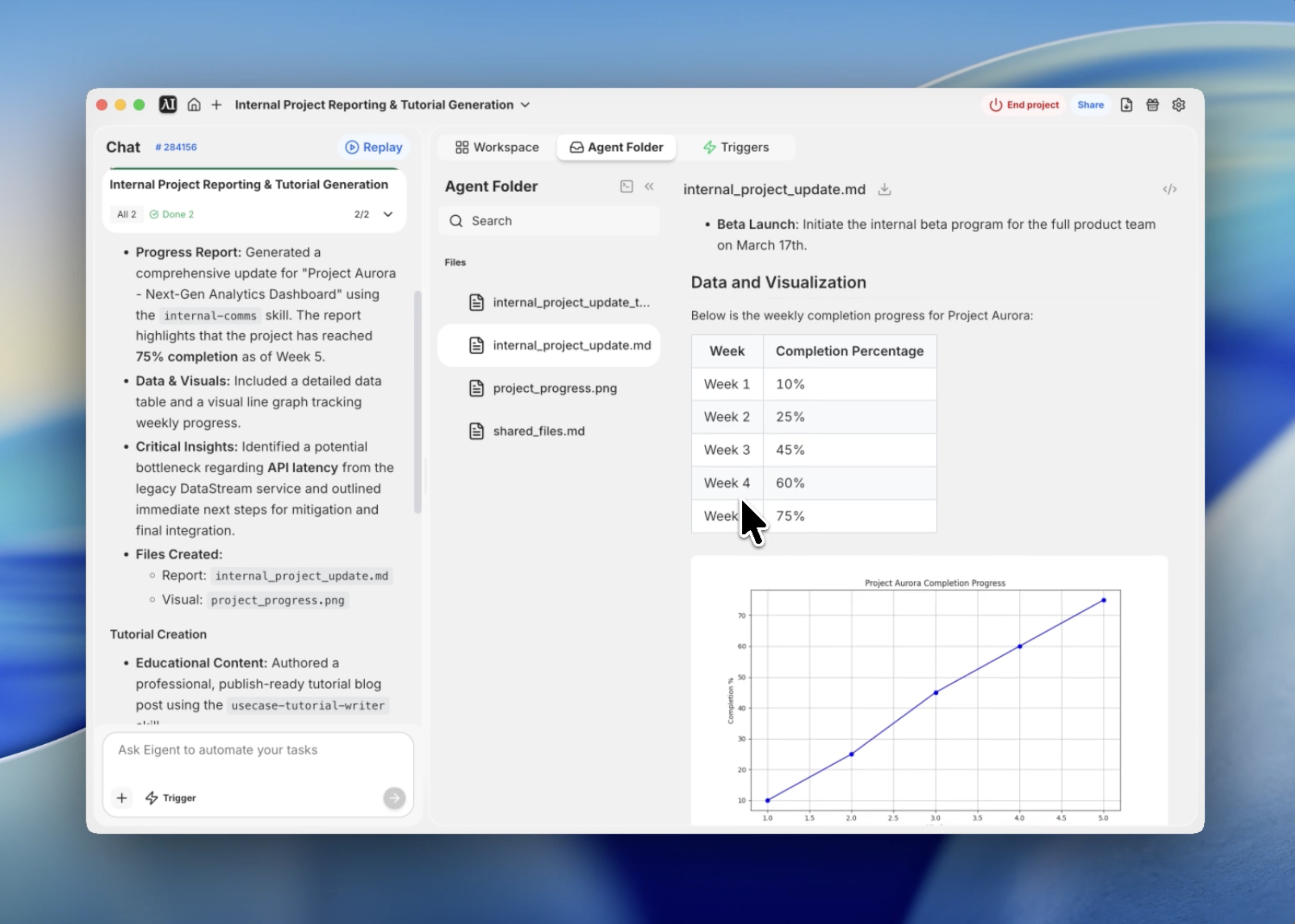
Eigent는 단순히 텍스트만 작성하지 않고 데이터를 구조화합니다. 프로젝트의 주차별 완료 표를 자동으로 생성해 Week 1부터 Week 5까지의 진행 상황을 추적했습니다. 이런 정량적 기반 덕분에 이후 보고서는 단순한 텍스트 요약보다 훨씬 더 신뢰도가 높아집니다.
자동 차트 생성으로 진행 상황을 시각화합니다
보고서를 "board-ready"하게 만들기 위해 시각 자료가 필요했습니다. Eigent는 터미널 기능을 사용해 진행 데이터의 선 그래프를 생성하고 실행하는 Python 스크립트를 작성했습니다. 결과 이미지 project_progress.png는 최종 보고서에서 참조할 수 있도록 프로젝트 디렉터리에 직접 저장되었습니다.
3P 업데이트를 작성합니다
internal-comms 가이드라인을 사용해, Eigent는 Progress, Problems, Plans로 구성된 3P 프레임워크에 맞춰 보고서를 정리했습니다. 이 구조가 업계 표준인 데에는 이유가 있습니다. 간결하면서도 이해관계자가 꼭 알아야 할 핵심에 정확히 집중하기 때문입니다. Eigent는 모의 "API Latency" 이슈를 식별하고 "Redis caching" 해결책을 제안해, 기술적 맥락을 다루는 능력을 보여주었습니다.
최종 Markdown 보고서를 내보냅니다
마지막 단계는 모든 내용을 하나의 깔끔한 Markdown 파일로 통합하는 것이었습니다. Eigent는 생성된 그래프를 연결하고, 데이터 표를 서식화하고, 명확한 헤더로 섹션을 정리했습니다. 그 결과는 Git 저장소나 팀 Slack 채널에 바로 올릴 수 있는 전문 문서가 되었습니다.
이것이 중요한 이유
이 워크플로우는 전문 스킬과 자율적인 도구 사용을 결합하는 힘을 보여줍니다. Eigent는 단순히 "보고서를 작성"한 것이 아니라, 한 번의 흐름에서 데이터 분석가, 그래픽 디자이너, 커뮤니케이션 전문가 역할을 모두 수행했습니다.
Eigent의 진정한 가치는 원시 데이터와 전문적인 प्रस्ते이션 사이의 간극을 수동 개입 없이 메워준다는 데 있습니다.
다음에 시도해 볼 것
청중을 'Executive Leadership'으로 바꾸고 예산과 ROI에 초점을 맞춰 보고서를 다시 생성하세요. 이 프로젝트의 진행 상황을 'Project Nebula' 타임라인과 비교하는 두 번째 그래프를 추가하세요. pptx 스킬을 사용해 Markdown 보고서를 5장짜리 PowerPoint 프레젠테이션으로 변환하세요.
이 모든 항목은 동일한 internal-comms 설정을 활용하므로, 추가 구성이 필요하지 않습니다.
더 나은 결과를 위한 팁
- 장애 요소를 구체적으로 작성하세요. 실제 문제가 있다면 프롬프트에 언급해 더 맞춤화된 "Plans" 섹션을 얻으세요.
- 톤을 설정하세요. "격려하되 투명한 톤을 유지하세요" 같은 프롬프트를 사용해 팀 문화에 맞추세요.
- 데이터를 재사용하세요. 생성된 표를 CSV로 저장해 다른 스프레드시트에서 사용할 수 있도록 Eigent에 요청할 수 있습니다.
- 기존 문서를 참고하세요. "context" 기능을 사용해 실제 Jira나 Trello 내보내기 파일을 Eigent에 연결하면 100% 정확한 보고가 가능합니다.