

어떤 블로그 글이든 자동으로 트윗으로 바꾸기
소셜 미디어 팀은 겉보기에는 단순하지만 의외로 많은 시간을 잡아먹는 작업에 상당한 시간을 씁니다. 블로그 글을 읽고 트윗으로 바꾸는 일입니다. 빠를 것 같지만, 이를 주당 20개 게시물에 적용하면 실제로는 큰 시간 소모가 됩니다. Eigent는 소스를 읽고, 게시물을 초안 작성하고, 게시하는 것까지 이 모든 과정을 끝까지 처리할 수 있습니다. Twitter를 직접 열 필요도 없습니다.
Twitter MCP 설정하기
이 워크플로는 Eigent가 Twitter/X 계정에 직접 게시할 수 있게 해주는 맞춤형 Twitter MCP(Model Context Protocol) 커넥터를 사용합니다. 아직 설정하지 않았다면 Eigent의 설정 → 커넥터로 이동해 API 자격 증명으로 Twitter 연동을 설정하세요.
MCP가 연결되면 Eigent는 단일 프롬프트만으로 타임라인을 읽고, 게시물을 초안 작성하고, 게시할 수 있습니다. 이 워크플로는 또한 Twitter Agent를 구동하는 오픈소스 자체 배포 모델을 활용하므로, 콘텐츠가 자체 인프라 안에 유지됩니다.
Eigent에 블로그 글 지정하기
트윗으로 바꾸고 싶은 블로그 글의 URL을 Eigent에 알려주세요:
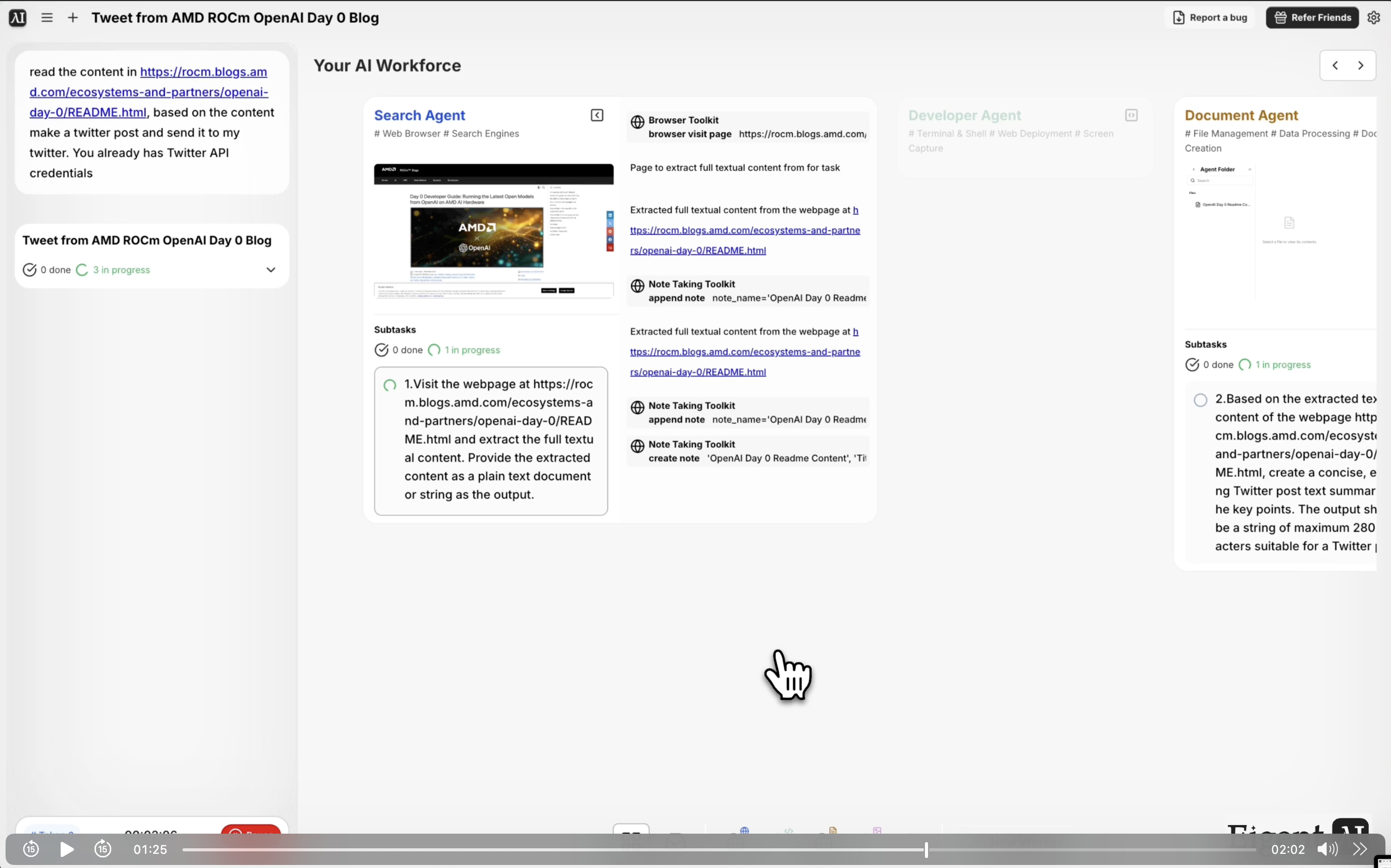
[URL]에서 콘텐츠를 읽고, 이를 바탕으로 Twitter 게시물을 작성해 내 Twitter 계정으로 보내주세요.
게시물이 로그인 뒤에 있거나 URL을 공유하고 싶지 않다면, 채팅에 텍스트를 직접 붙여넣을 수도 있습니다.
Eigent가 콘텐츠를 읽고 요약하기
Eigent의 브라우저 에이전트가 블로그 글을 가져와 핵심 포인트를 추출합니다. 제목, 주요 논지, 주목할 만한 통계, 또는 가장 인용할 만한 인사이트를 확인합니다. 그런 다음 글자 수 제한에 맞는 트윗 초안을 작성해 핵심 메시지를 유지하고, 소셜 오디언스에게 자연스럽게 읽히도록 만듭니다.
브랜드에 특정 톤이 있다면(캐주얼, 권위적, 기술적 등) 프롬프트에 포함하세요. 그러면 에이전트가 그 톤에 맞춥니다.
게시 전 검토하기(선택 사항)
기본적으로 Eigent는 초안 작성 직후 트윗을 게시합니다. 먼저 검토하고 싶다면 프롬프트에 해당 지시를 추가하세요:
게시하기 전에 트윗 초안을 보여주세요.
Eigent는 전송하기 전에 승인받을 수 있도록 제안된 트윗을 보여줍니다.
Twitter에 게시하기
승인되면 — 또는 검토 단계를 건너뛰면 즉시 — Eigent가 Twitter MCP를 통해 트윗을 게시합니다. 게시물 URL과 함께 확인 메시지를 받게 되므로 Twitter에서 바로 확인할 수 있습니다.
이것이 중요한 이유
이 워크플로는 더 큰 패턴의 작은 예입니다. 콘텐츠 제작과 배포 사이의 연결 고리를 Eigent로 닫는 방식입니다. 블로그 글을 만들면 Eigent가 소셜 확산을 처리합니다. 같은 접근 방식은 LinkedIn 게시물, 뉴스레터 발췌문, 또는 원본 자료를 읽고 새 채널에 맞게 변형해야 하는 모든 형식으로 확장할 수 있습니다. 또한 로컬 모델에서 실행되기 때문에 개인정보 보호가 중요한 환경에서도 작동합니다.
다음에 시도해볼 것
이번 주 블로그에서 가장 많이 본 글 5개를 읽고, 각각을 요약하는 트윗 스레드를 만들어주세요.
이 같은 콘텐츠를 더 긴 형식의 LinkedIn 게시물 버전으로 만들어주세요.
지난주 Twitter 참여도를 확인하고 어떤 게시물이 가장 성과가 좋았는지 알려주세요.
이 블로그 글을 소셜 미디어 릴용 짧은 비디오 스크립트로 바꿔주세요.
더 좋은 결과를 위한 팁
-
톤을 지정하세요. "대화체로 하고 관련 해시태그를 추가해줘" 또는 "전문적으로 유지하고 작성자 핸들을 포함해줘"처럼 요청하면, URL만 던져주는 것보다 Eigent가 훨씬 더 잘 작업할 수 있습니다.
-
행동 유도 문구를 포함하세요. 트윗이 게시물로 다시 트래픽을 보내길 원한다면, 링크와 함께 "더 보기 →" 같은 CTA를 포함하도록 Eigent에 요청하세요.
-
처음 실행할 때는 검토 단계를 사용하세요. 새 블로그나 브랜드 보이스로 처음 몇 개 게시물을 만들 때는 출력 품질에 자신이 생길 때까지 게시 전 검토 옵션을 사용하세요.





