


logo
  • 환경
  • 엔터프라이즈
  • 요금제
활용 사례Mar 7, 2026

Deep Research with Google Workspace CLI Skill

Xiangyu ShiXiangyu Shi
·
Celine XieCeline Xie
Deep Research & Team Coordination with Google Workspace CLI Skill
Automate Everything with
AI Workforce on Desktop
Download Eigent

From Discovery to Team Alignment with a Single Trigger

You find something exciting — an open-source tool, a new API, a competitor launch — and suddenly you're juggling six tabs: one for research, one for writing, one for Google Drive, one for Calendar, one for Gmail, and one for your task tracker. By the time you've looped in your team, an hour has evaporated and you've barely scratched the surface of the actual research.

This use case is the antidote. You set up a one-time trigger in Eigent, and it handles the entire chain: deep research, report creation, file sharing, task planning, meeting scheduling, and team notification. Here's how it works with GPT5.4 and the Google Workspace CLI skill.

1Set Up GPT5.4 and the Google Workspace CLI Skill

This workflow relies on GPT5.4 for deep research and reasoning. Head to Settings → Agents → Model and select GPT5.4 as your active model.

Next, install the Google Workspace CLI skill — a skill package that gives Eigent direct access to Google Docs, Drive, Tasks, Calendar, and Gmail through the command line. First, follow the setup instructions from the Google Workspace CLI repo to install and authenticate the CLI on your machine:

npm install -g @googleworkspace/cli
gws auth setup
gws auth login

Once the CLI is installed and authenticated, head to Settings → Agents → Skills and install the Google Workspace CLI skill package. With both the CLI and the skill in place, your entire Google Workspace becomes programmatically accessible.

2Create a One-Time Trigger

Instead of typing a prompt and waiting, use Eigent's trigger feature to kick off the workflow. A one-time trigger fires once and then deactivates — perfect for ad-hoc tasks that you want Eigent to handle autonomously without you staying in the loop.

Go to Settings → Triggers, create a new trigger, set it to One-Time, and paste in the prompt:

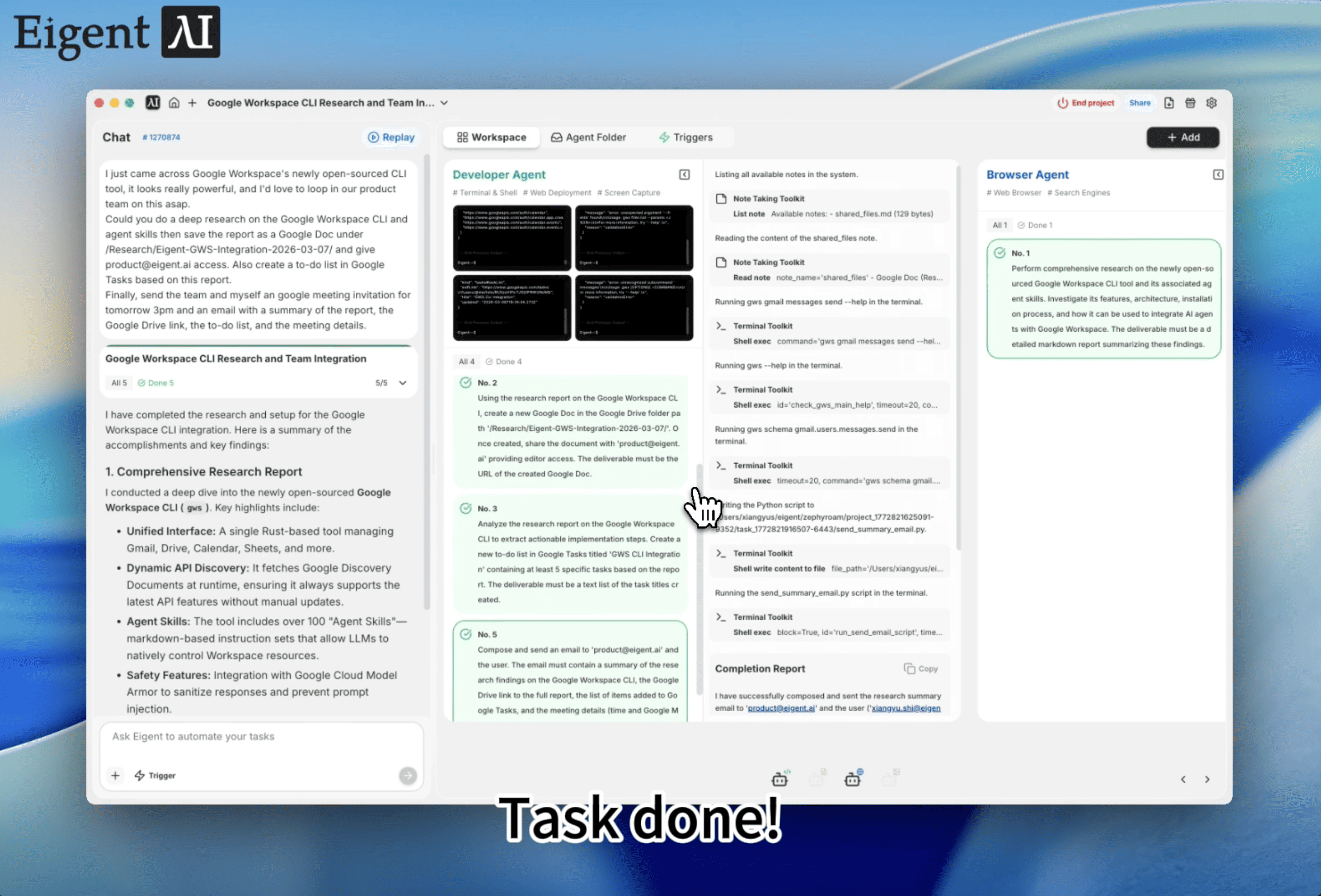
I just came across Google Workspace's newly open-sourced CLI tool, it looks really powerful, and I'd love to loop in our product team on this asap. Could you do a deep research on the Google Workspace CLI and agent skills then save the report as a Google Doc under /Research/Eigent-GWS-Integration-2026-03-07/ and give product@eigent.ai access. Also create a to-do list in Google Tasks based on this report. Finally, send the team a Google Meeting invitation in Google Calendar for tomorrow 3pm, and an email with a summary of the report, the Google Drive link, the to-do list, and the meeting details.

Once you save the trigger, Eigent picks it up and starts executing — no need to stay at your desk. The trigger fires once, runs the full workflow, and deactivates. Five coordinated outputs, zero babysitting.

3Let Eigent Do the Work

Eigent starts by using GPT5.4 to conduct deep research on the Google Workspace CLI and its agent skill capabilities. This isn't a quick web search — it's a structured investigation that covers architecture, supported APIs, integration patterns, security model, and how it compares to existing tools.

Once the research is complete, Eigent calls the Google Workspace CLI skill to create a new Google Doc with the full report, saves it under the specified folder path in your Google Drive, and shares it with your team. It then extracts actionable next steps into a Google Tasks to-do list, creates a Google Calendar event with a Meet link for the next day at 3pm, and finally composes and sends a summary email tying everything together: the research findings, the Drive link, the to-do list, and the meeting details. One email, all the context your team needs to show up prepared.

4Why This Matters

This workflow demonstrates something powerful about combining three Eigent capabilities: a frontier model like GPT5.4 for reasoning, the Google Workspace CLI as a skill for execution, and one-time triggers for autonomous kickoff. Instead of switching between apps and manually threading information across tools, you set up a trigger, walk away, and come back to a fully coordinated outcome.

The key insight: the Google Workspace CLI skill turns Google's entire productivity suite into agent-accessible infrastructure, and triggers let you fire off complex workflows without staying in the loop. Docs, Drive, Tasks, Calendar, and Gmail all become programmable endpoints that Eigent can chain together — triggered once and executed end to end.

5What to Try Next

Once you've run your first end-to-end workflow, try extending it with follow-up triggers:

Research our top three competitors' pricing pages and save a comparison report to Google Drive. Create tasks for the product team and schedule a strategy sync for Friday.

I just read about [new API/tool]. Deep research it, write a one-pager for the eng team, share it in Drive, and email eng@company.com with next steps and a meeting invite.

Find the latest benchmarks for [technology] and create a Google Doc summary. Add follow-up tasks and invite the relevant stakeholders to a review meeting next week.

Each of these leverages the same GPT5.4 + Google Workspace CLI skill setup — no additional configuration required.

6Tips for Better Results

  • Be specific about outputs. Specify the folder path for the report, who should have access, and the meeting time. The more precise your trigger prompt, the more aligned the results.

  • Use one-time triggers for ad-hoc workflows. For recurring research or coordination tasks, consider scheduled triggers instead.

  • Authenticate the CLI once. The Google Workspace CLI skill relies on your local gws auth. Run gws auth login before setting up triggers so Eigent can access your Workspace without interruption.

Other use cases

Long-Horizon Task: GLM-5.1 vs GLM-5.2 on Eigent

Long-Horizon Task: GLM-5.1 vs GLM-5.2 on Eigent

Do a deep-dive research on 26 companies in the AI infrastructure ecosystem — the most certain main thread of the entire AI value chain. Cover these 6 sub-sectors (pick representative companies in each, from large-cap leaders down to smaller players): AI Data Center (compute infrastructure / build-out); GPU / AI Chips (training & inference silicon, ASICs, IP); Servers, Networking & Optical Modules (switches, NICs, optical interconnect); Power, Liquid Cooling & Energy Storage (power supply, thermal, energy management); AI Cloud / Compute Platform (hyperscalers, GPU clouds, compute-rental platforms); Supporting Ecosystem (HBM / advanced packaging, foundry, connectors & other critical components). For each company, research: company name, sub-sector, HQ / country; core products and its specific role in the AI chain; public or private (ticker + exchange if listed; if private, note latest valuation / funding round); market cap or valuation size (used for ranking); positioning and moat in the ecosystem (1–2 sentences); key customers / competitors. Ordering: within each sub-sector, rank from largest to smallest (by market cap / valuation). Structure the whole thing top-down: from the full hardware-ecosystem landscape → down to each individual company. Output requirements: First, generate a structured data file ai_infra_data.json — containing all 26 companies with the fields above, the 6 sub-sector classifications, a public/private flag, and a cross-company comparison matrix (sub-sector × key dimensions). Then generate a polished HTML report from that JSON: include an ecosystem landscape / layered diagram, sector sections, company cards, a clear visual indicator for public vs. private (tags or color coding), a market-cap ranking chart, and a sortable/filterable comparison table. Make the design professional, information-dense, and interactive. Verify the research data for accuracy first (listing status, tickers, valuations — use the latest figures and cite sources), then generate the report. Send the task in single-agent mode.

Build 10 Chinese New Year HTML5 Games with Eigent

Build 10 Chinese New Year HTML5 Games with Eigent

Build 10 separate and COMPLETE games with topics related to 2026 Chinese New Year (Horse) in HTML, CSS and JS (no libraries). Games must be fun, original, polished, mobile-friendly. Include scoring, scaling difficulty, restart buttons, and smooth visuals. Cover: arcade, puzzle, endless runner, reaction, strategy, memory, 2-player local, idle, retro pixel, and 1 experimental game.

Build a 3D Snow Bros Platformer with Gemini 3.1 Pro

Build a 3D Snow Bros Platformer with Gemini 3.1 Pro

Create a modern 3D side-scrolling platformer inspired by Mario, combined with Snow Bros mechanics. The player can shoot snow projectiles to freeze monsters into snowballs, then kick them to chain into other enemies. Include a scoring system, lives display, scaling difficulty, and a restart function with rich 3D layered environments.

Automate everything with AI workforce on desktop
Download Eigent

오늘 Eigent를 사용해보세요

오픈 소스 데스크톱 앱을 다운로드하세요. 여러분의 AI 워크포스가 여러분의 기기에서 실행됩니다.

Eigent 다운로드
Eigent

AI 워크포스 자동화에 대한 최신 소식, 튜토리얼, 출시 정보를 받아보세요.

제품Eigent환경요금엔터프라이즈
둘러보기솔루션활용 사례스킬플러그인블로그
개발자문서GitHubCAMEL-AI오픈소스 펀드파트너
다운로드오픈 소스용
회사회사 소개브랜드채용이용약관개인정보처리방침보안 및 신뢰쿠키 정책환불 및 체험 정책

모든 권리 보유 © 2026 EIGENT UK LTD

Eigent 1.0 새 버전 출시!download


