

일반 언어로 데이터베이스를 조회하고 관리하세요
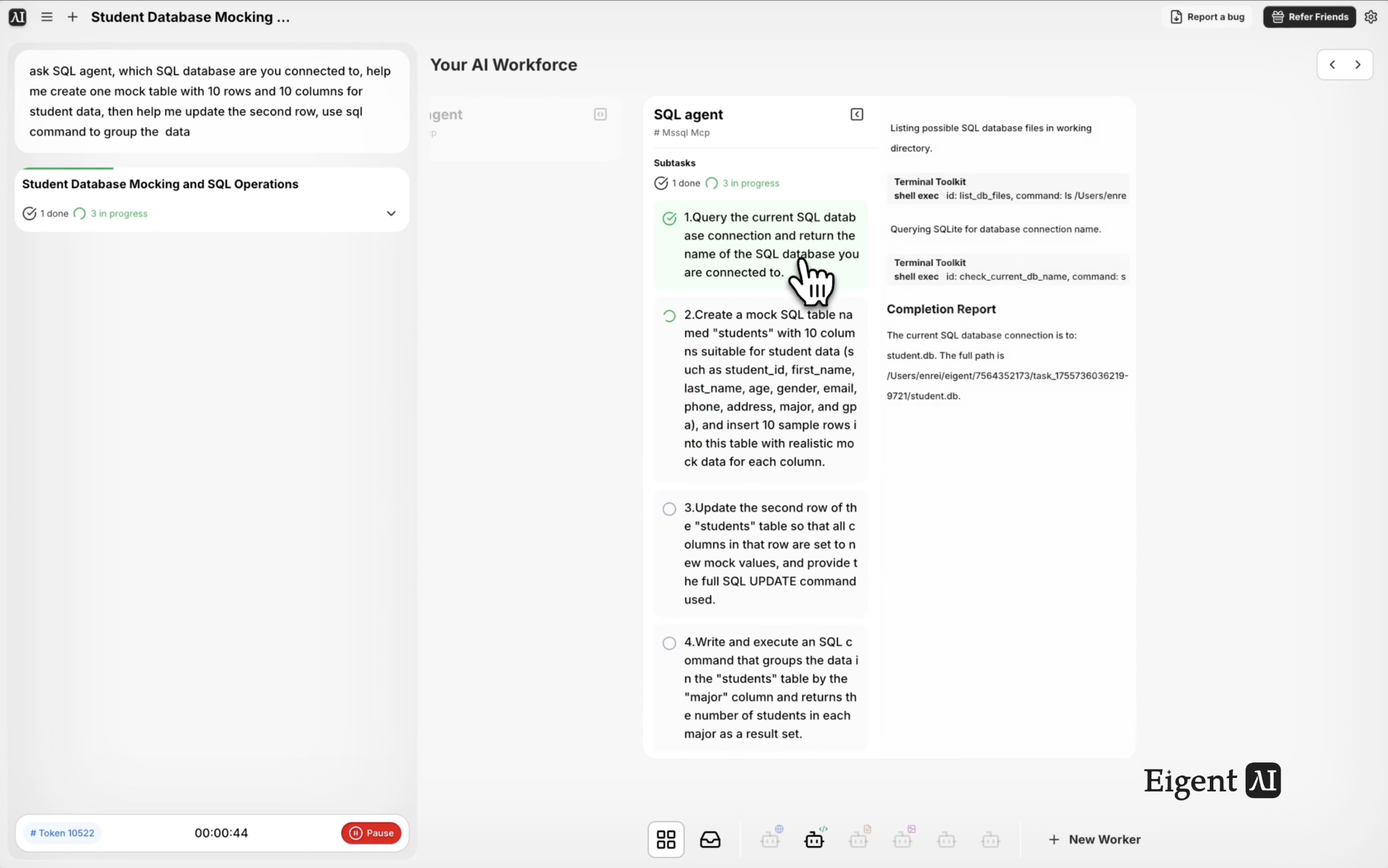
SQL 데이터베이스를 다룰 때는 보통 데이터베이스 클라이언트로 전환하고, 쿼리를 직접 작성하고, 문법이 맞기를 바래야 합니다. 엔터프라이즈급 SQL MCP로 구동되는 Eigent의 SQL Agent를 사용하면 자연어로 데이터베이스와 상호작용할 수 있습니다. 이 워크플로에서는 Eigent가 연결된 데이터베이스를 식별하고, 모의 데이터 테이블을 생성하며, 행을 업데이트하고, GROUP BY 쿼리를 실행합니다 — 이 모든 것을 하나의 대화형 프롬프트에서 처리합니다.
SQL MCP 연결하기
이 워크플로를 실행하기 전에 SQL MCP가 Eigent 설정에서 구성되어 있는지 확인하세요. Settings → Connectors → SQL로 이동해 데이터베이스 연결 정보(호스트, 포트, 데이터베이스 이름, 자격 증명)를 입력하세요. Eigent는 PostgreSQL, MySQL, SQLite 및 기타 일반적인 데이터베이스를 지원합니다.
연결이 완료되면 SQL Agent가 요청을 해석하고 라이브 데이터베이스에 대해 적절한 쿼리를 실행할 수 있습니다.
SQL 작업 프롬프트 작성하기
SQL을 직접 작성할 필요는 없습니다. 원하는 내용을 설명하기만 하면 됩니다:
SQL Agent에게 물어보세요: 어떤 SQL 데이터베이스에 연결되어 있나요? 학생 데이터를 위한 10개 행과 10개 열의 모의 테이블 1개를 만들도록 도와주세요. 그런 다음 두 번째 행을 업데이트하고, SQL을 사용해 데이터를 그룹화해 주세요.
Eigent는 연결 메타데이터 조회, 테이블 생성, 모의 데이터 삽입, 업데이트 실행, 그룹화까지 이 모든 작업을 순서대로 처리합니다.
데이터베이스 식별하기
SQL Agent는 먼저 데이터베이스 메타데이터를 조회해 어떤 데이터베이스에 연결되어 있는지와 사용 가능한 스키마가 무엇인지 확인합니다. 데이터베이스 유형, 버전, 현재 스키마를 보고하므로 작업을 수행하기 전에 명확한 기준점을 확보할 수 있습니다.
모의 테이블 생성
Eigent는 student_id, name, age, grade, enrollment_date, major, gpa, email, advisor, status 같은 필드를 포함한 10개 열의 학생 데이터용 새 테이블을 만들고, 현실적인 모의 데이터 10개 행을 삽입합니다. 이는 실데이터를 건드리지 않고 쿼리를 테스트하거나, 데모를 만들거나, SQL 작업을 학습할 때 유용합니다.
행 업데이트 및 데이터 그룹화
모의 데이터를 생성한 뒤, Eigent는 두 번째 행을 새 값으로 업데이트한 다음 GROUP BY 쿼리를 실행해 데이터를 집계합니다 — 예를 들어 전공이나 학년별로 학생을 그룹화할 수 있습니다. 결과는 읽기 쉬운 형식으로 반환되어 집계 결과를 즉시 확인할 수 있습니다.
이것이 중요한 이유
이 워크플로는 데이터베이스 작업이 수동일 필요도 없고 SQL 전문 지식이 필요하지도 않다는 점을 보여줍니다. 새로운 스키마를 테스트하는 개발자든, 운영 데이터를 조회하는 분석가든, 데이터베이스에서 빠른 보고서가 필요한 팀 리드든, Eigent의 SQL Agent는 문법 장벽을 완전히 없애줍니다. 필요한 내용을 자연어로 설명하면, Eigent가 이를 실제 데이터베이스에서 실행되는 정확한 SQL 쿼리로 변환합니다.
다음에 시도해 볼 것
이 테이블에서 GPA 상위 10명의 학생을 보여주세요.
student 테이블에 "scholarship_status"라는 새 열을 추가하고, GPA가 3.5를 넘는 학생에게는 "eligible"로 설정하세요.
이 테이블을 데스크톱의 CSV 파일로 내보내세요.
운영 데이터베이스에 연결해서 이번 달 각 주에 가입한 사용자 수 요약을 생성하세요.
더 나은 결과를 위한 팁
-
원하는 테이블 이름이 있다면 지정하세요. Eigent가 기본적으로 적절한 이름을 생성하지만, "테이블 이름을 'student_records'로 해 주세요"처럼 명시하면 데이터베이스를 더 체계적으로 관리할 수 있습니다.
-
데이터를 현실적으로 설명하세요. "미국 대학의 현실적인 전공, GPA, 입학 날짜를 포함한 모의 데이터"라고 말하면 일반적인 요청보다 더 유용한 테스트 데이터를 생성할 수 있습니다.
-
실행된 SQL을 요청하세요. 프롬프트에 "사용한 SQL 쿼리를 보여주세요"를 추가하면 검토, 문서화 또는 다른 도구에서 재사용할 실제 문장을 확인할 수 있습니다.





