

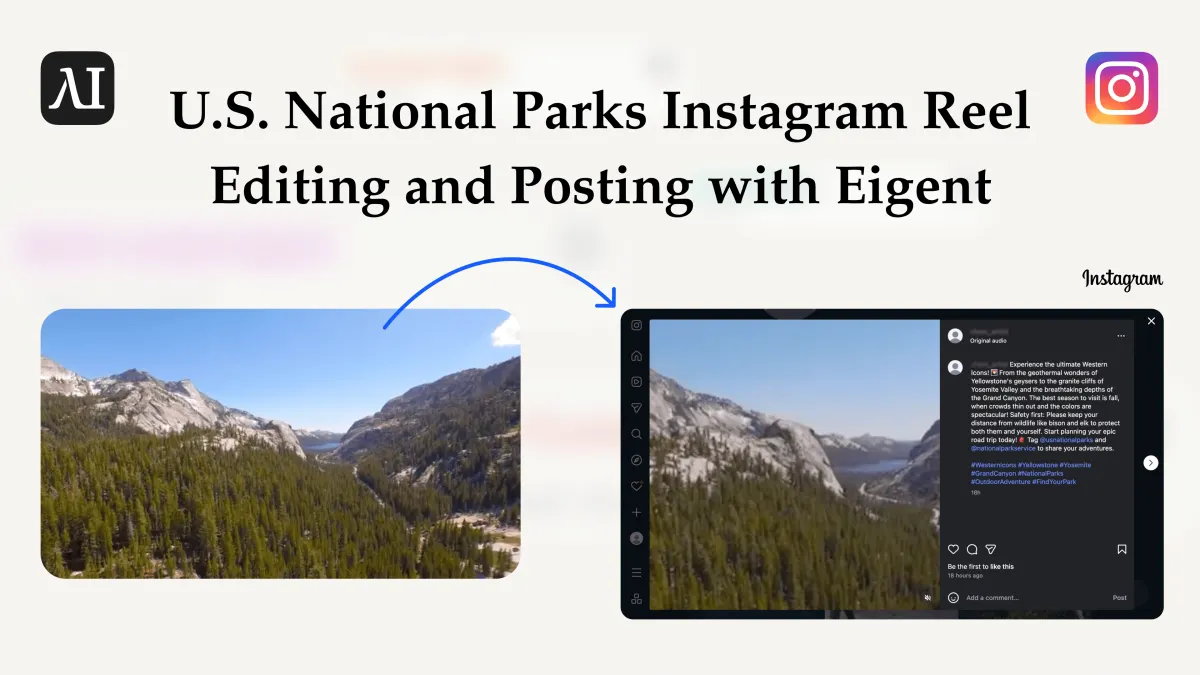
미국 국립공원 관광 브랜드를 위한 AI 동료, Instagram을 대신 운영하다
미국 국립공원 관광청, 지역 DMO, 여행사는 보통 방대한 원본 현장 영상 라이브러리를 보유하고 있습니다. Yellowstone의 간헐천 분출, Yosemite의 Half Dome 위로 떠오르는 일출, Grand Canyon의 림 산책, Zion의 Narrows 하이킹, Rocky Mountain의 고산호수, Great Smoky Mountains의 엘크, Olympic의 해안 폭풍, Grand Teton의 화강암 봉우리, Glacier의 야생화 초원, Acadia의 폭포 등과 함께, 각 공원이나 전망대에 대한 짧은 설명도 제품팀 또는 해설팀이 작성해 둡니다. 이 라이브러리를 여행 전환에 실제로 도움이 되는 일관된 Instagram Reel 시리즈로 바꾸는 일은 팀 누구에게도 시간이 없는 작업입니다.
이 유스케이스는 어떻게 미국 국립공원 관광 브랜드를 위한 AI 동료가 그 루프를 맡을 수 있는지 보여줍니다. 자체 데스크톱에서 멀티 에이전트 작업을 수행하는 오픈 소스 코워커인 Eigent를 사용하면, 국립공원 원본 영상을 테마별 릴로 묶고, 공원 방문객에 맞춘 7일치 인스타그램 게시 계획과 캡션을 작성한 다음, 매일의 영상을 자동 게시하는 반복 트리거를 설정할 수 있습니다. 이는 국립공원 관광 마케팅 자동화로, 단순한 스케줄러가 아니라 이미 트레일, 계절, 안전 우선순위를 알고 있는 주니어 소셜 미디어 매니저처럼 동작합니다.
워크플로우는 두 단계로 나뉩니다. 1단계는 창작입니다. Video Editor 스킬이 릴당 3~4개의 공원 또는 공원 경험을 묶고 주간 계획을 작성합니다. 2단계는 실행입니다. 반복 트리거와 Instagram Posting 스킬이 7일 동안 매일 아침 맞는 릴과 캡션을 게시하며, 채팅 프롬프트가 필요 없습니다.
폴더에 국립공원 미디어 준비하기
미국 국립공원 캠페인을 위해 관광 또는 콘텐츠 팀이 이미 관리 중인 폴더부터 시작하세요. 각 공원마다 다음이 포함된 자체 하위 폴더를 넣습니다:
- 원본 영상 자료 — Yellowstone National Park의 Old Faithful 분출과 들소 무리, Yosemite National Park의 Mist Trail과 Glacier Point 전망, Grand Canyon National Park South Rim의 일출과 일몰, Zion National Park의 Narrows와 Angels Landing에서 걷는 하이커들, Rocky Mountain National Park의 능선 하이킹과 고산호수, Great Smoky Mountains National Park의 안개 낀 능선과 폭포, Olympic National Park의 폭풍우 치는 해변과 우림, Grand Teton National Park의 화강암 봉우리와 야생동물, Glacier National Park의 Going-to-the-Sun Road 풍경, Acadia National Park의 해안 절벽과 등대.
- 설명 markdown 파일 — 공원 이름, 주요 볼거리, 방문하기 가장 좋은 계절, 안전 및 Leave No Trace 알림, 허가 또는 예약 입장 관련 메모, 접근성 안내, 그리고 선호 해시태그 및 @핸들(예:
#FindYourPark #Yellowstone #Yosemite및 공식 계정 또는 DMO 파트너)을 태그할 수 있도록 작성합니다.
Eigent를 열고 AI 동료를 루트 폴더에 지정하면 모든 에이전트 단계가 동일한 소스 자료를 보게 됩니다.
Video Editor와 Instagram Posting 스킬 설치하기
이 국립공원 관광 워크플로우는 두 가지 스킬을 사용합니다. Video Editor 스킬은 1단계를 담당합니다. 원본 클립을 짧은 세로형 영상으로 자르고, 이어 붙이고, 재타이밍하고, Reels에 최적화된 형식으로 렌더링하며, 필요하면 공원 이름 오버레이와 자막 캡션을 추가합니다. Instagram Posting 스킬은 2단계를 담당합니다. 완성된 영상을 업로드하고 연결된 Instagram 계정에 캡션과 함께 게시합니다.
둘 다 Settings → Skills에서 설치하세요. 그런 다음 Settings → Connectors로 이동해 게시에 사용할 브랜드 계정(예: @VisitYellowstone, @YourStateParks, 또는 지역 DMO 계정)에 대한 Instagram 연동을 승인하세요. 이 두 가지가 준비되면 AI 동료가 “원본 공원 영상 → 라이브 Reel” 전체 파이프라인을 맡을 수 있습니다.
1단계 — 공원을 묶고 7일 게시 계획 설계하기
1단계는 기획 단계입니다. 국립공원 관광 마케팅용 AI 동료가 어떤 공원과 경험을 함께 묶으면 좋은지 판단하고, 릴을 편집하며, 일주일 내내 일관된 스토리를 전달하는 주간 일정을 작성하길 원합니다. 다음 프롬프트를 채팅에 넣으세요:
Desktop/us-national-parks-content/에 미국 국립공원 미디어 폴더가 있습니다. 각 하위 폴더에 대해 원본 비디오 클립과 설명 markdown을 읽어 주세요. 공원들을 34개의 공원 또는 경험으로 이루어진 테마 묶음으로 그룹화하세요. 예: "Western Icons" (Yellowstone + Yosemite + Grand Canyon), "Red Rocks & Canyons" (Grand Canyon + Zion), "Peaks & Alpine Lakes" (Rocky Mountain + Glacier + Grand Teton), "Coast & Rainforest" (Olympic + Acadia), 또는 "Smoky Ridges & Waterfalls" (Great Smoky Mountains + 인근 scenic drive). 각 그룹에 대해 Video Editor 스킬을 사용해 하나의 짧은 세로형 Reel(9:16, 2040초)을 제작하고, 배경음악 폴더의 음악과 함께 공원과 장면이 자연스럽게 이어지도록 하세요. 그런 다음 7일치 Instagram 게시 계획을 만드세요 — 하루에 Reel 하나씩 — 각 날마다 다음을 지정하세요: 날짜, 비디오 파일 경로, 그리고 그 그룹의 설명 markdown 파일에서 가져온 캡션. 캡션은 공원 여행을 계획하는 여행자를 위해 작성하고, 방문하기 가장 좋은 계절을 언급하며, 5~8개의 국립공원 또는 아웃도어 여행 해시태그를 포함하고, 최소 한 개의 안전 또는 보전 메시지(예: 지정된 길을 벗어나지 않기, 야생동물과 거리 두기)를 넣고, 공식 계정과 관련 파트너를 태그해야 합니다. 계획을 같은 폴더에 posting-plan.md로 저장하세요.
Eigent는 폴더를 스캔해 공원들을 클러스터링하고, 각 Reel을 edited-videos/ 하위 폴더에 렌더링한 뒤, 다음과 같은 계획을 작성합니다:
Day 1 — 2026-04-14
Video: edited-videos/western-icons_yellowstone-yosemite-grand-canyon.mp4
Caption: 세 개의 서부 전설을 30초도 안 되는 시간에 담았습니다. Yellowstone에서 간헐천이 분출하는 장면을 보고,
Yosemite에서 Half Dome 위로 떠오르는 일출을 포착하고, Grand Canyon 림을 황금 시간대에 걸어보세요.
방문하기 가장 좋은 계절: 늦봄~초가을. 반드시 표시된 탐방로를 지키고
야생동물과 충분한 거리를 유지하세요. #FindYourPark #Yellowstone #Yosemite #GrandCanyon
#NPS #OutdoorAdventure #SeeAmerica

Day 2 — 2026-04-15
Video: edited-videos/red-rocks_and_canyons_grand-canyon-zion.mp4
Caption: Grand Canyon South Rim에서 Zion Narrows까지 협곡의 빛을 따라가 보세요.
끝없이 탁 트인 전망대부터 구불구불한 강의 슬롯까지, 이 붉은 바위의 상징들은
어떤 미국 서부 로드트립에도 잘 어울립니다. 방문하기 가장 좋은 계절: 더 시원한 기온의 봄과 가을.
출발 전에 충분한 물을 챙기고 트레일 상태를 확인하세요. #GrandCanyon #Zion
#SouthwestRoadTrip #HikingAdventures #PublicLands
계획을 검토한 뒤 다음 단계로 넘어가세요. 묶음이 어색하거나, 캡션을 더 다듬어야 하거나, 대상 고객에 맞게 계절 또는 안전 안내를 조정해야 한다면 posting-plan.md를 직접 수정하세요. 2단계는 이 파일을 주간의 단일 진실 소스로 읽습니다.
2단계 — 자동 게시용 반복 트리거 설정하기
계획이 승인되면 두 번째 단계는 순수 실행입니다. 먼저, 브라우저 설정에서 Instagram 계정에 로그인하세요(Dashboard > Browser > Cookies로 이동해 Instagram 계정 로그인 정보를 추가). 그러면 해당 계정의 쿠키와 로그인 상태가 저장됩니다. 에이전트는 그 인증 세션이 있어야 여러분을 대신해 게시물을 업로드하고 게시할 수 있습니다.
Triggers로 이동해 새 트리거를 만들고, Recurring으로 설정한 다음 향후 7일 동안 매일 오전 10:00에 실행되도록 지정하세요(기본 시간대와 대상 고객에 맞게 조정하세요. 예: 동부 해안 여행자를 대상으로 한다면 오전 9:00 Eastern). 다음 프롬프트를 붙여넣으세요:
posting-plan.md를 읽고 날짜 기준으로 오늘의 항목을 찾으세요. Instagram Posting 스킬을 사용해 첫 번째로 나열된 영상을 내 Instagram 계정에 업로드하고, 오늘 항목의 캡션과 함께 게시하세요. 게시 후, 오늘 항목 옆에 결과 게시물 URL과 타임스탬프를 posting-plan.md에 추가하세요.
그 순간부터 트리거가 매일 아침 실행됩니다. AI 동료가 계획을 열고, 현재 날짜에 맞는 행을 선택하고, 해당 국립공원 Reel을 업로드한 뒤, 일치하는 캡션과 함께 게시합니다. 채팅 프롬프트도, Instagram 앱도, 사람 개입도 필요 없습니다.
매일 아침 AI 동료가 하는 일
트리거가 실행되면 Eigent는 다음의 간결한 실행 순서를 수행합니다:
posting-plan.md를 불러와 오늘 날짜를 매칭합니다.- 비디오 파일 경로를 확인하고 캡션을 읽습니다.
- Instagram Posting 스킬을 호출해 Reel을 업로드하고 캡션 및 해시태그와 함께 게시합니다.
- 게시물 URL과 게시 타임스탬프를
posting-plan.md에 다시 기록해 감사 로그로 남깁니다.
문제가 발생하면 — Instagram 토큰 만료, 파일 누락, 또는 속도 제한 등 — 트리거 실행 로그에 오류가 표시되므로 전체 주간을 다시 실행하지 않고 해당 날짜만 수정할 수 있습니다.
국립공원 관광에서 표준 스케줄러보다 AI 동료가 나은 이유
Instagram 게시물을 큐에 넣을 수 있는 도구는 많습니다. 하지만 영상을 편집하고, 공원에 정통한 캡션을 작성하고, 실제 보유한 영상에 맞게 계획을 조정하는 일은 할 수 없습니다. 그것이 스케줄러와 국립공원 관광 브랜드용 AI 동료의 차이입니다. 동료는 창작 작업과 실행을 모두 처리합니다.
이 워크플로우를 공원 및 아웃도어 브랜드의 기존 소셜 미디어 도구와 다르게 만드는 요소는 세 가지입니다:
- 실제 소스 자료를 읽습니다. Video Editor 스킬은 “Yellowstone에 대해 올려라”라는 막연한 브리프가 아니라 원본 클립과 각 공원의 설명 markdown을 살펴봅니다.
- 사람이 통제권을 유지합니다. 1단계는 편집 가능한 markdown 계획을 생성합니다. 커뮤니케이션 및 해설 팀이 게시 전에 계절별 안내, 안전 메시지, 접근성 노트를 조정할 수 있습니다.
- 구성이 가능합니다. 스킬과 반복 트리거만 있으면 워크플로우를 다시 만들지 않고도 Instagram을 TikTok, YouTube Shorts 또는 다른 채널로 바꿀 수 있습니다.
미국 국립공원 관광청, 지역 DMO, 여행사 입장에서는, 이는 주 1회의 집중 기획 세션과 7일간의 자동 Reel 게시로 이어지며, 인력이나 또 다른 SaaS 구독을 추가할 필요가 없습니다.
다음에 시도해 볼 것
7일치 국립공원 게시 계획이 안정적으로 실행되기 시작하면, AI 동료가 할 수 있는 일을 확장해 보세요:
각 게시물이 올라간 뒤 Instagram에서 참여 지표를 가져와 posting-plan.md에 기록한 다음, 공원과 테마(예: 간헐천 vs. 폭포 vs. 협곡 전망대)를 Reel 성과별로 순위를 매기세요.
주말이 끝나면 가장 성과가 좋은 Reel을 요약하고 다음 주에 다시 강조할 공원 조합을 추천하세요(예: "Yellowstone + Grand Teton이 단일 공원 게시물보다 꾸준히 성과가 좋다" 또는 "Zion 하이킹은 Grand Canyon 전망대보다 저장 횟수를 더 많이 유도한다").
각 날의 Reel을 해당 스킬을 사용해 TikTok, YouTube Shorts 및 다른 채널에 크로스포스트하세요.
us-national-parks-content/에 남아 있는 미사용 영상을 바탕으로 매주 일요일 밤 다음 주 계획을 자동으로 재생성하고, Yellowstone, Yosemite, Grand Canyon, Zion, Rocky Mountain, Great Smoky Mountains, Olympic, Grand Teton, Glacier, Acadia 전반에 걸쳐 순환시키세요.
각 Reel의 영상과 설명을 바탕으로 확장 캡션이나 캐러셀 스크립트를 작성해 같은 공원에 대한 블로그 게시물, 여행 가이드 또는 이메일 캠페인을 지원하세요.
이 모든 것은 동일한 계획 파일과 동일한 반복 트리거를 기반으로 하므로 추가 설정이 필요 없습니다.
더 나은 결과를 위한 팁
- 소스 파일 이름을 설명적으로 지정하세요.
yellowstone_old-faithful_sunset.mp4처럼 이름을 붙이면 Video Editor 스킬이 각 테마 Reel에 맞는 클립을 더 쉽게 고를 수 있습니다. (또는 Eigent에게 이름 변경을 요청하세요) - 첫날 게시물을 수동으로 미리보기하세요. 반복 트리거를 일주일 전체에 적용하기 전에, 2단계 프롬프트를 day 1에 대해 한 번 실행하고 Reel이 Instagram에서 제대로 보이는지 확인하세요. 특히 위치 태그, 계절 안내, 안전 메시지를 점검하세요.
- 트리거 시간을 타깃 시장에 맞추세요. 현지 시간 오전 10:00은 무난한 기본값이지만, 사무실과 다른 시간대의 여행자를 타깃한다면 그들의 아침 또는 저녁 스크롤 시간대에 맞게 조정하세요.
- 정기적으로 새로운 영상을 공급하세요. 매주
us-national-parks-content/에 다른 계절의 새 클립(예: Acadia의 단풍, Yellowstone의 겨울, Great Smoky Mountains의 봄 야생화, Glacier와 Rocky Mountain의 여름 고산 하이킹)을 넣어 AI 동료가 늘 새로운 소재를 갖도록 하세요.
핵심 정리
- Eigent는 미국 국립공원 관광 브랜드를 위한 AI 동료로 작동하며, Yellowstone, Yosemite, Grand Canyon, Zion, Rocky Mountain, Great Smoky Mountains, Olympic, Grand Teton, Glacier, Acadia의 원본 영상을 한 주치 생생한 Instagram Reel로 바꿉니다.
- 1단계 — 한 번의 계획: Video Editor 스킬이 공원을 테마별 경험으로 묶고, Reel을 렌더링하며, 공원 방문객용 캡션이 포함된 7일치
posting-plan.md를 작성합니다. - 2단계 — 매일 실행: 반복 트리거와 Instagram Posting 스킬이 매일의 Reel을 자동 게시합니다.
- markdown 계획 파일은 계속 편집 가능하므로, 팀은 계절별 안내, 안전 및 보전 메시지, 접근성 노트를 통제하면서 반복 업무만 자동화할 수 있습니다.
- 동일한 패턴을 TikTok, YouTube Shorts, 이메일 캠페인, 블로그 콘텐츠로 확장할 수 있습니다. 계속 조합해 사용할 수 있는 국립공원 관광 마케팅 자동화입니다.
국립공원 관광 브랜드의 소셜 자리에 AI 동료를 앉힐 준비가 되셨나요? Eigent 다운로드하고, Video Editor 및 Instagram Posting 스킬을 설치한 뒤, 오늘 첫 번째 공원 영상 폴더에서 1단계를 실행해 보세요.





