
Transform your status reports from chores into data-driven insights
Every team lead knows the Monday morning dread: hunting down progress percentages, identifying blockers, and trying to make a spreadsheet look presentable for leadership. It is a recurring bottleneck that eats hours of high-value time just to report on the work instead of doing it.
I used Eigent to automate this entire process. By leveraging the internal-comms skill and a few simple prompts, I can generate a structured 3P update — Progress, Problems, Plans — complete with visual charts in seconds.
Here is how the workflow comes together.
Prepare the communication environment
Before starting, Eigent needs the right frameworks for corporate communication. I loaded the internal-comms skill, which contains pre-defined templates for status reports, newsletters, and incident updates. This ensures the output follows professional standards without me having to specify formatting details every time.
Describe the project state
I gave Eigent a high-level prompt describing what I needed for the update. The goal was to create a "Project Aurora" dashboard update that felt real — including specific milestones, a technical hurdle, and future plans.
Generate a mock internal project update for a product team. Include current progress, one potential issue, and the next step, with a graph and data. Save it as a document report.
Generate structured project data
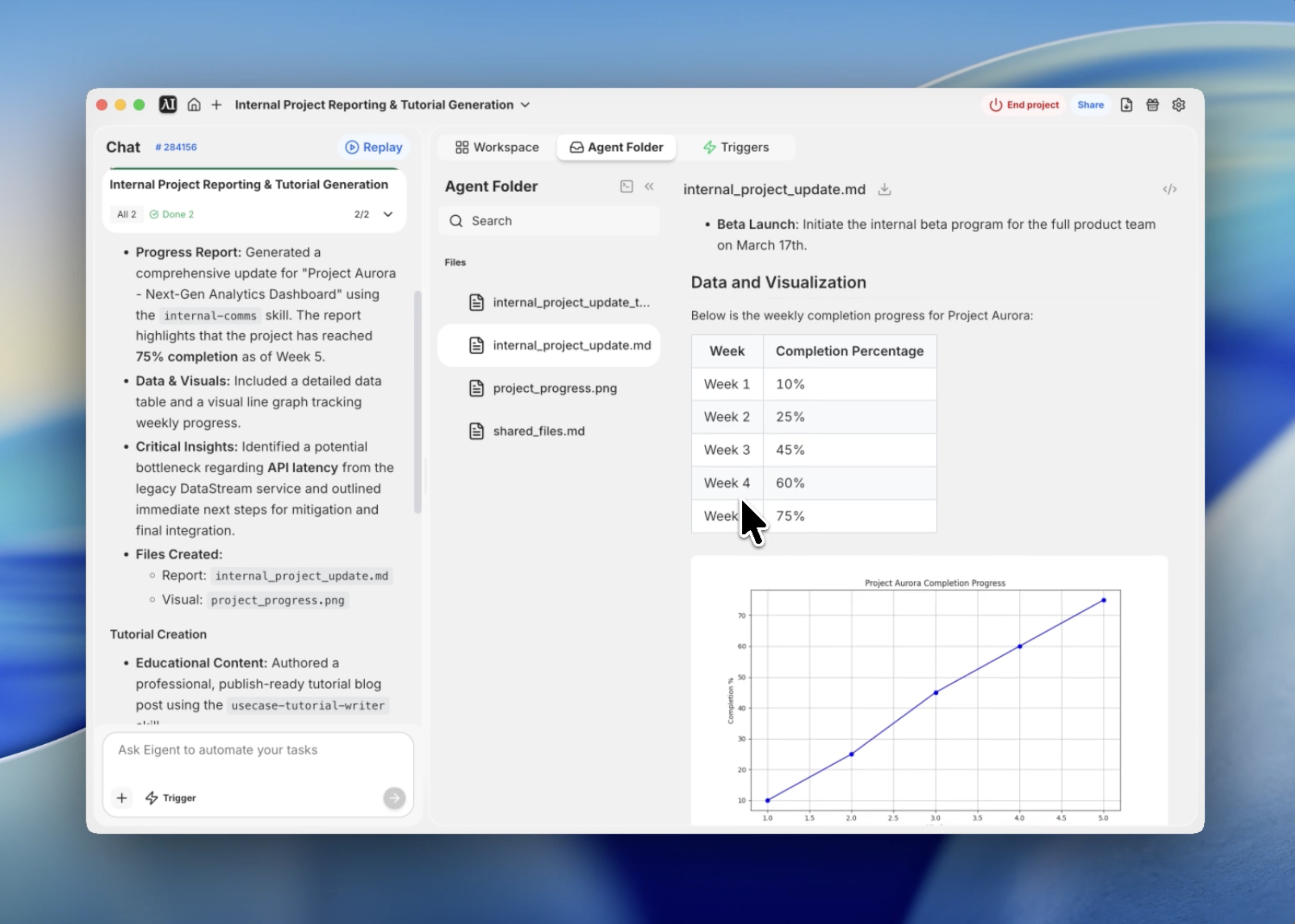
Eigent does not just write text — it structures data. It automatically generated a weekly completion table for the project, tracking progress from Week 1 to Week 5. This quantitative foundation makes the subsequent report much more credible than a simple text summary.
Visualize progress with automated charting
To make the report "board-ready," I needed a visual. Eigent used its terminal capabilities to write and execute a Python script that generated a line graph of the progress data. The resulting image, project_progress.png, was saved directly to the project directory to be referenced in the final report.
Draft the 3P update
Using the internal-comms guidelines, Eigent formatted the report using the 3P framework: Progress, Problems, and Plans. This structure is a industry standard for a reason — it is concise and focuses on exactly what stakeholders need to know. Eigent identified a mock "API Latency" issue and proposed a "Redis caching" solution, demonstrating its ability to handle technical context.
Export the final Markdown report
The final step was consolidating everything into a single, clean Markdown file. Eigent linked the generated graph, formatted the data table, and organized the sections with clear headers. The result is a professional document ready for a Git repository or a team Slack channel.
Why This Matters
This workflow demonstrates the power of combining specialized skills with autonomous tool use. Eigent did not just "write a report" — it acted as a data analyst, a graphic designer, and a communications specialist in one sequence.
The true value of Eigent lies in its ability to bridge the gap between raw data and professional presentation without manual intervention.
What to Try Next
Regenerate the report but change the audience to 'Executive Leadership' with a focus on budget and ROI. Add a second graph comparing this project's progress against the 'Project Nebula' timeline. Convert the Markdown report into a 5-slide PowerPoint presentation using the pptx skill.
Each of these leverages the same internal-comms setup — no additional configuration required.
Tips for Better Results
- Be specific about blockers. If you have a real issue, mention it in the prompt to get a more tailored "Plans" section.
- Set the tone. Use prompts like "Keep the tone encouraging but transparent" to match your team's culture.
- Reuse the data. You can ask Eigent to save the generated table as a CSV for use in other spreadsheets.
- Reference existing docs. Use the "context" feature to point Eigent to your real Jira or Trello exports for 100% accurate reporting.