Turn Any Blog Post Into a Tweet — Automatically
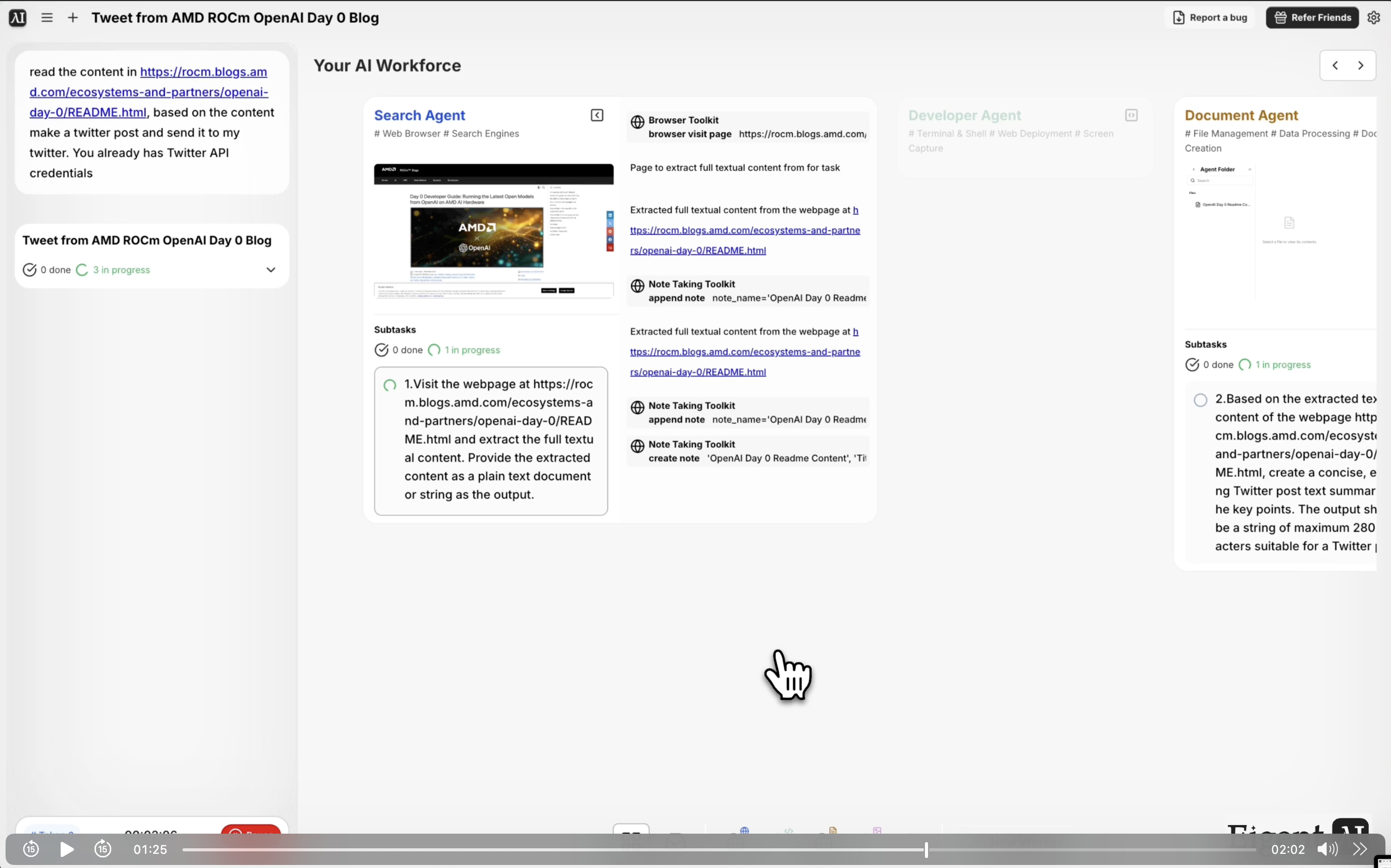
Social media teams spend a surprising amount of time on a deceptively simple task: reading a blog post and turning it into a tweet. It sounds fast, but multiply it across 20 posts a week and it becomes a real time sink. Eigent can handle this end to end — reading the source content, drafting the post, and publishing it — without you ever opening Twitter.
Set Up the Twitter MCP
This workflow uses a customized Twitter MCP (Model Context Protocol) connector that gives Eigent the ability to post directly to your Twitter/X account. If you haven't configured it yet, go to Settings → Connectors in Eigent and set up the Twitter integration with your API credentials.
Once the MCP is connected, Eigent can read your timeline, draft posts, and publish — all from a single prompt. This workflow also leverages an open-source, self-deployed model powering the Twitter Agent, so your content stays within your own infrastructure.
Point Eigent to the Blog Post
Give Eigent the URL of the blog post you want to turn into a tweet:
Read the content from [URL], create a Twitter post based on it, and send it to my Twitter account.
You can also paste the text directly into the chat if the post is behind a login, or if you'd prefer not to share a URL.
Eigent Reads and Summarizes the Content
Eigent's browser agent fetches the blog post and extracts the key points — the headline, main argument, notable statistics, or the most quotable insight. It then drafts a tweet that fits within the character limit, preserves the core message, and reads naturally for a social audience.
If your brand has a specific tone (casual, authoritative, technical), include that in the prompt and the agent will match it.
Review Before Publishing (Optional)
By default, Eigent will publish the tweet immediately after drafting. If you'd rather review first, add that instruction to your prompt:
Show me the draft tweet before posting.
Eigent will present the proposed tweet for your approval before sending.
Publish to Twitter
Once approved — or immediately if you skip the review step — Eigent publishes the tweet via the Twitter MCP. You'll get a confirmation with the post URL so you can view it live on Twitter.
Why This Matters
This workflow is a small example of a larger pattern: using Eigent to close the loop between content creation and distribution. You produce the blog post, Eigent handles the social amplification. The same approach extends to LinkedIn posts, newsletter excerpts, or any other format that requires reading source material and adapting it for a new channel — and because it runs on a local model, it works even in privacy-sensitive environments.
What to Try Next
Read this week's five most-viewed posts from our blog and create a tweet thread summarizing each one.
Create a LinkedIn post version of this same content in a longer format.
Check my Twitter engagement from the last week and tell me which posts performed best.
Turn this blog post into a short video script for a social media reel.
Tips for Better Results
-
Specify the tone. "Make it conversational and add relevant hashtags" or "keep it professional and include the author's handle" gives Eigent much more to work with than a bare URL.
-
Include a call to action. If you want the tweet to drive traffic back to the post, ask Eigent to include the link and a CTA like "Read more →".
-
Use the review step on first runs. For the first few posts with a new blog or brand voice, use the review-before-posting option until you're confident in the output quality.