
Build a Shareable Research Report Without Leaving Chat
There is a recurring pattern in team research work: someone notices a company getting attention, opens twenty tabs, collects scattered notes, and then spends another hour turning rough findings into something that other people can actually read. The research is only half the job. The other half is packaging it into a usable report.
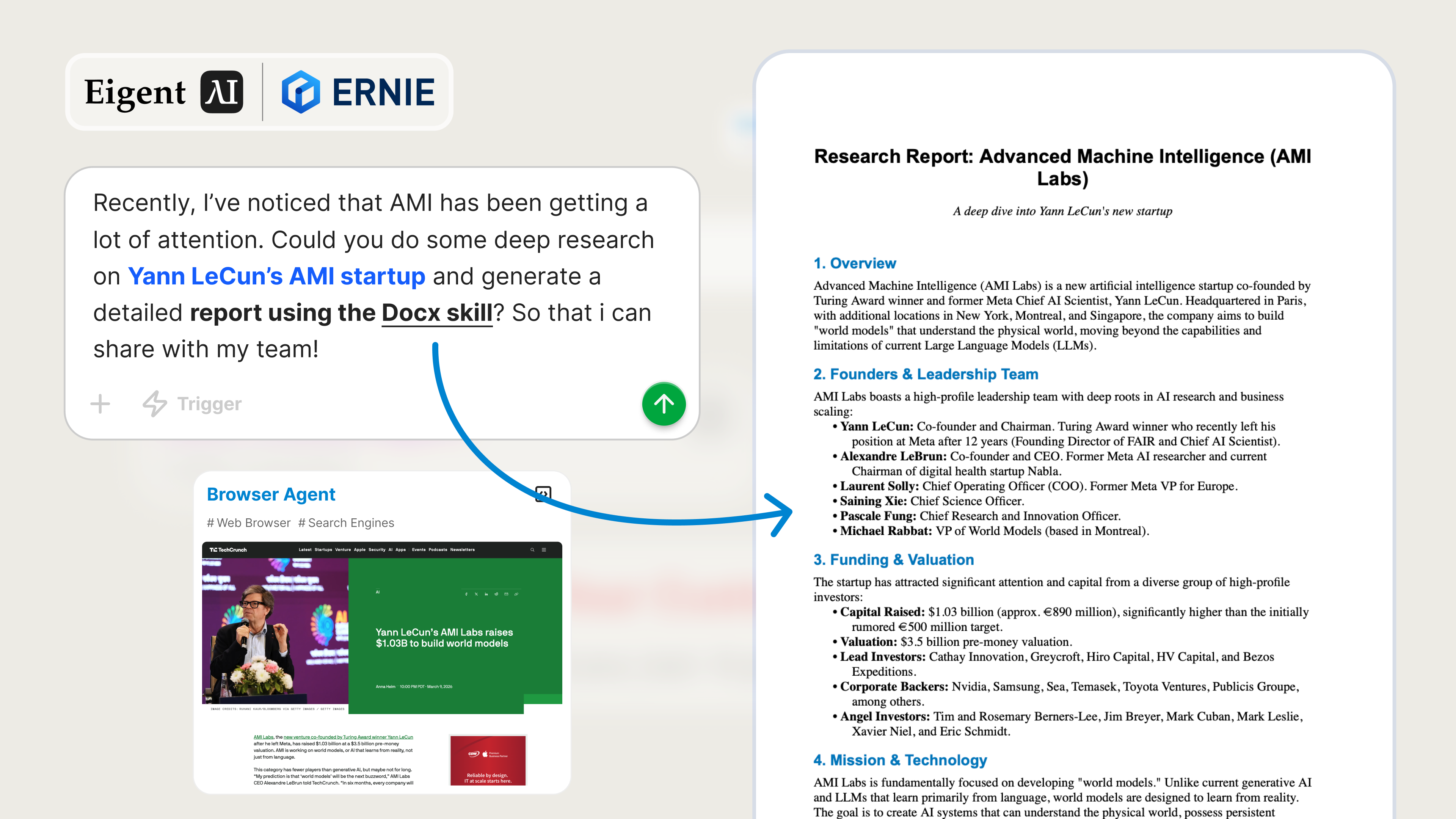
This workflow is exactly where Eigent is useful. You upload a single document-generation skill, describe the topic, and let Eigent handle the web research and report creation end to end. In this example, the task is to deeply research Yann LeCun's AMI startup and produce a detailed report in Word format that can be shared with the team.
Add the Docx Skill
Eigent supports custom skills, so you can extend it beyond the default toolset for specific outputs. In this case, we add a Docx skill so Eigent can generate a polished .docx report instead of leaving you with raw notes in chat.
Go to Settings → Agents → Skills → Example skills and find the Docx skill to install it. You can also browse our Skill Hub - Docx Skill for the Docx skill and installation details. Once installed, Eigent can create structured Word documents for future workflows as well, not just this one.
Give Eigent the Research Task
Instead of manually researching AMI and writing a report from scratch, you can hand the entire workflow to Eigent with a single prompt. Here is the prompt used for this example:
Recently, I've noticed that AMI has been getting a lot of attention. Could you do some deep research on Yann LeCun's AMI startup and generate a detailed report using the Docx skill? So that i can share with my team!
This works because the request is specific in the right ways: it defines the topic, asks for deep research, and clearly states the desired output format.
Let the Browser Agent Gather the Context
For a request like this, Eigent does not need an uploaded source document to get started. The browser agent can collect context from public sources on its own by researching AMI, Yann LeCun's involvement, the company's positioning, recent attention around the startup, and any relevant technical or market framing.
If you already have internal context, you can still provide it. Press coverage, a founder post, your own notes, competitor comparisons, or questions from leadership can all help steer the final report. But even without those materials, Eigent can independently assemble a solid first draft from web research.
Turn Research into a Real Deliverable
Once Eigent has enough context, it moves from browsing to document generation. The uploaded Docx skill takes the gathered material and formats it into a detailed Word report with a more structured narrative than you would get from a raw chat response.
That matters for team sharing. A proper document is easier to circulate, review, annotate, and reuse in follow-up discussions. Instead of copying findings out of a conversation, you get a file that is already packaged for collaboration.
Review the Output Folder
After the task finishes, open the agent output folder and you will find the generated report along with the supporting artifacts from the workflow. Depending on the run, that can include the Word document itself, intermediate notes, and traces of the browser research used to build the final report.
From there, you can review the report, make edits if needed, and send it to the rest of the team. The gap between "we should look into this startup" and "here is a report everyone can read" gets compressed into one workflow.
Why This Workflow Is Useful
This use case is about more than market research. It shows how Eigent combines two important capabilities:
- The browser agent can gather context autonomously from the web.
- Uploaded skills turn that context into a concrete output format such as a Word document.
That combination is what makes Eigent practical for real work. Research is useful, but research packaged as a reusable deliverable is much more valuable.
What to Try Next
Once the first AMI report is generated, you can build on it with follow-up prompts like:
Create a shorter executive-summary version of this report.
Rewrite this report for an internal product strategy discussion.
Turn the report into a competitive landscape comparing AMI with adjacent AI startups.
Expand the report with a section on technical implications and market risks.
Each of these reuses the same Docx skill, so the workflow becomes faster after the initial setup.
Tips for Better Results
- Be explicit about scope. If you want funding analysis, product positioning, competitive context, or technical analysis, say so in the prompt.
- Provide team context when available. If your team is evaluating AMI for investment, partnership, or internal learning, mentioning that will improve the structure of the report.
- Use the first draft as a working document. Eigent can generate a strong report quickly, and you can follow up with narrower prompts to refine it for different audiences.