

logo
  • Environments
  • Enterprise
  • Pricing
DeveloperJul 25, 2025

GitHub Stargazers Data Extraction

Wendong FanWendong Fan
GitHub Stargazers Data Extraction
Automate Everything with
AI Workforce on Desktop
Download Eigent

Turn Your GitHub Stars Into a Contact List

Every GitHub star is a signal. Someone found your repository interesting enough to bookmark it — and in most cases, they've also linked their LinkedIn or Twitter/X profile right on their GitHub page. Eigent can walk through every single stargazer's profile and extract that data into a structured table, giving you a ready-made list of potential users, contributors, or outreach targets.

1Identify the Repository

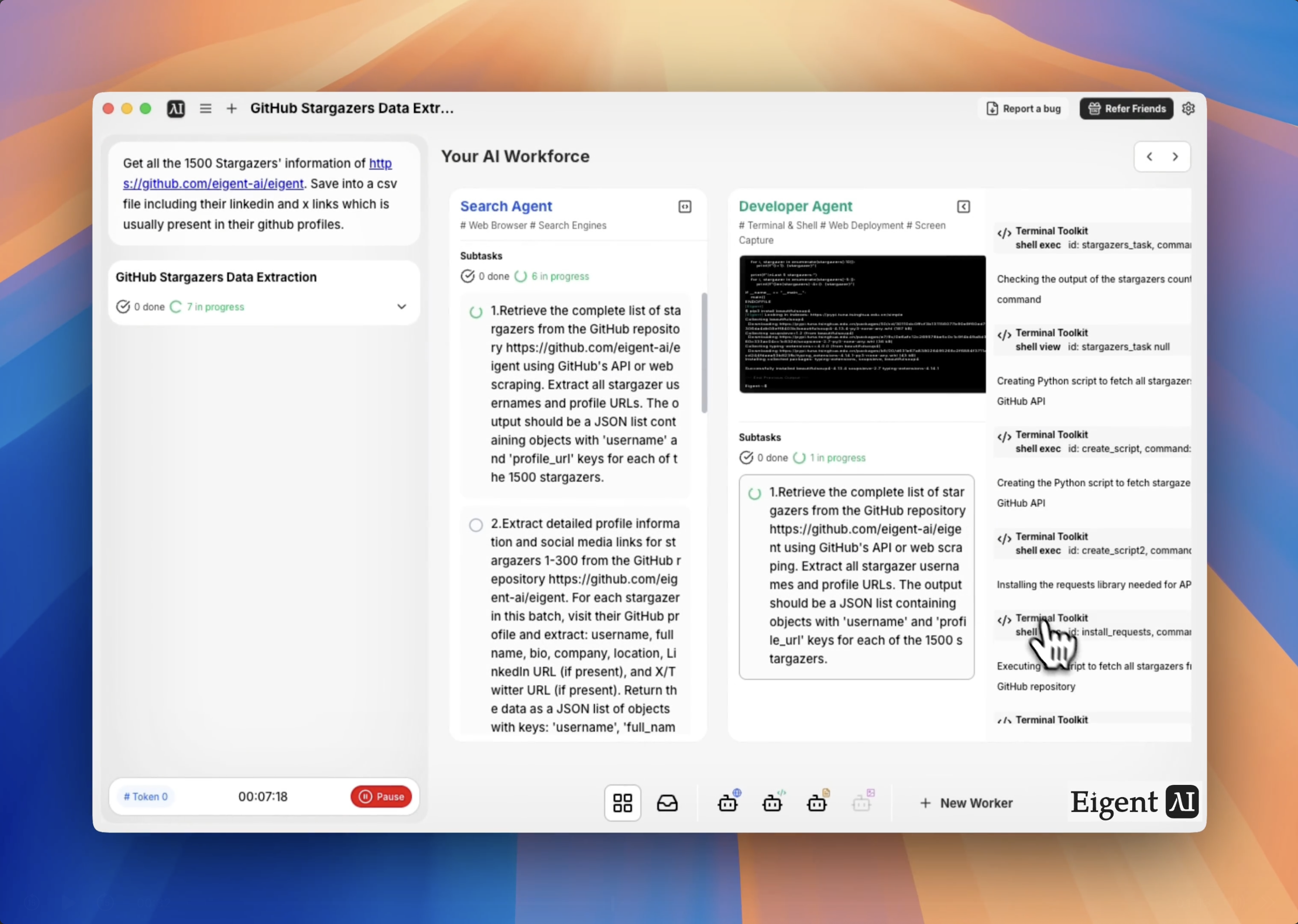
Start by telling Eigent which GitHub repository to pull stargazers from. For this workflow, the target is the Eigent open-source repository:

Get all the stargazers' information from https://github.com/eigent-ai/eigent. Save into a table including their LinkedIn and X links, which are usually present in their GitHub profiles.

You can substitute any public GitHub repository URL. The workflow scales to repositories with thousands of stars.

2Eigent Fetches the Stargazer List

Eigent navigates to the repository's stargazers page and collects every username. Depending on the total count, it may paginate through multiple pages of results. The browser agent handles this automatically — you don't need to worry about pagination limits or rate limiting.

3Profile Enrichment

For each stargazer, Eigent visits their GitHub profile page to collect:

  • Username and display name (if set)
  • GitHub profile URL
  • LinkedIn URL (if listed in their profile)
  • X (Twitter) URL (if listed in their profile)
  • Bio or location (optional, if requested)

This enrichment step runs in parallel across multiple profiles to keep the total time manageable even for large repositories.

4Table Output

The final output is a structured data table — saved as a CSV or displayed inline — with one row per stargazer and columns for each data point. The table is ready to import into a CRM, export to Google Sheets, or use as the basis for an outreach campaign.

5Filter and Segment

After the initial extraction, you can ask Eigent to filter or segment the data:

Filter this list to only stargazers who have a LinkedIn profile listed.

Show me only the stargazers who have more than 100 followers on GitHub.

Sort by most recently starred.

6Why This Matters

For open-source projects, your stargazer list is one of the most valuable and underused assets you have. These are people who have already self-selected as interested in what you're building. Eigent turns a passive vanity metric into an actionable contact database — without any manual profile-clicking or copy-pasting.

7What to Try Next

Do the same extraction for three competitor repositories and merge the results.

Find which of our stargazers are also contributors to similar open-source projects.

Cross-reference this list with our existing user database to identify who hasn't signed up yet.

Send a personalized outreach message to the top 50 stargazers who have a LinkedIn profile.

8Tips for Better Results

  • Run it on smaller repos first. For repositories with 10,000+ stars, the enrichment step takes longer. Test your prompt on a smaller repo before running it at full scale.

  • Request specific fields. If you only need LinkedIn links and don't need X/Twitter, say so — Eigent will skip the extra profile parsing and run faster.

  • Ask for a summary too. Adding "also tell me the most common employer domains and locations listed in the profiles" gives you instant audience insights on top of the raw list.


Other use cases

Gemini 4: Turn Video Tutorials into Production RL Engineering Skills

Gemini 4: Turn Video Tutorials into Production RL Engineering Skills

Watch the listed YouTube talks and turn their methods and insights into 2–4 reusable, file-based agent skills, using only these videos as primary sources. For each talk, build a timestamped outline, record the key insights, results, and warnings, and label every claim OBSERVED, INFERRED, or UPDATED. Give each skill a SKILL.md with a key insights section and a tool-agnostic path, plus an evidence.md. Validate every skill, then publish a light-mode HTML report served from 127.0.0.1 with the talks embedded, clickable timestamps, a comparison of the talks, a coverage matrix that shows gaps, and a clear list of limitations.

Build a CAD Model from Video: Gemini 3.7 Flash vs. 3.6 Flash

Build a CAD Model from Video: Gemini 3.7 Flash vs. 3.6 Flash

Analyze the transformers character in the uploaded reference video and generate a production-ready, highly detailed 3D CAD/mesh model exported as a .glb file. Analyze the character identity and style, joints and articulation, and surface details. Create ultra-high-precision hard-surface mechanical geometry with distinct body and armor pieces separated around logical joint pivot points. Use metallic PBR materials, including anodized metals, brushed steel, dark titanium, high-gloss painted armor, and emissive channels for the eyes, chest core, and joint glow effects. Pack the diffuse, normal, roughness, metallic, and emissive textures directly into the GLB. Ensure clean topology, manifold geometry, and real-time optimization without losing mechanical sharpness.

Automated VAT Return from Receipts and Invoices

Automated VAT Return from Receipts and Invoices

Please process all receipts and invoices in the "VAT" folder, including photos, scanned PDFs, and digital invoices. The final output should include only two files: (1) vat_return.xlsx — the Excel file should include one row per receipt or invoice, list all extracted fields, show whether each item is eligible for VAT recovery, show the recoverable VAT amount for each eligible item, include the exclusion reason for non-recoverable items, clearly flag items that require manual review, and include a summary sheet showing the total recoverable VAT amount. (2) vat_return.html — create a self-contained HTML file that can be opened directly and shared with the accounting team. The HTML file should show all VAT recovery items, the recoverable VAT amount for each item, excluded items and the reasons for exclusion, items requiring manual review, and the total recoverable VAT amount. Do not guess any uncertain information.

Automate everything with AI workforce on desktop
Download Eigent

Try Eigent today

Download the open-source desktop app. Your AI workforce, running on your machine.

Download Eigent
Eigent

Get the latest updates, tutorials, and releases on AI workforce automation.

Thank you for subscribing!

ProductEigentEnvironmentsPricingEnterprise
ExploreSolutionsUse CasesSkillsPluginsBlogs
DevelopersDocsGitHubCAMEL-AIOpen Source FundPartner
DownloadFor open source
CompanyAbout UsBrandCareersSupportTerms of UsePrivacy PolicySecurity & TrustCookie PolicyRefund & Trial Policy

All rights reserved © 2026 EIGENT UK LTD
