Plan a Full Trip Itinerary and Share It With Your Team — Automatically
Planning a trip from scratch involves a cascade of research tasks that all need to happen at once: flights, hotels, activities, restaurants, ticket availability, budget math, and preferences. Doing it manually means dozens of browser tabs and a lot of cross-referencing. Eigent handles all of it in parallel and delivers a formatted itinerary you can actually use — then posts a summary directly to Slack so your travel companions are immediately in the loop.
Write the Trip Prompt
The more detail you give Eigent, the more personalized the itinerary will be. Here's the prompt used in this workflow:
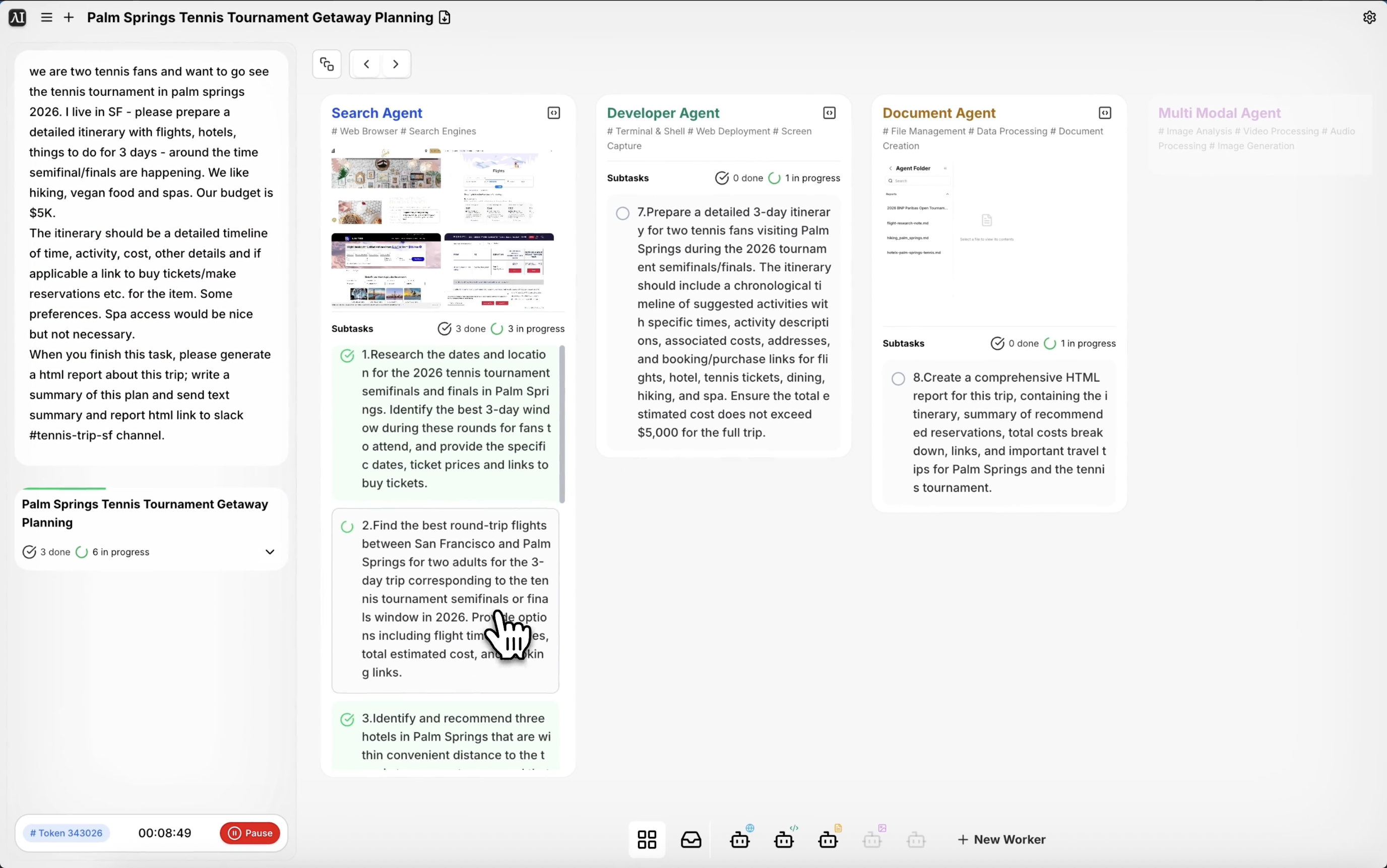
We are two tennis fans and want to go see the tennis tournament in Palm Springs 2026. I live in SF — please prepare a detailed itinerary with flights, hotels, and things to do for 3 days around the time the semifinals/finals are happening. We like hiking, vegan food, and spas. Our budget is $5K. The itinerary should be a detailed timeline with time, activity, cost, and links to buy tickets or make reservations. When you finish, generate an HTML report about this trip, write a summary, and send the text summary and report link to Slack channel #tennis-trip-sf.
Key elements that make the prompt effective: the departure city, destination, dates (around the tournament finals), preferences (hiking, vegan food, spas), budget, and the Slack delivery instruction.
Connect Slack (If Not Already Set Up)
This workflow ends with a Slack message, so make sure your Slack connector is active. Go to Settings → Connectors → Slack in Eigent and authorize your workspace. Once connected, Eigent can send messages and share links to any channel you have access to.
Eigent Researches Everything in Parallel
Rather than looking up each item sequentially, Eigent's multi-agent system runs multiple research tracks simultaneously:
- Flight options from SFO to Palm Springs around the tournament dates
- Hotels near the Indian Wells Tennis Garden within budget
- Vegan restaurants highly rated in the Palm Springs area
- Hiking trails accessible from Palm Springs
- Spa options (hotel-based and standalone)
- BNP Paribas Open ticket availability for semifinals and finals
Each track is handled by a separate browser agent, which is why the full research completes in a fraction of the time it would take manually.
Itinerary Assembly
With research complete, Eigent assembles a day-by-day timeline showing each activity in chronological order — time, activity name, estimated cost, and a direct link to purchase tickets or make a reservation where available. The budget is tracked across all items to ensure the total stays within your $5K cap.
HTML Report Generation
Eigent generates an HTML report containing the full itinerary, formatted for easy reading. The report includes a trip overview, the day-by-day schedule, budget breakdown, and all reservation links. It's saved locally and the URL is shared via Slack.
Slack Notification
When the task completes, Eigent sends a text summary of the trip plan to the specified Slack channel, along with a link to the full HTML report. Both travel companions can immediately see the plan without needing to be part of the Eigent session.
Why This Matters
Trip planning is exactly the kind of multi-track research task that Eigent is built for. The individual steps aren't complex — searching for flights, hotels, restaurants — but doing them all well and combining the results into something coherent takes hours. Eigent does it in minutes, and by routing the output to Slack, the result immediately becomes a shared team artifact rather than a private browser history.
What to Try Next
Plan a similar trip but for a different budget and add a day trip to Joshua Tree.
Update the itinerary with options if the semifinals tickets sell out.
Create a packing list based on the activities in this itinerary.
Send a daily reminder to Slack with the next day's itinerary the night before.
Tips for Better Results
-
Be specific about preferences. "Vegan food" is good. "Vegan food with at least a 4.5 rating on Yelp and within 15 minutes of the hotel" gives Eigent clearer filters to work with.
-
Include the budget breakdown you want. If you want Eigent to split the $5K as "$2K flights/hotels, $1K food, $1K activities, $1K tickets", say so — otherwise it will allocate at its own discretion.
-
Name the Slack channel exactly. Eigent will send the message to the channel you specify, so make sure the channel name in the prompt matches the actual channel name in your workspace.