From Footage to Playable Game — Without Writing a Line of Code
What if you could point at any video and say "make this into a game"? This workflow does exactly that. Eigent's Multi-Modal Agent watches footage from the 2026 Spring Festival Gala — a spectacular robot martial arts performance — extracts the characters, movements, and visual style, then hands that structured analysis to a Developer Agent that builds a complete Three.js game around it. The entire pipeline runs from one prompt and one video file.
The Two-Agent Pipeline
This workflow requires two specialized agents working in sequence:
- Multi-Modal Agent — handles Image Analysis, Video Processing, Audio Processing, and Image Generation. It watches the video and produces structured data about what it sees.
- Developer Agent — handles Terminal & Shell, Web Deployment, and Screen Capture. It takes the structured analysis and builds the game.
The key insight is the handoff: the Developer Agent doesn't receive the raw video — it receives a structured text document describing characters, moves, colors, setting, and themes. This translation step is what makes the game output faithful rather than generic.
Attach the Video and Write the Prompt
Attach Martial Arts.mp4 and describe what you want:
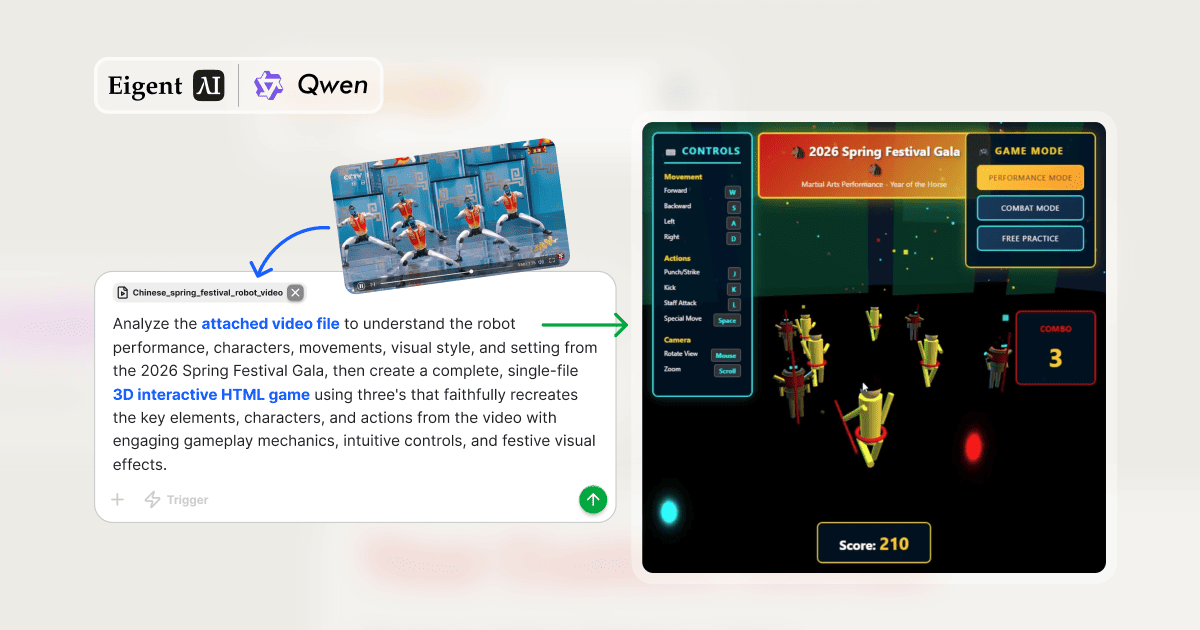
Analyze the attached video file to understand the robot performance, characters, movements, visual style, and setting from the 2026 Spring Festival Gala, then create a complete, single-file 3D interactive HTML game using Three.js that faithfully recreates the key elements, characters, and actions from the video with engaging gameplay mechanics, intuitive controls, and festive visual effects.
Two tasks are generated immediately — the second blocked until the first completes.
Task 1 — Multi-Modal Agent Watches the Video
The Multi-Modal Agent processes Martial Arts.mp4 frame by frame using the Video Downloader Toolkit to extract screenshots from key moments. It then analyzes those frames and produces a comprehensive written analysis saved as martial_arts_video_analysis.txt:
- Characters and robots: Physical appearance, proportions, color scheme (gold and red), number of performers
- Movements and actions: Specific martial arts techniques observed — punches, kicks, staff attacks, choreographed sequences
- Visual style: Stage lighting, color palette, festive decoration style, depth and scale of the performance space
- Setting and background: Stage environment, backdrop design, atmospheric elements
- Festive elements: CNY-specific decorations, symbolic motifs, effects used in the performance
This document becomes the creative brief — a structured description that the Developer Agent can act on precisely.
Task 2 — Developer Agent Builds the Game
With the analysis in hand, the Developer Agent reads the notes from the Note Taking Toolkit and builds spring_festival_martial_arts_game.html — a single self-contained file with all HTML, CSS, and JavaScript inline.
The game faithfully implements everything the Multi-Modal Agent identified:
- 3D robot characters rendered in Three.js with the gold/red color scheme from the video
- Martial arts animations replicating the punches, kicks, and staff attacks observed
- Stage environment matching the visual setting of the Spring Festival Gala performance
- Festive particle effects — lanterns, sparks, CNY decorations
- Multiple game modes: Performance Mode, Combat Mode, Free Practice
The Finished Game
Opening spring_festival_martial_arts_game.html in a browser delivers a complete experience:
- Title screen: 2026 Spring Festival Gala — Martial Arts Performance — Year of the Horse
- Controls: W/S/A/D movement · J Punch/Strike · K Kick · L Staff Attack · Space Special Move · Mouse for camera · Scroll to zoom
- HUD: Score counter (527 shown in demo), combo counter, mode indicator
- Visual: 3D robot characters in gold/red, festive stage background, particle effects
Total tokens used: approximately 467,000 — reflecting the depth of video analysis and Three.js game generation combined.
Why Video-to-Game Is a New Workflow Category
This pipeline establishes something novel: using video understanding as a design specification tool. Instead of writing a game design document, you record or find footage of the aesthetic, characters, and interactions you want — and let the Multi-Modal Agent translate that into implementation-ready specifications.
The applications extend well beyond games. The same video-to-structured-analysis-to-code pipeline works for UI mockup recreation, animation system design, interactive demo generation, and any context where video captures intent better than text.
What to Try Next
Analyze a product unboxing video and generate an interactive 3D product viewer that recreates the object from the footage.
Watch a cooking video and generate an interactive step-by-step recipe app that matches the video's visual style.
Analyze a sports highlight reel and generate a mini-game based on the sport shown.
Take the Spring Festival game and add a multiplayer mode where two players compete as different robots from the performance.
Tips for Better Results
-
Use high-quality source footage. The Multi-Modal Agent's scene extraction is most accurate with clear, well-lit video. Performance footage with distinct characters and movements — like this Gala video — produces richer analysis than fast-cut or low-resolution content.
-
Ask to review the analysis before building. Adding "show me the video analysis document before creating the game" gives you a checkpoint to verify the agent understood the video correctly before committing to the build.
-
Request a single file. Specifying "single-file 3D interactive HTML game" ensures everything is self-contained and immediately shareable without a build step or server.