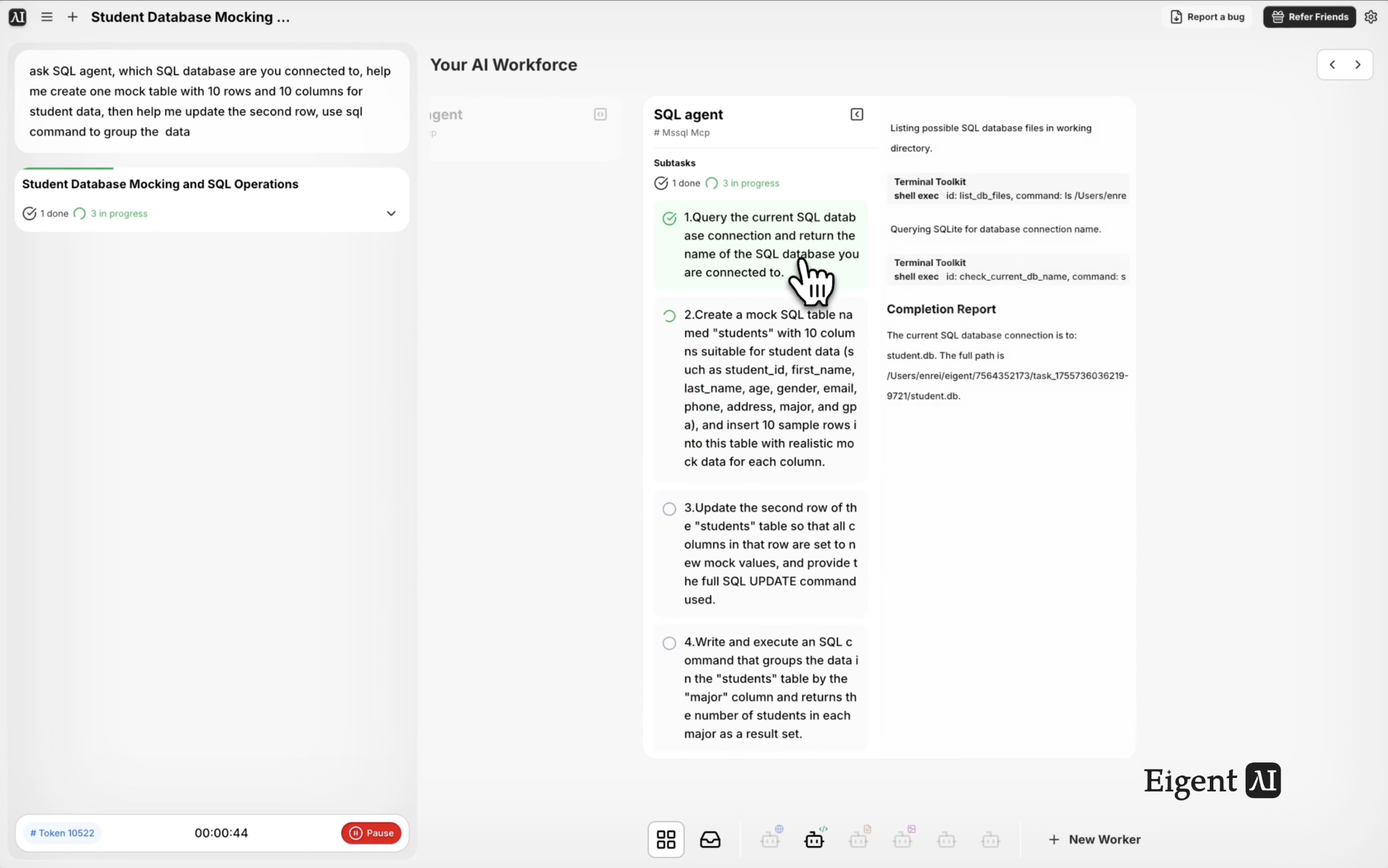
Query and Manage Your Database With Plain English
Working with SQL databases usually means switching between a database client, writing queries by hand, and hoping your syntax is correct. Eigent's SQL Agent — powered by an enterprise-ready SQL MCP — lets you interact with your database in plain language. In this workflow, Eigent identifies the connected database, creates a mock data table, updates a row, and runs a group-by query — all from a single conversational prompt.
Connect the SQL MCP
Before running this workflow, make sure the SQL MCP is configured in Eigent's settings. Go to Settings → Connectors → SQL and provide your database connection details (host, port, database name, credentials). Eigent supports PostgreSQL, MySQL, SQLite, and other common databases.
Once connected, the SQL Agent is available to interpret your requests and execute the appropriate queries against your live database.
Write the SQL Task Prompt
You don't need to write SQL — just describe what you want:
Ask the SQL Agent: which SQL database are you connected to? Help me create one mock table with 10 rows and 10 columns for student data, then help me update the second row, and use SQL to group the data.
Eigent will handle each of these operations in sequence: querying the connection metadata, creating the table, inserting mock data, running an update, and then grouping.
Eigent Identifies the Database
The SQL Agent starts by querying the database metadata to confirm which database it's connected to and what schemas are available. It reports back the database type, version, and current schema so you have a clear baseline before any operations are performed.
Mock Table Creation
Eigent creates a new table for student data with 10 columns — fields like student_id, name, age, grade, enrollment_date, major, gpa, email, advisor, and status — and inserts 10 rows of realistic mock data. This is useful for testing queries, building demos, or learning SQL operations without touching live data.
Row Update and Data Grouping
After creating the mock data, Eigent updates the second row with new values, then runs a GROUP BY query to aggregate the data — for example, grouping students by major or by grade level. The results are returned in a readable format so you can see the aggregate output immediately.
Why This Matters
This workflow demonstrates that database operations don't need to be manual or require SQL expertise. Whether you're a developer testing a new schema, an analyst querying production data, or a team lead who needs a quick report from the database, Eigent's SQL Agent removes the syntax barrier entirely. You describe what you need in plain language, and Eigent translates that into precise SQL queries executed against your real database.
What to Try Next
Show me the top 10 students by GPA from this table.
Add a new column called "scholarship_status" to the student table and set it to "eligible" for any student with a GPA above 3.5.
Export this table to a CSV file on my desktop.
Connect to our production database and generate a summary of how many users signed up each week this month.
Tips for Better Results
-
Specify the table name if you have preferences. Eigent will generate a sensible name by default, but naming it explicitly (e.g., "call the table 'student_records'") keeps your database organized.
-
Describe the data realistically. Saying "mock data for a US university with realistic majors, GPAs, and enrollment dates" generates more useful test data than a generic request.
-
Ask for the SQL it ran. Adding "show me the SQL queries you used" to your prompt gives you the actual statements for review, documentation, or reuse in other tools.